JSON (JavaScript Object Notation) is an open standard file format for sharing data that uses human-readable text to store and transmit data. JSON files are stored with the .json extension. JSON requires less formatting and is a good alternative for XML. JSON is derived from JavaScript but is a language-independent data format. The generation and parsing of JSON is supported by many modern programming languages. application/json is the media type used for JSON.
Why is JSON used?
JSON is used in JavaScript on the internet as an alternative to XML for organizing data. JSON is language-independent and can be combined with C++, Java, Python and many other languages. Unlike XML, which is a full markup language, JSON is simply a way to represent data structures. JSON documents are relatively lightweight and are rapidly executed on web servers.
Characteristics of JSON
- JSON is easy to read and write.
- It is a lightweight text-based interchange format.
- JSON is language independent.
Example in JSON
{
 "book": [
 {
 "id":"01",
 "language": "Java",
 "edition": "third",
 "author": "Herbert Schildt"
 },
 {
 "id":"07",
 "language": "C++",
 "edition": "second"
 "author": "E.Balagurusamy"
 }]
}
JSON HTML CODE
<html>
<head>
<title>JSON example</title>
<script language="javascript" >

 var object1 = { "language" : "Java", "author" : "herbert schildt" };
 document.write("<h1>JSON with JavaScript example</h1>");
 document.write("<br>");
 document.write("<h3>Language = " + object1.language+"</h3>");
 document.write("<h3>Author = " + object1.author+"</h3>");
 var object2 = { "language" : "C++", "author" : "E-Balagurusamy" };
 document.write("<br>");
 document.write("<h3>Language = " + object2.language+"</h3>");
 document.write("<h3>Author = " + object2.author+"</h3>");

document.write("<hr />");
document.write(object2.language + " programming language can be studied " +
"from book written by " + object2.author);
document.write("<hr />");

</script>
</head>
<body>
</body>
</html>

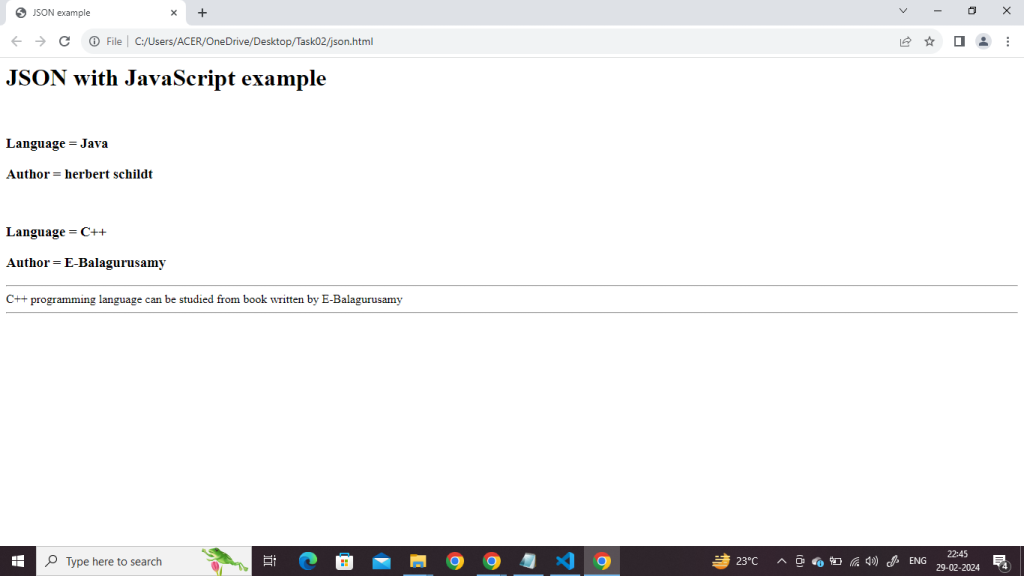
OUTPUT :-
JSON Syntax
JSON (JavaScript Object Notation) has a simple and easy-to-read syntax. Here are the basic syntax rules
Json Syntax Rules
- Data is represented as key-value pairs enclosed in curly braces {}.
- Keys and strings are enclosed in double-quotes.
- Values can be strings, numbers, objects, arrays, booleans, or null.
- Multiple key-value pairs are separated by commas.
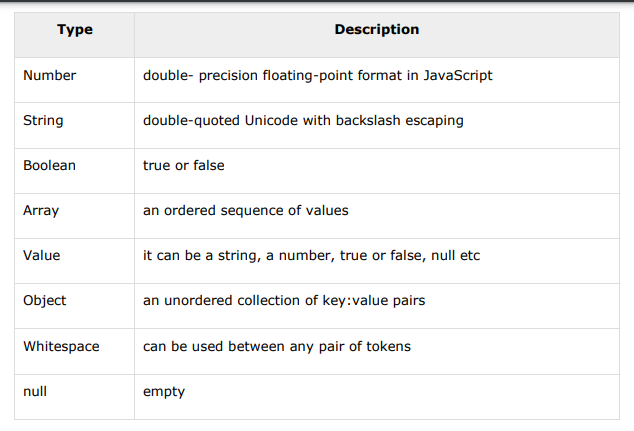
JSON supports several data types, and each data type serves a specific purpose. Here are the main JSON data types.