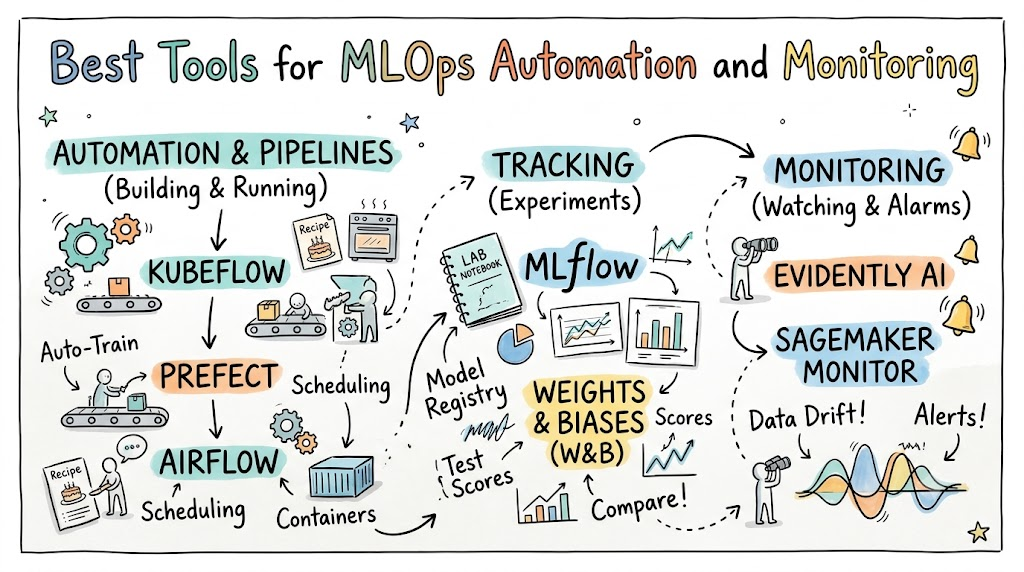
Computers can learn from data to make smart guesses. We call this machine learning, or ML for short. But keeping these smart computer brains working every day is hard work.
Teams need special helpers called MLOps tools. You can learn how to build and run these systems with Xopsschool. These helpers watch your models and run them on autopilot.
What Is MLOps?
First, think of a model like a recipe for a cake. You need good ingredients and the right oven heat.
If the milk goes bad, the cake tastes terrible. MLOps tools test your ingredients and bake your cake automatically.
Next, these tools watch the cake so it does not burn. They keep the steps clean and repeatable.
Why Automation Matters
Writing code by hand takes a long time. People also make silly typos when they get tired.
Automation runs your checks with one click. It trains your computer brains on fresh data every night.
So, your team saves hours of boring work. Your users get better answers much faster, too.
Why Monitoring Matters
Models can get confused over time. The world changes, but old models stay the same.
We call this problem data drift. Data drift happens when new facts look different from old training facts.
Monitoring tools ring an alarm bell when a model guesses wrong. Then, engineers can fix the problem right away.
Top Automation Tools
Kubeflow
Kubeflow runs your training steps inside neat boxes called containers. It works on top of a system called Kubernetes.
You can break your big project into tiny steps. If one step breaks, Kubeflow runs just that one piece again.
Also, it shares computer power across many big machines easily. Large teams pick this tool to handle giant piles of data.
Prefect
Prefect turns your plain Python code into a neat pipeline. You just add simple tags to your daily functions.
Next, Prefect tracks when each task starts and stops. It retries failed tasks without waking you up at night.
Because it stays lightweight, beginners can set it up in minutes. The clear dashboard shows every step in bright colors.
Top Tracking Tools
MLflow
MLflow works like a science notebook for your experiments. It writes down your test scores and settings every time you run code.
Next, it stores your best models in a safe library. This library is called a model registry.
So, you never lose track of your winning recipe. Anyone on your team can download and run it.
Weights and Biases
Teams call this tool W&B for short. It turns boring numbers into pretty charts and graphs.
You can compare two models side by side on a screen. It shows which model made the fewest mistakes.
Also, it saves your test pictures, sound clips, and text tables. Teams love it because sharing results is super easy.
Top Monitoring Tools
Evidently AI
Evidently AI checks the health of your live data. It looks for sudden shifts in what users type or buy.
Then, it prints clean reports with colorful visual charts. You can spot weird data bugs before customers complain.
Best of all, you can run it right inside your code tests. It blocks bad data from entering your main system.
Amazon SageMaker Model Monitor
Cloud giants also offer built-in tools. Amazon built Model Monitor right into their cloud service.
It scans incoming user data around the clock. When model quality drops, it pings your phone with an alert.
Then, it can tell your training pipeline to build a new model. This keeps your system smart with zero manual clicks.
Tool Comparison
| Tool Name | Main Job | Best Feature |
| Kubeflow | Pipeline Automation | Runs huge tasks on big clusters |
| Prefect | Task Scheduling | Simple Python code setup |
| MLflow | Experiment Tracking | Free and very easy to save models |
| W&B | Visual Tracking | Beautiful charts for team sharing |
| Evidently AI | Drift Monitoring | Catches bad data with easy tests |
How to Pick Your Tools
First, look at the size of your team. Small teams should start with simple tools like MLflow and Prefect.
Next, check where your data lives. If you use one big cloud, use their built-in tools first.
Finally, do not buy every tool on day one. Pick one tool for pipelines and one tool to watch for errors.
Quick Summary
Building a smart model is only the first step. You must care for it every day so it stays helpful.
Automation tools test your recipes and build models without human mistakes. Monitoring tools watch for drift and sound the alarm when things break.