In the ever-evolving world of artificial intelligence, numerous tools have emerged to streamline work processes and enhance business efficiency. Here, we explore some of the most impactful AI websites for professionals and teams, starting with the widely acclaimed ChatGPT.
ChatGPT | AI Conversation Platform
Overview
ChatGPT, an AI tool that revolutionized digital communication and research since its launch in January 2023, continues to set benchmarks with its latest iterations, GPT-4 and GPT-4 Turbo. This AI platform excels in summarizing complex topics, aiding in research, and generating creative content, making it an indispensable asset for professionals.
Key Features
Summarizes Complex Topics Effortlessly:
ChatGPT can take intricate subjects and distill them into easily digestible summaries, making it an invaluable tool for quick understanding and knowledge transfer.
Versatile for Writing, Research, and Creativity:
Whether you need help with drafting documents, conducting research, or generating creative content, ChatGPT provides versatile support across various tasks.
Integrated with Bing Search Engine:
With its integration with Bing, ChatGPT can pull in real-time information, enhancing its responses and keeping you up-to-date with the latest data and trends.
Generates Images with DALL·E 3:
Utilizing DALL·E 3, ChatGPT can create and classify images based on text prompts, fostering creativity and innovation in design and visual projects.
Pros
Boosts Productivity in Content Creation:
By automating content creation and providing intelligent suggestions, ChatGPT significantly enhances productivity, allowing professionals to focus on higher-level tasks.
Efficient Task Completion Saves Time:
The ability to quickly generate accurate responses and solutions helps streamline workflows and save valuable time.
Rapid Answers Reduce the Need for Internet Searches:
ChatGPT provides quick and precise answers, minimizing the need to conduct extensive internet searches and sifting through multiple sources.
Cons
Multiple Prompts May Be Needed for Quality Output:
Achieving the desired quality of responses might require multiple prompts and refinements, which can be time-consuming.
Requires Checks for Content Accuracy:
While ChatGPT is highly advanced, it is still crucial to verify the accuracy of its outputs, especially for critical tasks, as AI-generated content may occasionally contain errors.
Applications of ChatGPT
Creating Chatbots for Automated Communication:
ChatGPT can be leveraged to develop sophisticated chatbots, enhancing customer support and engagement without the need for constant human intervention.
Developing Searchable Internal Knowledge Bases:
Organizations can use ChatGPT to create comprehensive and searchable knowledge bases, facilitating easy access to information for employees.
Writing, Refactoring, and Debugging Code:
With its advanced natural language processing capabilities, ChatGPT assists developers in writing, refactoring, and debugging code efficiently, reducing development time and improving code quality.
Producing Code Documentation:
Generating clear and concise code documentation can be a time-consuming task. ChatGPT automates this process, ensuring consistency and clarity in documentation.
Generating and Classifying Images:
Integrated with DALL·E 3, ChatGPT can generate and classify images based on text prompts, opening new avenues for creativity and design in various fields.
Transcribing Audio and Generating Text-to-Speech:
ChatGPT’s ability to transcribe audio and convert text to speech makes it a versatile tool for content creation, accessibility, and more.
10Web leverages AI to expedite the website building process, creating WordPress sites up to ten times faster than traditional methods. By answering a few business-related questions, 10Web generates a complete website with tailored content. The platform also converts existing non-WordPress sites to WordPress, offering automated performance optimization and hands-free management.
Key Features
AI-Powered Website Builder:
At the heart of 10Web is its AI-driven engine, which simplifies the website creation process. By analyzing user inputs, it builds professional, fully-functional websites in minutes, eliminating the need for extensive coding knowledge.
Converts Any Site to WordPress:
One of 10Web’s standout features is its ability to convert existing websites into WordPress. This feature is especially useful for businesses looking to migrate their current sites to a more versatile and manageable platform without losing content or design elements.
Drag-and-Drop Website Editor:
The intuitive drag-and-drop editor allows users to easily customize their websites. This feature empowers users of all skill levels to create visually appealing and functional sites without needing advanced technical skills.
Automated Site Management and Performance:
10Web automates various aspects of site management, including performance optimization, backups, and security. This ensures that websites are not only built efficiently but also maintained effectively over time.
Pros
Rapid Website Creation:
10Web dramatically reduces the time required to create a website. Its AI capabilities allow for the rapid development of tailored websites, making it ideal for businesses that need to establish an online presence quickly.
Automated Performance Optimization:
The platform continuously monitors and optimizes website performance, ensuring fast load times and a smooth user experience. This automation relieves users from the technical burden of manual optimization.
24/7 Customer Support:
With round-the-clock customer support, 10Web ensures that users have access to assistance whenever needed, enhancing the overall user experience and reliability of the platform.
Hands-Free Website Management:
From updates to backups, 10Web automates many routine management tasks, allowing users to focus on content and growth rather than maintenance.
Cons
Exclusive to WordPress:
While 10Web excels at creating and managing WordPress sites, its exclusivity to this platform might be a limitation for users who prefer or need other content management systems.
Limited to Building and Hosting WordPress Sites:
The platform’s functionalities are tailored specifically for WordPress, meaning it’s not a one-size-fits-all solution for every type of website or hosting need.
Krisp is an AI-driven app designed to enhance voice quality by removing background noise in real-time. It integrates seamlessly with popular communication apps like Teams, Zoom, and Skype. Krisp’s noise cancellation preserves speech while eliminating echoes and other background sounds, making it ideal for professional environments.
Key Features
AI-Powered Background Noise Removal:
Krisp leverages advanced AI algorithms to effectively remove background noise from your calls. This ensures that only your voice is heard, providing a clear and professional audio experience.
Compatible with All Communication Apps:
Krisp works with a wide range of communication apps including Teams, Zoom, Skype, Slack, and more. This universal compatibility makes it a versatile tool for any virtual communication need.
Meeting Transcription and Notes:
Beyond noise cancellation, Krisp offers meeting transcription and note-taking features. This helps you keep track of important discussions and decisions, enhancing productivity and organization.
Real-Time Accent Adjustment:
Krisp can adjust accents in real-time, making conversations smoother and more understandable for participants with different accents. This feature is particularly useful in global teams where diverse accents are common.
Pros
Easy Integration with Conferencing Apps:
Krisp seamlessly integrates with most popular conferencing and communication apps, requiring minimal setup and ensuring smooth operation across different platforms.
Professional Call Quality with Less Noise:
By effectively removing background noise, Krisp significantly improves the quality of your calls. This leads to clearer, more professional communication, free from distractions.
Transcribes and Summarizes Meetings:
The app’s ability to transcribe and summarize meetings is a major productivity booster, allowing you to focus on the conversation without worrying about taking notes.
Generous Free Plan:
Krisp offers a free plan with ample features, allowing users to experience the benefits of AI-driven noise cancellation without an immediate financial commitment.
Cons
Occasional Noise Cancellation Issues:
While Krisp is highly effective, it may occasionally struggle with certain background noises, leading to imperfect noise cancellation.
Some Features Are Still Improving:
As with any cutting-edge technology, some of Krisp’s features are continuously being developed and improved. Users might experience occasional bugs or limitations.
Brandmark.io is a leading AI logo maker that helps businesses develop comprehensive brand identities. Using AI, Brandmark generates unique logos and branding assets based on your brand name and descriptive keywords. It also offers an AI-powered logo ranking tool to assess existing logos.
Key Features
Generates Complete Brand Identities:
Brandmark goes beyond just creating logos. It generates complete brand identities, including color palettes, typography, and visual elements, ensuring a cohesive and professional look for your brand.
Creates Logos and Other Branding Assets:
From logos to social media graphics and business cards, Brandmark provides a range of branding assets to meet your diverse needs and elevate your brand presence across various platforms.
AI-Powered Logo Effectiveness Tool:
Brandmark’s AI-powered logo ranking tool analyzes logos based on various factors such as uniqueness, memorability, and scalability, helping you choose the most effective design for your brand.
Pros
Time-Saving Brand Identity Tools:
Brandmark streamlines the brand identity creation process, saving you time and resources. With its AI-driven capabilities, you can quickly develop a professional brand identity without the need for extensive design skills or resources.
Quick and Varied Logo Creation:
The platform offers a wide range of logo design options, allowing you to explore different styles and concepts quickly. This versatility ensures that you find a logo that resonates with your brand identity and objectives.
Additional Assets for Social Media and More:
In addition to logos, Brandmark provides additional assets tailored for social media platforms, websites, and other marketing materials, ensuring consistency and coherence across all brand touchpoints.
Cons
Editor Can Be Laggy and Less Intuitive:
Some users have reported that Brandmark’s editor can be laggy and less intuitive compared to other design tools. This might result in a less smooth and efficient design experience, particularly for users accustomed to more user-friendly interfaces.
Logo Quality Can Vary Compared to Other Tools:
While Brandmark offers a wide range of logo design options, the quality of designs may vary compared to other professional design tools or custom design services. This could potentially impact the overall effectiveness and appeal of your brand identity.

Beautiful.ai is a generative AI presentation software that simplifies the creation of modern, professional-looking slides. By using text prompts, Beautiful.ai’s DesignBot generates a deck of slides with pre-populated information, graphics, and designs. Its AI tools also help in generating unique slide content and graphics.
Key Features
AI-Powered Professional Slide Generation:
Beautiful.ai’s AI engine intelligently designs slides based on your content, ensuring a consistent and visually appealing presentation layout. This saves time and effort, allowing users to focus on content rather than design.
Text Prompts for Presentation Design:
Users can input text prompts to guide Beautiful.ai in designing their slides. Whether it’s a title, bullet points, or key message, the AI engine utilizes this information to create relevant and engaging visuals.
AI Tools for Content Generation:
Beyond slide design, Beautiful.ai offers AI tools for content generation, helping users craft compelling narratives and messages for their presentations. This ensures that each slide is not only visually appealing but also communicates effectively.
Auto-Generated Smart Templates:
Beautiful.ai provides a library of smart templates that adapt to your content, ensuring consistency and coherence throughout your presentation. These templates are designed to enhance readability and engagement.
Pros
Saves Time with Auto-Generated Slides:
Beautiful.ai’s auto-generated slides eliminate the need for manual design work, saving users valuable time and effort in creating professional-looking presentations.
Enhanced Textual Content Suggestions:
The AI-powered content generation tools offer valuable suggestions for crafting clear and compelling messages, ensuring that your presentation resonates with your audience.
Branded Slides and Image Library:
Beautiful.ai allows users to customize slides with their brand colors, logos, and fonts, ensuring brand consistency across all presentations. Additionally, the platform offers access to an extensive image library to enhance visual appeal.
Attractive, Unique Designs:
Beautiful.ai’s AI-driven designs are visually stunning and unique, setting presentations apart from generic templates and enhancing audience engagement.
Cons
Some AI Features Are Still Improving:
While Beautiful.ai’s AI capabilities are impressive, some features may still be in the developmental stage, leading to occasional limitations or inconsistencies in output.
Team Plans Can Be Pricey:
For teams or organizations requiring multiple licenses, the cost of Beautiful.ai’s team plans may be prohibitive, especially for smaller businesses or educational institutions.
Limited Integration with Popular Tools:
Beautiful.ai’s integration with other tools and platforms may be limited, making it challenging to seamlessly incorporate presentations into existing workflows.
Limited Customization of Layouts:
While Beautiful.ai offers customizable templates, the level of layout customization may be limited compared to other presentation design tools, potentially restricting design flexibility for some users.
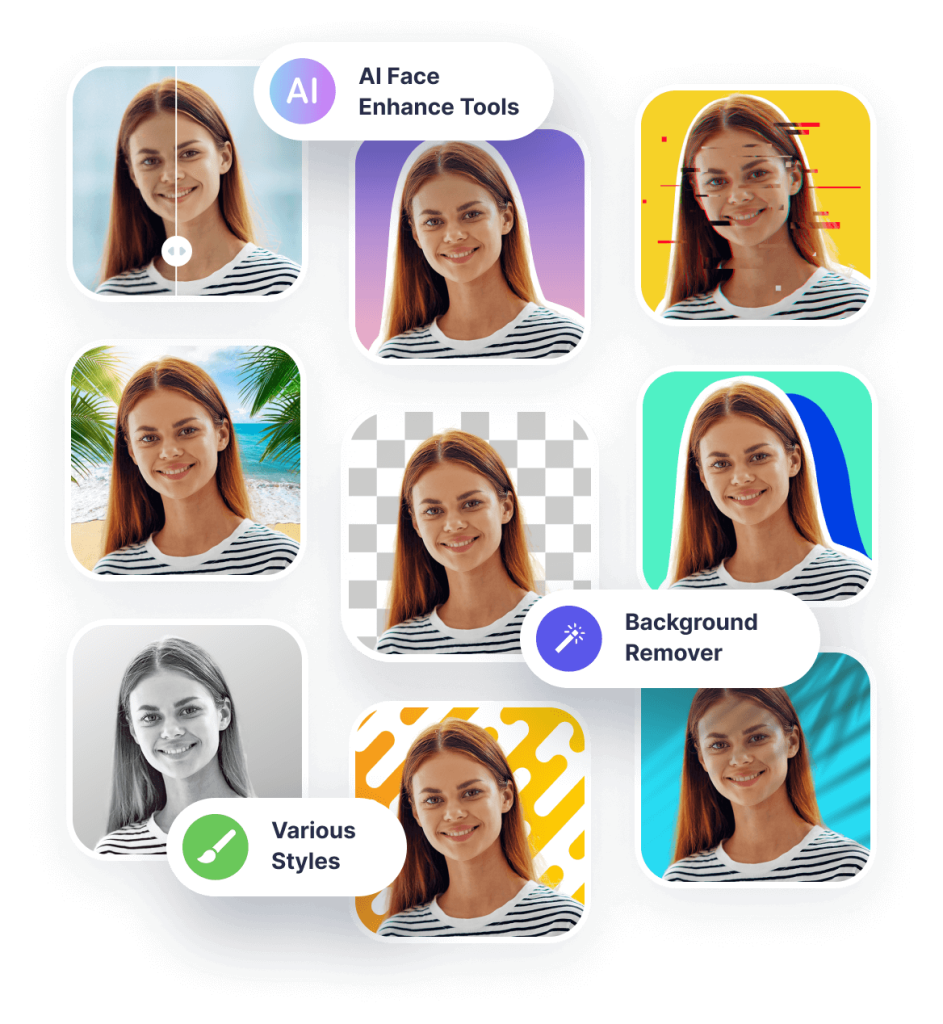
Pfpmaker is introduced as an AI-driven solution for professionals seeking to create polished profile pictures easily. It offers both free and paid plans, with varying features to cater to different user needs. The rating indicates its general reception among users.
Key Features
AI-powered background replacement: Pfpmaker utilizes AI technology to replace backgrounds in profile pictures, offering a seamless and professional look.
Customizable styles and effects: Users can customize their profile pictures with various colors, effects, and styles to suit their preferences and branding.
Pros
Varied styles for different accounts: Pfpmaker provides a range of styles suitable for different types of accounts, ensuring versatility in profile picture creation.
User-friendly and professional results: The tool is praised for its ease of use and the professional quality of the profile pictures it generates.
Cons
Delays in image generation: Some users may experience delays in generating profile pictures, potentially affecting workflow efficiency.
Inconsistent AI retouching: The AI retouching process may yield inconsistent results, leading to variations in the quality of profile pictures.
Long processing time: The processing time for generating profile pictures may be longer than expected, potentially causing frustration for users.