Creating effective URLs is a fundamental aspect of web development and SEO (Search Engine Optimization). Here’s a detailed guide on the topic, following the structure provided:
Creating a clear and user-friendly URL structure is crucial for both user experience and search engine optimization (SEO). Here are the basics to get you started:
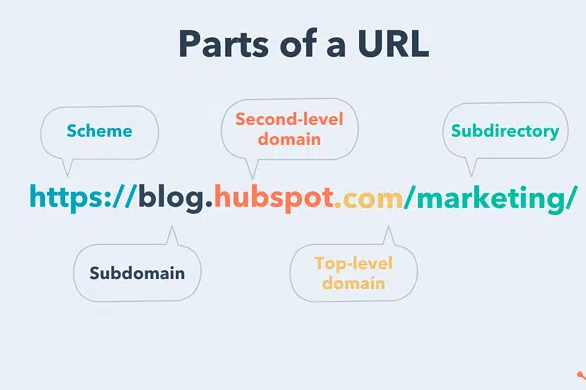
Key Components of a URL
Protocol
Definition: Indicates the method used to fetch the resource.
Common Protocols:
http:// (Hypertext Transfer Protocol)
https:// (Hypertext Transfer Protocol Secure)
Importance: Using https:// is crucial as it ensures data encryption and security, which is favored by search engines and users alike.
Domain
Definition: The main address of the website.
Example: example.com
Importance: The domain is a critical part of your brand identity. Choosing a domain name that is easy to remember and relevant to your business can enhance user trust and recall.
Path
Definition: Specifies the specific page or resource within the website.
Example: /about-us
Importance: The path helps users and search engines understand the structure and content of your website. Keeping it descriptive and relevant improves navigation and SEO.
Parameters
Definition: Additional data passed to the server, usually found after a ?.
Example: ?id=123
Importance: Parameters are often used for tracking, session IDs, or for filtering content. However, they should be used sparingly to avoid cluttering the URL.
Best Practices
Keep URLs Short and Descriptive
Why: Short URLs are easier to read, type, and share. They also look cleaner and more professional.
How: Use concise language to describe the content. For example, instead of example.com/category/subcategory/product-name-with-lots-of-details, use example.com/product-name.
Avoid Special Characters
Why: Special characters can cause issues with URL encoding and may not be interpreted correctly by all browsers and servers.
How: Use hyphens (-) to separate words instead of underscores (_), spaces, or other special characters. Hyphens are preferred because they are treated as word separators by search engines.
Use Lowercase Letters
Why: URLs are case-sensitive, meaning Example.com/Page is different from example.com/page. Using lowercase letters consistently avoids confusion and potential errors.
How: Always create URLs in lowercase and configure your server to handle any case variations appropriately.
Exclude Unnecessary Parameters
Why: Parameters can make URLs look messy and complex, which can deter users and negatively impact SEO.
How: Simplify URLs by removing unnecessary query strings. If parameters are necessary (e.g., for search or filter functionality), use clean and meaningful names.
Using Laravel’s Routing System

Defining Routes: Define routes in the web.php file, e.g., Route::get(‘/about-us’, [PageController::class, ‘about’]);.
Named Routes: Use named routes for better maintainability, e.g., Route::get(‘/about-us’, [PageController::class, ‘about’])->name(‘about’);.
Crafting Clean URLs
Human-Readable URLs: Use Laravel’s features to create URLs that are easy to read and understand.
Avoiding Clutter: Ensure the paths are short and free from unnecessary segments.
Examples of Good and Bad URL Structures in Laravel
Good: example.com/products/laptop
Bad: example.com/index.php?category=electronics&subcat=laptops
The Importance of Good URLs
Good URLs are more than just a web address. They play a significant role in:
User Experience

Clarity
Why It Matters: Clear URLs help users understand what a page is about before they click on it. This can improve click-through rates as users are more likely to click on a link if they know what to expect.
Example: Compare example.com/products/laptops to example.com/p?id=123. The former clearly indicates that the page is about laptops, while the latter is ambiguous.
Memorability
Why It Matters: Simple and descriptive URLs are easier to remember, which is especially useful for users who want to return to a page or share the URL with others.
Example: example.com/recipes/chocolate-cake is easier to remember and share than example.com/c?=r&x=choc123.
SEO Impact
Search Engine Favorability
Why It Matters: Search engines like Google prefer well-structured URLs as they are easier to crawl and index. A clear URL structure helps search engines understand the hierarchy and relevance of your content.
Example: URLs like example.com/services/seo-consulting are more likely to be indexed favorably compared to example.com/page?service=1.
Keyword Inclusion
Why It Matters: Including relevant keywords in your URLs can improve your search engine rankings. Keywords in URLs act as a signal to search engines about the content of the page.
Example: A URL like example.com/seo-tips includes the keyword “SEO tips,” which can help the page rank higher for searches related to SEO tips.
Crafting Trending URLs for Better Google Search Performance
To make your URLs stand out and perform well on Google, you need to optimize them for both users and search engines. Here’s how:
Optimizing for Search Engines

Relevant Keywords
Why: Keywords in URLs help search engines understand the page’s content and improve its ranking for relevant searches.
How: Include primary keywords that accurately describe the page. For instance, if your page is about the benefits of yoga, a URL like example.com/benefits-of-yoga is ideal.
Readability
Why: Readable URLs are preferred by users and search engines. They should be easy to understand at a glance.
How: Avoid using complex strings of numbers and characters. A readable URL like example.com/contact-us is more user-friendly than example.com/?page=1234.
Analyzing Trends
Google Trends
Why: Using Google Trends helps you identify popular search terms and topics, ensuring that your content aligns with current interests.
How: Search for relevant keywords and see their popularity over time. Use trending keywords in your URLs to capture more search traffic.
Example: If “vegan recipes” is trending, a URL like example.com/vegan-recipes can attract more visitors.
Adapting to Trends
Why: Adjusting your URLs based on trending topics can help you stay relevant and increase traffic.
How: Regularly update and optimize URLs to reflect current trends. If a particular topic is gaining traction, modify your URLs to include related keywords.
Examples and Recommendations for URL Management Packages
Using URL management packages can simplify the process of creating and maintaining effective URLs in your Laravel projects.
Popular Packages
Laravel SEO

Overview: This package provides various SEO tools, including URL management.
Implementation: Install via Composer (composer require artesaos/seotools), then configure it in your Laravel application.
Usage: Helps in managing meta tags, canonical URLs, and more, ensuring that your URLs are optimized for search engines.
Laravel Sluggable
Overview: This package automatically generates URL slugs from model attributes.
Implementation: Install via Composer (composer require cviebrock/eloquent-sluggable), then configure the model to use sluggable.
Usage: Simplifies the creation of SEO-friendly URLs by converting titles or other attributes into slugs.
Implementation Examples
Laravel SEO:
use SEOTools;

SEOTools::setTitle('Page Title');
SEOTools::setDescription('Page description');
SEOTools::opengraph()->setUrl('http://example.com/current-url');
SEOTools::setCanonical('http://example.com/canonical-url');
Laravel Sluggable:
use Cviebrock\EloquentSluggable\Sluggable;

class Post extends Model
{
    use Sluggable;

    public function sluggable(): array
    {
        return [
            'slug' => [
                'source' => 'title'
            ]
        ];
    }
}
Tips for Customization
Configuration: Customize the package settings to match your specific requirements. For instance, configure the sluggable package to generate unique slugs even for duplicate titles.
Extending Functionality: Extend or override package methods to add additional functionality, such as appending a date to slugs for better uniqueness and SEO value.
Popular Packages
Laravel SEO: Helps with various SEO optimizations, including URL management.
Laravel Sluggable: Automatically generates URL slugs from model attributes.
Implementation Examples
Laravel SEO: composer require artesaos/seotools
Laravel Sluggable: composer require cviebrock/eloquent-sluggable
Tips for Customization
Tweak Configuration: Customize package configurations to fit your specific needs.
Extend Functionality: Extend or override package methods for additional functionality.
Additional Tips and Best Practices
Keep It Simple: Avoid complex and lengthy URLs.
Consistency: Maintain a consistent URL structure throughout your site.
Redirection: Properly manage redirects to maintain SEO value when URLs change.
By following these guidelines and utilizing the right tools, you can create URLs that enhance user experience and boost your site’s visibility on search engines.