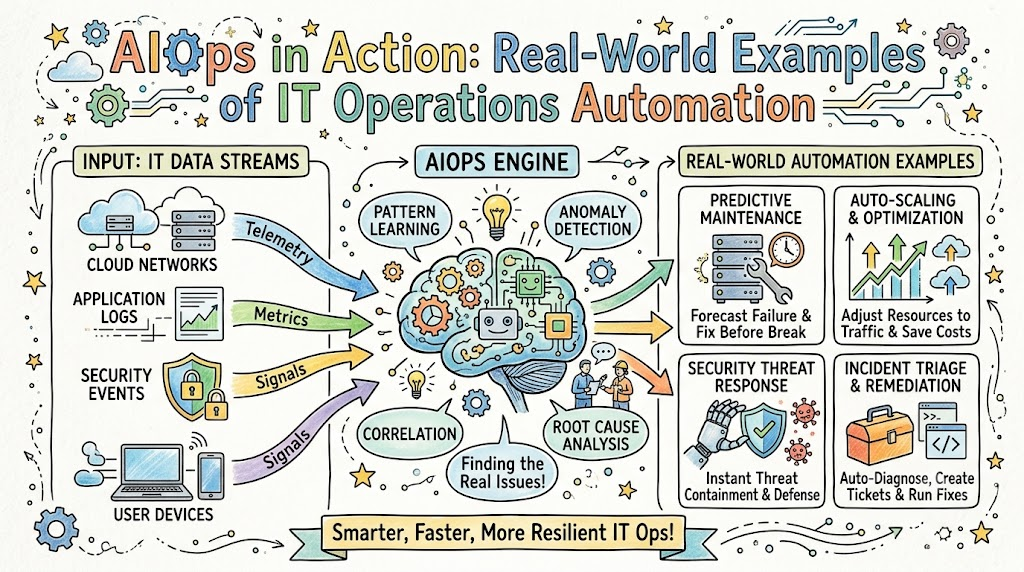
Modern computer systems power our entire world today. Every time you order food, play games, or stream videos, large server rooms handle your clicks. When these computer systems break, businesses lose money and people get upset.
Companies now use smart robot assistants to run their technology smoothly. We call this clever technology AIOps. You can learn how to build and manage these automated systems with Xopsschool. In this easy guide, we will explore real examples of smart automation at work.
What Does AIOps Mean?
AIOps stands for artificial intelligence for IT operations. It simply means using smart software to fix computer problems fast.
Think of it like a caring doctor for huge computer networks. The doctor listens to heartbeats all day long. When the doctor hears a strange sound, they find the trouble right away.
In the past, human engineers had to read thousands of lines of computer notes. Now, smart computers read these notes in a single second. Because of this speed, engineers can fix issues before anyone notices.
Example 1: Stopping False Alarm Storms
Large banks run thousands of computers day and night. When a single cable gets unplugged, hundreds of red lights flash at once.
Human workers call this flood an alert storm. The workers get tired because they must check every single beep. In most cases, these beeps turn out to be harmless false alarms.
A global bank used smart software to group related alarms together. The robot combined five hundred messy alerts into one clear ticket. Next, it told the team the exact power cord that came loose. This simple step saved workers hours of boring checking.
Example 2: Self-Healing Online Stores
Online shops see huge crowds during big holiday sales. Millions of people click the buy button at the exact same minute.
Sometimes, an overloaded server crashes and drops customer orders. In the past, shoppers saw an annoying error screen. The store lost sales while engineers rushed to restart the frozen machine.
Now, smart platforms watch server memory levels in real time. When memory runs low, the system boots up new servers automatically.
- The tool spots high traffic before computers freeze.
- Next, it creates extra server space in seconds.
- Then, it reroutes shoppers without dropping a single cart.
Example 3: Finding Sneaky Software Bugs
Streaming video apps push new software updates every single day. Even tiny mistakes in code can make movies load slowly.
Finding the exact line of bad code used to take days. Engineers had to guess which update caused the slowdown. This waiting made movie fans very frustrated.
A popular media company set up smart tracing software. The software checks how data travels through every app screen. When a movie stutters, the tool points straight to the bad code line. So, developers can repair the bug during lunch.
Old IT Work vs. Modern Smart IT Work
| Daily Task | Old Manual IT Methods | Modern AIOps Automation |
|---|---|---|
| Reading Alerts | Humans check every single message | Robots group similar alerts into one |
| Finding Problems | Workers guess and search through logs | Software points to the true cause |
| Fixing Outages | Engineers type commands by hand | Pre-made recipes fix machines instantly |
| System Growth | Teams guess how many servers to buy | Machines predict growth using math |
Example 4: Smart Help Desks for Office Workers
Every company has an internal tech support desk. Workers ask for password resets or new laptop permissions every morning.
Answering these simple questions takes up half of the IT team’s day. That means technicians have less time to work on big projects.
Modern companies now use friendly chat helpers powered by smart software. An employee can ask for a software license inside a work chat.
The smart helper checks company rules and approves the request right away. As a result, the worker gets back to work without waiting in line.
Example 5: Cutting Cloud Server Bills
Companies rent servers in the cloud to host their apps. But teams often forget to turn off test servers over the weekend.
Leaving idle servers on burns through company budgets quickly. It is like leaving all the lights on in an empty school.
Smart operations tools scan cloud bills every night. They find servers that nobody has touched for forty-eight hours.
Next, the tool powers down those idle machines safely. This practice saves companies thousands of dollars each month without hurting daily work.
Simple Steps to Start with Automation
Your team does not need to change everything in one single day. Great improvements happen one step at a time.
First, pick your noisiest monitoring tool. Turn on alert grouping so your inbox stays peaceful.
Next, write down the three most common computer problems you fix each week. Build simple automated scripts to handle those three chores first.
- Start small with clear and simple goals.
- Always keep human experts in charge of final approvals.
- Teach your team how the new smart tools work.
The Bright Future of IT Operations
Automating operations does not mean replacing human workers. Instead, it takes away boring, repetitive computer tasks.
Engineers can spend their days building fun, creative projects. Meanwhile, smart systems quietly protect machines in the background.
Using smart software helps companies run faster and stay strong. As these tools grow friendlier, running technology becomes a breeze for everyone.