Sure, I Can Help, Follow the steps to install XAMPP on a Linux system:
- Download the XAMPP Installer:
- Visit the official XAMPP download page and download the Linux version of the installer.
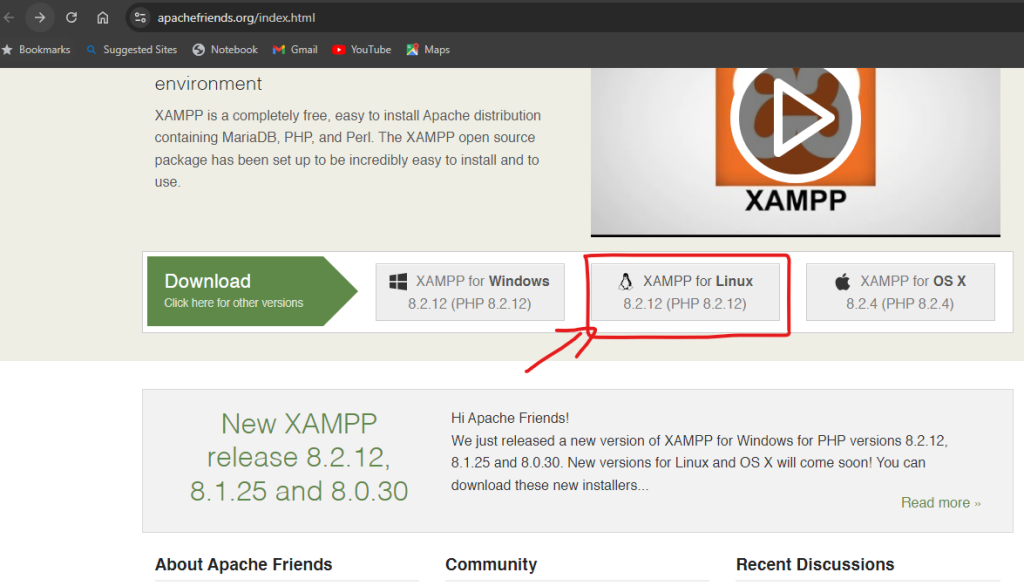
- Click the “Download” button for the desired version.
2. Extract the Downloaded File:
- Once the download is complete, open your terminal and navigate to the directory where you saved the downloaded file.
3. Navigate to the Downloads Directory:
- Use the command
cd downloadsto move to the directory where the installer is downloaded.
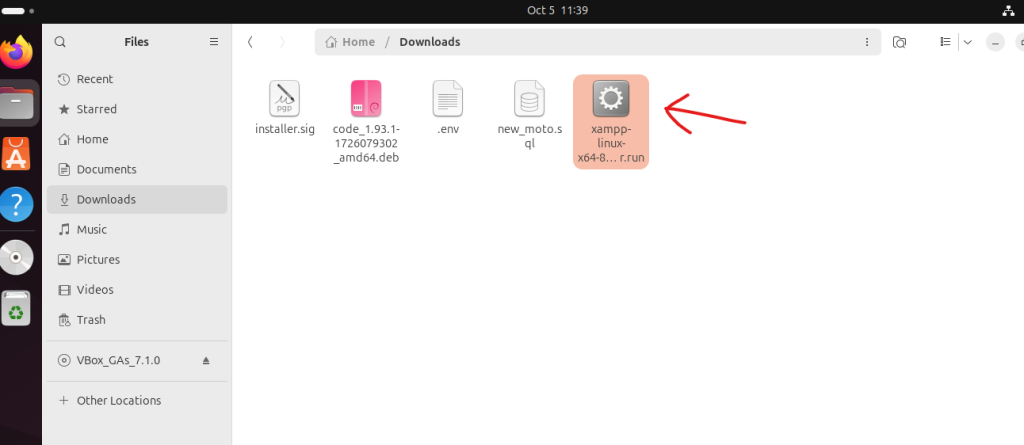
4 .Open Terminal:
- You can open the Terminal by pressing right click and
open in terminalclick andCtrl + Alt + T
5. Make the Installer Executable:
- Run the command
chmod +x xampp-linux-x64-8.0.30.0-installer.run6. Run the Installer:
- Execute the installer with
sudo ./xampp-linux-x64-8.0.30.0-installer.run.7. Start XAMPP:
- To start XAMPP, navigate to the installation directory with
cd /opt/lamppand runsudo ./xampp start.
These steps should get XAMPP up and running on your Linux system.
How to Start the XAMPP Control Panel in Linux:
- Open a terminal and navigate to the XAMPP installation directory:
cd /opt/lampp2. Start the XAMPP Control Panel:
sudo ./manager-linux-x64.run

3. Manage XAMPP Services:
- You can start, stop, and restart XAMPP services (Apache, MySQL, etc.) from the control panel.
- you can manage services via the terminal.
sudo /opt/lampp/lampp start
sudo /opt/lampp/lampp stop
sudo /opt/lampp/lampp restart
Its steps should help you get the XAMPP Control Panel up and running on your Linux machine.