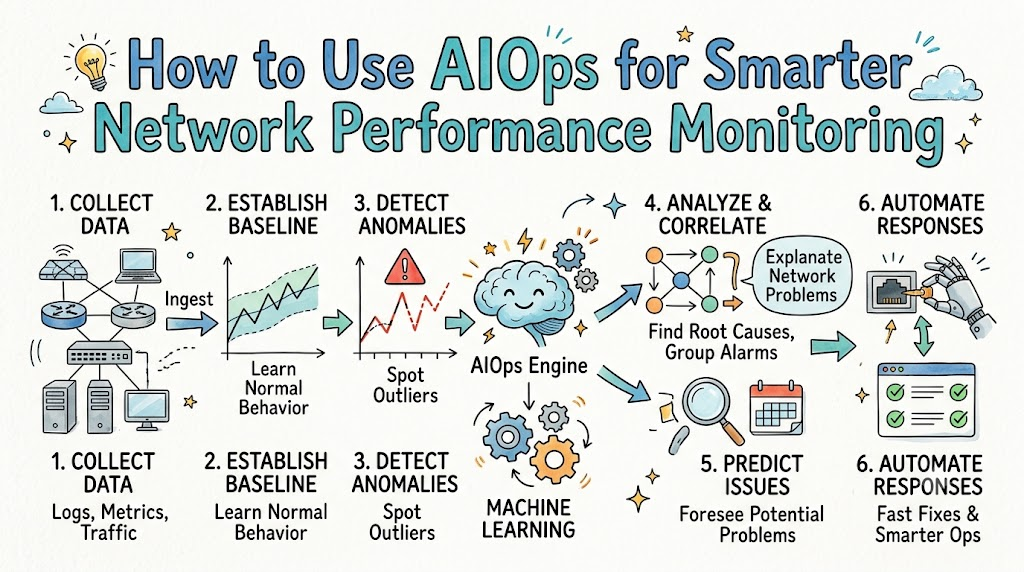
Computer networks connect devices so people can share information easily. When a network slows down, work stops. Today, teams use artificial intelligence to keep networks fast and safe. We call this smart tool AIOps.
You can master these operational concepts and network systems by learning with Xopsschool. Smart tools help engineers find problems quickly. In this guide, you will learn how to use these tools step by step.
What Is AIOps?
AIOps stands for artificial intelligence for IT operations. It combines big data and smart math models.
In simple words, it acts like a smart robot helper for your network. The robot watches traffic day and night. It learns what looks normal. Next, it tells engineers when something looks wrong.
Old monitoring tools only look at basic rules. They send an alert every time a number goes up. In contrast, AIOps understands the full picture.
Why Old Monitoring Tools Fall Short
Traditional tools create thousands of alerts each day. Engineers call this flood of messages alert noise.
Because of all the noise, people miss real dangers. It feels like looking for a needle in a haystack. Engineers get tired of checking false alarms.
Also, old tools wait for things to break before speaking up. That reactive style causes long downtime for companies. Modern networks are simply too big for humans to watch alone.
Step 1: Collect All Network Data
A smart system needs good facts to make good choices. First, connect your routers, switches, and servers to the platform.
Gather logs, packet flows, and performance numbers in one spot. When you bring all data together, blind spots vanish. Clean data gives your system the clearest vision.
- Logs: Text records that show what devices did.
- Metrics: Numbers that measure speed and usage.
- Traces: Paths that show how messages travel.
Step 2: Clean the Incoming Information
Dirty data leads to bad guesses. Because of this, you must clean your records early.
Format the timestamps so every device agrees on the time. Remove duplicate notes that clutter the screen. Next, organize the notes into simple tags.
This cleanup helps the computer read everything without errors. As a result, the tool works much faster.
Step 3: Establish a Normal Baseline
Every network has its own rhythm. People send more emails on Monday morning than on Sunday night.
The AI tool studies these traffic habits over several weeks. It sets a baseline, which is a picture of healthy behavior.
Next, the system ignores ordinary traffic jumps during busy work hours. But it flags a surprise spike that happens at midnight. This smart filter stops pointless alarms.
Step 4: Group Related Alerts Together
When one wire fails, twenty alarms might ring at once. A basic tool sends twenty separate emails.
AIOps acts differently. It groups those twenty alerts into a single event. The engine links causes to effects across the system.
So, your team receives only one clear message. This quiet saves precious time during emergencies.
Step 5: Pinpoint the Root Cause
Finding the real source of a trouble ticket takes time. Engineers call this step root cause analysis.
The software traces the network graph from top to bottom. It checks every connected path to spot the true broken link.
Then, it highlights the exact router causing the slowdown. Your team no longer has to guess what went wrong.
Step 6: Automate Easy Fixes
Many common errors have very simple answers. For instance, a cache fills up or a service stops running.
You can set up small recipes called playbooks. When a known error appears, the system runs the fix automatically.
It can restart a frozen port in two seconds. Best of all, human workers do not even have to wake up.
Comparing Old Tools with AIOps
| Feature | Old Monitoring Tools | Modern AIOps Tools |
|---|---|---|
| Alert Style | Sends alerts for every tiny jump | Bundles related events together |
| Response | Waits for things to break | Predicts issues before outages |
| Finding Causes | Engineers search through logs by hand | Software points to the true cause |
| Fixing Errors | Needs a human for every ticket | Runs auto-fixes for common errors |
Best Practices for Your Team
Start small so your staff does not feel overwhelmed. Turn on alert grouping first to cut down notifications.
Next, review the recommendations that the machine gives you. Check its work before you turn on full auto-pilot mode. Trust builds through steady practice and clear results.
- Set clear goals, such as cutting repair times in half.
- Keep your humans in charge of all big decisions.
- Train your operators on how the machine thinks.
Final Thoughts on Smarter Networks
Using artificial intelligence makes network monitoring easier and much faster. It filters out distracting noise so teams can focus on real work.
Because it spots patterns early, problems stop before users even notice. By following these easy steps, you give your team the best tools for success. Smart networks build a smooth road for the future.