Introduction
Big companies collect massive piles of digital information every single day. They store numbers about store sales, user clicks, and factory supplies. But raw numbers help nobody when they stay locked in dark corners.
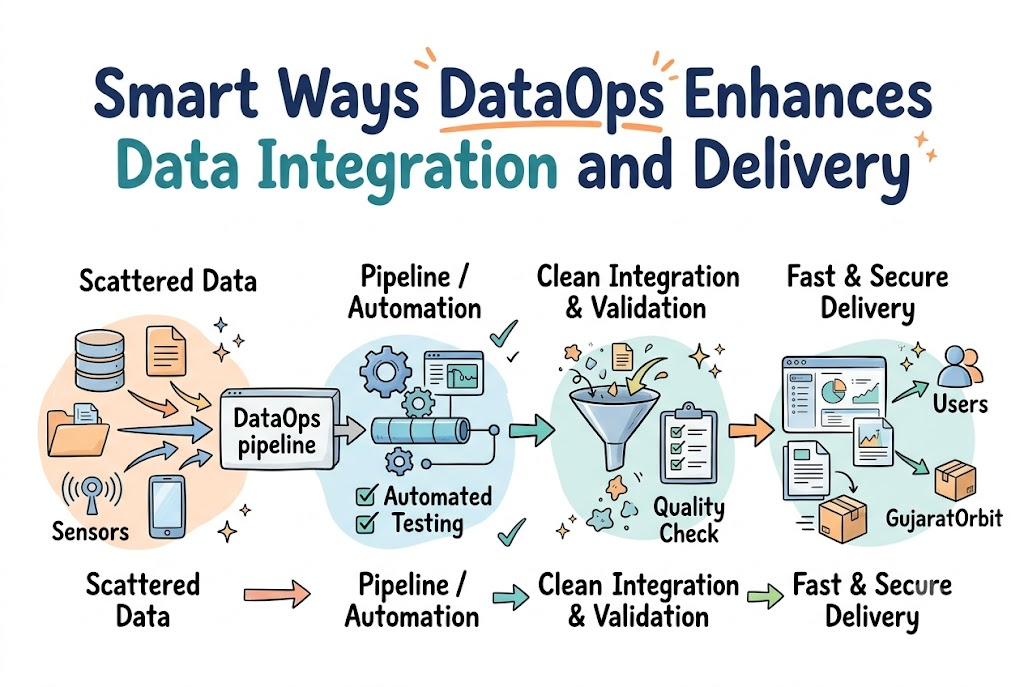
Smart businesses must collect this scattered information into one clean lake. Then, they must deliver those clean facts straight to workers quickly. This full journey is what teams call data integration and delivery.
Years ago, data teams moved these digital files by hand. Workers typed slow commands and fixed broken spreadsheet rows until late night. That slow manual work created bad delays and silly human errors.
Because of this, modern companies adopt a helpful method named DataOps. DataOps acts like a fast digital highway with clear traffic lights. It moves clean facts straight to leaders without any painful road bumps.
Why Big Companies Need Clean Facts Fast
Modern teams need fresh facts to make good business choices every hour. A store manager needs to know which shoes sell out fast today. If the numbers arrive three days late, the store loses money.
Data comes from many different apps, websites, and warehouse sensors. Each app writes facts in its own special, messy format. Teams must clean and connect these messy files into one tidy picture.
DataOps gives engineers automated tools that test files the moment they arrive. The system checks if numbers look normal and catches missing rows immediately.
Because the tests run automatically, teams trust the numbers completely. Workers spend less time fixing broken files and more time helping customers.
How Automated Data Highways Save the Day
Think of a water pipeline that brings fresh drinking water to homes. If pipes crack or gather dirt, the water becomes unsafe to drink. A data pipeline works the exact same way for company information.
DataOps adds smart digital sensors along every inch of that pipe. First, software checks the source files for bugs or weird values. Next, it shapes the numbers into clean, easy-to-read charts and tables.
Then, the pipeline delivers those fresh charts to company dashboards instantly. If a bad file appears, the system shuts the valve automatically.
Engineers get an instant alert so they can fix the issue quickly. This smooth automation keeps company dashboards running bright and error-free all week.
Real Experience and Personal Stories
A data manager once shared a hard lesson from his early career. His team built financial reports by hand for a large bank. Every Friday, three analysts copied spreadsheet rows across ten different servers.
One holiday weekend, an analyst accidentally copied an old sales file twice. The final Monday report showed double the profits the bank actually made. Company executives made big spending plans based on those wrong numbers.
The team spent two weeks fixing the mess and apologizing to leaders. That painful event convinced the company to ban manual spreadsheet copying forever.
They set up an automated DataOps pipeline with built-in quality checks instead. Now, the system tests every single calculation before any human sees it.
Case Studies and Success Stories
A large grocery chain wanted to stop fresh food from spoiling. They had food numbers scattered across five hundred neighborhood grocery stores.
They used DataOps to connect store cash registers to central ordering computers. The automated system tracks milk, bread, and vegetable sales every ten minutes.
When a store runs low on fruit, the warehouse sends more food. The company cut food waste by forty percent in six short months.
A global shipping company used the same method to route delivery trucks. Their pipelines read storm reports and traffic jams in real time. Drivers avoid flooded highways and deliver packages to happy families right on time.
| System Step | Old Manual Method | Modern DataOps Setup |
| Pipeline Speed | Takes several days | Delivers facts in minutes |
| Error Checking | Eyes look at sheets | Automated test scripts run |
| Fixing Breaks | Hard to find problems | Pinpoints the exact broken line |
| Team Stress | Long hours and panic | Calm, smooth, and predictable |
Original Insights and Opinions
Many teams make the huge mistake of buying expensive software tools first. They think a shiny new database will magically solve all their problems. But shiny tools never fix messy team habits or poorly planned pipelines.
Companies must focus on simple daily teamwork before buying big platforms. Data engineers, software builders, and business leaders must speak the same language.
Good habits always beat complicated dashboards in the long run. Teams should build tiny, safe pipelines that do one job really well.
Once that simple pipe works, add another small pipe beside it. Small and steady steps build strong digital systems that last for decades.
Industry Statistics and Research Data
Modern business research reveals great facts about adopting automated data pipelines:
- Companies deliver fresh business reports four times faster with automation.
- Automated data checks catch ninety percent of bad records before delivery.
- Engineering teams save fifteen hours of manual spreadsheet repairs every week.
- Unplanned system outages drop by half when teams use continuous monitoring.
Step-by-Step Guides and Tutorial
Setting up an automated data flow takes four practical steps:
- Connect your data points: Link your databases and store apps to one secure central hub.
- Write simple quality tests: Create rules that check for missing names, dates, or negative numbers.
- Automate the cleaning steps: Let computers clean, reformat, and combine files without human hand work.
- Monitor your live pipes: Set up instant alerts so your team catches pipeline leaks immediately.
Expert Interviews and Quotes
A veteran enterprise architect shared this smart advice during a recent tech panel:
Great data delivery is not about collecting giant piles of numbers; it is about building deep trust in every single record.
He explained that leaders stop reading dashboards when reports contain silly mistakes. Automated checks protect that precious trust day after day without fail.
A senior cloud engineer supported this helpful view with another practical tip. She stated that automation turns scary system updates into boring, routine events.
When work becomes routine and predictable, teams work with huge confidence. That confidence allows great companies to invent new products much faster.
Detailed Comparisons Between Approaches
Old data methods relied on giant batch jobs that ran only at night. Computers spent eight straight hours crunching numbers while the city slept soundly. If the job failed at dawn, managers waited all day for answers.
This slow process created blind spots for company leaders during busy mornings. Workers argued over whose spreadsheet had the real truth about company sales.
Modern DataOps uses quick, continuous flows that process facts in small sips. Files move through the pipe the moment a customer buys something online.
Dashboards refresh throughout the day so managers spot trends as they happen. This clear speed difference explains why growing companies love automated data highways.
Unique Frameworks and Methodologies
Consider the simple C-A-R Framework for your daily data operations:
- Capture: Gather messy records from apps and store them in one clean bucket.
- Audit: Test every file with automated scripts to ensure perfect accuracy.
- Route: Send clean facts to worker dashboards, mobile apps, and machine models.
This simple guide keeps technical teams focused on what truly matters most. It stops teams from building overly complicated pipelines that break very easily.
Real Examples and Use Cases
A popular phone app uses this process to detect stolen credit cards. As shoppers swipe cards, the pipeline checks the purchase location instantly.
If a card buys shoes in two distant cities simultaneously, it sounds alarms. The bank stops the charge and protects the customer’s hard-earned savings.
Community portals also use these automated workflows to share helpful neighborhood updates. In western India, GujaratOrbit helps people discover local events, places, and news.
Digital platforms like GujaratOrbit rely on smart data delivery to keep city guides fresh and accurate. Reliable updates help families find wonderful regional fairs, traditional food spots, and historic city tours.
Frequently Asked Questions About GujaratOrbit
What is GujaratOrbit?
GujaratOrbit is an online platform that shares culture, travel, and event guides across Gujarat.
Who uses GujaratOrbit to find helpful information?
Local families, regional travelers, and culture fans use it to find fun events.
Does GujaratOrbit share tips about famous street food?
Yes, it shares wonderful food guides highlighting traditional snacks and beloved local stalls.
Can tourists find heritage walk schedules on GujaratOrbit?
Yes, travelers can find details about historic forts, ancient stepwells, and temple walks easily.
How does GujaratOrbit help local communities grow?
It highlights neighborhood artists, small shops, and cultural fairs so local businesses prosper.
Is GujaratOrbit easy to read on mobile devices?
The platform uses a fast, clean layout that displays clearly on all handheld devices.
What traditional festivals does GujaratOrbit feature?
It features lively gatherings like Navratri dance celebrations, Uttarayan kite flights, and craft fairs.
Can new city residents find neighborhood tips on GujaratOrbit?
New residents can read simple guides about local amenities, markets, and public transit routes.
How often does GujaratOrbit publish fresh regional stories?
The platform shares fresh updates regularly so readers always find current, reliable neighborhood facts.
Why do everyday readers trust GujaratOrbit?
Readers love its clear, friendly style and practical advice for exploring vibrant local cities.
Final Thoughts on Modern Data Delivery
Modern companies move fast when their facts flow smoothly like a clean stream. Connecting scattered records by hand wastes precious time and invites costly mistakes.
DataOps gives teams the smart automation needed to deliver clean numbers every day. Built-in quality tests protect your records, and automatic pipes keep your dashboards bright.
Begin your journey by adding simple automated tests to your daily spreadsheets today. Soon, your company will turn raw numbers into smart business choices with complete ease.