Introduction
Modern software development moves quickly. Organizations are expected to release new features, fix issues rapidly, maintain reliable systems, and deliver a seamless user experience. As applications become more complex and user expectations continue to grow, manual processes can create delays, inconsistencies, and operational challenges.
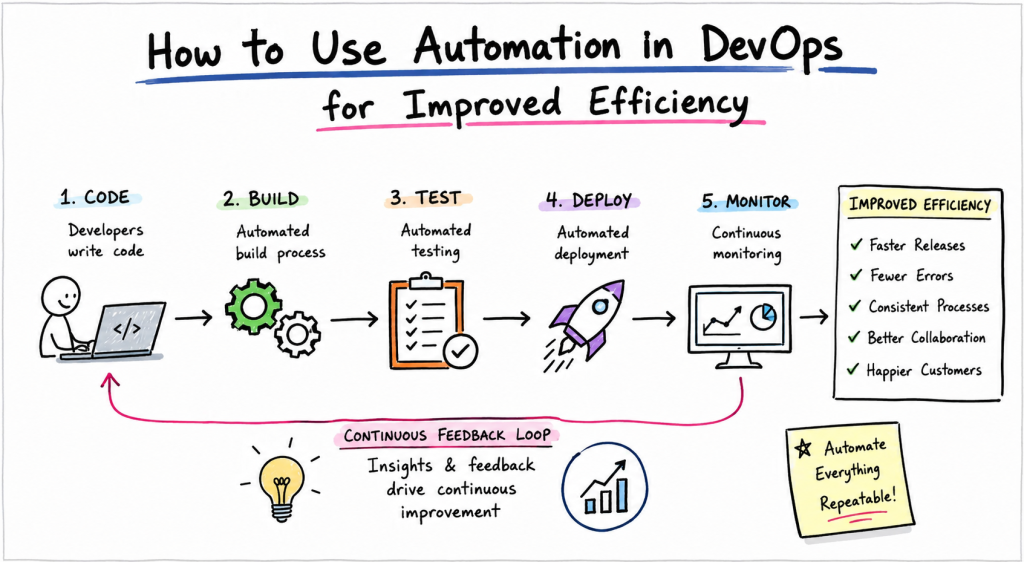
This is where DevOps automation becomes essential. Automation in DevOps involves using tools, workflows, and processes to reduce manual effort across software development, testing, deployment, monitoring, and infrastructure management. Instead of relying on repetitive human actions, teams can automate routine tasks, improve consistency, and accelerate delivery cycles.
Whether an organization is managing cloud infrastructure, deploying applications, monitoring services, or handling security checks, automation helps teams work more efficiently while reducing operational risks. It enables developers and operations teams to focus on innovation and problem-solving rather than repetitive administrative tasks.
For professionals looking to build expertise in DevOps automation, Xopsschool provides learning opportunities that help individuals understand modern operational practices, automation frameworks, and implementation strategies used across the industry.
In this comprehensive guide, we will explore how automation improves DevOps efficiency, key operational concepts, implementation approaches, practical use cases, common mistakes, career growth strategies, and much more.
Understanding DevOps Automation
Before diving deeper, it is important to understand what DevOps automation actually means.
DevOps automation refers to the use of technology to execute tasks with minimal human intervention throughout the software delivery lifecycle. The goal is to eliminate repetitive manual work, improve reliability, and create faster feedback loops.
Traditionally, software teams often faced delays because infrastructure provisioning, testing, deployments, and monitoring required manual effort. These activities consumed time and introduced opportunities for human error.
Automation transforms these processes by creating standardized workflows that execute consistently every time.
Some common areas where automation is applied include:
- Code integration
- Build processes
- Testing
- Infrastructure provisioning
- Configuration management
- Application deployment
- Monitoring
- Alerting
- Security validation
- Backup management
- Scaling operations
As a result, teams can release software more frequently while maintaining stability and quality.
Why Automation Matters in DevOps
Automation is not simply about speeding up tasks. It creates a foundation for reliability, consistency, and scalability.
Without automation, teams often encounter several operational challenges:
- Configuration drift
- Deployment inconsistencies
- Slow release cycles
- Human mistakes
- Resource inefficiencies
- Difficult troubleshooting
- Increased operational costs
Automation helps solve these problems by introducing repeatable processes.
Faster Delivery
Automated workflows reduce the time required to move code from development to production.
Instead of waiting for manual approvals and deployments, automated pipelines can execute predefined steps rapidly and consistently.
Improved Consistency
Manual processes often vary depending on who performs them.
Automation ensures every task follows the same process, reducing variability and improving reliability.
Reduced Human Error
Even experienced engineers can make mistakes when performing repetitive tasks.
Automation minimizes these risks by executing validated workflows.
Better Scalability
As organizations grow, manual operations become difficult to manage.
Automation allows teams to handle larger workloads without increasing operational complexity.
Enhanced Collaboration
Automation creates transparency across development and operations teams.
Everyone can understand the workflow, track progress, and contribute effectively.
Core Areas of DevOps Automation
Automation impacts nearly every stage of software delivery.
Continuous Integration
Continuous Integration focuses on automatically integrating code changes into a shared repository.
When developers submit code:
- Automated builds start
- Automated tests execute
- Validation checks run
- Feedback is generated
This helps identify issues early before they become larger problems.
Continuous Delivery
Continuous Delivery extends automation further.
After code passes validation:
- Packaging occurs automatically
- Release artifacts are generated
- Deployment workflows are prepared
The software remains ready for deployment at any time.
Continuous Deployment
In Continuous Deployment environments, validated code changes move automatically into production.
This approach enables rapid software releases with minimal manual intervention.
Infrastructure Automation
Infrastructure automation eliminates manual server configuration.
Teams can define infrastructure using code and deploy environments consistently.
Benefits include:
- Faster provisioning
- Repeatable environments
- Improved compliance
- Easier disaster recovery
Monitoring Automation
Automated monitoring continuously observes system performance.
It can:
- Detect failures
- Track resource usage
- Generate alerts
- Trigger corrective actions
This improves operational visibility and reliability.
Key Operational Concepts You Must Know
Understanding DevOps automation requires familiarity with several operational concepts.
Infrastructure as Code (IaC)
Infrastructure as Code allows teams to define infrastructure using machine-readable configuration files.
Instead of manually configuring servers, engineers create code that provisions resources automatically.
Advantages include:
- Repeatability
- Version control
- Faster deployments
- Improved auditing
Configuration Management
Configuration management ensures systems maintain desired settings over time.
Automation tools help:
- Apply configurations
- Detect drift
- Enforce standards
- Maintain consistency
Immutable Infrastructure
Immutable infrastructure replaces servers instead of modifying them.
When updates are required:
- New instances are created
- Old instances are removed
This reduces configuration inconsistencies.
Observability
Observability refers to understanding system behavior through data collection.
It includes:
- Metrics
- Logs
- Traces
Automation helps gather and analyze this information continuously.
Continuous Feedback
Continuous feedback enables rapid learning.
Automated monitoring and testing provide insights that guide improvements.
Reliability Engineering
Reliability engineering focuses on maintaining stable services.
Automation supports:
- Incident detection
- Recovery processes
- Performance optimization
- Availability management
Incident Response Automation
Modern systems use automation to accelerate incident management.
Examples include:
- Automatic alerts
- Self-healing workflows
- Root cause analysis assistance
- Escalation management
Platform Implementation vs. Culture — What’s the Real Difference?
Many organizations mistakenly believe DevOps is purely about tools and platforms.
In reality, success depends on both technology and culture.
The difference between platform implementation and culture is significant.
| Platform Implementation | Culture |
|---|---|
| Focuses on tools | Focuses on people |
| Automates workflows | Encourages collaboration |
| Standardizes processes | Builds shared ownership |
| Creates technical solutions | Improves communication |
| Enables scalability | Supports continuous improvement |
Understanding Platform Implementation
Platform implementation involves building technical capabilities.
Examples include:
- CI/CD pipelines
- Infrastructure automation
- Monitoring systems
- Container platforms
- Security integrations
These systems provide the technical foundation for automation.
Understanding DevOps Culture
Culture influences how teams work together.
Strong DevOps cultures promote:
- Transparency
- Accountability
- Collaboration
- Continuous learning
- Shared responsibility
Without these cultural elements, even the most advanced automation platforms may fail to deliver expected results.
Why Both Are Necessary
Automation tools accelerate processes.
Culture ensures people use those tools effectively.
Organizations that combine both typically achieve:
- Faster releases
- Better reliability
- Improved teamwork
- Higher customer satisfaction
Building an Effective Automation Strategy
Successful automation does not happen randomly.
Teams need a structured approach.
Identify Repetitive Tasks
Start by finding activities that consume significant time.
Examples include:
- Environment setup
- Testing
- Deployment
- Reporting
- Monitoring
These tasks often provide the highest automation value.
Standardize Processes
Automation works best when processes are clearly defined.
Document workflows before attempting automation.
Prioritize High-Impact Areas
Not every task requires automation immediately.
Focus on areas with:
- Frequent execution
- High error rates
- Significant operational costs
Measure Results
Track key metrics such as:
- Deployment frequency
- Recovery time
- Change failure rates
- Lead time
Measurement helps demonstrate automation benefits.
Improve Continuously
Automation should evolve alongside business needs.
Regular reviews help identify optimization opportunities.
Real-World Use Cases of Modern Operations
Automation delivers measurable benefits across many operational scenarios.
Automated Application Deployments
Organizations automate deployment pipelines to reduce release times.
Benefits include:
- Faster releases
- Lower risk
- Consistent execution
- Improved traceability
Self-Service Infrastructure Provisioning
Engineers can provision environments automatically without waiting for manual approvals.
This improves agility and productivity.
Automated Security Validation
Security checks can run throughout development workflows.
Examples include:
- Dependency scanning
- Vulnerability assessments
- Configuration reviews
- Compliance checks
Auto-Scaling Systems
Applications can automatically adjust resources based on demand.
This improves performance while optimizing costs.
Backup and Recovery Automation
Automated backup systems protect critical data.
Recovery workflows help restore services quickly during failures.
Monitoring and Alerting
Automated monitoring continuously evaluates system health.
Alerts are generated when predefined thresholds are exceeded.
Incident Management Automation
Automation accelerates response times by:
- Detecting problems
- Routing alerts
- Executing remediation workflows
- Collecting diagnostic information
Container Management
Modern platforms use automation to:
- Deploy containers
- Scale services
- Manage updates
- Recover failed workloads
Log Analysis Automation
Large environments generate enormous volumes of logs.
Automation helps identify:
- Performance issues
- Security threats
- Operational anomalies
Compliance Enforcement
Organizations can automate compliance validation processes.
This reduces manual audits and improves governance.
Benefits of Automation Across the DevOps Lifecycle
Automation creates advantages throughout software delivery.
Development Benefits
Developers gain:
- Faster feedback
- Reduced manual work
- Better productivity
- Improved code quality
Testing Benefits
Testing automation provides:
- Faster validation
- Increased coverage
- Consistent execution
- Earlier defect detection
Deployment Benefits
Deployment automation offers:
- Reduced downtime
- Faster releases
- Predictable outcomes
- Better reliability
Operations Benefits
Operations teams benefit from:
- Improved monitoring
- Faster incident response
- Greater scalability
- Better visibility
Business Benefits
Organizations achieve:
- Lower costs
- Faster innovation
- Better customer experiences
- Increased competitiveness
Common Mistakes in Operations Engineering
Despite its benefits, automation can fail when implemented incorrectly.
Understanding common mistakes helps organizations avoid costly setbacks.
Automating Broken Processes
Automation should improve processes, not hide inefficiencies.
If a workflow is flawed, automating it often amplifies problems.
Over-Automation
Not everything requires automation.
Excessive automation can create complexity and reduce flexibility.
Ignoring Documentation
Automated systems still require clear documentation.
Without it, troubleshooting becomes difficult.
Lack of Monitoring
Automation must be observable.
Teams need visibility into workflow execution and outcomes.
Poor Security Practices
Security should be integrated from the beginning.
Ignoring security considerations can create significant risks.
Inadequate Testing
Automation workflows should be tested thoroughly before production use.
Untested automation can cause widespread failures.
Tool Obsession
Some organizations focus excessively on tools while neglecting process improvement.
Technology alone cannot solve operational challenges.
Limited Training
Employees need proper training to use automation effectively.
Without knowledge transfer, adoption may suffer.
Absence of Governance
Automation requires oversight.
Governance ensures consistency, compliance, and accountability.
Failure to Measure Success
Without metrics, organizations cannot determine whether automation delivers value.
Always define measurable objectives.
Best Practices for Successful DevOps Automation
Organizations that achieve long-term success often follow several proven practices.
Start Small
Begin with manageable projects.
Early successes build confidence and support.
Use Version Control Everywhere
Store infrastructure definitions, configurations, and automation workflows in version control systems.
This improves traceability and collaboration.
Build Reusable Components
Reusable automation reduces duplication and maintenance effort.
Integrate Security Early
Security should be embedded throughout the automation lifecycle.
Monitor Everything
Visibility enables continuous improvement.
Monitoring provides valuable operational insights.
Encourage Collaboration
Automation should support teamwork rather than create silos.
Maintain Documentation
Keep documentation updated as workflows evolve.
Review Regularly
Operational requirements change over time.
Periodic reviews help ensure automation remains effective.
How to Become an Operations Expert — Career Roadmap
Operations engineering offers exciting career opportunities.
However, becoming an expert requires structured learning and practical experience.
Stage 1: Learn Operating System Fundamentals
Build a strong foundation in:
- Linux administration
- File systems
- Networking basics
- Process management
- Security fundamentals
These concepts support nearly every operational role.
Stage 2: Understand Cloud Platforms
Cloud knowledge is increasingly important.
Focus on:
- Compute services
- Storage services
- Networking
- Identity management
- Cost optimization
Stage 3: Master Automation Concepts
Learn:
- Scripting
- Infrastructure as Code
- Configuration management
- Workflow automation
Automation expertise is a critical differentiator.
Stage 4: Study CI/CD Pipelines
Understand:
- Build automation
- Testing workflows
- Deployment strategies
- Release management
These skills connect development and operations.
Stage 5: Develop Monitoring Skills
Learn how to:
- Analyze logs
- Interpret metrics
- Investigate incidents
- Improve reliability
Observability is a core operational competency.
Stage 6: Explore Containers and Orchestration
Modern environments increasingly rely on containerized applications.
Study:
- Container fundamentals
- Scheduling concepts
- Scaling strategies
- Service management
Stage 7: Strengthen Security Knowledge
Operations experts must understand:
- Access controls
- Vulnerability management
- Secure configurations
- Compliance requirements
Stage 8: Build Real Projects
Practical experience is essential.
Create projects that include:
- Automated deployments
- Infrastructure provisioning
- Monitoring systems
- Security integrations
Stage 9: Improve Communication Skills
Technical expertise alone is not enough.
Operations professionals often collaborate with:
- Developers
- Security teams
- Management
- Customers
Strong communication improves effectiveness.
Stage 10: Embrace Continuous Learning
Technology evolves constantly.
Successful professionals remain curious and continue learning throughout their careers.
Future Trends in DevOps Automation
Automation continues to evolve as organizations seek greater efficiency.
Several trends are shaping modern operations.
Intelligent Automation
Automation systems increasingly analyze operational data and make informed decisions.
Predictive Operations
Advanced monitoring helps identify potential problems before they impact users.
Self-Healing Infrastructure
Systems can automatically detect failures and initiate corrective actions.
Unified Platforms
Organizations increasingly consolidate operational tools into integrated platforms.
Enhanced Observability
Data-driven insights continue improving operational visibility and decision-making.
Security Automation Expansion
Security validation is becoming more deeply integrated throughout software delivery processes.
FAQ Section
What is DevOps automation?
DevOps automation is the use of technology to perform software development and operational tasks with minimal manual intervention.
Why is automation important in DevOps?
Automation improves speed, consistency, reliability, scalability, and overall operational efficiency.
Which processes should be automated first?
Teams should begin with repetitive, high-impact activities such as testing, deployments, monitoring, and infrastructure provisioning.
Does automation eliminate the need for operations engineers?
No. Automation reduces repetitive work while allowing engineers to focus on architecture, optimization, troubleshooting, and innovation.
What is Infrastructure as Code?
Infrastructure as Code is the practice of managing infrastructure through code-based definitions instead of manual configuration.
How does automation improve security?
Automation enables continuous security checks, vulnerability scanning, compliance validation, and policy enforcement.
Can small organizations benefit from DevOps automation?
Yes. Even small teams can improve productivity, reduce errors, and accelerate delivery through automation.
What skills are required for automation engineering?
Important skills include scripting, cloud computing, infrastructure management, monitoring, CI/CD, security, and problem-solving.
How do organizations measure automation success?
Common metrics include deployment frequency, lead time, recovery time, operational costs, and system reliability.
Is DevOps only about tools?
No. DevOps combines technology, processes, and culture to improve collaboration and software delivery outcomes.
Final Summary
Automation has become one of the most important pillars of modern DevOps practices. By reducing manual effort, improving consistency, accelerating delivery, and enhancing operational reliability, automation enables organizations to achieve higher levels of efficiency and scalability.
Successful DevOps automation extends beyond simply adopting tools. It requires a combination of well-defined processes, strong collaboration, continuous improvement, operational visibility, and a culture that embraces shared responsibility.
Throughout the software lifecycle, automation delivers measurable benefits. From infrastructure provisioning and testing to deployments, monitoring, security validation, and incident response, automated workflows help teams operate faster and more effectively.
Organizations that invest in automation often experience shorter release cycles, reduced operational risk, improved service quality, and better customer satisfaction. At the same time, professionals who develop expertise in automation gain valuable skills that are highly relevant across modern technology environments.
By understanding core operational concepts, avoiding common mistakes, implementing proven best practices, and following a structured learning roadmap, both organizations and individuals can unlock the full potential of DevOps automation and create more efficient, resilient, and scalable systems.