Introduction
Modern software delivery depends on speed, reliability, automation, and collaboration. Organizations no longer rely on manual deployment processes because they need faster releases, better quality control, and stronger operational efficiency. As a result, DevOps has become a critical practice that connects development teams, operations teams, security professionals, and business stakeholders.
DevOps is not simply a collection of tools. Instead, it represents a way of working that encourages automation, continuous improvement, monitoring, collaboration, and rapid delivery. However, the right tools play a major role in enabling these practices. Without proper tooling, teams often struggle with repetitive tasks, deployment failures, inconsistent environments, and poor visibility into system performance.
Many organizations learn DevOps through professional training providers such as Xopsschool, where learners gain practical experience with automation platforms, cloud technologies, infrastructure management solutions, and monitoring systems. Understanding the most important DevOps tools helps professionals build efficient delivery pipelines and manage modern infrastructure effectively.
Understanding the Role of DevOps Tools
DevOps tools help teams automate, manage, monitor, secure, and optimize software delivery processes. These tools reduce manual work while improving consistency across environments.
A typical software delivery lifecycle includes planning, coding, building, testing, deployment, monitoring, incident response, and optimization. Different tools support different stages of this lifecycle. When combined correctly, they create a seamless workflow that accelerates delivery while maintaining reliability.
Organizations use DevOps tools because they help achieve several important objectives:
- Faster software releases
- Improved deployment consistency
- Better collaboration across teams
- Reduced operational risks
- Stronger system reliability
- Enhanced visibility into infrastructure
- Improved security practices
- Greater scalability
The effectiveness of DevOps depends heavily on selecting tools that align with organizational goals, technical requirements, and team capabilities.
Core Categories of DevOps Tools
Before exploring specific tools, it is important to understand the major categories within the DevOps ecosystem.
Source Code Management Tools
Source code management systems provide version control capabilities. They allow multiple developers to collaborate efficiently while maintaining a complete history of code changes.
Popular options include:
- Git
- GitLab
- GitHub
- Bitbucket
These platforms support branching strategies, code reviews, pull requests, and collaborative development workflows.
Continuous Integration Tools
Continuous Integration (CI) automates code validation whenever developers commit changes.
Common CI tools include:
- Jenkins
- GitLab CI/CD
- CircleCI
- TeamCity
- Bamboo
These tools automatically build applications, execute tests, and validate code quality.
Continuous Delivery and Deployment Tools
Continuous Delivery tools automate application release processes.
Popular solutions include:
- Argo CD
- Spinnaker
- GitLab CD
- Jenkins Pipelines
These platforms reduce deployment errors while enabling faster releases.
Infrastructure as Code Tools
Infrastructure as Code (IaC) tools manage infrastructure through configuration files rather than manual operations.
Leading IaC solutions include:
- Terraform
- Ansible
- Pulumi
- CloudFormation
These tools improve consistency and simplify infrastructure management.
Containerization Tools
Containers package applications together with their dependencies.
Widely used tools include:
- Docker
- Podman
- Buildah
Containers help eliminate environment-related inconsistencies.
Container Orchestration Tools
Container orchestration platforms manage large-scale container deployments.
Popular platforms include:
- Kubernetes
- OpenShift
- Rancher
- Nomad
These systems automate scaling, recovery, scheduling, and resource allocation.
Monitoring and Observability Tools
Monitoring tools provide visibility into infrastructure and application performance.
Common solutions include:
- Prometheus
- Grafana
- Datadog
- New Relic
- Zabbix
Observability helps teams detect and resolve issues before they impact users.
Logging Tools
Centralized logging simplifies troubleshooting and operational analysis.
Popular platforms include:
- Elasticsearch
- Logstash
- Kibana
- Fluentd
- Splunk
These tools collect and analyze system logs from multiple sources.
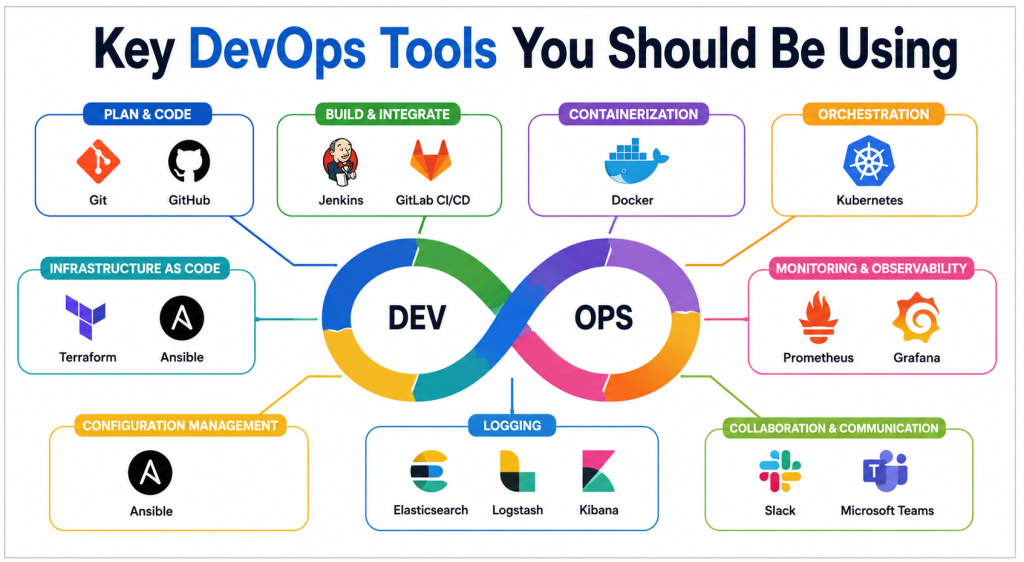
Key DevOps Tools You Should Be Using
Git
Git remains the foundation of modern software development.
It provides distributed version control capabilities that allow teams to track changes, collaborate safely, and maintain complete project histories. Developers can create branches, experiment with new features, and merge changes without affecting production code.
Git also supports rollback capabilities, making recovery from mistakes much easier.
Key Benefits
- Strong version control
- Easy collaboration
- Branching and merging
- Complete audit trail
- Distributed architecture
GitHub
GitHub extends Git by adding collaboration and automation capabilities.
Teams use GitHub for source code hosting, code reviews, pull requests, issue tracking, and workflow automation. Its ecosystem supports extensive integrations with CI/CD platforms and cloud services.
GitHub Actions also provides built-in automation for testing and deployment pipelines.
Key Benefits
- Centralized repositories
- Workflow automation
- Code review processes
- Security scanning
- Developer collaboration
Jenkins
Jenkins remains one of the most widely used automation servers in DevOps.
It enables continuous integration and continuous delivery through customizable pipelines. Teams can automate builds, tests, deployments, and reporting processes.
The extensive plugin ecosystem allows integration with virtually every major DevOps platform.
Key Benefits
- Pipeline automation
- Large plugin ecosystem
- Strong community support
- Flexible deployment options
- Extensive integrations
Docker
Docker revolutionized software packaging and deployment.
Containers created using Docker run consistently across development, testing, and production environments. This consistency eliminates many environment-specific issues that traditionally delayed releases.
Docker images also simplify application distribution.
Key Benefits
- Lightweight containers
- Environment consistency
- Faster deployments
- Simplified application packaging
- Efficient resource utilization
Kubernetes
Kubernetes has become the industry standard for container orchestration.
Organizations use Kubernetes to automate container deployment, scaling, networking, and recovery processes. It ensures applications remain available even during infrastructure failures.
Kubernetes supports highly scalable and resilient cloud-native architectures.
Key Benefits
- Automated scaling
- Self-healing workloads
- Load balancing
- Resource optimization
- High availability
Terraform
Terraform enables infrastructure management through code.
Instead of manually creating servers, networks, databases, and cloud resources, teams define infrastructure using configuration files.
Terraform supports multiple cloud providers and promotes infrastructure consistency.
Key Benefits
- Infrastructure automation
- Multi-cloud support
- Version-controlled infrastructure
- Repeatable deployments
- Reduced configuration drift
Ansible
Ansible simplifies configuration management and automation.
Its agentless architecture makes deployment relatively simple. Teams use Ansible for server configuration, application deployment, security updates, and operational automation.
Human-readable playbooks improve maintainability and collaboration.
Key Benefits
- Agentless architecture
- Easy automation
- Configuration consistency
- Fast implementation
- Scalable management
Prometheus
Prometheus provides powerful monitoring and alerting capabilities.
It collects metrics from applications, servers, containers, and infrastructure components. Teams use these metrics to monitor performance, capacity, and system health.
Prometheus works particularly well within Kubernetes environments.
Key Benefits
- Time-series database
- Powerful alerting
- Kubernetes integration
- Flexible querying
- Open-source ecosystem
Grafana
Grafana transforms monitoring data into meaningful visual dashboards.
Operations teams use Grafana to analyze metrics, identify trends, and investigate incidents. It integrates with numerous data sources and supports highly customizable dashboards.
Key Benefits
- Visual analytics
- Custom dashboards
- Multiple integrations
- Real-time monitoring
- Operational visibility
Elasticsearch Stack
The Elastic Stack helps organizations centralize logs and operational data.
Teams use it for troubleshooting, security investigations, compliance monitoring, and performance analysis. Centralized logging significantly reduces time spent diagnosing issues.
Key Benefits
- Centralized log management
- Advanced search capabilities
- Data visualization
- Incident investigation
- Operational analytics
Key Operational Concepts You Must Know
Strong DevOps practices require a deep understanding of operational concepts. Tools alone cannot solve operational challenges.
Automation
Automation removes repetitive manual tasks from operational workflows.
Organizations automate infrastructure provisioning, deployments, testing, monitoring, scaling, and incident response activities. Automation improves consistency while reducing human error.
Infrastructure as Code
Infrastructure as Code treats infrastructure definitions like software.
Teams store configurations in repositories, review changes through pull requests, and deploy infrastructure automatically. This approach improves repeatability and governance.
Continuous Integration
Continuous Integration encourages developers to merge code changes frequently.
Automated builds and tests identify issues early, reducing integration challenges and improving software quality.
Continuous Delivery
Continuous Delivery ensures software remains deployable at all times.
Automated validation processes increase confidence in releases and reduce deployment risks.
Observability
Observability extends beyond traditional monitoring.
It combines metrics, logs, traces, and contextual information to help teams understand system behavior and diagnose issues efficiently.
Reliability Engineering
Reliability engineering focuses on maintaining service availability and performance.
Organizations define service level objectives, monitor reliability metrics, and continuously improve operational resilience.
Incident Management
Operational excellence requires structured incident response procedures.
Effective incident management includes detection, escalation, communication, resolution, and post-incident analysis.
Security Integration
Security must be integrated throughout the software lifecycle.
DevSecOps practices ensure vulnerabilities are identified and addressed early rather than after deployment.
Platform Implementation vs. Culture — What’s the Real Difference?
Many organizations invest heavily in technology platforms but struggle to achieve DevOps success. The reason often lies in confusing platform implementation with cultural transformation.
What Platform Implementation Means
Platform implementation focuses on technology adoption.
Organizations deploy tools such as Kubernetes, Jenkins, Terraform, and monitoring systems. These technologies automate workflows and improve operational efficiency.
Platform implementation usually includes:
- Infrastructure deployment
- Tool configuration
- Pipeline creation
- Monitoring setup
- Automation development
Technology platforms are essential because they enable scalable operations.
What Culture Means
Culture focuses on how people work together.
A DevOps culture encourages collaboration, shared ownership, continuous learning, experimentation, transparency, and accountability.
Strong DevOps cultures eliminate organizational silos and improve communication between teams.
Why Culture Matters More
Organizations can purchase tools quickly. However, cultural transformation requires sustained effort.
Without cultural alignment:
- Teams resist change.
- Automation remains underutilized.
- Knowledge remains isolated.
- Delivery bottlenecks persist.
- Operational conflicts increase.
Best Approach
Successful organizations combine both elements.
Technology platforms provide operational capabilities, while culture ensures teams use those capabilities effectively. Long-term success requires balancing people, processes, and technology.
Real-World Use Cases of Modern Operations
Modern operations teams support a wide range of business-critical activities.
E-Commerce Platforms
Online retailers experience significant traffic fluctuations.
Operations teams use Kubernetes, autoscaling mechanisms, monitoring systems, and automated deployment pipelines to maintain performance during peak shopping periods.
Automation helps organizations respond rapidly to changing demand.
Financial Services
Banks and financial institutions require high availability and strong security controls.
Operations teams implement infrastructure automation, continuous monitoring, disaster recovery planning, and compliance validation processes.
These practices reduce operational risk while maintaining service reliability.
Healthcare Systems
Healthcare applications often support critical patient services.
Operational teams focus heavily on uptime, security, backup management, and incident response capabilities.
Reliable infrastructure directly impacts service delivery.
Software-as-a-Service Platforms
SaaS providers release features continuously.
DevOps teams automate testing, deployments, monitoring, and rollback procedures to support frequent updates without disrupting customers.
Telecommunications
Telecommunication providers manage highly distributed infrastructure environments.
Operations teams use monitoring platforms, orchestration systems, and automation frameworks to maintain network stability and performance.
Manufacturing
Manufacturers increasingly rely on connected systems and industrial automation.
Modern operations practices help ensure system reliability, predictive maintenance, and operational visibility across facilities.
Common Mistakes in Operations Engineering
Many organizations face avoidable challenges because they repeat common operational mistakes.
Over-Reliance on Manual Processes
Manual operations introduce inconsistencies and increase the likelihood of errors.
Teams should automate repetitive activities whenever possible.
Ignoring Monitoring
Without visibility, operational teams struggle to identify emerging issues.
Comprehensive monitoring must cover applications, infrastructure, databases, networks, and user experiences.
Poor Documentation
Operational knowledge often becomes trapped within individual team members.
Documentation improves consistency, onboarding, troubleshooting, and knowledge sharing.
Tool Overload
Organizations sometimes adopt too many tools simultaneously.
This creates integration challenges, training burdens, and operational complexity.
Weak Security Practices
Security should not be treated as a separate function.
Embedding security into operational workflows reduces vulnerabilities and improves compliance.
Lack of Disaster Recovery Planning
Infrastructure failures, outages, and cyber incidents can occur unexpectedly.
Organizations need tested recovery procedures to minimize business disruption.
Ignoring Technical Debt
Temporary solutions often become permanent operational challenges.
Regular maintenance and modernization activities help prevent technical debt accumulation.
Insufficient Training
Even the best tools become ineffective when teams lack necessary skills.
Continuous learning remains essential for operational excellence.
Building a Modern DevOps Toolchain
Every organization requires a toolchain tailored to its specific requirements.
A typical modern toolchain might include the following components:
| Function | Recommended Tool |
|---|---|
| Source Control | Git, GitHub |
| CI/CD | Jenkins, GitLab CI |
| Containers | Docker |
| Orchestration | Kubernetes |
| Infrastructure as Code | Terraform |
| Configuration Management | Ansible |
| Monitoring | Prometheus |
| Visualization | Grafana |
| Logging | Elastic Stack |
| Security Scanning | Trivy |
Organizations should evaluate tools based on scalability, integration capabilities, operational complexity, support requirements, and team expertise.
How to Become an Operations Expert — Career Roadmap
Building expertise in operations engineering requires structured learning and practical experience.
Stage 1: Learn Operating Systems
Begin by mastering Linux fundamentals.
Focus on:
- Command line usage
- File systems
- Process management
- Networking basics
- User management
- Shell scripting
Linux knowledge forms the foundation of modern operations roles.
Stage 2: Learn Networking
Strong networking skills help professionals troubleshoot distributed systems.
Study:
- TCP/IP
- DNS
- HTTP
- Load balancing
- Firewalls
- VPN technologies
Networking knowledge improves operational effectiveness significantly.
Stage 3: Learn Version Control
Master Git workflows and repository management practices.
Understand:
- Branching
- Merging
- Pull requests
- Conflict resolution
- Repository governance
Version control skills are essential across all DevOps roles.
Stage 4: Learn Cloud Platforms
Modern infrastructure increasingly operates within cloud environments.
Focus on:
- Compute services
- Storage services
- Networking services
- Identity management
- Security controls
Practical cloud experience is highly valuable.
Stage 5: Learn Infrastructure Automation
Develop expertise in:
- Terraform
- Ansible
- Configuration management
- Infrastructure lifecycle management
Automation skills significantly increase productivity.
Stage 6: Learn Containers
Understand:
- Docker architecture
- Container images
- Registries
- Container networking
- Security practices
Container expertise is now a core requirement.
Stage 7: Learn Kubernetes
Study:
- Pods
- Services
- Deployments
- Ingress
- Storage
- Scaling
Kubernetes knowledge remains highly sought after.
Stage 8: Learn Monitoring and Observability
Focus on:
- Metrics
- Logging
- Alerting
- Tracing
- Incident analysis
Observability skills improve operational decision-making.
Stage 9: Learn Security
Develop knowledge of:
- Vulnerability management
- Identity controls
- Encryption
- Compliance practices
- Security automation
Security expertise strengthens operational capabilities.
Stage 10: Gain Real Experience
Build projects, contribute to open-source initiatives, and manage production-like environments.
Practical experience remains the fastest path to operational mastery.
FAQ Section
What is the most important DevOps tool?
There is no single most important tool because DevOps depends on multiple capabilities. However, Git, Docker, Kubernetes, Jenkins, and Terraform are commonly considered foundational technologies.
Do I need to learn coding for DevOps?
Yes. Basic programming and scripting skills help automate tasks, build pipelines, manage infrastructure, and troubleshoot systems efficiently.
Is Kubernetes mandatory for DevOps careers?
Not always, but Kubernetes has become one of the most widely adopted orchestration platforms, making it a valuable skill for most operations professionals.
How long does it take to learn DevOps?
The learning timeline depends on prior experience. Consistent practice across Linux, networking, cloud computing, automation, and monitoring can gradually build expertise over time.
What is Infrastructure as Code?
Infrastructure as Code is the practice of managing infrastructure using configuration files instead of manual processes. This approach improves consistency and repeatability.
Why is monitoring important?
Monitoring provides visibility into system health, performance, capacity, and reliability. It helps teams identify issues before they affect users.
Can small organizations benefit from DevOps?
Yes. Small organizations often gain significant advantages through automation, faster releases, reduced operational overhead, and improved service reliability.
Which cloud platform should beginners learn?
Any major cloud provider can provide valuable learning opportunities because core cloud concepts remain similar across platforms.
Is automation replacing operations engineers?
No. Automation removes repetitive tasks, allowing engineers to focus on higher-value activities such as optimization, architecture, reliability, and innovation.
What skills do employers look for in operations professionals?
Employers typically seek Linux administration, networking, cloud computing, automation, infrastructure as code, containerization, monitoring, troubleshooting, and communication skills.
Final Summary
DevOps has transformed the way organizations build, deploy, and operate software systems. While culture remains the foundation of successful DevOps adoption, the right tools enable teams to automate workflows, improve reliability, and accelerate delivery.
Tools such as Git, GitHub, Jenkins, Docker, Kubernetes, Terraform, Ansible, Prometheus, Grafana, and the Elastic Stack form the backbone of many modern operational environments. Each tool addresses a specific challenge, from version control and deployment automation to infrastructure management and observability.
At the same time, operational excellence requires more than technology. Professionals must understand automation, Infrastructure as Code, continuous delivery, monitoring, security, reliability engineering, and incident management. Organizations that balance platform implementation with cultural transformation achieve the greatest long-term success.