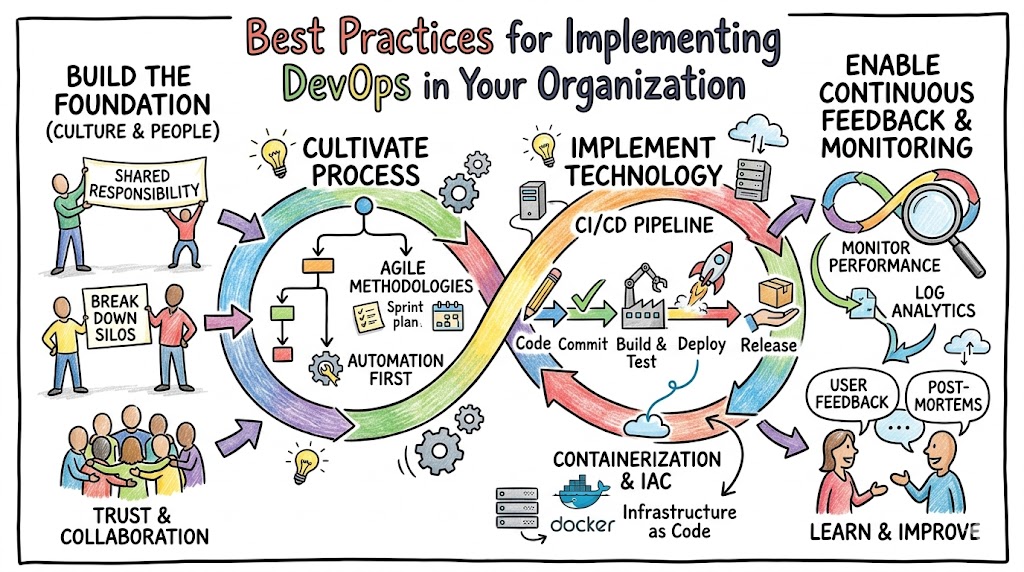
Implementing DevOps effectively requires shifting from isolated workflows to a unified, automated lifecycle. At its core, DevOps bridges the traditional gap between development and operations teams. This methodology relies heavily on continuous integration, automated testing, and rapid infrastructure provisioning to accelerate software delivery cycles safely. When you integrate these processes smoothly, your business gains the agility needed to release updates frequently while maintaining high system stability.
To achieve this level of operational excellence, teams must move away from manual handoffs and embrace shared responsibilities. Organizations often struggle when they view this transition purely as a technology upgrade. True success comes when you combine modern automation frameworks with a collaborative mindset. If you want to establish a resilient, scalable infrastructure, exploring a structured program through Xopsschool can provide your team with the practical skills required to guide this transformation.
Key Operational Concepts You Must Know
1. Infrastructure as Code (IaC)
Managing infrastructure manually introduces configuration drift and human error into your deployment pipeline. Infrastructure as Code solves this by treating server configurations, networks, and storage elements exactly like application source code. Consequently, you can version control your environment setups, review changes through pull requests, and deploy identical environments across development, staging, and production zones.
Using declarative tools ensures that your target environment always matches the state defined in your code files. This approach eliminates the old problem of an application working perfectly on a developer’s machine but failing miserably in production.
2. Continuous Integration and Continuous Delivery (CI/CD)
Automated validation acts as the heartbeat of any modern engineering workflow. Continuous Integration forces developers to merge their code changes into a central repository multiple times a day. Each merge triggers an automated build and test sequence instantly, which catches syntax bugs and logical errors before they compound.
Moving further down the pipeline, Continuous Delivery automates the packaging and staging of those validated changes. Therefore, your application remains in a deployable state at any given moment, allowing business stakeholders to trigger production releases at the push of a button.
+------------------+     +------------------+     +------------------+
|   Code Commit    | --> |  Automated Build | --> | Unit/Lint Tests  |
+------------------+     +------------------+     +------------------+
                                                                   |
+------------------+     +------------------+     +------------------+     v
|Production Deploy | <-- | Staging Rollout  | <-- | Integration Test |
+------------------+     +------------------+     +------------------+
3. Comprehensive Monitoring and Observability
You cannot fix what you cannot see, which makes visibility a foundational pillars of stable operations. Monitoring focuses on tracking explicit metrics like CPU utilization, memory consumption, and disk input-output speeds to alert you when thresholds break.
Observability goes a step deeper by analyzing the internal state of your systems based on external outputs. By aggregating logs, metrics, and distributed traces, your engineers can understand precisely why a complex microservice network is slowing down, rather than just knowing that it is slow.
4. Microservices and Containerization
Monolithic applications often become too heavy to deploy frequently because a change in one small module can crash the entire system. Breaking your application into microservices isolates distinct business capabilities into independent, lightweight services.
Packaging these services into containers ensures consistency across different computing environments. Containers bundle the application code alongside its specific runtime engine, system tools, and libraries, which guarantees predictable behavior from local testing environments to cloud clusters.
Platform Implementation vs. Culture — What’s the Real Difference?
Organizations frequently make the mistake of buying expensive automation tooling and expecting their delivery speeds to double overnight. However, installing a platform without altering human behavior rarely yields sustainable results. You must understand how these two elements interact to build a lasting operational strategy.
| Characteristic | Platform Implementation | Cultural Transformation |
| Primary Focus | Tools, software installations, and infrastructure automation grids. | Shared responsibility, breaking down silos, and psychological safety. |
| Execution Method | Writing automation code scripts, building CI/CD pipelines, and setting up cloud environments. | Adjusting performance incentives, running post-mortems, and changing communication habits. |
| Measurable Metrics | Deployment frequency, pipeline build durations, and infrastructure uptime percentages. | Change failure rates, time to recovery, and cross-team collaboration feedback scores. |
| Failure Mode | Misconfigured cloud policies, broken build scripts, and unoptimized resource allocations. | Team resistance, pointing fingers during outages, and hoarding operational access. |
Designing the Engineering Platform
Building a dedicated internal developer platform streamlines workflows by offering self-service capabilities to product teams. This setup minimizes ticket queues and friction.
- Standardized Blueprints: Provide pre-configured templates for database provisioning, security access, and load balancing.
- Automated Guardrails: Embed compliance and security scanning directly into the base platform layers.
- Unified Interfaces: Use central dashboards to give developers clear visibility into their deployment states and resource health.
Cultivating the Shared Responsibility Mindset
Tools merely accelerate your current workflows; they do not fix broken organizational habits. To shift your culture, you must foster environment where development and operations share both praise and system failures.
- Blameless Post-Mortems: Focus on fixing systemic bugs instead of punishing the specific engineer who made a mistake during a live incident.
- Joint Goal Settings: Align performance metrics so developers care about system stability and operations teams support feature delivery velocity.
- Knowledge Exchanges: Rotate engineers between building features and maintaining platforms to naturally build empathy and shared technical context.
Real-World Use Cases of Modern Operations
1. High-Frequency Financial Services
A prominent retail banking platform struggled with weekly deployment windows that regularly required late-night maintenance hours and caused occasional service disruptions. Because their deployment routines relied on manual validation steps, engineers frequently missed minor configuration errors.
To solve this issue, the organization restructured its approach by building an automated deployment pipeline running run-time integration suites. They introduced blue-green deployment strategies, maintaining two identical production environments to switch traffic seamlessly.
[ Active Traffic ] ──> [ Environment Blue (v1.0) ]
                       [ Environment Green (v1.1) ]  <── [ Running Smoke Tests ]

*After successful verification, traffic switches instantly:*

[ Active Traffic ] ──> [ Environment Green (v1.1) ]
                       [ Environment Blue (v1.0) ]   <── [ Held for Rollback Option ]
Consequently, their delivery pipeline shifted from manual verifications to automated continuous deployment. This strategy reduced their production deployment timeline from six hours down to eleven minutes while dropping their change failure rates significantly.
2. Large-Scale E-Commerce Migration
During seasonal shopping events, an e-commerce giant faced massive traffic spikes that routinely overloaded their static on-premises data centers. Manual provisioning could not keep pace with the volatile user traffic, which led to abandoned carts and lost revenue.
The engineering team implemented an elastic cloud architecture managed completely via declarative infrastructure files. They also built automated horizontal autoscaling triggers tied directly to live user traffic metrics.
- Dynamic Scaling: System capacity expands automatically when CPU utilization exceeds sixty percent across the fleet.
- Resource Efficiency: Cloud instances terminate gracefully during low-traffic night hours to minimize unnecessary operational expenditures.
- High Availability: Database replicas distribute dynamically across multiple geographic availability zones to prevent single points of failure.
This automation setup allowed the infrastructure to scale seamlessly from fifty to five hundred nodes without manual intervention, saving millions in potential infrastructure downtime during peak sales windows.
3. Healthcare Data Regulatory Compliance
A medical software provider needed to accelerate feature releases while satisfying stringent governmental data privacy regulations. Their manual compliance auditing process delayed every release by at least two months, stalling business innovation.
The organization integrated automated compliance checks directly into their version control systems, a process often referred to as DevSecOps. Every code update underwent automated security scans before reaching compilation stages.
- Static Code Analysis: Automated scanners review application code for security flaws during the initial pull request phase.
- Vulnerability Detection: Container image builders analyze underlying base libraries for known exploits before saving final images.
- Audit-Ready Logging: Every infrastructure change generates unalterable logs automatically, proving continuous compliance to external inspectors.
By embedding these compliance checks into the automated pipeline, the firm eliminated the two-month manual review buffer. This allowed them to deploy security patches daily while maintaining an audit-ready regulatory posture.
Common Mistakes in Operations Engineering
Over-Automating Everything on Day One
Engineers frequently fall into the trap of trying to build a flawless, fully automated pipeline before understanding their basic software delivery patterns. Attempting to automate poorly defined or unstable manual processes usually creates complex, unmaintainable build scripts that break constantly.
First, focus on documenting and stabilizing your manual workflows. Once your team executes a procedure consistently by hand, you can safely write automation scripts to handle those predictable steps.
Treating Security as a Final Checklist Item
Leaving security reviews until the final day before a major production launch always creates major project bottlenecks. When security teams find critical flaws right before a release, developers have to scramble to rewrite core architecture components, delaying timelines.
Traditional Approach (High Risk):
[ Plan ] ──> [ Code ] ──> [ Test ] ──> [ Deploy ] ──> [ SECURITY CHECK ] ──> [ Production ]

Modern DevSecOps Approach (Low Risk):
[ Plan + Sec ] ──> [ Code + Scan ] ──> [ Test + Policy ] ──> [ Automated Deploy ]
Shift your security practices to the left side of your delivery lifecycle. By running automated vulnerability scans and dependency checks early in the development cycle, engineers catch and resolve security risks long before code reaches production environments.
Ignoring Logging and Tracing Requirements
Building fast deployment pipelines is pointless if your engineering team is completely blind when production incidents occur. Launching new features without proper application logs, health metrics, and distributed tracing systems makes troubleshooting live outages an exercise in guesswork.
Every feature branch should include custom logging configurations alongside the functional code. Ensure your production environments export these data streams to centralized dashboards, giving your on-call engineers the visibility they need to resolve service degradations quickly.
Allowing Tooling Proliferation
Giving every development team absolute freedom to choose their own deployment engines, cloud vendors, and testing tools creates massive operational chaos. Central operations teams eventually become overwhelmed trying to maintain dozens of disparate platforms and conflicting code frameworks.
Establish a curated, organization-wide technology catalog that fulfills most development needs. Limiting your core toolset simplifies maintenance, lowers licensing costs, and allows engineers to move between different projects without facing a steep learning curve.
How to Become an Operations Expert — Career Roadmap
Transitioning into a senior operations or DevOps role requires a balanced mix of software engineering skills and systems administration expertise. If you want to master this field, follow this structured progression path to build your capabilities systematically.
+--------------------------------------------------------+
| STEP 4: Architecture Design & Organizational Strategy  |
+--------------------------------------------------------+
                           ^
                           |
+--------------------------------------------------------+
| STEP 3: Advanced Orchestration, Service Meshes & Cloud |
+--------------------------------------------------------+
                           ^
                           |
+--------------------------------------------------------+
| STEP 2: Core Automation, IaC & CI/CD Pipeline Building |
+--------------------------------------------------------+
                           ^
                           |
+--------------------------------------------------------+
| STEP 1: Linux Foundations, Networking & Programming    |
+--------------------------------------------------------+
Stage 1: Core Technical Foundations
Before exploring advanced cloud platforms, you must master the fundamental operating system concepts that power modern enterprise servers.
- Linux Systems Administration: Learn to navigate the terminal, manage file permissions, analyze system processes, and configure core networking components.
- Network Protocols: Build a clear understanding of routing protocols, DNS resolution paths, load-balancing mechanisms, and SSH security configurations.
- Scripting Proficiency: Master at least one programming language, such as Python or Go, to automate repetitive system tasks and interact with external APIs.
Stage 2: Infrastructure and Pipeline Automation
Once you understand the underlying operating systems, focus your efforts on automating system configurations and deployment lifecycles.
- Declarative Infrastructure: Study tools like Terraform or OpenTofu to provision and manage multi-cloud environments using clean, version-controlled code.
- Configuration Management: Learn platforms such as Ansible or SaltStack to deploy application dependencies across fleets of servers predictably.
- CI/CD Implementation: Gain practical experience building automation workflows using engines like GitHub Actions, GitLab CI, or Jenkins.
Stage 3: Container Orchestration and Cloud Ecosystems
Modern enterprise systems rely on container grids to run resilient microservice architectures at scale.
- Container Runtimes: Learn to package applications efficiently by mastering Docker files, image optimization tactics, and local container networks.
- Kubernetes Governance: Deep dive into container orchestration platforms to manage cluster networking, scaling policies, and persistent storage layers.
- Cloud Architecture: Master core cloud services across platforms like AWS, Azure, or Google Cloud, focusing on IAM access controls and cost optimization.
Stage 4: Advanced Observability and System Design
Expert-level engineers focus heavily on system resilience, disaster recovery planning, and organization-wide development platforms.
- Telemetry Architecture: Set up production monitoring systems using Prometheus, Grafana, and OpenTelemetry to track live application performance.
- Site Reliability Engineering: Apply software engineering principles to operations tasks, establishing clear Service Level Objectives (SLOs) and automated error budget tracking.
- Platform Design: Build tailored internal developer platforms that empower product teams to provision resources independently while adhering to organizational security guardrails.
FAQ Section
- What is the single most important metric to track when starting a DevOps transformation?
Deployment frequency combined with your change failure rate gives you the most accurate overview of your delivery pipeline’s health. Tracking how often you deploy tells you your system velocity, while tracking how often those deployments cause production failures measures your overall stability.
- Can our organization implement DevOps methodologies if we are still running legacy on-premises applications?
Yes, you can absolutely apply these core principles to on-premises environments without migrating to public cloud networks. You can run automated testing pipelines, manage bare-metal servers using configuration scripts, and package legacy apps into containers to improve infrastructure reliability anywhere.
- How does an organization balance development velocity with infrastructure security requirements?
You achieve this balance by embedding automated security checkpoints directly into your continuous integration workflows instead of running reviews at the very end. This shift allows developers to find and fix vulnerabilities as they write code, maintaining fast deployment speeds while preserving strict security compliance.
- Who should ideally manage the infrastructure code templates within a mid-sized engineering team?
A centralized platform engineering team should design and maintain the foundational infrastructure templates, but individual product teams must own their specific implementation values. This model provides solid structural guardrails while giving developers the autonomy they need to ship applications quickly.
- Why do so many automated testing initiatives fail to deliver long-term value to engineering organizations?
Automated testing efforts usually fail when teams do not dedicate time to maintain their test suites, which leads to flaky tests that fail randomly. When engineers lose trust in pipeline alerts, they start ignoring build failures, which completely defeats the purpose of running automated validation steps.
- What is the difference between continuous delivery and continuous deployment in an active production pipeline?
Continuous delivery ensures that every code change passes automation checks and sits ready to deploy, though the final production release requires manual sign-off. Continuous deployment takes that automation a step further by rolling out every validated code change to live users automatically without human intervention.
Final Summary
Successfully adopting DevOps requires a balanced combination of automated platforms and collaborative engineering cultures. Organizations often stumble when they treat this shift as a pure tool migration without changing how teams communicate. By prioritizing infrastructure automation, continuous integration, and deep system observability, you eliminate operational bottlenecks while building a highly stable production environment.
True transformation happens when you replace manual handoffs with shared operational responsibilities. This shift empowers your development teams to innovate quickly without compromising system availability. As you design your automation roadmaps, remember that software tools exist to support your people. Investing in continuous learning and refining your team’s technical skills ensures that your operational workflows remain resilient and scalable as your business grows.