
OpenSSF OSPS Baseline – Tutorial (about 60 minutes)
- View
The Open Source Project Security Baseline, usually shortened to OSPS Baseline, is a free, community-maintained catalogue of security controls for open-source projects, published by the Open Source Security Foundation (OpenSSF). It groups its requirements into three maturity levels, so a one-person hobby library and a heavily used piece of infrastructure can each find a sensible target. Maintainers use it to decide what to fix first, foundations use it to set expectations for their projects, and companies that consume open source use it to understand what a project has done to protect itself. After this tutorial you will be able to read any Baseline control, choose a fitting level for a project, run a gap analysis and make an honest, dated claim about compliance.
Course overview
Edition and status: The current release is OSPS Baseline v2026.08.28, which the official site baseline.openssf.org labels "current" and says is the only version to use for new compliance efforts. Versions are named by release date (YYYY-MM-DD, labelled v2026.08.28). The project has published four releases so far: the initial release of 2025-02-25, then 2025-10-10, 2026-02-19 and 2026-08-28; an in-development ("devel") version is also public. Earlier versions stay online for reference and do not change, apart from fixes of technical or typographic errors. The Baseline is maintained by the OpenSSF Security Baseline Special Interest Group (SIG) under the Linux Foundation, which commits to re-evaluating the controls at least once a year and publishing a new version when needed. The 2026-08-28 release added and removed no controls; it widened two requirements, dropped the "while active" qualifier from all requirement texts, added a mapping to OpenSSF Scorecard and moved the content and mappings to the machine-readable Gemara format. Verified 2026-10-29.
Who this is for: open-source maintainers and contributors, platform and DevOps engineers who run project infrastructure, product-security and open-source program office (OSPO) staff, and procurement or third-party-risk people who need to judge the open-source components their organisation depends on.
Prerequisites: none. It helps to have seen a Git hosting platform (a "forge" such as GitHub or GitLab) and a continuous integration pipeline, but every term is explained the first time it appears.
By the end of this tutorial:
- You will be able to explain what problem the OSPS Baseline solves, what is in and out of its scope, and what it should not be used for.
- You will be able to use its vocabulary: control family, control, requirement identifier, maturity level, sensitive resource, primary branch, untrusted input, SBOM, VEX, coordinated vulnerability disclosure and self-attestation.
- You will be able to describe the three maturity levels and the eight control families and say what each family protects.
- You will be able to plan an adoption: choose a target level, run a gap analysis, implement controls and record evidence.
- You will be able to explain how compliance is claimed and checked, including self-attestation, automated evaluation and the badge programme.
- You will be able to relate the Baseline to neighbouring work such as OpenSSF Scorecard, the Best Practices Badge, SLSA, NIST SSDF and the EU Cyber Resilience Act.
Lesson 1 – Origins, purpose and scope
Why a baseline was needed
Almost every modern application is assembled largely from open-source components. That brings speed and quality, but it also means that a weakness in a small upstream project can travel into thousands of downstream products. Over the last decade the industry has seen stolen maintainer accounts used to publish poisoned packages, build pipelines tricked into leaking their credentials, secrets accidentally committed to public repositories, and long-lived social-engineering campaigns that slowly gained commit rights in a project. The Cloud Native Computing Foundation's security group even keeps a public catalogue of real supply-chain compromises so that projects can learn from them.
Two practical problems made this hard to address. First, although open source is transparent, it is difficult for an adopter to tell what a project has actually done to secure itself. Is multi-factor authentication enforced? Who can push to the main branch? Is there a private way to report a vulnerability? The answers are often scattered across settings pages, contributor guides and mailing lists, or simply not written down. Second, maintainers who wanted to improve did not know where to start. There were many overlapping frameworks, some of them commercial or designed for large companies with compliance teams, and few of them took account of how volunteer-run projects of very different sizes really work.
The OSPS Baseline was created to answer both problems with a short, open, community-agreed list of security hygiene measures. Its FAQ describes it as a minimum set of security-related good practices, scaled to a project's maturity, which signals to users and contributors that the essential protective steps have been taken. It was built by community leaders from several Linux Foundation communities, including the OpenSSF, the OpenJS Foundation, the Cloud Native Computing Foundation (CNCF) and the Fintech Open Source Foundation (FINOS), and was first released in February 2025.
What "baseline" means here
A baseline is a floor, not a ceiling. The Baseline does not try to describe everything a mature security programme might do; it lists the things that every project at a given level should reasonably be expected to do. The FAQ encourages every project, whatever its size, to meet at least Level 1, calling it a universal security floor for open source. Higher levels add more expectations as a project gains maintainers and users, because more users means a bigger impact if something goes wrong, and more maintainers means more capacity to carry the work.
The project explains its scope with a food-safety analogy: health inspectors do not certify that every meal is delicious, but they do expect hair nets, clean equipment, correct refrigerator temperatures and a working recall process. In the same way, the Baseline concentrates on the ways a project works, how it delivers its software and how it equips users to adopt that software safely. It does not judge whether the code is well designed, whether it is free of bugs or whether it is the right choice for a particular use.
What it is not
Three limits are important from day one, because misunderstanding them is the source of most misuse.
- It is not a scoring or ranking tool. The maintainers say explicitly that it should not be used to compare projects with each other or to grade them. Two projects may meet the same requirement in quite different ways, and automated tools cannot see every implementation.
- It is not a certification. There is no accredited certification body and no audit scheme. Projects declare compliance themselves; the FAQ says the level a project reaches should not be treated as a substitute for formal regulatory compliance or certification.
- It is not mandatory by itself. Nobody is required to meet any level unless a sponsoring organisation, such as an open-source foundation, decides to require it of its projects.
Who uses it and how
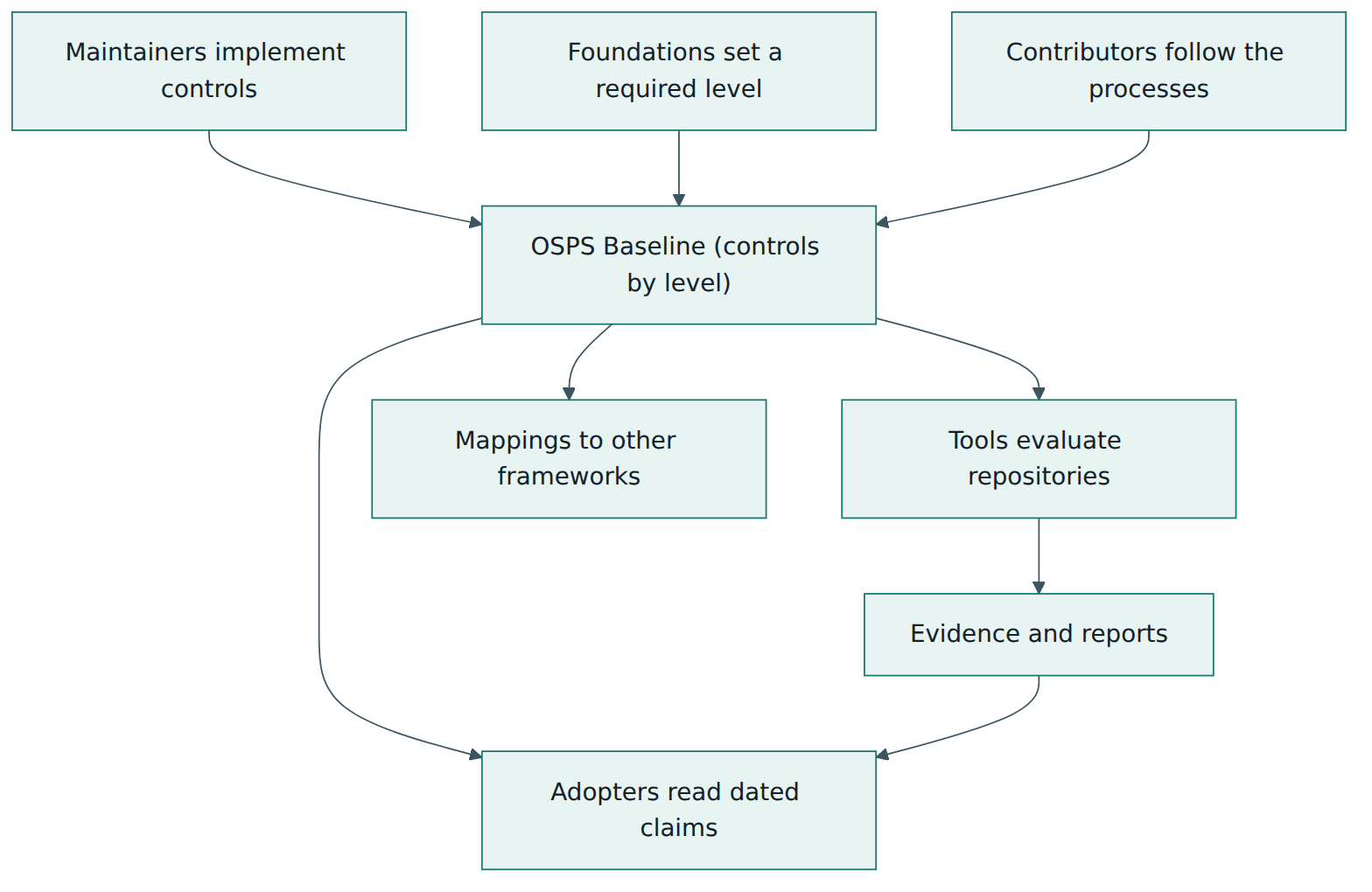
Maintainers implement the controls and describe what they did. Contributors follow the processes the controls create, such as signing off commits or using the private reporting channel. Foundations may set a minimum level for their hosted projects or align their own maturity criteria with it. Tool builders automate checks against it. Adopters read the resulting claims and evidence. Finally, external frameworks are linked through mappings, which helps everybody translate between the Baseline and the standards their organisation already uses.
How the Baseline itself is maintained
The Baseline follows its own open process. Editorial fixes need approval from two maintainers; new, removed or re-worded controls are proposed in GitHub pull requests and need a majority of the maintainers. At least once a year the maintainers re-evaluate the controls and publish a new version if needed. Identifiers of retired controls are never reused, and a substantial change in meaning creates a new identifier, while a minor change, even a move to another level, keeps the old one.
Lesson 2 – Key concepts and vocabulary
The Baseline uses a small number of precise terms. Several of them are defined in its own lexicon; this lesson explains them in plain words, plus a few general security terms you will meet in the requirements.
Structure terms
- Control family – one of eight thematic groups, each with a two-letter code: Access Control (AC), Build and Release (BR), Documentation (DO), Governance (GV), Legal (LE), Quality (QA), Security Assessment (SA) and Vulnerability Management (VM).
- Control – a named security goal within a family, with a short objective that explains the risk it reduces. For example,
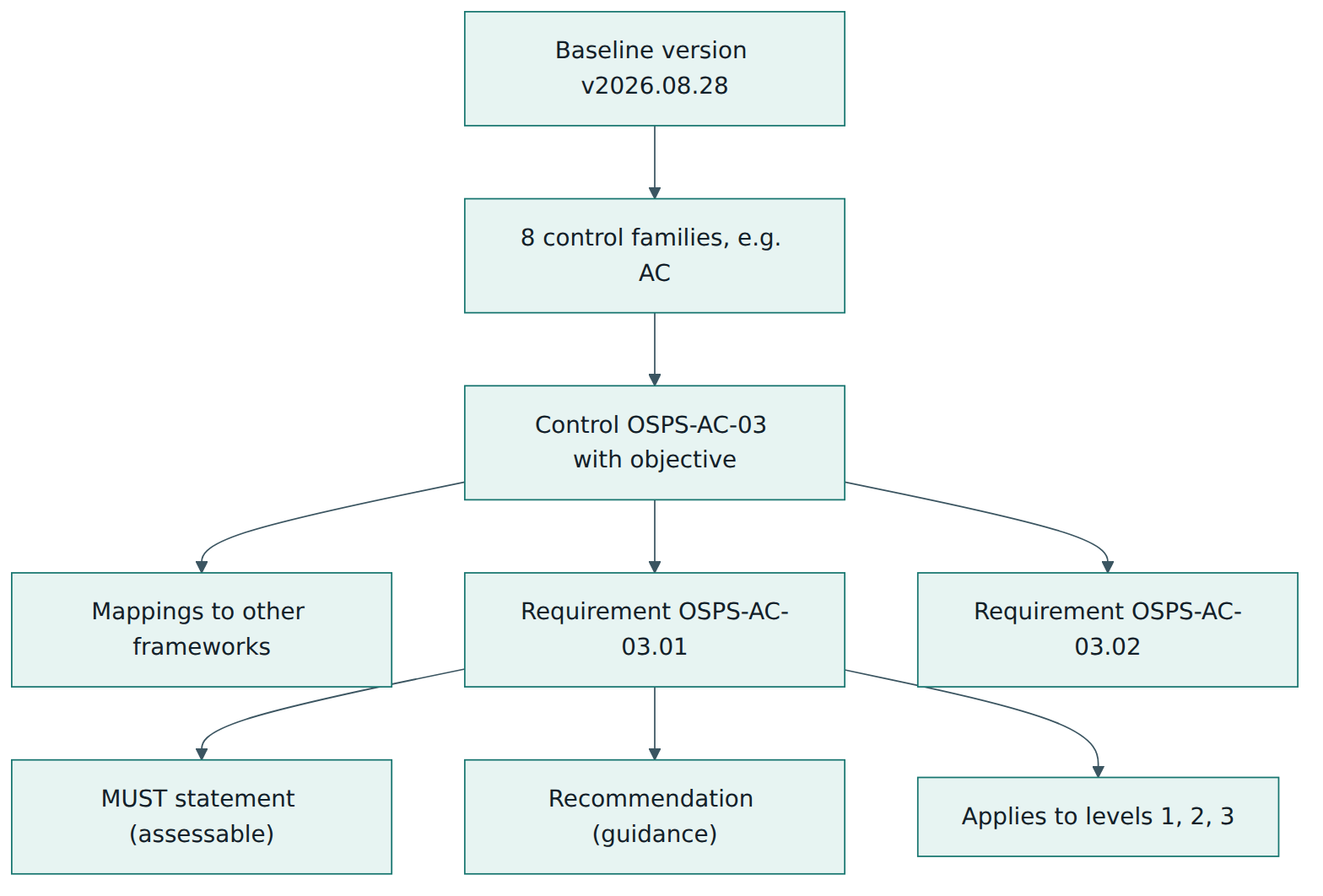
OSPS-AC-03is about protecting the primary branch. - Requirement – the testable statement inside a control, written with the word MUST (or MUST NOT). A control can contain one or several requirements; they carry the full identifier, such as
OSPS-AC-03.01andOSPS-AC-03.02. - Requirement identifier – the label
OSPS-<family>-<control>.<requirement>. Numbers are assigned in sequence and carry no hidden meaning; retired identifiers are never reused, so an identifier always means the same thing across versions. - Recommendation – the non-binding implementation advice under each requirement. It suggests how a project might comply, but a project may meet the requirement in another way.
- Maturity level – one of three tiers (Level 1, 2 or 3) that say which requirements apply to which kind of project, based mainly on the number of maintainers and the size of the user base.
- Crosswalk (mapping) – a published relationship between a Baseline control and an item in another framework, such as NIST SSDF or the EU Cyber Resilience Act. Mappings are references, not equivalences.
People and project terms
- Contributor, collaborator and maintainer – a contributor is anyone who has changed the contents of a repository; a collaborator is anyone who has been granted some permission on it; a maintainer is a human collaborator who can authorise changes.
- Primary branch – the main development branch, typically called
mainormaster, from which releases are usually made. - Sensitive resource – anything that, if compromised, would give an attacker a path to tamper with building and delivering the software or to expose sensitive data. Repository settings, build systems, package and image registries and data stores are examples.
- Sensitive data – information whose disclosure would cause harm: secrets such as passwords and access tokens, personal data, financial details and information about vulnerabilities that are still under embargo.
- Project documentation – the written material around the code: user and developer guides, contribution guidelines, security policies and release information. Many requirements are satisfied by documentation.
Build and release terms
- CI/CD pipeline – automated jobs for continuous integration (building and testing each change) and continuous delivery (publishing results, for example to a package registry). In the Baseline, "CD" means delivery, not automatic deployment into production.
- Untrusted input – data or code that a pipeline did not originate and cannot vouch for, such as the title of a pull request from a stranger, a branch name or the code in a fork. Attackers can craft such input to inject commands into a pipeline.
- Released software asset – anything delivered to users as part of a release: archives, binaries, libraries, container images.
- Status check – an automated test or validation that runs against a proposed change before it is merged.
- Software bill of materials (SBOM) – a machine-readable inventory of the components in a piece of software, in the SPDX or CycloneDX format, including names, versions, suppliers, licences and relationships.
- Signed manifest – a file listing the cryptographic hashes of every asset in a release, itself signed, so that users can check that each file is genuine and unchanged.
Vulnerability terms
- Coordinated vulnerability disclosure (CVD) – the process of receiving a vulnerability report, working with the reporter and other affected parties, and publishing the problem together with its fix in an agreed way.
- Private vulnerability reporting – a confidential channel, such as a dedicated email address or a forge's private advisory feature, that lets a finder tell the maintainers about a weakness before the public learns of it.
- Software composition analysis (SCA) – automated identification of the third-party components a project uses, so that known vulnerabilities and licence problems in them can be found.
- Static application security testing (SAST) – automated analysis of the project's own source code for patterns that indicate security weaknesses.
- VEX (Vulnerability Exploitability eXchange) – a machine-readable statement saying whether a known vulnerability in a component actually affects a product, for example because the vulnerable function is never called.
- Threat modelling – a structured way of "thinking like an attacker" about a system's components, interfaces and processes in order to find and close weaknesses before they are exploited. Methods include STRIDE and the four-question approach.
Legal and evidence terms
- Developer Certificate of Origin (DCO) and Contributor License Agreement (CLA) – two common ways for a contributor to state that they have the legal right to submit a change. The DCO is usually expressed by a
Signed-off-byline added withgit commit --signoff; a CLA is a signed agreement with the project or its host. - Security Insights – an OpenSSF specification for a YAML file (
security-insights.yml) in which a project describes its security practices in machine-readable form, so that tools can check controls that cannot be read from forge settings. - Self-attestation – a project's own dated statement that it meets a given level of a given Baseline version. This is the normal way of claiming compliance.
Lesson 3 – Structure of the Baseline
The Baseline has three dimensions: a version, three maturity levels and eight control families. Inside each family sit controls, and inside each control sit one or more requirements. Every requirement says at which levels it applies.
Anatomy of a requirement
Each requirement on the official page has the same parts. The requirement text is the normative, assessable sentence and uses MUST or MUST NOT; there is no separate tier of optional SHOULD requirements, so everything listed is expected at the levels where it applies. The recommendation gives practical, optional hints, for example that passkeys are an acceptable form of multi-factor authentication or that a SECURITY.md file is a typical place for security contacts. The applies to line names the maturity levels. The parent control adds an objective, which explains the risk being reduced, and a list of external framework relations: related items in other catalogues, given once for the whole control. When you assess a project, you assess the requirement text; the recommendation helps you decide how to meet it.
Many requirements begin with a trigger such as "when the project has made a release" or "when a CI/CD pipeline operates on untrusted metadata". The trigger matters: a project that has never released anything does not yet need release documentation, and a project without pipelines has no pipeline permissions to restrict.
The three maturity levels
The levels are defined by the kind of project, not by how ambitious the maintainers feel:
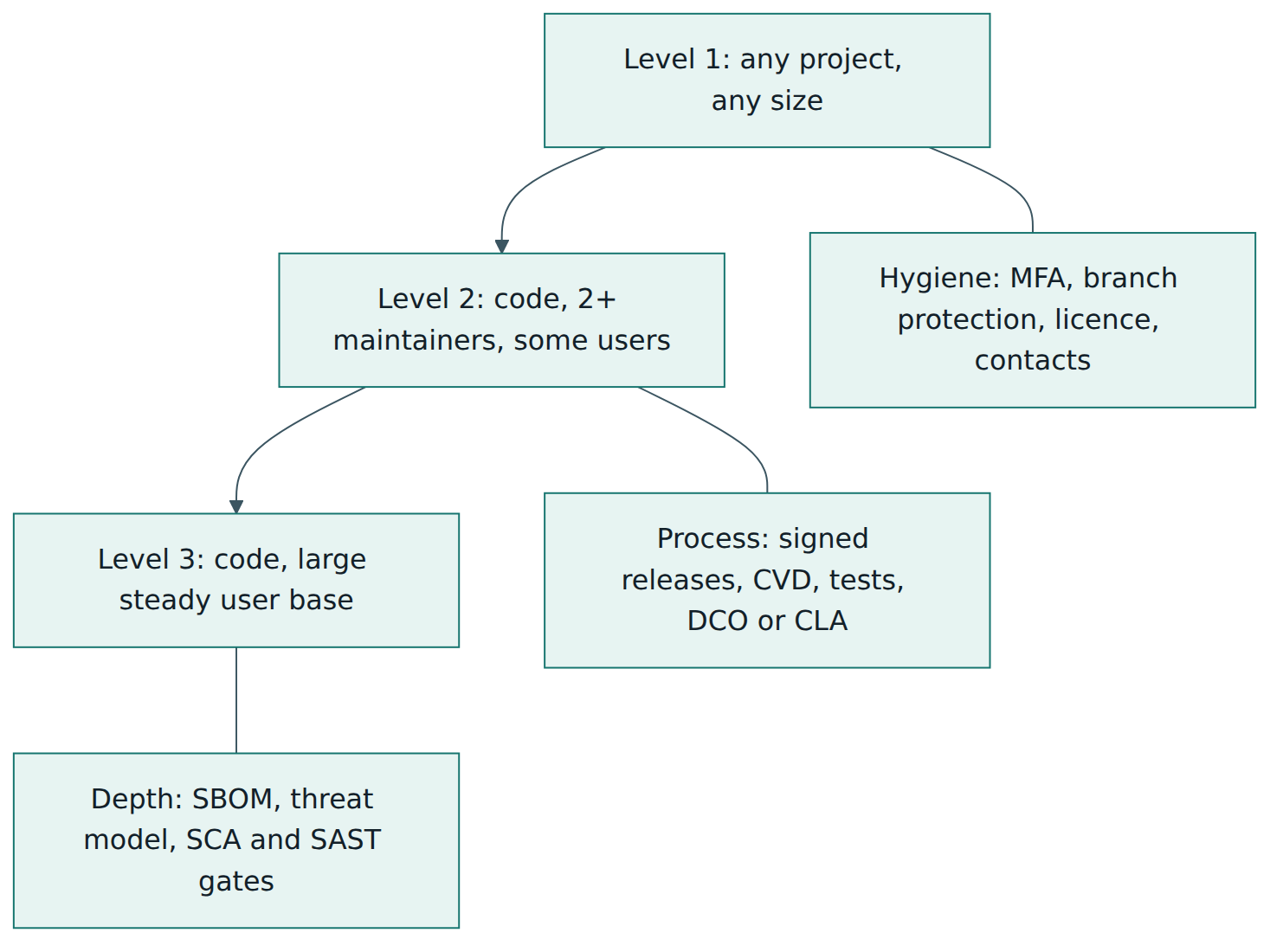
- Level 1 applies to any project, code or non-code (for example a documentation or specification project), whatever the number of maintainers or users.
- Level 2 applies to code projects with at least two maintainers and a small but steady group of users.
- Level 3 applies to code projects with a large, steady user base.
The official checklist lists each requirement at the lowest level where it first appears. Counting that checklist for v2026.08.28 gives 64 active requirements: 24 at Level 1, 19 more that first appear at Level 2 and 21 more that first appear at Level 3. Almost every requirement that applies at a lower level is also listed for the higher levels, so in practice the levels stack: a Level 2 project meets the Level 1 requirements as well as the new ones. Exact counts change between versions, so always check the version you claim.
The eight control families
The table below summarises each family in our own words, with examples of what it asks for. It is a teaching summary, not a substitute for reading the official requirement text.
| Family | What it protects | Examples of what is asked (paraphrased) |
|---|---|---|
| AC – Access Control | Who can reach the repository and pipelines, and with what rights | Multi-factor authentication for sensitive actions; minimal default rights for new collaborators; no direct pushes to the primary branch and confirmation before deleting it; least-privilege pipeline permissions (default at Level 2, per job at Level 3) |
| BR – Build and Release | The path from source to published artefacts, including secrets | Sanitising untrusted metadata, keeping privileged credentials away from untrusted code, encrypted official channels and no unencrypted secrets in version control (Level 1); unique version numbers, change logs, standard dependency tooling and signed releases (Level 2); a secrets policy and per-asset release identifiers (Level 3) |
| DO – Documentation | Information users and contributors need to act safely | User guides and a defect-reporting guide once released (Level 1); dependency management and build instructions (Level 2); how to verify release integrity and author identity, support scope and end of security updates (Level 3) |
| GV – Governance | Roles, decisions and contribution processes | Public discussion channels and an explanation of how to contribute (Level 1); a list of members with sensitive access, their roles and a contributor guide (Level 2); a policy for reviewing people before granting escalated rights (Level 3) |
| LE – Legal | Licensing clarity and the right to contribute | An OSI- or FSF-recognised licence kept in a standard location for source and releases (Level 1); a per-commit assertion of legal authority, such as a DCO sign-off or CLA (Level 2) |
| QA – Quality | Transparency of source, dependencies, testing and review | Public repository with full change history, a dependency list, no generated executables or unreviewable binaries in the repository (Level 1); status checks and an automated test suite before merging (Level 2); an SBOM for compiled releases, documented testing policy and a non-author approval for every merge (Level 3) |
| SA – Security Assessment | Understanding of the design and its risks | Design documentation, descriptions of external interfaces and a security assessment of likely, high-impact problems (Level 2); threat modelling and attack surface analysis (Level 3) |
| VM – Vulnerability Management | Receiving, handling and publishing vulnerability information | Named security contacts (Level 1); a CVD policy with a response timeframe, private reporting and public vulnerability data (Level 2); VEX statements, SCA and SAST remediation thresholds and automated blocking of policy violations (Level 3) |
Versions and change
The catalogue evolves. For example, the 2025-10-10 release added six requirements, four of them at Level 1, plus new definitions; the 2026-02-19 release added new requirements at all three levels, retired one (OSPS-BR-01.02, whose identifier is now permanently unused) and shortened control titles; the 2026-08-28 release added or removed no controls but widened two requirements, for example allowing a LICENSES/ directory as a licence location. Each release has notes, a Markdown checklist and, since v2026.08.28, a generated crosswalk page that lists external requirements next to Baseline controls. This is why every compliance statement must name the version.
Lesson 4 – How it works in practice
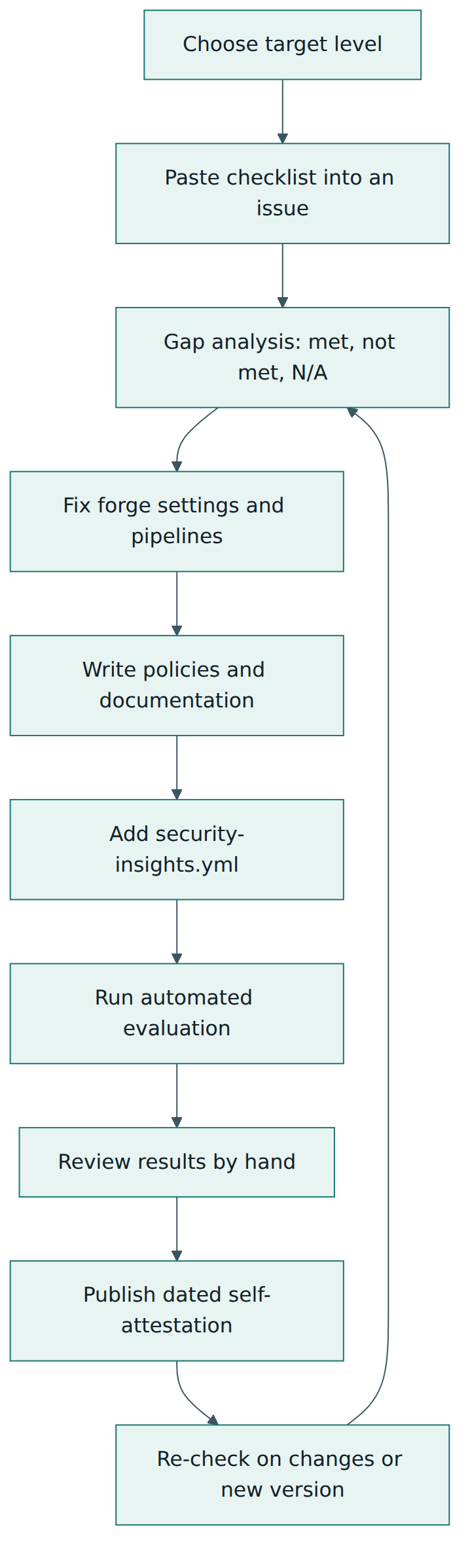
Adopting the Baseline is a small project in its own right. The steps below follow the official maintainer guidance and common practice in projects that have done it.
Step 1 – Choose the target level honestly
Start from the level definitions, not from ambition. Level 2 is defined for code projects with at least two maintainers, so a project with one maintainer should aim for Level 1 and plan to recruit a second maintainer. The Level 3 definition mentions only a large, steady user base, but several of its requirements, such as a non-author approval for every merge, are hard to sustain with one maintainer, so a popular single-maintainer project should also secure Level 1 first. A small team with a steady user base fits Level 2. A widely depended-upon library, runtime or tool belongs at Level 3. Foundations sometimes set the target for you; otherwise, write down why you chose a level, because adopters may ask.
Step 2 – Make the checklist visible
The Baseline website publishes a Markdown checklist for each version. The maintainer guidance suggests pasting it into an issue in the repository and ticking items as they are done. It becomes a shared work list and a record of progress.
Step 3 – Run a gap analysis
For each applicable requirement, record one of three answers: met (with the evidence), not met (with a planned action) or not applicable (with the reason, for example "no releases yet"). Evidence can be a forge setting, a file in the repository, a pipeline configuration or a written policy. Be careful with "not applicable": it must follow from the requirement's own trigger, not from the work being inconvenient.
Step 4 – Fix platform settings first
Many Level 1 requirements are settings in the forge and can be closed in an afternoon: enforce multi-factor authentication for the organisation, set the default permission for new members to the minimum, add branch protection or rulesets that block direct pushes to the primary branch and protect it from deletion, and turn on secret scanning or push protection where the platform offers it.
Step 5 – Harden the pipelines
Pipelines are a favourite target because they often hold publishing tokens. The Baseline asks projects to treat data such as branch names, pull request titles and commit messages as untrusted and to sanitise it before using it in scripts, and never to run untrusted code, such as a fork's pull request, in a context that can reach privileged credentials. At Level 2, jobs that do not declare permissions must fall back to the minimum; at Level 3, every job must be given only the privileges it needs, and even input from trusted collaborators who trigger a workflow manually must be validated. In practice this means explicit, read-only default token permissions, separating "test the contribution" jobs from "publish the release" jobs, and passing untrusted values through environment variables instead of pasting them directly into shell commands.
Step 6 – Write the documents
A surprising share of the Baseline is satisfied by clear documentation. A typical set is: a README and user guide; CONTRIBUTING.md explaining how to contribute and what makes a contribution acceptable; SECURITY.md naming security contacts, the private reporting channel and the disclosure policy with response times; a governance or maintainers file listing who holds sensitive access and what each role does; build instructions; a dependency policy; a support and end-of-life statement; and, at Levels 2 and 3, design and interface descriptions and the results of a security assessment or threat model.
Step 7 – Make releases verifiable
From Level 2, each release needs a unique version, a change log that mentions security-relevant changes and a signature or signed manifest of hashes. The recommendation mentions options such as GPG signatures, Sigstore signing, SLSA provenance or SLSA verification summaries. Level 3 adds an SBOM for compiled assets, clear association of every asset with its release and documentation that tells users how to check integrity and the expected identity of whoever or whatever produced the release.
Step 8 – Automate the quality and security gates
Level 2 expects at least one automated test suite and status checks that must pass (or be consciously bypassed) before changes land. Level 3 adds a required approval from someone other than the author, automated dependency scanning against a documented policy and automated static analysis, both able to block a change unless a finding is explicitly declared non-exploitable. The policies matter as much as the tools: the project must define thresholds, for example which severities must be fixed before a release.
Step 9 – Describe yourself in a machine-readable way
Some requirements cannot be checked from forge settings alone, for example whether a support policy exists. The maintainer guidance recommends adopting the OpenSSF Security Insights specification: add a security-insights.yml file that points to your security policy, contacts, release and dependency information. Evaluation tools read this file to check controls automatically.
Step 10 – Evaluate, attest and repeat
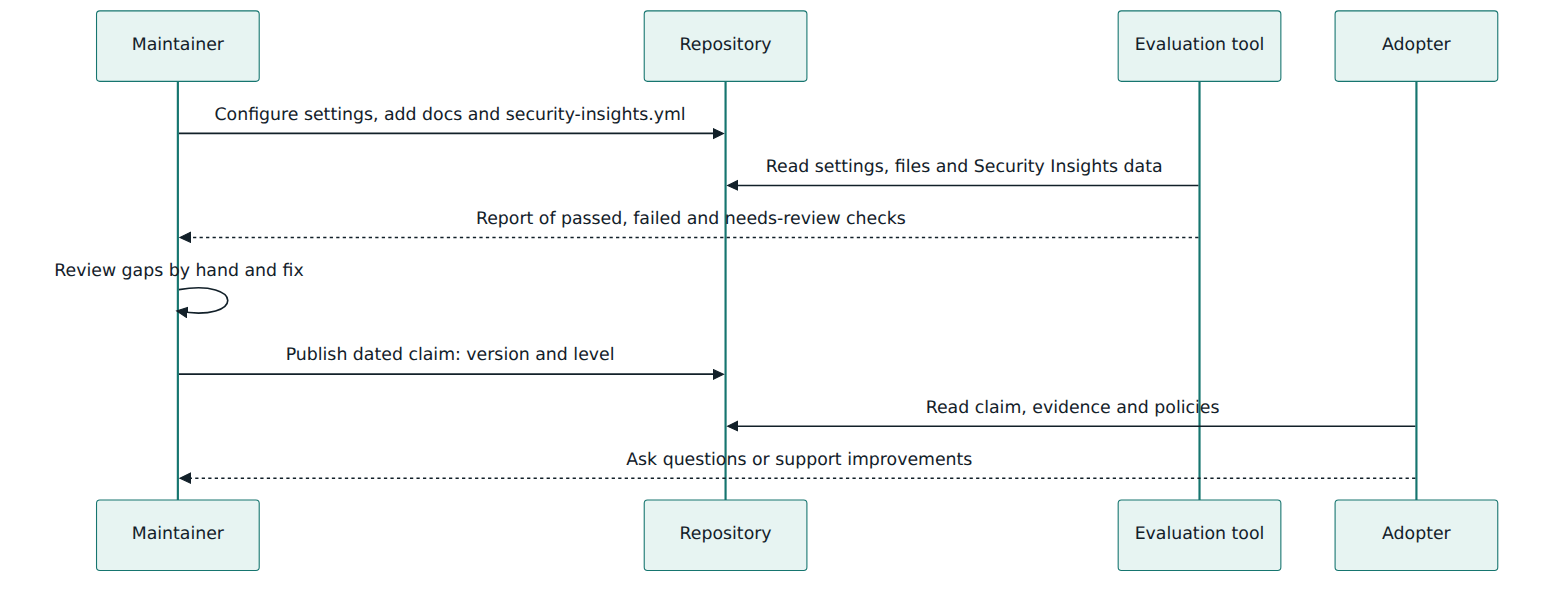
Run an automated evaluation, review the results by hand, fix what remains and then publish a dated statement of the level and version you meet. Plan to revisit it: compliance is a point-in-time status, settings drift, people join and leave, and new Baseline versions appear.
Roles during adoption
In a small project one person may hold several roles, but it helps to name them. Maintainers own the settings, pipelines and policies. Security contacts receive and coordinate vulnerability reports. Release managers make sure versions, change logs, signatures and SBOMs are produced. Contributors follow sign-off and review rules. A foundation or sponsoring company may provide tooling or review support, and adopters can help a project level up instead of simply demanding a badge.
Lesson 5 – Assessment, certification and compliance
There is no formal certification
No accredited body certifies projects against the OSPS Baseline, and there is no audit scheme or certificate. The FAQ states that projects can self-attest compliance. Open-source projects rarely have the money for independent audits. If an organisation needs stronger assurance about a specific upstream project, the FAQ suggests either accepting the project's self-attestation or making a separate arrangement with the project that meets its needs.
What a good claim looks like
Because compliance is a snapshot, a claim should include three things: the date, the Baseline version and the level. A statement in the style "As of 2026-10-01, this project meets OSPS Baseline v2026.08.28 Level 2" tells a reader exactly what was assessed. A claim without a version is ambiguous, because requirements are added, clarified and retired between versions; a claim without a date says nothing about whether settings have drifted since.
Automated evaluation
Many requirements can be checked by reading forge settings and repository contents. The official maintainer guidance points to two tools. LFX Insights, a Linux Foundation service, measures project health metrics including Baseline controls, and projects do not need to be hosted by the Linux Foundation to be added. Its evaluation is powered by a Privateer plugin for GitHub repositories, which is also available as a GitHub Action so a project can run the assessment in its own pipeline. An OpenSSF case study describes how the GUAC project used LFX Insights to check itself against Levels 1 and 2 in under an hour. These tools rely partly on the Security Insights file for information that cannot be read from platform interfaces.
Automation has limits, and the Baseline maintainers stress them. Some requirements concern private settings that an outside tool cannot see, such as whether multi-factor authentication is enforced for every person with access. Others are about policies whose quality a tool cannot judge. A project may also meet a requirement in an unusual way that a scanner does not recognise. Treat automated results as a starting point for human review, not as a verdict.
The badge programme
The OpenSSF Best Practices Badge site (bestpractices.dev), long known for its "passing", "silver" and "gold" series, also offers a Baseline series with Level 1, Level 2 and Level 3 pages tied to a stated Baseline version. Projects fill in the criteria and self-certify; the badge can then be shown on the project's pages. It remains self-certification: the badge records the project's answers and justifications, it is not an independent audit.
Verifying an upstream project as an adopter
If you consume open source, the Baseline gives you a structured set of questions. Many answers are public: you can see whether there is a licence in a standard place, a security policy with contacts, signed releases with verification instructions, a change log, an SBOM and a history of published advisories. You cannot see private settings, so for those you rely on the project's statement. Use what you find to understand risk and to decide where to help, not to rank projects against each other. Remember that the Baseline does not tell you whether the code itself is free of vulnerabilities.
Mappings and regulation
Each control lists related items in other frameworks. In v2026.08.28 these include the OpenSSF Best Practices Badge, OpenSSF Scorecard, NIST Cybersecurity Framework 2.0, NIST SSDF (SP 800-218), NIST SP 800-161, the EU Cyber Resilience Act, ISO/IEC 18974, OWASP SAMM, SLSA, PCI DSS, the Proactive Software Supply Chain Risk Management framework (P-SSCRM), the German BSI technical guideline TR-03185-2, the UK Software Security Code of Practice and OpenCRE. Since 2026-08-28 the mappings are published as machine-readable documents. The Baseline is careful to say that these mappings show a relationship, not equivalence: meeting a Baseline requirement does not mean you meet the mapped external requirement, and the mappings are no substitute for an audit. They are best used to reuse evidence and to explain your work to people who think in another framework.
This is especially relevant to the EU Cyber Resilience Act (Regulation (EU) 2024/2847), which places security obligations on manufacturers of products with digital elements and lighter obligations on "open-source software stewards" that support open-source projects intended for commercial use. The Baseline maps its controls to requirements of the Act and can provide useful evidence, but a manufacturer that ships a component remains responsible for its own conformity; a Baseline claim by the upstream project does not transfer that responsibility.
Lesson 6 – Worked example
This example is fictional but realistic. "Riverbed" is an open-source Python library that reads and validates sensor data files. It is hosted on a public forge, published to the Python Package Index and used by a few hundred other projects and several companies. It has three maintainers in different countries. One of its corporate users, a manufacturing firm, asks the maintainers which OSPS Baseline level the project meets, because its product-security team is preparing for supply-chain regulation.
1. Choosing the level
Riverbed is a code project with three maintainers and a modest, steady user base, so it clearly fits Level 2. It is not yet among the very widely used libraries for which Level 3 is intended, but the maintainers decide to reach Level 2 first and then take on selected Level 3 items, starting with those that protect users most directly. They record this decision in their governance file.
2. Gap analysis
The lead maintainer pastes the v2026.08.28 checklist into an issue and the team works through it over a week. The main findings:
| Area | Finding | Action |
|---|---|---|
| Access control | Two-factor login enforced for the organisation; default member permission is "write"; direct pushes to main possible for maintainers | Set default permission to read; add a ruleset that blocks direct pushes and protects main from deletion |
| Pipelines | A workflow labels pull requests by echoing the pull request title into a shell script and runs with a token that can publish packages | Pass the title through an environment variable, split labelling from publishing, set read-only default token permissions |
| Secrets | An old test configuration file in history contained an API key | Revoke the key, enable secret scanning and push protection, add a pre-commit secret check |
| Releases | Versions are unique and a change log exists, but security fixes are described vaguely; no signatures | Use trusted publishing from the CI pipeline with Sigstore-based attestations; label security fixes clearly in the change log |
| Legal | Licence file present; no per-commit sign-off | Adopt the DCO and enable a check that every commit carries a sign-off |
| Vulnerability management | A SECURITY.md exists with one personal email address | Enable private vulnerability reporting, name two contacts, add a disclosure policy with response times, publish past fixes as advisories |
| Security assessment | No design or interface documentation | Write a short architecture page, describe the public API and file formats, and record a security assessment |
3. Quick wins first
On day one a maintainer changes the organisation's default permission, adds the branch ruleset and enables secret scanning. The leaked key is already expired, but they revoke it formally and note that history rewriting would not help, because the repository is public and the key must be assumed exposed. These steps close several Level 1 gaps immediately.
4. Pipelines and releases
The second maintainer, who looks after the pipelines, rewrites the labelling workflow so that the pull request title is never interpreted by the shell, and moves the publishing step into a separate workflow that runs only for tags created by maintainers. Every workflow file now declares minimal permissions, which already goes beyond the Level 2 default-permission requirement and prepares for the per-job Level 3 requirement. Publishing switches from a long-lived token to the package index's trusted-publishing mechanism, and the release job produces signed attestations so that users can verify each file.
5. Documentation sprint
The third maintainer organises a documentation sprint with two regular contributors. They add build instructions, a dependency policy explaining that dependencies are declared in pyproject.toml and locked for testing, a maintainers file listing who holds administrator and publishing rights, a contributor guide with acceptance criteria (tests, sign-off, review), and an expanded SECURITY.md. They also hold a two-hour session to sketch the data flow, list the external interfaces (the public Python API, the supported file formats and an optional network fetch helper) and record the most likely and most damaging problems, such as malformed files causing excessive memory use. That record satisfies the Level 2 security assessment and is the seed of a future threat model.
6. Automated evaluation and review
They add a security-insights.yml file pointing to the new policies, then run the OSPS assessment action in their pipeline. The first report shows most checks passing, two failures and a handful of "needs review" results. One failure is real: a small helper repository, used for test data, lacks branch protection; because Riverbed has more than one repository, they also add a list of all its codebases to the documentation. The other failure is a tool limitation: the scanner did not recognise their change-log format. The items needing review concern private settings, so a maintainer checks them by hand and records screenshots in the tracking issue.
7. The claim
Five weeks after starting, the README gains a short statement: "As of 2026-10-20, Riverbed meets OSPS Baseline v2026.08.28 Level 2. Evidence and the full checklist are in issue #412." They also complete the Baseline Level 2 page on the Best Practices Badge site. The corporate user's security team reads the evidence, confirms the public items, accepts the self-attestation for the private ones and offers to fund a hosted static-analysis service to help the project move towards Level 3.
8. Looking ahead
The Level 3 roadmap in the tracking issue lists the next steps in order of user value: verification instructions for releases, a support and end-of-security-updates statement, an SBOM (not strictly required, because Riverbed ships pure-Python packages rather than compiled assets, but useful to its corporate users), a required second-person review for every merge, dependency and static-analysis gates with documented thresholds, VEX statements for dependency vulnerabilities that do not affect Riverbed, and a proper threat model of the network fetch helper. They schedule a review of the claim each time a new Baseline version is released.
Most of the work was ordinary engineering and writing. The biggest risk reductions (pipeline injection, publishing credentials, leaked secrets) came from Level 1 and Level 2 items. The claim is honest because it is dated, versioned and linked to evidence.
Lesson 7 – Relationship to other standards and frameworks
Knowing the Baseline's neighbours helps you avoid duplicated effort and explain your work to people who use other frameworks.
| Framework | What it is | Main audience | Relationship to the OSPS Baseline |
|---|---|---|---|
| OpenSSF Scorecard | Automated tool that runs checks on a repository and gives scores from 0 to 10 | Maintainers and consumers wanting a quick automated signal | Overlapping topics (branch protection, signed releases, binary artifacts, security policy). Scorecard grades automatically; the Baseline is a requirement catalogue that also covers practices a tool cannot see. Mapped since 2026-08-28. |
| OpenSSF Best Practices Badge | Self-certification programme with passing, silver and gold criteria, plus a Baseline series | Maintainers | The metal series covers broader quality topics; the Baseline focuses on security. The badge site is one way to record Baseline self-attestation. |
| SLSA | Framework of levels for build integrity and provenance, with Build and Source tracks | Build platforms, producers, consumers | Goes much deeper on build and source integrity. Baseline release-signing requirements can be met using SLSA provenance. |
| NIST SSDF (SP 800-218) | Catalogue of secure software development practices and tasks | Software producers, often for government buyers | Broader and organisation-level; the Baseline gives project-level, testable requirements that map to many SSDF tasks. |
| EU Cyber Resilience Act | EU regulation with security requirements for products with digital elements | Manufacturers, importers, open-source stewards | Legal obligations; the Baseline provides helpful evidence and mappings but not legal conformity. |
| ISO/IEC 18974 (OpenChain Security Assurance) | International standard for the key requirements of an organisation's open-source security assurance programme | Organisations that use and distribute open source | Organisation-level process for consuming open source safely; the Baseline describes what a project does to be a safe dependency. |
| OWASP SAMM | Maturity model for an organisation's software assurance programme | Security and engineering leaders | Measures programme maturity across business functions; Baseline requirements map to specific SAMM practices. |
How to combine them
A useful mental model is producer versus consumer, and project versus organisation. The Baseline answers "what should an open-source project do?" from the producer's side. SLSA zooms into one part of that answer, build and source integrity, with much more detail. Scorecard and the badge programme are ways of measuring and showing parts of it. On the consumer side, ISO/IEC 18974 and the SSDF describe what an organisation should do in its own processes, including how it chooses and monitors dependencies; the Baseline helps those organisations by giving them concrete questions to ask upstream projects. Regulations such as the Cyber Resilience Act set legal duties; frameworks and evidence help organisations meet them, but responsibility stays with the regulated party.
Common pitfalls and best practices
Pitfalls
- Treating the level as a grade. Using Baseline levels to rank projects or to reject a dependency without looking at the evidence contradicts the Baseline's stated purpose and can punish projects that implement controls in unusual ways.
- Undated or unversioned claims. Saying "we are Baseline Level 2" without a date and version leaves readers unable to tell what was checked or whether it is still true.
- Trusting the scanner blindly. Automated results miss private settings and creative implementations, and can show false failures; a clean report is not proof, and a red item is not always a real gap.
- Overreaching on level. A single-maintainer project declaring Level 3 obligations it cannot sustain will quietly fall out of compliance; it is better to meet Level 1 fully.
- Paper policies. Writing a disclosure policy with a response time no one can meet, or an SCA threshold no one enforces, creates false assurance.
- Confusing mappings with compliance. Assuming that a Baseline level automatically satisfies NIST, PCI DSS or Cyber Resilience Act requirements because a crosswalk exists.
- Ignoring pipelines. Focusing on documentation while CI workflows still expose publishing credentials to untrusted pull requests leaves the most attacked path open.
Best practices
- Start with Level 1 everywhere. It is cheap, covers the most common attack paths and is recommended for every project.
- Track the checklist in the open. A public issue with evidence links invites help, shows progress and doubles as the record behind your claim.
- Fix settings and pipelines before prose. Multi-factor authentication, branch protection, least-privilege tokens and secret scanning deliver large risk reductions quickly.
- Publish machine-readable metadata. A Security Insights file helps tools evaluate you accurately and saves adopters from searching.
- Write policies you can keep. Choose realistic response times and thresholds, and name more than one security contact.
- Re-assess on change. Review the claim when maintainers change, when infrastructure moves and whenever a new Baseline version is released.
- Use the crosswalk to reuse evidence. When a customer or regulator asks about another framework, start from the mappings, then check the actual external requirement.
Summary and key takeaways
- The OSPS Baseline is an open OpenSSF catalogue of minimum security practices for open-source projects; the current release is v2026.08.28, and versions are named by date.
- Three maturity levels match the kind of project: Level 1 for any project, Level 2 for code projects with at least two maintainers and some steady users, Level 3 for widely used code projects.
- Eight families (AC, BR, DO, GV, LE, QA, SA, VM) contain controls, and each control contains MUST requirements with stable identifiers such as
OSPS-AC-03.01. - Each requirement has assessable text, optional recommendations and the levels it applies to, and each control lists mappings to other frameworks; you assess against the requirement text.
- Adoption is a cycle: choose a level, run a gap analysis, fix settings and pipelines, write the policies, add machine-readable metadata, evaluate, review by hand and attest.
- There is no certification; compliance is self-attested, point in time, and should always state date, version and level.
- Automated tools such as LFX Insights and the Privateer-based assessment action help, but cannot see everything.
- The Baseline complements Scorecard, the Best Practices Badge, SLSA, NIST SSDF, ISO/IEC 18974 and the Cyber Resilience Act; its mappings show relationships, not equivalence.
Reflection questions
- Think of an open-source project you maintain or depend on. Which maturity level fits it, and what evidence would you look at to decide?
- Which three Level 1 requirements would close the most serious risks in that project today, and how long would each take to implement?
- Look at one CI workflow you know. Where does it use data or code it did not create, and what credentials could that data or code reach?
- How would you explain to a procurement colleague why a Baseline claim is useful evidence but not a guarantee that a component is secure?
- If your organisation must meet NIST SSDF or Cyber Resilience Act expectations, how would you use the Baseline crosswalk without assuming that a mapping equals compliance?
Further reading and official sources
- Open Source Project Security Baseline – home and version list – OpenSSF Security Baseline SIG
- OSPS Baseline v2026.08.28 (current controls, lexicon and mappings) – OpenSSF
- OSPS Baseline release notes – OpenSSF
- OSPS Baseline frequently asked questions – OpenSSF
- Implementation guidance for maintainers – OpenSSF
- ossf/security-baseline source repository – OpenSSF on GitHub
- Security Insights specification – OpenSSF on GitHub
- OpenSSF Best Practices Badge (including the Baseline series) – OpenSSF
Original tutorial by xOps School (DevOpsSchool Private Limited), written from public sources about OpenSSF OSPS Baseline. Not affiliated with or endorsed by the standard's owner; standard names are trademarks of their owners. Buy the official standard from its publisher for the authoritative text.