
OWASP MASVS – Tutorial (about 60 minutes)
- View
The OWASP Mobile Application Security Verification Standard (MASVS) is a free, community-written standard that describes the security and privacy properties a mobile app should have on Android and iOS. Mobile developers, security testers, product owners, app buyers and regulators use it as a shared baseline for designing, building and checking mobile apps. After this tutorial you will be able to explain how MASVS is organised, choose a suitable MAS testing profile for an app, turn MASVS controls into engineering and test work, plan an honest verification, and place MASVS next to related standards.
Course overview
Edition and status: the current release is MASVS v2.1.0, published on 18 January 2024 by the OWASP Mobile Application Security (MAS) project of the OWASP Foundation (the Open Worldwide Application Security Project, a vendor-neutral non-profit). It is the latest tagged release and it is stable. Version 2.1.0 added the MASVS-PRIVACY group to the major redesign of version 2.0.0 (April 2023). The project has since edited explanatory text in its repository (for example resilience guidance in 2025 and the description of the testing profiles in 2026) without issuing a new version number. The companion testing guide, MASTG, reached its first stable v2 release (v2.0.0) on 30 June 2026. MASVS is released under the Creative Commons Attribution-ShareAlike 4.0 licence. Verified 2026-10-29 on mas.owasp.org and the OWASP/masvs GitHub releases page.
Who this is for: Android and iOS developers, mobile architects, security champions, penetration testers, QA engineers, product owners, procurement and vendor-risk staff, and compliance people who hear phrases such as "the app must pass MASVS L1" or "test the app against MASVS" and want to know what that really involves.
Prerequisites: none. It helps to know roughly how a mobile app works: it is installed from an app store, keeps some data on the phone, talks to a server over the internet, and asks the user for permissions such as camera or location. Every security term is explained the first time it appears.
By the end of this tutorial:
- You will be able to explain what MASVS is for, what it covers and what it deliberately leaves to other standards.
- You will be able to use the core vocabulary: control group, control, weakness, test, profile, threat model, identity pinning, IPC, WebView and resilience.
- You will be able to describe the eight control groups of MASVS v2.1.0 and say which one a given security problem belongs to.
- You will be able to choose and justify a combination of MAS testing profiles (L1, L2, R and P) from an app's risks.
- You will be able to turn MASVS controls into backlog items, design decisions and test cases using MASWE and MASTG.
- You will be able to plan, scope and report a MASVS verification and judge whether a "MASVS compliant" claim is meaningful.
- You will be able to relate MASVS to OWASP ASVS, the OWASP Mobile Top 10, NIST mobile app vetting guidance and industry assessment schemes.
Lesson 1 – Origins, purpose and scope
Why mobile apps need their own standard
A web application lives mostly on servers the company controls. A mobile app is different: a copy of the program runs on millions of phones the company does not control. Anyone can download the app package, unpack it, read the code that was compiled into it, run it on a modified phone and watch everything it does. The phone itself may be lost, stolen, shared with family members or infected with malicious apps. The app also uses features that do not exist in a browser, such as local databases, the system keychain, fingerprint and face sensors, push notifications, links that open other apps, and embedded browser windows.
These differences create risks that a general web security checklist does not address well. A banking app that stores a login token in a plain file, a health app that writes lab results into the phone's log, or a shopping app that accepts any link from another app and opens it with full privileges can all be attacked without touching the server. MASVS was created to give the mobile world a clear, testable description of what "secure" means for the app itself.
A short history
The work began inside OWASP around 2016 as part of the Mobile Security Testing Guide project, and version 1.0 of MASVS was released in early 2018. Version 1 was a long list of numbered requirements grouped into chapters (architecture, storage, cryptography and so on) and tagged with three levels: L1 for standard security, L2 for defence in depth, and R for resilience against reverse engineering. Translations into many languages followed and the standard became widely used by testing companies and, later, by industry app-assessment programmes.
In April 2023 the project released version 2.0.0, a deliberate redesign. The authors made the standard shorter and more abstract: each control now states a goal, while the technical details of how to achieve and test it moved into the testing guide. Redundant requirements were removed, terminology was aligned with other standards, and topics that belong elsewhere (such as general secure development process) were handed to standards like OWASP SAMM and NIST SSDF. The L1, L2 and R levels were taken out of the controls and turned into separate "MAS testing profiles". In January 2024 version 2.1.0 added a privacy group with four controls, together with a matching privacy profile. If you meet older material that talks about chapters V1 to V8 or requirement numbers such as "MSTG-STORAGE-14", it describes version 1, not the current standard.
Purpose
The project states three main uses for MASVS, which you will see throughout this course:
- As a metric – a yardstick that developers and app owners can compare an app against, so that results from different testers and different years mean the same thing.
- As guidance – a description of what to build during design, development and testing, so that security is planned in rather than bolted on.
- As a baseline in procurement – a way for buyers to state security expectations when they commission or buy a mobile app.
Other uses grow from these: security architects use MASVS to choose mobile-specific controls that general architecture frameworks miss; teams use it in place of an off-the-shelf secure coding checklist; trainers use it to teach what a secure app looks like; and engineers turn many controls into automated unit and integration tests.
What is in scope and what is not
MASVS covers the mobile app on the device, the client side. It applies whether the app is written natively (Kotlin or Java on Android, Swift or Objective-C on iOS) or with a cross-platform or hybrid framework such as Flutter, React Native or a web-wrapper framework. The project also notes that the same ideas apply to apps preinstalled on devices and to software development kits (SDKs), the third-party libraries that apps embed for analytics, advertising, payments and so on.
Several things are deliberately out of scope. MASVS does not specify how the back-end servers and APIs the app talks to should be secured; for those, OWASP points to the Application Security Verification Standard (ASVS). It is not a secure development process standard; it assumes you already follow good practices for architecture, design and threat modelling. It assumes the other parts of the ecosystem, such as connected devices, cars or Internet of Things hardware, meet their own relevant standards. And it does not promise absolute security: it is a baseline, to be extended where an app's specific risks demand more.
Finally, MASVS assumes an attacker can do three kinds of things: analyse the app package without running it (static analysis), run the app on a device that may be compromised and observe or change its behaviour (dynamic analysis), and sit on the network between the app and its servers (a "man-in-the-middle" position). The controls are written with those capabilities in mind.
Lesson 2 – Key concepts and vocabulary
MASVS uses a compact vocabulary. Once these terms are clear, the standard and its companion documents become easy to navigate.
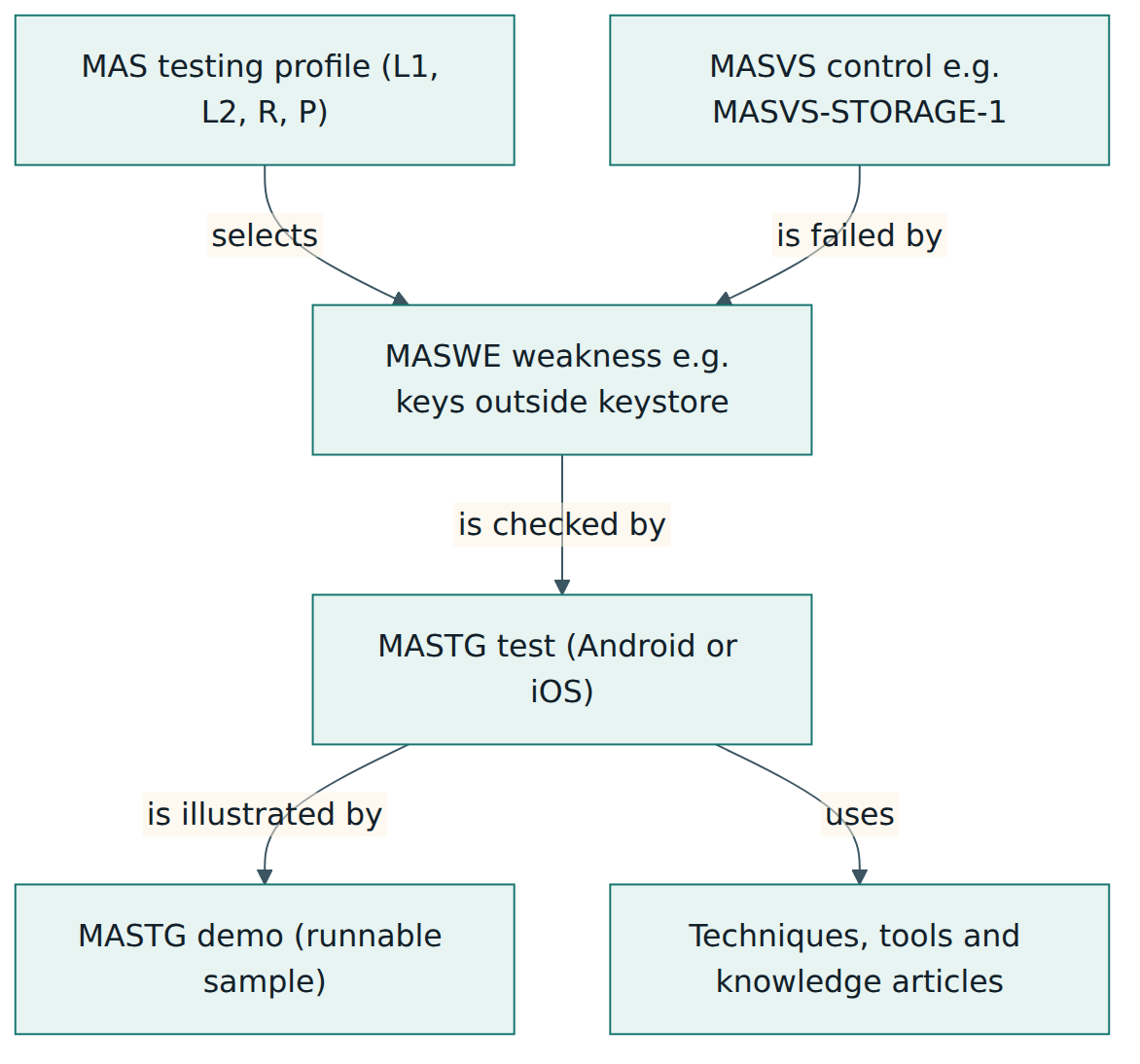
- OWASP MAS – the OWASP Mobile Application Security flagship project. It publishes three linked resources: MASVS (the standard), MASWE (the weakness list) and MASTG (the testing guide).
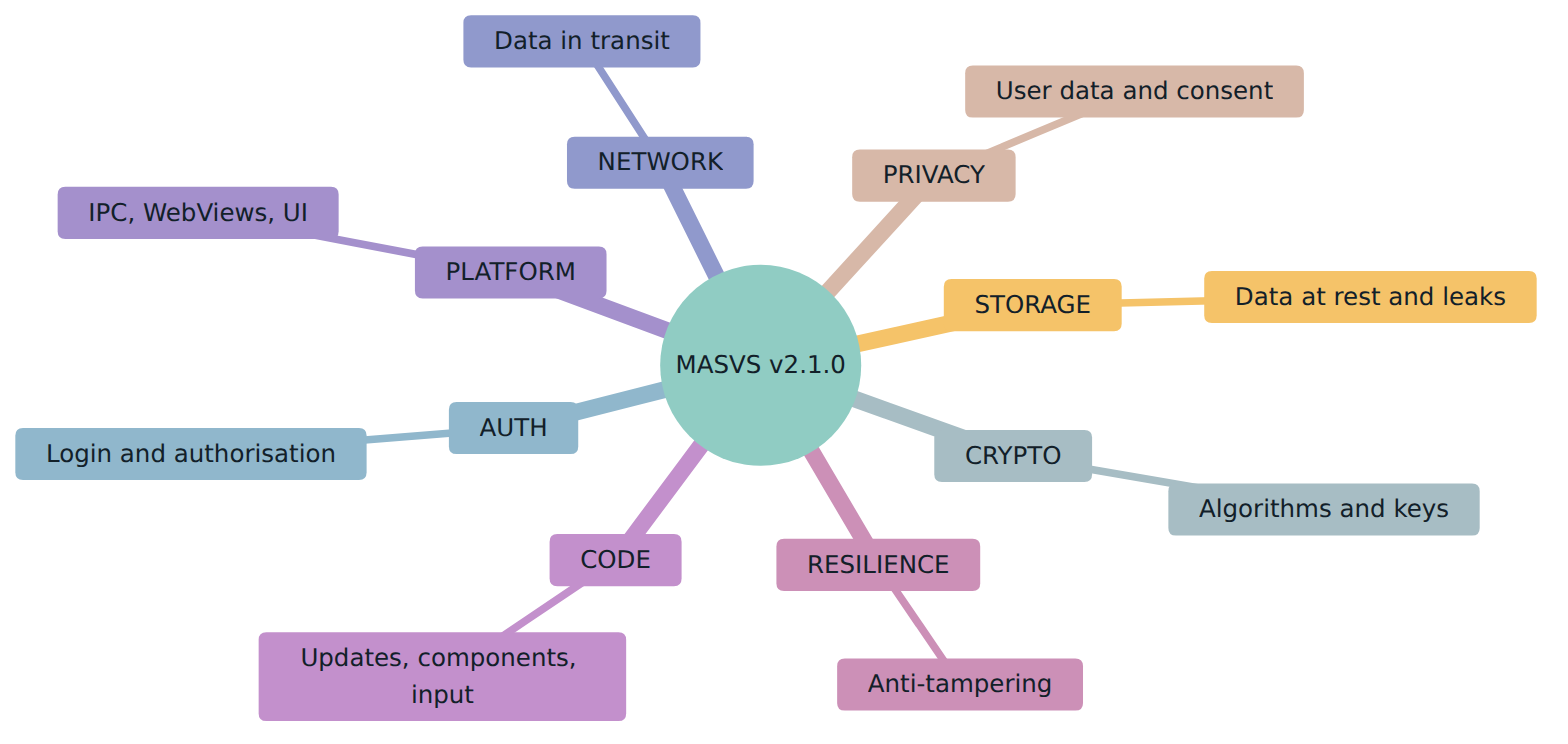
- Control group – one of the eight top-level areas of the mobile attack surface, named MASVS-STORAGE, MASVS-CRYPTO, MASVS-AUTH, MASVS-NETWORK, MASVS-PLATFORM, MASVS-CODE, MASVS-RESILIENCE and MASVS-PRIVACY.
- Control – a single, high-level statement of a property the app should have, identified as MASVS-GROUP-n, for example MASVS-STORAGE-1. Version 2.1.0 has 24 controls.
- Weakness – a condition in an app that could contribute to a vulnerability under certain circumstances, such as storing a key outside the platform keystore. A weakness is not yet an exploitable flaw; a vulnerability is a flaw resulting from a weakness that an attacker can actually exploit.
- MASWE – the Mobile Application Security Weakness Enumeration, a catalogue of mobile weaknesses numbered MASWE-0001 onwards, inspired by the general Common Weakness Enumeration (CWE). Each entry describes the weakness, its impact, how it is typically introduced and how to mitigate it.
- MASTG – the Mobile Application Security Testing Guide, a manual of tests, techniques, tools, knowledge articles, best practices and runnable demos for verifying the controls through the weaknesses. It was previously called the Mobile Security Testing Guide (MSTG).
- MAS testing profile – a named bundle of requirements and tests that matches a typical attacker model: MAS-L1, MAS-L2, MAS-R and MAS-P. Profiles replaced the "levels" of version 1.
- Threat model – a structured description of what an app must protect, from whom, and how it could be attacked. MASVS expects profile selection and tailoring to come from a threat model.
- Sensitive data – any data whose disclosure or alteration would harm the user or the business: personal data, health or payment details, passwords, session tokens, API keys and cryptographic keys.
- Private storage – the app's own sandboxed storage area, which other apps cannot normally read. Public or shared storage, such as a downloads folder, can be read by the user and by other apps.
- Keystore and Keychain – the platform-provided secure stores for keys and secrets: Android Keystore and the iOS Keychain. They can tie keys to device hardware so that keys cannot simply be copied out.
- IPC (inter-process communication) – mechanisms that let apps exchange data or trigger each other, such as Android intents and content providers, custom URL schemes and universal or app links (often called deep links).
- WebView – an embedded browser component inside a native app, used to show web content. A badly configured WebView can let web content reach app data or native functions.
- Identity pinning – restricting which server certificates or public keys the app accepts for its own servers, instead of trusting every certificate authority the device trusts. It is also called certificate pinning or public key pinning.
- Rooting and jailbreaking – removing the operating system's built-in restrictions on Android (rooting) or iOS (jailbreaking). On such a device the platform's security controls can no longer be relied on.
- Reverse engineering and tampering – analysing a compiled app to understand its logic, and modifying it or its runtime behaviour, for example to unlock paid features or bypass checks.
- Resilience – defence-in-depth measures that make reverse engineering and tampering harder: obfuscation, anti-debugging, integrity checks and runtime application self-protection (RASP), which is code inside the app that detects and reacts to attacks while it runs.
- Open-book review – a verification in which testers receive source code, documentation, access to developers and test accounts, rather than attacking the app blind.
Two distinctions deserve emphasis. First, a control is a goal, a weakness is a way of failing that goal, and a test is a way of checking for that failure. Second, a profile is not a quality grade; it describes the kind of attacker the app must withstand.
Lesson 3 – Structure of the standard
Eight control groups, 24 controls
MASVS v2.1.0 is short. After introductory chapters on using the standard and on assessment, it presents eight control groups. Each group opens with an explanation of why the area matters and then lists two to four controls. The summaries below are paraphrased; read the official text for the exact wording.
MASVS-STORAGE (2 controls)
Mobile apps keep data on the device: login tokens, cached records, files and keys. The first storage control asks that sensitive data the app deliberately stores is protected wherever it ends up. The second covers unintended leaks, where sensitive data escapes as a side effect of normal platform features: system logs, automatic cloud or device backups, keyboard caches, screenshots in the task switcher or temporary files. The developer usually has a way to switch these leaks off, which is why they are in scope.
MASVS-CRYPTO (2 controls)
Because phones are easily lost or stolen, encryption is often the last barrier between an attacker and the data. One control asks the app to use current, strong cryptography in the way industry practice recommends: no outdated algorithms, no home-made schemes, proper random numbers, correct modes and parameters. The other covers key management through the whole life of a key: generating it properly, storing it in the platform keystore, restricting its use and never hard-coding it in the app. MASVS points to external sources such as NIST guidance for the detailed cryptographic rules.
MASVS-AUTH (3 controls)
Most apps log users into a remote service. MASVS is careful here: the enforcement of authentication and authorisation must happen on the server, and the server is verified with ASVS. On the client side, the first control asks that the app uses secure authentication and authorisation protocols correctly, for example standard OAuth 2.0 flows and safe handling of tokens. The second asks that local authentication, such as unlocking with a fingerprint, face or PIN, is done the way the platform recommends, ideally tied to a key in the keystore rather than a simple yes/no answer that can be faked. The third asks for extra authentication before sensitive actions such as transferring money or changing an email address.
MASVS-NETWORK (2 controls)
The first network control asks that all network traffic is secured with current practice, in practice TLS with proper certificate validation and no exceptions that quietly allow plain or unverified connections. Developers often break the secure defaults of the platform by accident, for instance by disabling certificate checks during testing and forgetting to re-enable them, or by using a low-level library that skips validation. The second control asks the app to pin the identity of the servers that the developer controls, so that a certificate issued by some other authority, or one installed on the device by an attacker, is not accepted.
MASVS-PLATFORM (3 controls)
Apps interact with the operating system and with other apps. The three controls cover secure use of IPC mechanisms (only exposing what is needed, validating callers and data), secure use of WebViews (restricting what content they load and what native features and files that content can reach), and secure use of the user interface (for example hiding sensitive data from screenshots and recent-apps previews, and not showing one-time codes in notifications on the lock screen).
MASVS-CODE (4 controls)
This group deals with code quality issues that have a security effect. The app should require a reasonably current operating system version, because old versions lack security patches and features. It should have a way to make users update when a critical fix is released. It should only use third-party components without known vulnerabilities, which means knowing what components are inside (a software bill of materials, or SBOM, helps) and updating them. And it should validate and sanitise all untrusted input, whether that input comes from the user interface, other apps, files or the network, to prevent injection and similar attacks.
MASVS-RESILIENCE (4 controls)
The resilience controls ask the app to check the integrity of the platform it runs on (for example detecting rooted or jailbroken devices and emulators), to resist modification of its own code and resources, to make static analysis harder (for example through obfuscation), and to make dynamic analysis harder (for example detecting debuggers and hooking tools). MASVS states clearly that the absence of resilience measures is not, by itself, a vulnerability. These are extra layers for apps that must protect business assets or deter client-side abuse, and they never replace the other controls. The project also discusses trade-offs: resilience reduces transparency for public-interest apps, may lock out legitimate users of less common Android variants, and similar techniques are used by malware, so testers must know how to recognise and bypass them.
MASVS-PRIVACY (4 controls)
Added in version 2.1.0, the privacy group sets a baseline for user privacy that can be checked in the app itself. The app should minimise its access to sensitive data and device resources and respect consent, including making sure embedded SDKs do not collect data before or without consent. It should prevent identification and tracking of the user, for example through pseudonymisation and by keeping fingerprint-like signals separated by purpose. It should be transparent about what it collects and why, consistent with its privacy policy and app store declarations. And it should give users control over their data: viewing, deleting, changing settings and withdrawing consent. MASVS-PRIVACY is not a substitute for legal privacy work such as a data protection impact assessment under the GDPR.
Supporting chapters
Besides the control groups, the standard explains how to use it (its assumptions, applicability to native, hybrid, preinstalled apps and SDKs, and the profiles) and how to approach assessment and certification. It is also published in machine-readable forms (YAML and a CycloneDX JSON file) so that tools can import the control list. Because the controls are short and stable, most of the change you will see over time happens in MASWE and MASTG, not in MASVS itself.
Lesson 4 – How it works in practice
Start with the threat model
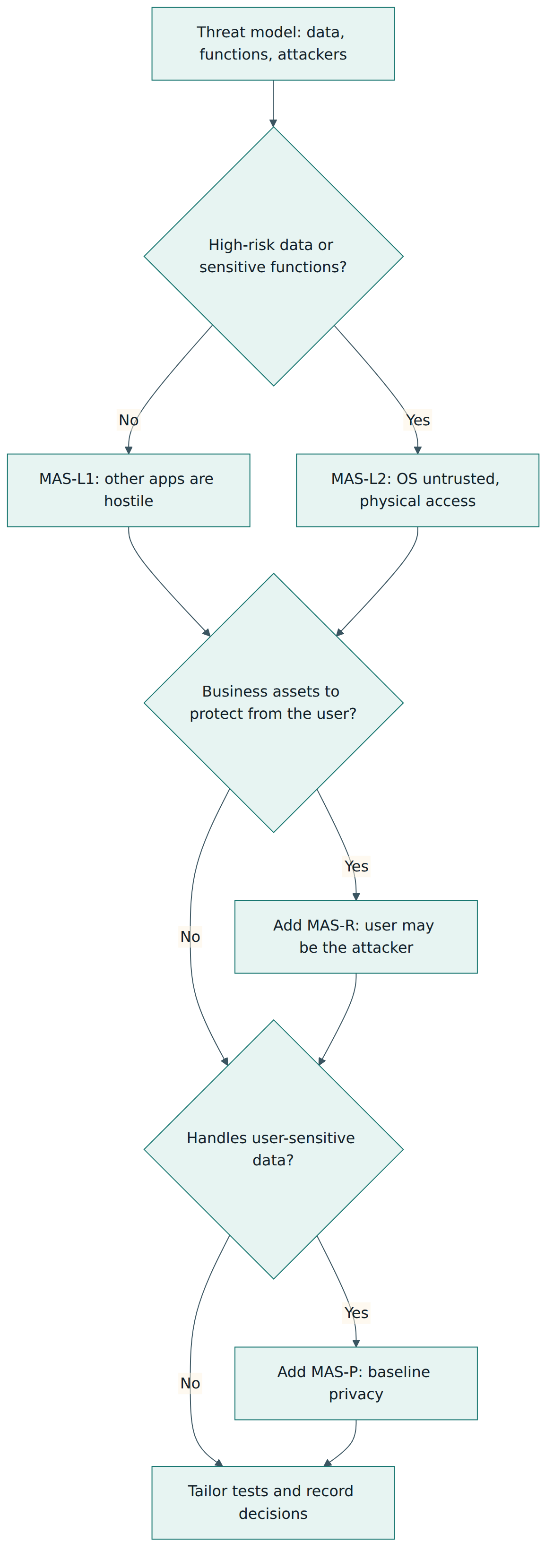
MASVS is not meant to be applied blindly. The intended approach is: understand what the app does and what it handles, decide who might attack it and how, and then select the controls and tests that matter. A simple news reader and a payment app face different attackers and deserve different effort. The project describes this as a risk-based decision taken together with the business owners, with every deviation from the recommended set justified and recorded.
The four default testing profiles
When a team cannot build a fully custom profile from a detailed threat model, the MAS project offers four default profiles. Three address security threats and one addresses privacy:
- MAS-L1 (essential security) – assumes other apps on the device may be hostile, but the operating system's protections hold and the device's owner is not the attacker. It focuses on secure platform defaults and widely accepted measures such as TLS and strong cryptography. It is recommended as the baseline for every app, and is enough on its own for apps that only handle low-risk data and offer no sensitive functions.
- MAS-L2 (advanced security) – builds on L1 and adds the assumption that the operating system cannot be trusted (the device may be rooted or jailbroken) and treats third parties, with or without physical access to the device, as adversaries. It suits apps handling high-risk data or sensitive functions, such as health, banking or messaging apps.
- MAS-R (resilient security) – treats the device's own user as a possible attacker: a reverse engineer, a cheater or someone trying to unlock paid features. It adds anti-tampering and anti-analysis measures to protect business assets. It is meant to be added on top of L1 or L2, never used alone.
- MAS-P (baseline privacy) – not built around an attacker but around responsible handling of users' personal data. It is recommended for every app that deals with user-sensitive data, combined with L1 or L2.
Typical combinations follow from these definitions. A news or calendar app with no business secrets might choose L1 plus P. An advertising-funded app with some proprietary logic might add R. A health or messaging app would choose L2 plus P, and a banking or competitive gaming app might choose L2 plus P plus R. The project also publishes specialised profiles for particular contexts, such as one for the EU Digital Identity Wallet. These examples are illustrations, not rules: the project stresses that the goal is not to comply with every profile or every test, but to apply what the threat model justifies.
Weighing the trade-offs
Going higher up the profile stack is not free. Each extra control costs development and maintenance time; some make the app harder to use (frequent re-authentication, for example); some security measures collect personal data themselves (SMS-based second factors expose phone numbers); and resilience checks can block legitimate users on unusual devices. The guidance is to apply additional controls where the potential impact of a compromise outweighs their cost, and to resolve conflicts between security, usability and privacy during design rather than after launch. Sensitivity can also differ by area: data that never leaves the device might need L2-grade storage protection while L1 is enough for the network side.
From controls to engineering work
Because MASVS controls are abstract, teams use MASWE and MASTG to make them concrete. A practical workflow looks like this:
- Scope the app: platforms, versions, features, data types, third-party SDKs and the back-end services it calls.
- Choose and tailor profiles: start from the defaults, drop items that do not apply (an app without biometrics needs no biometric tests), and add items the threat model requires.
- Translate into requirements: each profile requirement maps to a MASVS control and a MASWE weakness. Write it as a user story or acceptance criterion, keeping the identifiers for traceability.
- Design shared solutions: one secure storage wrapper around the keystore, one network layer with TLS and pinning configured, one deep-link router that validates input, one consent manager for SDKs.
- Automate checks: static analysis and dependency scanning in the build pipeline, unit tests for input validation and storage settings, and lint rules for risky configuration such as cleartext traffic or debuggable builds.
- Verify: run the MASTG tests for the selected weaknesses, manually and with tools, on both platforms.
- Fix, retest and maintain: track findings to closure and re-verify after major changes, platform releases or updates of the standard and guide.
Roles and artefacts
Product owners and business owners decide, with security advice, which profiles apply and accept any residual risk. Architects own the threat model and the shared security components. Developers implement controls and automated tests. Security testers, internal or external, carry out the verification and write the report. Privacy or legal specialists handle the regulatory side that MASVS-PRIVACY deliberately leaves to them. Useful artefacts include the threat model, a profile and tailoring decision record, the requirement backlog with MASVS and MASWE references, an SBOM, test evidence and the verification report.
Lesson 5 – Assessment, certification and compliance
OWASP does not certify
The most important fact first: OWASP does not certify apps, vendors or testers against MASVS. There is no official OWASP "MASVS certified" status, logo or register. The standard says that any trust mark or certificate claiming MASVS conformance has not been vetted by OWASP, and that organisations relying on such claims should be careful about the trust they place in them. Companies are free to offer assurance services based on MASVS, as long as they do not claim official OWASP certification.
Industry schemes built on MASVS
Because MASVS is open and testable, other organisations have built formal programmes on it. The best known is the Mobile Application Security Assessment (MASA) of the App Defense Alliance, an industry group started by Google with security partners and now hosted by the Linux Foundation. MASA uses authorised independent laboratories that test apps against a profile derived from MASVS, and Google Play lets developers who complete such an independent review show it in the app's Data safety section. National bodies have also published guidance based on MASVS, such as the Cyber Security Agency of Singapore's Safe App Standard, and the MAS profile guidance points organisations that vet apps for their own devices to NIST's mobile app vetting publication. These schemes have their own rules, profiles and scope; a pass in one of them is a statement by that scheme, not by OWASP.
How a good verification is run
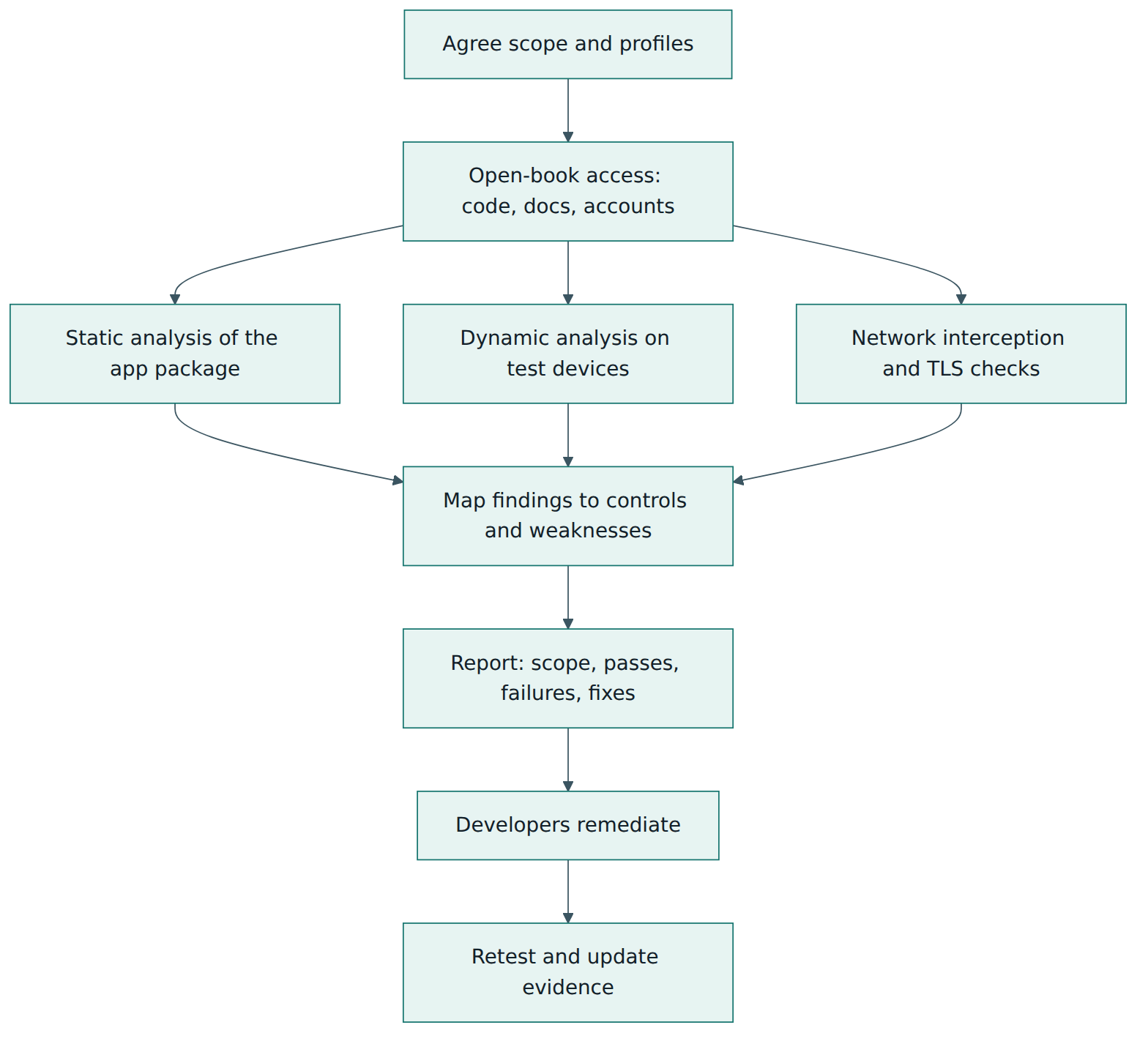
The standard recommends an open-book review. Testers receive the app builds, source code, documentation and design artefacts, access to architects and developers, and working accounts for every user role. This lets them check that controls are actually present and correctly designed, rather than guessing from outside. Typical activities are:
- Static analysis – inspecting the app package and source for hard-coded secrets, insecure configuration, weak cryptography, exported components and vulnerable libraries.
- Dynamic analysis – running the app on test devices, including rooted or jailbroken ones where the profile assumes an untrusted operating system, and observing files, logs, memory, IPC and WebView behaviour.
- Network analysis – intercepting traffic through a proxy to confirm encryption, certificate validation and pinning.
- Manual review of design and behaviour – authentication flows, extra authentication for sensitive actions, privacy disclosures and consent handling.
Automated scanners are encouraged for efficiency, but MASVS is explicit that tools alone cannot complete a verification: every app is different, and a tester must understand its architecture, business logic and the frameworks used. Running a tool and forwarding its output is not a MASVS assessment.
What the report must contain
The assessment chapter sets clear expectations for anyone reporting a verification. The report should state the scope, especially any key component left out; summarise the results, including both passed and failed tests; and explain how to fix each failure. Testers are expected to keep working papers: screenshots or recordings, scripts that reproduce issues, proxy logs and notes. In a dispute there should be enough evidence to show that every control claimed as verified was really tested. Because MASVS covers only the client, the report should also say how the back end was handled, for example "the APIs were tested separately against ASVS" or "back end out of scope".
Making and judging claims
A precise claim reads something like: "Version 4.2 of the Android and iOS app was verified against MASVS v2.1.0 using the MAS-L2 and MAS-P profiles by an independent tester in March; two findings remain open with accepted risk; the back-end API was assessed separately." A vague claim such as "our app is MASVS compliant" says nothing about version, profile, scope, method, date or exceptions. When you receive such a claim from a supplier, ask for those details and for the report.
Compliance uses
MASVS is not a law, but it helps organisations meet obligations that are written in general terms. Regulations on health, payment or personal data, and contracts with large customers, often require "appropriate technical measures" for apps. Mapping the selected profile to those obligations, and keeping verification evidence, makes it easier to demonstrate due care. The profile pages themselves point out which kinds of regulation typically matter for health or financial apps, while leaving the legal interpretation to specialists.
Lesson 6 – Worked example
The organisation and the app
Meridian Clinics is a fictional network of outpatient clinics. Its new app, CareLink, runs on Android and iOS and lets patients book appointments, read lab results, chat securely with clinicians, join video consultations and pay invoices by card through a payment provider's SDK. The app uses a WebView to show clinic news and help pages, and includes an analytics SDK and a crash-reporting SDK. The mobile team has eight developers; an external security company will verify the app before launch.
Step 1 – Scope and threat model
The architect runs a threat-modelling workshop with the product owner, a developer from each platform and the privacy officer. They list the assets: health records, chat messages, session tokens, card payment flows and the patient's identity. They list the attackers: malicious apps on the same phone, a thief or family member with the unlocked phone, an attacker on public Wi-Fi, and malware on a rooted device. They note that CareLink has no proprietary algorithms worth stealing and that fraud controls sit on the server. The back-end APIs are owned by another team and will be assessed against ASVS; this is written into the scope.
Step 2 – Choose and tailor profiles
Because the app handles health data and payments, the team picks MAS-L2 plus MAS-P. They discuss MAS-R. Root detection is tempting, but the threat model shows that the critical decisions are made by the server, and blocking rooted devices could lock out some patients using less common Android variants. They decide not to adopt the full R profile; instead the app will warn users on rooted or jailbroken devices and the server will apply stricter session rules for them. The product owner signs this decision record. They also remove tests for features CareLink does not have, such as custom keyboards, and record why.
Step 3 – Turn the profile into backlog items
Each selected requirement becomes a story with its MASVS and MASWE references. Examples:
- Storage (MASVS-STORAGE-1 and -2): cached lab results are encrypted with a key held in Android Keystore or the iOS Keychain; tokens are never written to logs; the local database and cache are excluded from device backups.
- Crypto (MASVS-CRYPTO-1 and -2): use only platform cryptography libraries with modern algorithms; generate keys on the device; no keys or API secrets in the app package.
- Auth (MASVS-AUTH-1 to -3): sign-in uses the standard OAuth 2.0 authorisation code flow with PKCE; biometric unlock releases a keystore key instead of returning a simple flag; paying an invoice or changing the registered email requires fresh authentication.
- Network (MASVS-NETWORK-1 and -2): no cleartext traffic allowed in the platform configuration; certificate pinning for the clinic's own API and chat domains, with a backup pin and a documented rotation procedure; the payment SDK's own endpoints follow the provider's guidance.
- Platform (MASVS-PLATFORM-1 to -3): only the appointment deep link is exposed, and its parameters are validated; the WebView loads only the clinic's help domain, with JavaScript bridges disabled and no file access; screens showing results and chats are hidden in the app switcher and blocked from screenshots.
- Code (MASVS-CODE-1 to -4): minimum supported OS versions set from the platforms' security support; a server-controlled forced-update check; an SBOM and dependency scanning in the pipeline; validation of all data arriving through deep links, push messages and files.
- Privacy (MASVS-PRIVACY-1 to -4): the analytics SDK starts only after consent; location permission is not requested at all; a pseudonymous identifier is used for analytics, separate from the patient ID; app store privacy declarations match actual data flows; users can download and delete their data and withdraw consent in settings.
Step 4 – Build and automate
Developers create a shared secure-storage module and a single network client with pinning configured. The pipeline runs static analysis, a dependency check against known-vulnerability databases, and custom lint rules that fail the build if the Android manifest allows backups of the database or marks components as exported without a reason. Unit tests feed malformed deep links into the router. Pull-request templates ask whether new SDKs or permissions have been added.
Step 5 – Independent verification
The external testers receive both app builds, source access, design documents, the decision record and test accounts for a patient, a clinician and an administrator. Over two weeks they perform static, dynamic and network analysis using MASTG tests for every selected weakness, including runs on a rooted Android phone and a jailbroken iPhone because L2 assumes the OS may be compromised. They find four issues:
- The iOS crash-reporting configuration includes the session token in breadcrumbs written to a log (MASVS-STORAGE-2).
- The analytics SDK sends a device identifier at first launch, before the consent screen appears (MASVS-PRIVACY-1).
- The video consultation library connects to a clinic-owned signalling server without pinning (MASVS-NETWORK-2).
- The help WebView follows a redirect to an external site while still allowing JavaScript (MASVS-PLATFORM-2).
Step 6 – Report, fix and retest
The report lists the scope (app versions, platforms, profiles, the decision not to adopt MAS-R, the back end excluded), every requirement with pass, fail or not applicable, the four findings with reproduction steps and evidence, and recommended fixes. The team fixes all four within a sprint; the testers retest and update the report. Meridian's public security page later states the version tested, the standard version, the profiles, the tester, the date and that the back end was assessed separately against ASVS. It does not claim to be "OWASP certified".
What the example teaches
The value came less from the final test than from the early decisions: a threat model that justified the profiles, a recorded choice about resilience, backlog items that carried traceable identifiers, shared components that solved each problem once, and automation that caught regressions. The independent verification then found the issues that only a skilled human with full access tends to find, such as SDK behaviour before consent.
Lesson 7 – Relationship to other standards and frameworks
MASVS is deliberately narrow: it covers the mobile client and leans on other standards for everything else. Knowing the neighbours helps you build a complete picture.
| Standard or resource | Owner | What it covers | How it relates to MASVS |
|---|---|---|---|
| OWASP MASTG and MASWE | OWASP MAS project | Mobile weaknesses, tests, techniques, tools and demos | The detailed "how" and "what can go wrong" behind each MASVS control; profiles are maintained here |
| OWASP ASVS | OWASP | Testable security requirements for web applications, APIs and back-end services | Covers the servers the app talks to; a mobile product normally needs MASVS for the app and ASVS for its back end |
| OWASP Mobile Top 10 (2024) | OWASP | Awareness list of the most common mobile risk categories | Explains what tends to go wrong; MASVS states what must be true and can be verified |
| NIST SP 800-163 Rev. 1 | NIST (US) | A process for organisations to vet mobile apps before allowing them on their devices | Describes the vetting process; MASVS and MAS profiles can supply the security requirements that process checks |
| App Defense Alliance MASA | App Defense Alliance (Linux Foundation) | Independent lab assessment scheme for mobile apps | Builds its test specification on MASVS and MASTG; adds its own rules and recognition |
| OWASP SAMM and NIST SP 800-218 (SSDF) | OWASP; NIST | Secure software development practices and maturity | MASVS assumes such a process exists; it measures the product, they measure and guide the process |
| ISO/IEC 27001 | ISO and IEC | Management system for information security across an organisation | An ISMS may select MASVS as the technical requirement set for the mobile apps it develops or buys |
MASVS and ASVS together
The most common confusion is between these two sister standards. ASVS is written for web applications and web services; MASVS for apps installed on a device. Authentication is a good illustration: ASVS verifies that the server enforces login, session expiry and access rules, while MASVS verifies that the app uses the protocol correctly, stores tokens safely and secures local unlocking. Neither alone covers a mobile product. Plan both in the same scope statement.
MASVS and the Mobile Top 10
The Mobile Top 10 lists risk categories such as insecure data storage, insecure communication, inadequate privacy controls and insufficient binary protections. It is excellent for awareness and training, but it is a list of problems, not a specification you can pass or fail. MASVS controls and MASTG tests turn those concerns into verifiable statements. Teams often use the Top 10 to explain why the work matters and MASVS to define and check the work itself.
MASVS and process frameworks
SAMM and the NIST SSDF describe what a development organisation does: training, threat modelling, secure build, testing, vulnerability management. MASVS describes what the resulting mobile app should look like. A team can be mature in SAMM and still ship an app that leaks tokens to logs; MASVS verification would catch that. Conversely, passing a MASVS verification once does not prove that the process will keep producing secure releases.
Regulations and national guidance
Data protection laws such as the GDPR, health and payment rules, and national mobile security guidelines often require appropriate security without naming technical controls. MASVS gives a concrete, openly available way to show what "appropriate" means for the app, and some national guidelines are built directly on it. Legal compliance still needs legal and privacy expertise: MASVS-PRIVACY covers what can be tested in the app, not the lawfulness of the processing.
Common pitfalls and best practices
Pitfalls
- Treating a scanner report as a MASVS assessment. Automated tools find some issues quickly but cannot judge design, business logic, consent flows or many platform interactions. MASVS says tools alone cannot complete a verification.
- Using version 1 material for version 2 work. Old requirement numbers, chapter names and level definitions no longer apply. Always state which MASVS version you are using.
- Choosing profiles by habit. Defaulting to L1 because it is smallest, or demanding L2 plus R for every app, ignores the risk-based selection MASVS expects and wastes effort or leaves risk untreated.
- Using MAS-R as a substitute for real security. Obfuscation and root detection slow attackers down; they do not fix insecure storage, weak authentication or missing server checks.
- Forgetting the back end. MASVS covers the client only. A perfect app talking to an insecure API is still an insecure product.
- Claiming "OWASP certified" or "MASVS certified". OWASP certifies nothing; such claims mislead customers and damage trust.
- Ignoring third-party SDKs. Analytics, advertising and payment SDKs run with the app's permissions and can leak data or collect it before consent.
- Black-box only testing. Withholding code, documentation and test accounts produces slower, shallower results.
Best practices
- Start from a threat model and record which profiles you selected, what you tailored out and why, with business-owner sign-off.
- Keep identifiers everywhere: MASVS control and MASWE weakness IDs in stories, tests and findings, so results stay traceable as documents evolve.
- Use platform features first: keystore and keychain, platform TLS configuration, secure biometric APIs and backup exclusion settings are safer than custom code.
- Build shared security components once and reuse them across screens and both platforms.
- Automate what can be automated: static analysis, dependency checks, configuration lint rules and unit tests in every build.
- Verify open-book, with evidence, on real devices including compromised ones where the profile requires it.
- Govern SDKs and permissions: inventory them, check their data behaviour, and gate them behind consent.
- Re-verify after major changes, new operating system releases and updates to MASVS, MASWE and MASTG.
Summary and key takeaways
- MASVS is OWASP's free, openly licensed standard for the security and privacy of mobile apps on the device; the current release is v2.1.0 from January 2024.
- It has eight control groups (storage, crypto, auth, network, platform, code, resilience, privacy) and 24 short, goal-style controls.
- MASVS states what must be true; MASWE describes the weaknesses that break each control; MASTG explains how to test for them on Android and iOS.
- The former levels are now MAS testing profiles: L1 for every app, L2 for high-risk data and functions, R added for business-asset protection, and P for privacy.
- Profiles should be chosen and tailored from a threat model, with trade-offs between security, cost, usability and privacy decided explicitly.
- OWASP does not certify; good verifications are open-book, use static, dynamic and network analysis, keep evidence and report scope, passes and failures.
- MASVS covers only the client; pair it with ASVS for the back end and with process frameworks such as SAMM or SSDF for the development lifecycle.
Reflection questions
- Pick a mobile app you use or build. Which combination of MAS profiles would you select for it, and what in its data, functions and attackers justifies that choice?
- For the same app, list three ways sensitive data could leak through platform features rather than deliberate storage. How would you prevent and test each one?
- Your product owner asks for root detection "because the bank app has it". How would you explain the benefits, limits and side effects of resilience controls, and what would you decide?
- A supplier says their app "passed MASVS". Write the questions you would ask to understand what was actually verified, by whom and with what scope.
- Which MASVS checks could your build pipeline perform automatically, and which would always need a skilled human tester? Explain why for at least two examples.
Further reading and official sources
- OWASP Mobile Application Security Verification Standard (MASVS) – OWASP MAS project
- MASVS releases and change notes – OWASP on GitHub
- MAS Testing Profiles – OWASP MAS project
- Mobile Application Security Weakness Enumeration (MASWE) – OWASP MAS project
- Mobile Application Security Testing Guide (MASTG) – OWASP MAS project
- OWASP Mobile Top 10 – OWASP Foundation
- NIST SP 800-163 Rev. 1, Vetting the Security of Mobile Applications – NIST
- Mobile Application Security Assessment (MASA) – App Defense Alliance
Original tutorial by xOps School (DevOpsSchool Private Limited), written from public sources about OWASP MASVS. Not affiliated with or endorsed by the standard's owner; standard names are trademarks of their owners. Buy the official standard from its publisher for the authoritative text.