
OWASP Top 10:2025 – Tutorial (about 60 minutes)
- View
The OWASP Top 10 is a free, community-built awareness document that names the ten most critical categories of security risk in web applications. Developers, testers, architects, security teams, auditors and product managers all over the world use it as a shared vocabulary and as the first checklist for secure software. After this tutorial you will be able to explain what each of the ten 2025 categories means, how the list is produced, how to use it across the software lifecycle without over-relying on it, and how it relates to deeper standards such as the OWASP Application Security Verification Standard (ASVS).
Course overview
Edition and status: The current edition is the OWASP Top 10:2025, published by the OWASP Foundation (the Open Worldwide Application Security Project, a non-profit). It is the eighth installment of a list first published in 2003. The 2025 list was released as a release candidate in November 2025, around OWASP Global AppSec USA, for public comment; the release-candidate label was removed from the official project repository and website on 24 December 2025, and it is now the final, current version, replacing the OWASP Top 10:2021. OWASP has not announced a newer edition. The Top 10 has no formal certification scheme. Verified 2026-10-29 against the official OWASP Top 10 project page, the 2025 documentation and the project repository history.
Who this is for: software developers and team leads, QA and test engineers, DevOps and platform engineers, architects, penetration testers starting out, security champions, product owners, and compliance or audit staff who keep hearing phrases such as "we test against the OWASP Top 10" and want to know what that really means. It is also useful for buyers of software and security tools, because many contracts and product sheets mention the list.
Prerequisites: none. A basic idea of how a web application works (a browser talks to a server over HTTP, the server reads and writes a database) helps, but every security term is explained when it first appears. You do not need to write code to follow the lessons.
By the end of this tutorial:
- You will be able to explain what the OWASP Top 10 is for, who publishes it, and why it is an awareness document rather than a complete security standard.
- You will be able to name and describe the ten 2025 categories, from Broken Access Control (A01) to Mishandling of Exceptional Conditions (A10), and say what changed since 2021.
- You will be able to describe how the list is built from contributed testing data, CVE scoring and a community survey.
- You will be able to place Top 10 activities into each phase of a software development lifecycle, from requirements to retirement.
- You will be able to judge claims of "OWASP Top 10 compliance" or "full coverage" and choose a verifiable standard such as ASVS when one is needed.
- You will be able to run a simple Top 10 review of a real application, prioritise the findings and track their fixes.
Lesson 1 – Origins, purpose and scope
Where the list comes from
OWASP began in 2001 as an open community of people who wanted software to be more secure. Its projects are free: documents, testing guides, cheat sheets, tools such as ZAP (originally OWASP ZAP, now run outside OWASP) and Dependency-Check, and teaching applications such as Juice Shop and WebGoat. In 2023 the organisation changed the meaning of its acronym from "Open Web" to "Open Worldwide" to reflect that its work now covers mobile, cloud, APIs and AI as well as classic websites.
The Top 10 is OWASP's best-known project. The first list appeared in 2003, followed by editions in 2004, 2007, 2010, 2013, 2017, 2021 and now 2025. Each edition answers one question: if a team could pay attention to only ten kinds of web application security risk, which ten matter most right now? Over time the answer has shifted. Early editions were dominated by specific bugs such as cross-site scripting and SQL injection. Later editions moved towards root causes, such as weak design, missing access checks and poorly managed third-party components.
What it is for
OWASP describes the Top 10 primarily as an awareness document. Its job is to make busy people notice the most common and most damaging classes of mistake, give everyone the same names for them, and point to deeper guidance. It is written for a broad audience: a developer who has never had security training should be able to read a category and understand what can go wrong, how attackers use it, and what to do about it.
Because it is short, free and widely recognised, the list has become much more than an awareness poster. Organisations use it in secure coding training, in code review checklists, in procurement questionnaires, in penetration test reports and in tool marketing. OWASP itself acknowledges that people treat it as a de facto standard, and it warns that, used that way, it is only the bare minimum and a starting point.
What it is not
- It is not a complete list of every web risk. Ten categories cannot cover everything, and OWASP publishes a "Next Steps" section with further risks that narrowly missed the list.
- It is not a set of testable requirements. Several categories, such as Insecure Design, describe problems that no scanner can find automatically.
- It is not a certification. Nobody can be "OWASP Top 10 certified", and no accredited body audits against it.
- It is not specific to one programming language or framework. Each category groups many weaknesses, and only some of them apply to any given technology stack.
Scope of the 2025 edition
The 2025 list focuses on web applications in the broad sense: browser-based applications, the server-side code and APIs behind them, the configuration of the platforms they run on, and the supply chain that builds and delivers them. Separate OWASP lists cover APIs specifically (the API Security Top 10), mobile apps (the Mobile Top 10) and large language model applications (the Top 10 for LLM Applications). If your product is mainly an API or an AI assistant, you would read those lists alongside this one.
Lesson 2 – Key concepts and vocabulary
The Top 10 uses a handful of terms again and again. Learning them first makes every category easier to understand.
- Application security (AppSec) – the practice of designing, building, testing and operating software so that it resists misuse and protects the data and functions it handles.
- Vulnerability – a specific flaw in a specific product that an attacker can exploit, for example a missing permission check on one page of one version of one application.
- Weakness – a general type of mistake that can lead to vulnerabilities, such as "using a broken cryptographic algorithm". Weaknesses are catalogued by MITRE in the Common Weakness Enumeration.
- CWE (Common Weakness Enumeration) – the public dictionary of weakness types, each with a number such as
CWE-79for cross-site scripting. Every Top 10 category is a group of related CWEs. - CVE (Common Vulnerabilities and Exposures) – the public identifier system for individual, disclosed vulnerabilities in real products, for example
CVE-2021-44228(Log4Shell). CVEs are usually linked to one or more CWEs. - CVSS (Common Vulnerability Scoring System) – a scoring method that rates how severe a vulnerability is, with sub-scores for how easy it is to exploit and how much harm it causes. OWASP uses these sub-scores to rank categories.
- Risk category – one entry in the Top 10, such as A05:2025 Injection. The code combines the position (A05) and the edition year (2025), which is why "A03" means different things in 2021 and 2025.
- Incidence rate – the share of tested applications that had at least one instance of a weakness. It ignores how many times the weakness appeared in each application.
- Threat agent – whoever might attack the application: an opportunistic bot, a criminal group, a malicious insider, a competitor. Different applications face different threat agents.
- Attack surface – all the places where an attacker can interact with a system: pages, APIs, file uploads, admin consoles, build pipelines, third-party scripts.
- Authentication versus authorisation – authentication proves who someone is (logging in); authorisation, also called access control, decides what that person may do once they are known. The Top 10 treats them as separate categories (A07 and A01).
- Trust boundary – a line in a system where data or code moves from a less trusted place to a more trusted one, for example from a user's browser to your server, or from a public package registry into your build.
- Fail closed and fail open – when something goes wrong, a system that fails closed refuses the risky action (deny, roll back); one that fails open lets the action continue as if nothing happened.
- SBOM (Software Bill of Materials) – a machine-readable inventory of all the components, including indirect dependencies, inside a piece of software.
- SAST, DAST and SCA – static application security testing reads source code; dynamic application security testing probes the running application from outside; software composition analysis checks third-party components against vulnerability databases.
- Threat modelling – a structured design activity that asks what can go wrong in a system, how, and what controls are needed, before or while the system is built.
How risk is described
OWASP describes an application security risk as a chain. A threat agent uses an attack vector (a way in) to reach a weakness where a security control is missing or ineffective. If the attack succeeds, it causes a technical impact, such as data being read, changed or destroyed, and that leads to a business impact, such as fines, lost customers or outage costs. The same weakness can be a minor issue for a public brochure site and a severe one for a health-records system, because the threat agents and the business impacts are different.
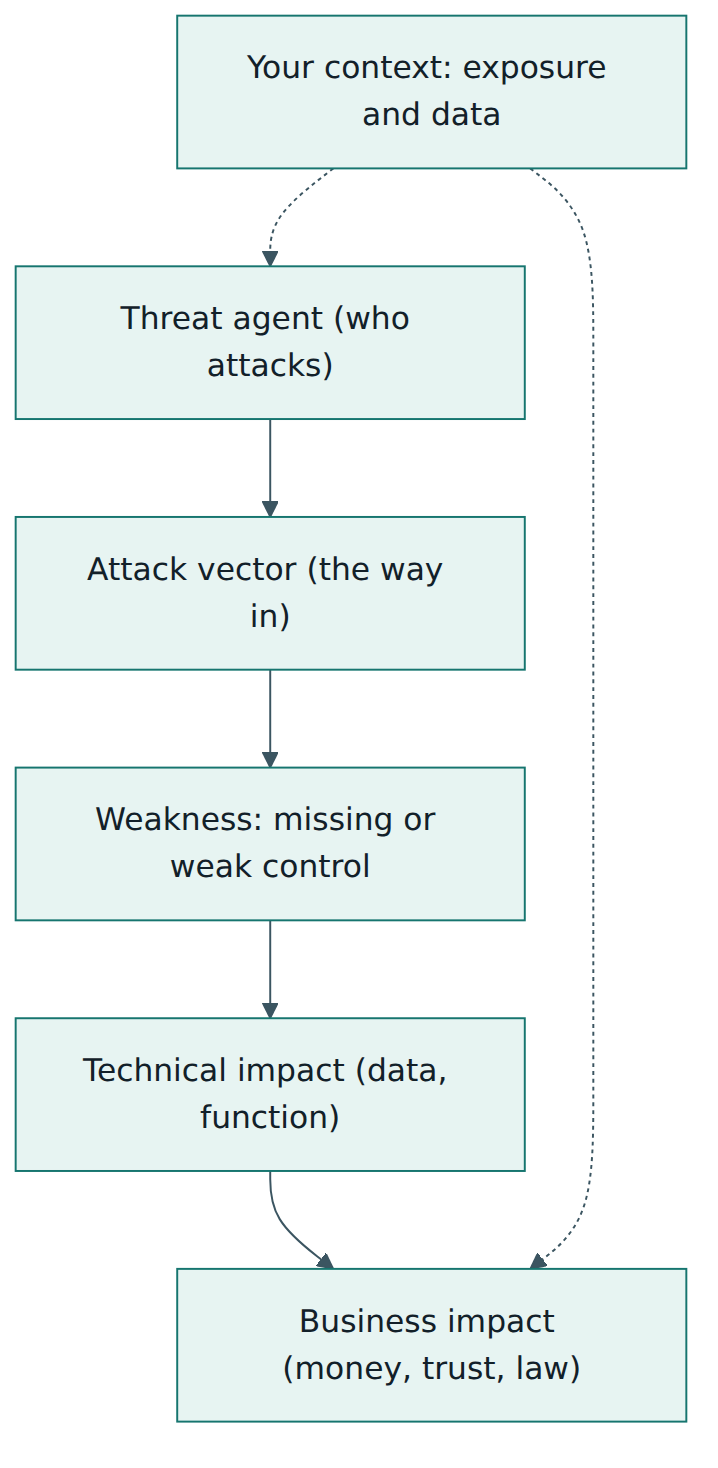
The Top 10 can only estimate the middle of this chain for the whole industry: how often a weakness is found, how exploitable it tends to be and how much technical damage it tends to cause. The two ends, who attacks you and what it costs your business, depend on your own application. That is why every organisation must adapt the list to its context rather than treating the ranking as its own risk register.
Lesson 3 – The ten categories of 2025 and how they are chosen
How the list is built
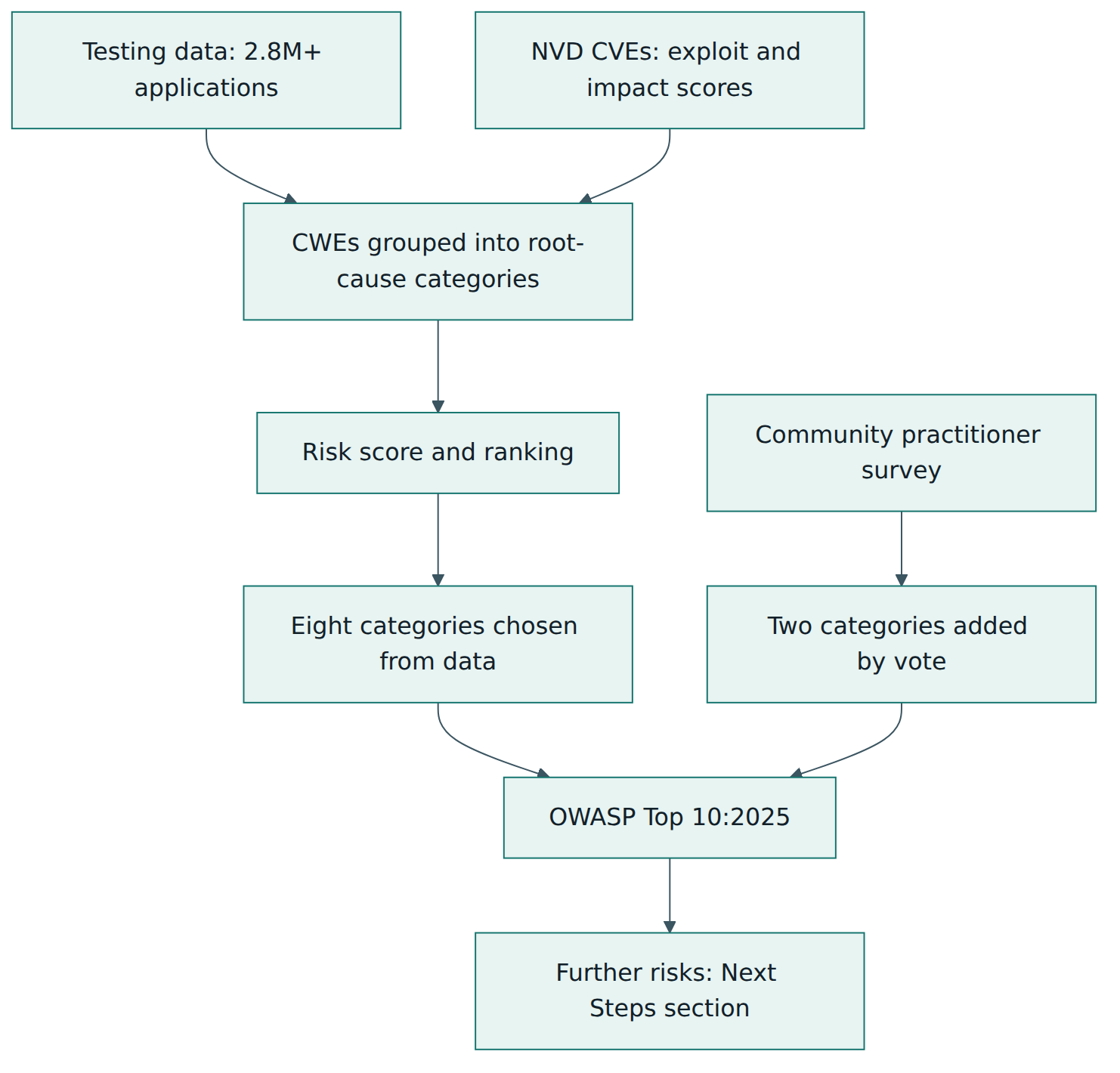
The 2025 edition is described by its authors as data-informed but not blindly data-driven. Three sources of evidence are combined.
- Contributed testing data. Twelve named organisations plus several anonymous donors (security testing vendors, consultancies and bug bounty platforms) supplied results for more than 2.8 million applications. For each weakness they reported how many applications were tested and how many had at least one finding. The dataset covered 589 distinct CWEs, far more than earlier editions.
- Exploit and impact scores from public CVE data. The team extracted about 175,000 CVE-to-CWE records from the US National Vulnerability Database and averaged the CVSS exploitability and impact sub-scores for each CWE. CVSS version 4.0 was not used, because its formula no longer exposes those two sub-scores in the same way.
- A community survey. Testing data always looks backwards: it takes years before a new kind of weakness can be tested automatically at scale. So eight categories are chosen from the data and two places are reserved for risks that practitioners vote for. OWASP's notes indicate that the survey strongly backed Software Supply Chain Failures, and that Security Logging & Alerting Failures, which is hard to test and therefore rare in the data, was again voted onto the list.
CWEs were grouped into categories by root cause where possible ("cryptography was used wrongly") rather than by symptom ("sensitive data was exposed"), because a root cause tells a team what to fix. Each category was capped at 40 CWEs; the ten categories together contain 248 CWEs. A risk score then combined, with different weights, the highest incidence rate, the testing coverage, the average exploit and impact scores and the number of affected applications. Categories that scored lower, such as memory management problems, were left out of the main ten.
The ten categories, explained
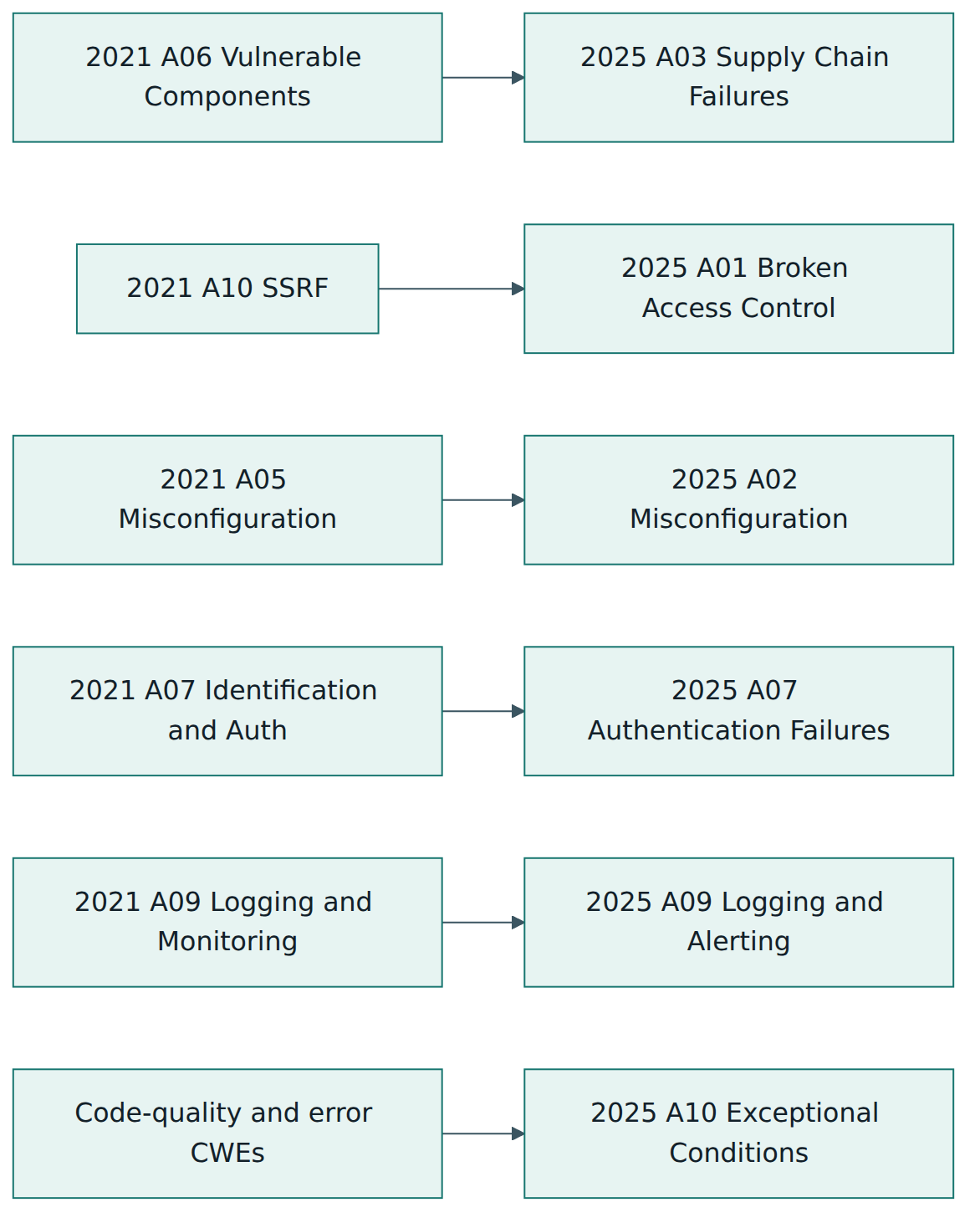
A01:2025 Broken Access Control. The application lets users act outside their intended permissions: reading another customer's invoice by changing an ID in the URL (an insecure direct object reference), calling an admin API as a normal user, tampering with a token or cookie to raise privileges, or loose cross-origin settings that let other websites call the API. Server-side request forgery (SSRF), where an attacker makes the server fetch an internal address on their behalf, was its own category in 2021 and is now part of A01. The core defences are to deny by default, enforce checks in trusted server-side code, tie every record to its owner, centralise the access logic and test it in unit and integration tests.
A02:2025 Security Misconfiguration. A system, application or cloud service is set up insecurely: default accounts left active, unnecessary features and ports enabled, detailed error pages shown to users, missing security headers, storage buckets readable by anyone, or new security features switched off for backward compatibility. It rose from fifth to second place because more and more of an application's behaviour is now controlled by configuration. Defences include a repeatable, automated hardening process, minimal platforms, identical configuration across environments (with different secrets), automated configuration checks and short-lived platform credentials instead of static keys.
A03:2025 Software Supply Chain Failures. This is a new, broader version of the 2021 category about vulnerable and outdated components. It covers anything that goes wrong in the way software is built, distributed or updated: libraries with known vulnerabilities, unmaintained packages, malicious packages, compromised build servers, poisoned IDE extensions, weak control over who can push code to production. It had the fewest occurrences in the data but the highest average exploit and impact scores, and it topped the community survey. Defences include an SBOM, tracking direct and transitive dependencies, continuous monitoring of vulnerability sources, trusted and signed sources, staged roll-outs, separation of duties in the pipeline, and hardening of repositories, developer workstations and CI/CD systems.
A04:2025 Cryptographic Failures. Sensitive data is not protected properly because cryptography is missing, weak or misused: data sent without TLS, outdated algorithms or hash functions, hard-coded or reused keys, poor random number generation, passwords stored with fast hashes, certificates not validated. It fell from second to fourth. Defences start with classifying data so you know what needs protection, then using well-tested libraries, strong current protocols, authenticated encryption, proper key management, slow salted password hashing functions, and not storing sensitive data at all when you do not need it. OWASP also asks high-risk systems to prepare for post-quantum cryptography.
A05:2025 Injection. Untrusted input reaches an interpreter, such as a SQL database, an operating system shell, an LDAP directory or the browser, and the interpreter executes part of it as a command. Cross-site scripting (XSS), where attacker-controlled script runs in another user's browser, belongs here and accounts for a very large number of CVEs; SQL injection is less frequent but usually more damaging. The main defence is to keep data separate from commands: parameterised queries, safe APIs and context-aware output encoding, with positive input validation as an extra layer. Prompt injection against language models is a related idea covered by the OWASP LLM list.
A06:2025 Insecure Design. The weakness is in the design itself, not in a coding slip: a control that was never designed, or one designed so that it cannot work. A perfect implementation of an insecure design is still insecure. Examples include a password-recovery flow based on guessable questions, a booking system with no limit on how many items one customer can reserve, or tenants sharing data without isolation. It moved from fourth to sixth because Security Misconfiguration and Software Supply Chain Failures overtook it, and OWASP notes noticeable industry improvements in threat modelling and secure design since 2021. Defences are a secure development lifecycle, threat modelling of critical flows, secure design patterns and "paved road" components, security stories in the backlog and tests for misuse cases.
A07:2025 Authentication Failures. The system can be tricked into accepting someone who is not the real user. Typical causes are allowing automated password guessing and credential stuffing (trying usernames and passwords leaked from other sites), weak or breached passwords, weak recovery processes, missing multi-factor authentication (MFA), session identifiers exposed in URLs or not renewed after login, and tokens that are not invalidated at logout. The 2021 name, "Identification and Authentication Failures", was shortened. Defences include MFA, checking new passwords against breached-password lists, generic error messages that do not reveal whether an account exists, throttling, secure server-side session management and using well-tested identity systems rather than writing your own.
A08:2025 Software or Data Integrity Failures. (In 2021 the name was "Software and Data Integrity Failures".) Code or data is trusted without checking that it is genuine and unchanged: auto-updates downloaded without signature checks, scripts loaded from a third-party content delivery network without integrity checking, plugins from untrusted sources, or serialised objects accepted from a client and turned back into live objects. It overlaps with A03 but sits at a lower level: A03 is about the whole supply chain, while A08 is about a specific trust boundary where integrity is assumed instead of verified. Defences are digital signatures, trusted repositories, review of code and configuration changes, a segregated pipeline and integrity checks on any data that crosses from an untrusted client.
A09:2025 Security Logging & Alerting Failures. Attacks happen but nobody notices in time. Important events such as logins, failed logins, access-control failures and high-value transactions are not logged, logs are not protected or kept long enough, nothing watches them, or alerts are missing, ignored or drowned in false positives. The 2021 name ended with "Monitoring"; the change to "Alerting" stresses that good logs without alerts that trigger a response have little value. Defences include logging every security control's success and failure with enough context, a consistent machine-readable format, encoding log data, tamper-resistant audit trails, alert use cases with playbooks, honeytokens (decoy records that no legitimate user touches) and an incident response plan.
A10:2025 Mishandling of Exceptional Conditions. This new category is about what software does when something unusual happens: a missing parameter, a full disk, a network timeout, a null value, an unexpected privilege error. If the program does not prevent, detect and respond to such conditions properly, it may crash, leak sensitive details in error messages, leave transactions half finished, or fail open and skip a security check. Defences include catching errors where they occur, rolling back incomplete transactions, failing closed, a global exception handler as a safety net, consistent error handling across the organisation, strict input validation, and limits such as rate limits and quotas so that nothing is unbounded.
Reading a category page
Every category on the OWASP site follows the same layout, which makes it easy to use as a teaching unit. A background section explains why the category is where it is. A score table gives the number of mapped CWEs, incidence rates, testing coverage, average exploit and impact scores, total occurrences and total related CVEs. A description lists typical ways an application is vulnerable. A "How to prevent" section gives defensive guidance. Example attack scenarios show the weakness in action, and the page ends with references and the full list of mapped CWEs. When you train a team, the description and scenarios are the best starting point; when you configure tools or write test cases, the CWE list is the useful part.
Beyond the ten: Next Steps
The 2025 document also contains a Next Steps section describing further risks that did not make the main list but deserve attention: lack of application resilience, memory management failures (mainly relevant to languages such as C and C++), and inappropriate trust in AI-generated code, sometimes called "vibe coding". These are a reminder that the Top 10 is a floor, not a ceiling.
Lesson 4 – Using the Top 10 in practice
Knowing the ten categories is useful; changing how software is built is what reduces risk. OWASP's own advice is that the best way to avoid these risks is a proper application security programme, and the 2025 document gives a practical outline for building one. This lesson turns that advice into steps a team can follow.
Step 1 – Know your portfolio and its risk
Start by listing your applications and APIs and rating each by the data it handles, how exposed it is (internet-facing or internal) and what the business would lose if it were attacked. Use one consistent risk rating model so that applications can be compared; OWASP offers a free risk rating methodology for this. Record the result in your inventory or configuration management database. A public marketing site and a payment API should not receive the same level of testing.
Step 2 – Build a foundation
Write a short set of security policies and standards that all teams follow, and provide reusable security controls (an authentication service, an authorisation library, an approved crypto wrapper, a logging library) so that teams do not reinvent them. Provide role-specific training. The Top 10 is ideal entry-level training material; developers who need more depth can move on to the OWASP Cheat Sheet Series, the Proactive Controls and hands-on labs such as Juice Shop and WebGoat.
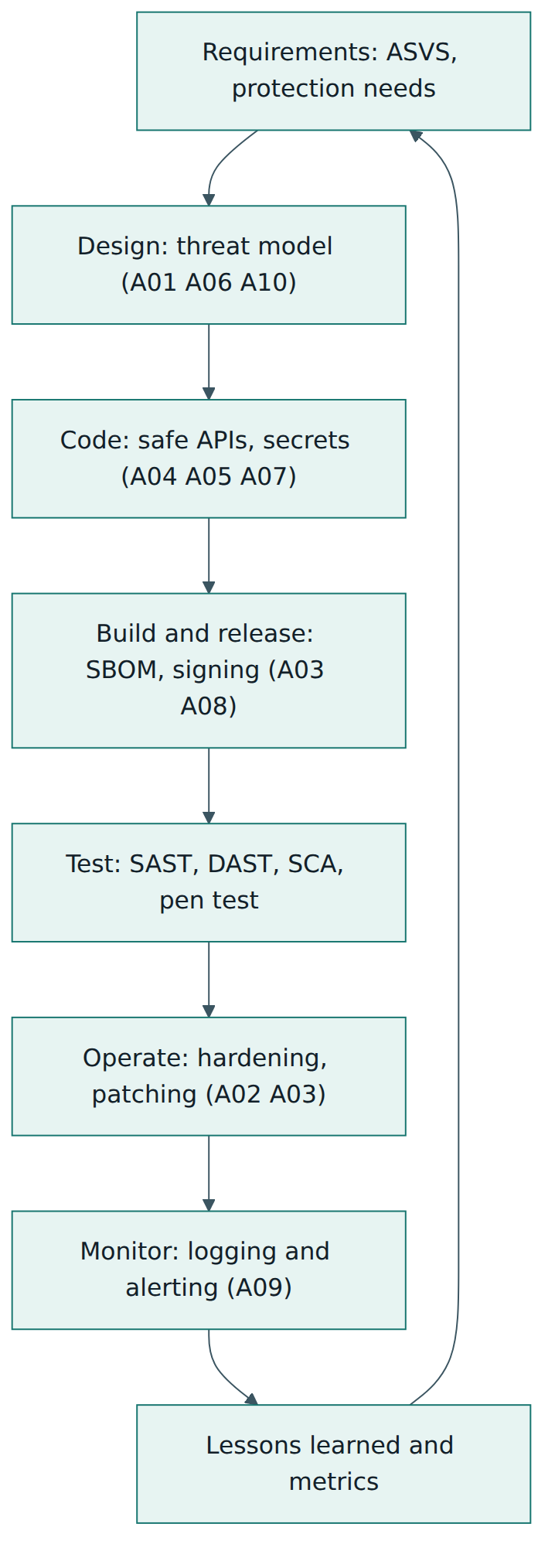
Step 3 – Put security into each phase of the lifecycle
The Top 10 categories map naturally onto lifecycle phases. Requirements should state protection needs and use ASVS as the source of security requirements. Design should include threat modelling for critical flows (A06), access-control design (A01) and error-handling design (A10). Coding should rely on safe libraries and frameworks (A05, A04, A07), with secrets kept in a secrets manager rather than in code. Building and releasing should include dependency scanning, an SBOM and signed artefacts (A03, A08). Testing should combine SAST, DAST, SCA, manual review and, for higher-risk systems, penetration testing. Operations should cover configuration hardening (A02), patching (A03), and logging with alerting and incident response (A09). Retirement should remove accounts, archive what must be kept and wipe the rest.
Step 4 – Make the secure way the easy way
A recurring theme in the 2025 guidance is the "paved road": secure defaults and ready-made components that make the easiest option also the safest one. If the standard project template already includes a parameterised data-access layer, a central authorisation check, security headers and structured logging, most teams will avoid several categories without thinking about it. Guardrails, such as pipeline checks that block a build with a critical vulnerable dependency or a public storage bucket, catch the rest.
Step 5 – Measure and improve
Track a small set of metrics: the share of applications covered by each testing activity, the number of open findings by category and severity, the time taken to fix them against agreed service levels, and repeat findings. Looking at findings by Top 10 category across the portfolio quickly shows systemic problems: if half of all findings are A01, the fix is probably a shared authorisation component and training, not fifty separate patches.
Roles
- Developers use the categories to recognise risky patterns while coding and reviewing.
- Architects lead threat modelling and choose secure patterns, especially for A01, A06 and A10.
- Security champions (developers with extra security training who sit in product teams) spread the knowledge and triage findings.
- Testers and penetration testers design test cases around the categories and report findings with their category code.
- Platform and operations teams own hardening, patching, secrets and the logging pipeline.
- Managers and product owners fund the work, accept or reject residual risk and make room in the backlog for fixes.
When you already have a programme
If an organisation already runs an application security programme, OWASP suggests measuring its maturity with a model such as OWASP SAMM (Software Assurance Maturity Model) or the DevSecOps Maturity Model, which are far broader than the Top 10 and help decide where to invest next. The Top 10 then becomes one input among many rather than the whole plan.
Lesson 5 – Assessment, compliance and coverage claims
There is no certification
No organisation, product or person can be certified against the OWASP Top 10. OWASP does not run an assessment scheme, does not accredit auditors and does not endorse vendors. When a report or contract says that an application "complies with" or "was tested against" the Top 10, it simply means someone checked for the kinds of weakness in the ten categories. How thoroughly they checked can vary enormously, so you should always ask what was tested, with which methods and against which detailed requirements.
Why "full coverage" is not possible
The 2025 document is blunt about this: OWASP discourages any claim that a tool fully covers the Top 10, because it is simply not true. Some categories are well suited to automated testing; others are not:
- Injection (A05) and many cryptographic (A04) and misconfiguration (A02) issues can often be found by SAST, DAST and configuration scanners.
- Supply chain problems (A03) involving known vulnerable components can be found by SCA tools, but a malicious package or a compromised build server usually cannot.
- Broken access control (A01) needs knowledge of the business rules: a tool cannot know that user B should not see user A's invoice unless someone tells it.
- Insecure design (A06) is largely beyond the reach of testing; it is found through design review and threat modelling.
- Logging and alerting (A09) can only really be verified by interviews, reviewing log samples and checking how real incidents or test attacks were detected and handled.
Using ASVS when you need a verifiable standard
When an organisation needs something it can test against and contract for, OWASP recommends the Application Security Verification Standard (ASVS) instead. ASVS is a catalogue of specific, verifiable security requirements organised into chapters, with three levels of assurance: Level 1 for a basic baseline, Level 2 for most applications that handle sensitive data, and Level 3 for the most critical systems. The current version, ASVS 5.0, was released in 2025. OWASP's comparison is simple: the Top 10 is the right tool for awareness and entry-level training, while ASVS is the right tool for coding standards, code review checklists, test plans, tool support and secure supply chain requirements. OWASP goes further and calls ASVS "the only acceptable choice for tool vendors" who want to describe what their tool verifies.
How a Top 10-based review is usually done
- Scope. Agree which applications, environments, APIs and user roles are in scope, and what is out of scope.
- Method. Combine automated scanning (SAST, DAST, SCA, configuration and secrets scanning) with manual testing, code review and design review. Interviews cover logging, alerting and incident handling.
- Criteria. Use ASVS requirements (at the agreed level) as the detailed checklist, and the Top 10 categories as the reporting structure that non-specialists understand.
- Findings. Record each finding with its category code, the CWE where possible, the evidence, a severity based on your own risk model, and a recommended fix.
- Remediation and retest. Fix, verify the fix, and track recurring categories at portfolio level.
Compliance context
Some regulations, industry standards and customer contracts mention the OWASP Top 10, or ask for protection against "common web application vulnerabilities". In practice, auditors and customers usually accept evidence that a secure development process exists and that relevant testing is done; they rarely expect the Top 10 alone to be the complete control set. When you answer a security questionnaire, describe what you actually do (for example "ASVS Level 2 requirements, SAST in every pull request, annual penetration test reported by Top 10 category") rather than claiming blanket compliance.
Reading a vendor claim
When a scanner, firewall or testing service says it "covers the OWASP Top 10", ask three questions. Which CWEs in each category does it actually detect or block? Which categories does it not address at all (usually A06 and A09, often much of A01)? And what evidence, such as test results against known vulnerable applications, supports the claim? A credible vendor will answer these openly.
Lesson 6 – Worked example: a Top 10 review at a booking platform
The organisation
Lakeside Bookings is a fictional company of 60 people that sells an online appointment-booking service to small clinics and salons. Its product has a web front end, a REST API, a PostgreSQL database, an object-storage bucket for uploaded documents, and a CI/CD pipeline that builds containers and deploys them to a public cloud. Customers' patients book appointments, receive reminders and sometimes pay deposits through a payment provider. After a larger clinic group asks in a tender for "evidence of protection against the OWASP Top 10", the head of engineering, Priya, decides to run a structured review rather than simply reply "yes".
Step 1 – Scope and context
Priya lists the assets: the booking web app, the public API used by a partner calendar integration, the admin console used by Lakeside staff, the pipeline and the cloud account. She rates the booking app and API as high risk (personal and some health-related data, internet-facing, payments), the admin console as high risk (powerful functions), and the marketing site as low risk. She chooses ASVS Level 2 as the detailed requirement set for the high-risk components and decides to report results by Top 10 category so that the sales team and the customer can follow them.
Step 2 – Gather evidence
The team runs SAST on the main repository, SCA on all dependency manifests, DAST against a staging copy, and a cloud configuration scanner on the production account. A security champion, Marco, and an external tester spend three days on manual testing focused on access control and business logic. Priya holds a two-hour threat-modelling workshop for the booking and payment flows, and interviews the on-call lead about logs and alerts.
Step 3 – Findings by category
| Category | Finding | Fix chosen |
|---|---|---|
| A01 Broken Access Control | Changing the numeric appointment ID in an API call returns another clinic's appointment. | Central ownership check in the data-access layer; tenant ID enforced on every query; tests for cross-tenant access. |
| A02 Security Misconfiguration | The document bucket allows public listing; the API returns stack traces on errors. | Block public access at account level; generic error responses; configuration checks in the pipeline. |
| A03 Software Supply Chain Failures | Two libraries with known critical vulnerabilities; no SBOM; one developer can push straight to production. | Upgrade libraries; generate an SBOM per build; require a second reviewer for production releases. |
| A04 Cryptographic Failures | An old admin table stores passwords as unsalted fast hashes. | Move admins to the main identity provider; rehash with a slow, salted password hashing function. |
| A05 Injection | A report filter builds SQL by joining strings with user input. | Parameterised query with an allow-list for sortable column names. |
| A06 Insecure Design | Nothing stops a script from holding every free slot with unpaid bookings. | Per-customer booking limits, deposits for peak slots and expiry of unpaid holds. |
| A07 Authentication Failures | Admin console has no MFA; login page reveals whether an email address exists. | MFA for all staff; identical messages for every failed login; throttling. |
| A08 Software or Data Integrity Failures | A chat widget script is loaded from a third-party CDN with no integrity check. | Self-host the script or add an integrity hash; review third-party scripts quarterly. |
| A09 Security Logging & Alerting Failures | Failed logins and access-control denials are not logged; nobody is alerted to bursts. | Structured security events sent to the central log platform; alerts with a short playbook. |
| A10 Mishandling of Exceptional Conditions | If the payment provider times out, the booking is confirmed anyway. | Fail closed: hold the booking as pending, retry, and cancel if payment is not confirmed. |
Step 4 – Prioritise
Priya does not fix the findings in Top 10 order. She uses Lakeside's own risk model. The cross-tenant data leak (A01) and the public bucket (A02) are fixed within 48 hours because they expose personal data to anyone on the internet. The vulnerable libraries (A03), SQL injection (A05), payment fail-open (A10) and missing admin MFA (A07) follow within two weeks. The design issue (A06), logging (A09) and the remaining items go into the next two sprints with named owners.
Step 5 – Fix the system, not only the bug
Two findings point to deeper causes. The access-control bug existed because each endpoint did its own checks; Lakeside replaces them with one shared authorisation component and adds a pipeline test that tries every endpoint with a second tenant's credentials. The payment problem existed because nobody had designed for failure; the team adds "what happens if this dependency fails or is slow?" to its threat-modelling template and its definition of done. These changes make the same mistakes much less likely in new features.
Step 6 – Report honestly
Priya's answer to the tender does not say "we are OWASP Top 10 compliant". It says that Lakeside follows a secure development process with ASVS Level 2 as the requirement baseline, runs SAST, SCA and configuration checks on every build, performs annual manual testing with results reported by Top 10 category, and fixed all high-severity findings from the latest review within agreed timescales. She attaches a summary table and offers the full report under a non-disclosure agreement. The clinic group's security officer finds this far more convincing than a one-word "yes".
What the example shows
The Top 10 gave Lakeside a structure for looking at its whole application and a language its sales team and customer understood. ASVS supplied the detailed requirements, the company's own risk model set the priorities, and threat modelling caught the design and error-handling problems that no scanner would have found.
Lesson 7 – Relationship to other standards and frameworks
The OWASP Top 10 sits in a family of related documents. Knowing which one to reach for saves time and avoids misusing the Top 10 for jobs it was not designed to do.
| Document | Owner | What it is | How it relates to the Top 10 |
|---|---|---|---|
| OWASP ASVS | OWASP | Detailed, testable security requirements in three assurance levels. | The verifiable standard OWASP recommends when the Top 10 is not enough; use it for requirements, reviews and tests. |
| OWASP Proactive Controls | OWASP | A short list of defensive techniques for developers. | The "what to build" counterpart to the Top 10's "what goes wrong". |
| OWASP Cheat Sheet Series | OWASP | Concise how-to guides on specific topics such as password storage or threat modelling. | Practical fixes for each category; most category pages link to them. |
| OWASP API Security Top 10 | OWASP | Awareness list of the main API-specific risks. | Read it alongside the Top 10 for API-heavy systems; it splits authorisation problems into object, property and function levels. |
| OWASP Top 10 for LLM Applications | OWASP GenAI Security Project | Awareness list of risks in applications built on large language models. | Covers prompt injection and other AI-specific risks that the web list only mentions. |
| OWASP SAMM | OWASP | Maturity model for a whole software security programme. | Measures and improves the process that prevents Top 10 problems. |
| CWE Top 25 Most Dangerous Software Weaknesses | MITRE / CISA | Ranked list of 25 individual CWEs, derived from CVE data. | Ranks single weaknesses; the Top 10 groups many CWEs into broader categories. |
| NIST SP 800-218 (SSDF) | NIST | Secure Software Development Framework: high-level secure development practices. | Describes the organisational practices; the Top 10 helps teams understand which technical risks those practices must address. |
Why categories rather than a list of single weaknesses
People sometimes ask why OWASP does not simply list the ten worst CWEs, as MITRE does with its Top 25. OWASP gives two reasons. First, not every CWE exists in every language or framework, so a list of single CWEs would leave parts of the list irrelevant to many teams. Second, the same kind of problem is often recorded under several different CWEs depending on who reports it. Grouping related CWEs into categories gives a stable, teachable set of ideas while still letting teams drill down to the specific weaknesses relevant to their stack.
Fitting into management system standards
Organisations with an information security management system, for example one certified to ISO/IEC 27001, usually need a secure development control and evidence of secure coding and security testing. The Top 10 can be cited in their secure coding standard and training material, and ASVS can provide the testable requirements, but neither replaces the management-system processes of risk assessment, policy, internal audit and management review. The same applies to frameworks such as NIST CSF 2.0: the Top 10 informs technical work inside functions such as Identify, Protect and Detect, rather than serving as a framework of its own.
Common pitfalls and best practices
Common pitfalls
- Treating the list as complete. Teams that only look for ten categories miss business logic flaws, resilience problems, memory safety issues and AI-specific risks.
- Claiming "Top 10 compliance". There is no scheme to comply with; such claims mislead customers and give a false sense of safety.
- Trusting a tool to cover everything. Scanners help with some categories but cannot judge access rules, design flaws or whether anyone responds to alerts.
- Using the ranking as your own priority order. The ranking reflects the industry as a whole; your fixes should follow your own risk model and context.
- Confusing edition codes. "A03" meant Injection in 2021 and means Software Supply Chain Failures in 2025; always write the year with the code.
- Fixing symptoms one by one. Patching each injection or access bug separately, without a shared safe component, guarantees repeat findings.
- Logging without alerting. Collecting logs that nobody watches gives evidence after a breach but no warning during one.
Best practices
- Use the Top 10 for awareness and ASVS for requirements. Teach with the categories; specify, build and test against ASVS at a level that fits the risk.
- Threat-model critical flows early. Design reviews catch A01, A06 and A10 problems that testing finds late or never.
- Build paved roads. Shared, secure-by-default components for authentication, authorisation, data access, crypto and logging remove whole categories at once.
- Know your supply chain. Keep an SBOM, monitor dependencies continuously, protect the pipeline and require review before production.
- Design for failure. Decide in advance how each important flow behaves on errors and timeouts, and make it fail closed.
- Report by category, prioritise by risk. Use category codes with the year for clear communication, and your own risk rating for the order of work.
- Measure trends. Track findings by category across all applications to spot systemic weaknesses and invest where they recur.
Summary and key takeaways
- The OWASP Top 10:2025 is the current edition of OWASP's free awareness list of the ten most critical web application security risk categories; it replaced the 2021 edition and has no certification scheme.
- The ten 2025 categories are Broken Access Control, Security Misconfiguration, Software Supply Chain Failures, Cryptographic Failures, Injection, Insecure Design, Authentication Failures, Software or Data Integrity Failures, Security Logging & Alerting Failures, and Mishandling of Exceptional Conditions.
- Since 2021, supply chain risk has been broadened into a new A03, SSRF has been merged into A01, a new A10 covers error and exception handling, and three categories have been renamed (A07, A08 and A09).
- Each category is a group of related CWEs chosen by root cause; eight categories come from ranked testing and CVE data and two from a practitioner survey.
- The list works best as a shared vocabulary and training base; OWASP calls it the bare minimum when used as a coding or testing standard.
- No tool can fully cover the Top 10; access control, insecure design and logging need human review, threat modelling and interviews.
- For verifiable requirements, use ASVS; for programme maturity, use SAMM; for API and AI systems, add the corresponding OWASP lists.
- A good Top 10 review reports by category, prioritises by your own risk, and fixes root causes through shared secure components.
Reflection questions
- Pick an application you know. Which three of the ten 2025 categories do you think pose the greatest risk to it, and why might your answer differ from the official ranking?
- Your company's sales team wants to tell customers that the product is "OWASP Top 10 compliant". What would you say instead, and what evidence would you offer?
- Which parts of your current development process would detect a Broken Access Control flaw before release, and which would miss it?
- Describe one important flow in a system you work on. What happens if a dependency in that flow fails or times out, and does it fail open or closed?
- If you had budget for only one improvement to your software supply chain this quarter, what would it be, and which Top 10 categories would it help with?
Further reading and official sources
- OWASP Top 10:2025 (full document) – OWASP Foundation
- OWASP Top Ten project page – OWASP Foundation
- OWASP Top 10 source repository – OWASP Foundation on GitHub
- OWASP Application Security Verification Standard (ASVS) – OWASP Foundation
- OWASP Cheat Sheet Series – OWASP Foundation
- OWASP Top 10 Proactive Controls – OWASP Foundation
- CWE Top 25 Most Dangerous Software Weaknesses – MITRE
- SP 800-218 Secure Software Development Framework (SSDF) – NIST
Original tutorial by xOps School (DevOpsSchool Private Limited), written from public sources about OWASP Top 10:2025. Not affiliated with or endorsed by the standard's owner; standard names are trademarks of their owners. Buy the official standard from its publisher for the authoritative text.