
CIS Critical Security Controls v8.1 – Tutorial (about 60 minutes)
- View
The CIS Critical Security Controls (usually shortened to the CIS Controls) are a free, prioritised set of defensive actions that help an organisation stop or limit the most common cyber attacks. They are maintained by the Center for Internet Security (CIS), a non-profit organisation, and are used by small businesses, schools, hospitals, local governments and large enterprises as a practical security baseline. After this tutorial you will be able to explain how the 18 Controls and their Safeguards are organised, choose a starting Implementation Group, plan and measure an implementation, and connect the Controls to frameworks such as NIST CSF 2.0 and ISO/IEC 27001.
Course overview
Edition and status: The current version is CIS Critical Security Controls Version 8.1 (v8.1), published by the Center for Internet Security in June 2024 as an iterative update to Version 8, which was released in May 2021. Version 8.1 keeps the same 18 Controls, 153 Safeguards and three Implementation Groups as Version 8; it adds a "Govern" security function aligned with NIST CSF 2.0, revises the asset classes, expands the glossary and clarifies some Safeguard descriptions. No newer version has been published: CIS's Controls pages still present v8.1 as the latest version. CIS has said publicly that it is working on ideas for Version 9, but no release date has been announced, so v8.1 is the version to learn and use. The document is free to download and is licensed under Creative Commons Attribution-NonCommercial-NoDerivatives 4.0. Verified 2026-10-29.
Who this is for: system administrators, cloud and DevOps engineers, IT managers, security analysts, auditors, compliance officers and managers of small organisations who have been asked to "align with the CIS Controls" or who need a realistic, prioritised starting point for a security programme. It is also useful for anyone answering a customer security questionnaire or a cyber-insurance application, because many of the questions asked there map closely onto CIS Safeguards.
Prerequisites: none. A general familiarity with everyday IT (laptops, servers, user accounts, email, backups, cloud services) helps, but every security term is explained when it first appears.
By the end of this tutorial:
- You will be able to explain why the CIS Controls exist, where they came from and what problem prioritisation solves.
- You will be able to describe the structure of v8.1: 18 Controls, 153 Safeguards, asset classes and the six security functions.
- You will be able to explain the three Implementation Groups and decide which one an organisation should target first.
- You will be able to outline a practical implementation cycle, including roles, documents and the evidence each step produces.
- You will be able to describe how CIS Controls adoption is assessed and measured, and explain why there is no CIS certificate for organisations.
- You will be able to apply the Controls to a realistic mid-sized organisation and recognise common implementation mistakes.
- You will be able to relate the CIS Controls to NIST CSF 2.0, ISO/IEC 27001, CIS Benchmarks and other frameworks.
Lesson 1 – Origins, purpose and scope
The problem the Controls solve
Security teams are rarely short of advice. Laws, regulations, vendor white papers, industry frameworks and auditors all produce lists of things an organisation "should" do, and many of those lists contain hundreds of items. For a small IT team, that abundance is paralysing: if everything is important, nothing is. The people who started the CIS Controls asked a sharper question. Given what attackers actually do in real incidents, which defensive actions give the most protection for the effort spent, and in what order should an organisation take them?
The answer is a short, ranked set of actions written for practitioners. Each action is concrete enough that an engineer can implement it and a manager can check whether it has been done. The guiding idea is often summarised as "offense informs defense": the content is chosen and reviewed by people who analyse real attacks, respond to incidents and test defences, and it is revised as attack techniques change. The Controls are not meant to cover every possible risk. They focus on the attacks that hit most organisations most often, such as phishing, ransomware, exploitation of unpatched software, stolen or reused passwords and misconfigured systems.
A short history
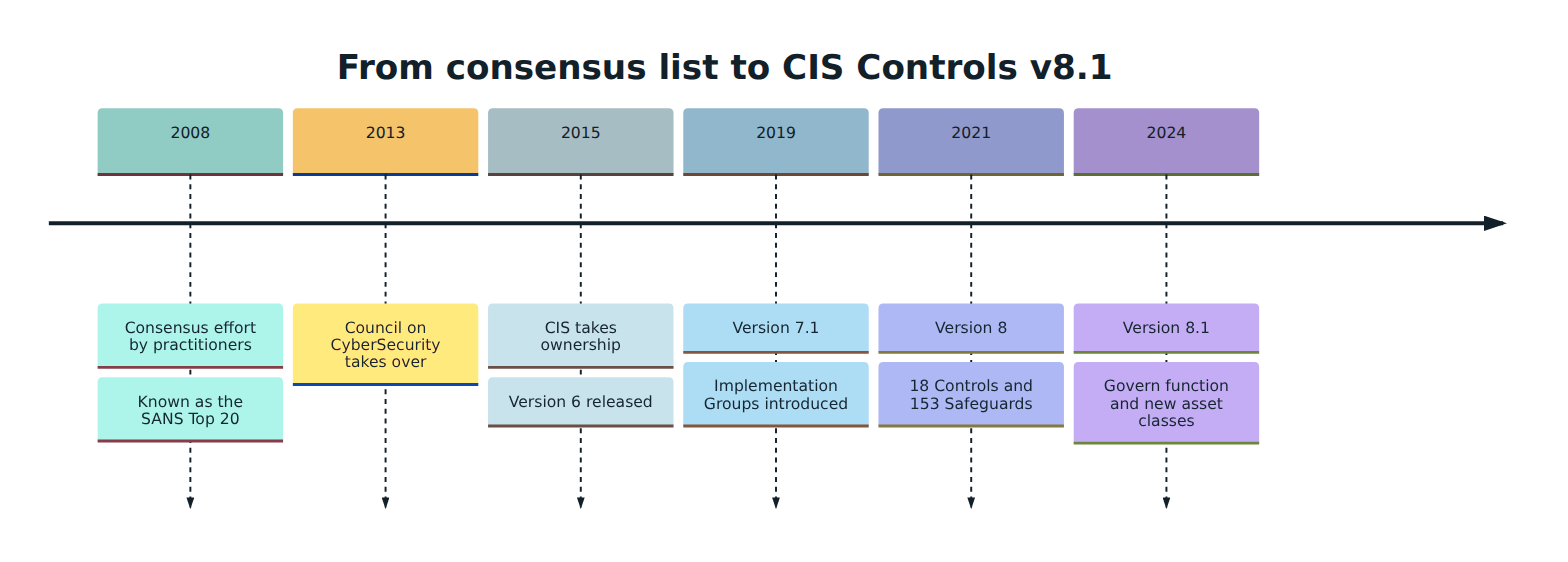
The Controls began in 2008 as a grassroots, consensus effort by security practitioners from government, industry and academia. Early versions were widely known as the SANS Top 20 or the SANS Critical Security Controls, because the SANS Institute helped publish and promote them. In 2013 stewardship passed to the Council on CyberSecurity, and in 2015 the Center for Internet Security took ownership and released Version 6 under the CIS name. Version 7 kept the list at 20 Controls, and Version 7.1 introduced Implementation Groups, which changed how organisations decide what to do first.
Version 8, released in May 2021, was a significant redesign. The 20 Controls were consolidated into 18, organised by activity rather than by who manages a device, so that the guidance would fit cloud services, remote work and outsourced IT. The detailed actions, previously called sub-controls, were renamed Safeguards. Version 8.1, released in June 2024, is deliberately a small update: CIS describes its design principles for the revision as context, clarity and consistency, which in practice means better definitions and examples while keeping the Controls stable for existing users. No Implementation Group assignments were changed and the intent of every Safeguard stayed the same.
Purpose and scope
The purpose of the CIS Controls is to give any organisation a prioritised, measurable path to a defensible security posture. Three ideas sit behind that purpose.
- Prioritisation. Not every Safeguard is equally urgent. The Implementation Groups tell an organisation which Safeguards to do first given its size, resources and risk.
- Measurability. Safeguards are written as actions whose presence can be checked, often with a stated frequency, such as "run weekly, or more frequently" or "review annually". That makes progress something you can report rather than something you have to assert.
- Community. CIS stresses that the list itself is only part of the value. Much of the value lies in the ecosystem around the list: mappings to other frameworks, assessment tools, companion guides, configuration benchmarks and the shared experience of many adopters.
The scope is the whole enterprise's technology environment: on-premises systems, cloud services, remote and mobile devices, network equipment, software, data, user accounts and the service providers that handle the organisation's data. Physical, virtual and cloud assets are all in scope. CIS publishes companion guides that explain how to apply the Controls in particular environments, including cloud, mobile devices, the Internet of Things and industrial control systems.
It is just as important to know what the CIS Controls are not. They are not a law or a regulation, although some laws and regulators point to them as an example of reasonable security. They are not a management system standard like ISO/IEC 27001, so they do not prescribe how to run leadership reviews or internal audits. They are not a product, and no vendor tool "implements the CIS Controls" on its own. Finally, they are not a detailed configuration guide; that is the job of the separate CIS Benchmarks, which the Controls reference.
Lesson 2 – Key concepts and vocabulary
The CIS Controls use a small set of words with precise meanings. Version 8.1 expanded its glossary, partly so that words such as "plan", "process" and "sensitive data" are used consistently across all Safeguards. Learn these terms before looking at the structure.
- CIS Control – one of the 18 top-level topics, such as data protection or incident response management. A Control explains an objective and why it matters, but the actual work is described in its Safeguards.
- Safeguard – a specific, checkable action inside a Control, numbered by Control and position (for example, Safeguard 5.3 is the third Safeguard of Control 5). Before Version 8, Safeguards were called sub-controls.
- Implementation Group (IG) – a self-assessed category that tells an organisation which subset of Safeguards to implement, based on its risk profile and resources. There are three: IG1, IG2 and IG3. Each group includes everything in the group before it.
- Essential cyber hygiene – CIS's name for IG1: the foundational Safeguards that every organisation, however small, should apply to defend against the most common, non-targeted attacks.
- Enterprise asset – any device that can store or process data: end-user devices such as laptops and phones, servers, network devices and IoT or non-computing devices, whether physical, virtual or cloud-hosted.
- Asset class – the category of thing a Safeguard acts on. Version 8.1 uses six: Devices, Software, Data, Users, Network and Documentation. Each Safeguard is tagged with the asset class it acts on.
- Security function – the kind of outcome a Safeguard supports, borrowed from the NIST Cybersecurity Framework 2.0: Govern, Identify, Protect, Detect, Respond and Recover. Each Safeguard is tagged with the function it supports.
- Govern – the security function, added to the mappings in v8.1, that covers direction-setting work: policies, documented processes, roles and oversight. Many of the Safeguards that establish and maintain a process are tagged Govern.
- Sensitive data – data that must be kept confidential, accurate and available because its unauthorised disclosure, alteration or destruction would harm the organisation, its customers or other people, or would break a contract or regulation.
- Service provider – any external organisation that provides platforms, software or services, such as a managed service provider, a software-as-a-service application or a cloud provider. Control 15 is dedicated to managing them.
- Policy, process, procedure and plan – four kinds of documentation that v8.1 distinguishes. A policy states what must or must not be done; a process describes the general activities that achieve a goal; a procedure gives ordered steps for one task; a plan brings policies, processes and procedures together to put them into effect.
- Allowlisting – permitting only approved software, libraries or scripts to run, and blocking everything else. It is the opposite of trying to list and block every bad program.
- Multi-factor authentication (MFA) – sign-in that requires more than one kind of evidence, such as a password plus a code from an app or a hardware key. Several IG1 Safeguards require MFA for high-risk access.
- CIS Benchmarks – separate, consensus-developed secure configuration guides for specific products (operating systems, cloud platforms, databases and more). The Controls tell you to maintain secure configurations; the Benchmarks show what secure settings look like.
- Community Defense Model (CDM) – CIS's data-driven analysis that maps the most common attack types to MITRE ATT&CK techniques and then measures which Safeguards defend against them. It is the evidence CIS uses to argue that IG1 is worth doing first.
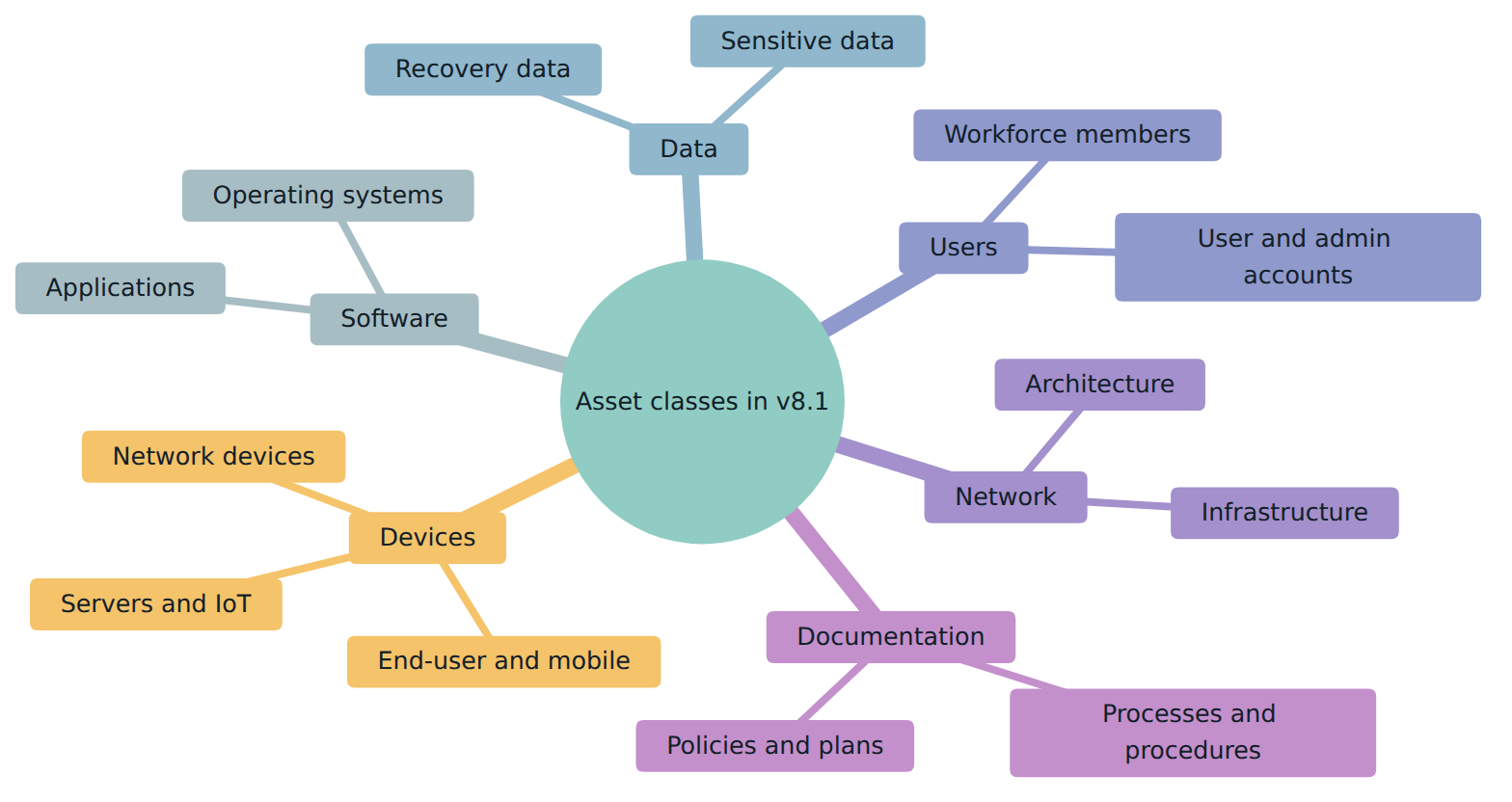
Two of these ideas cause the most confusion for newcomers. First, "Implementation Group" is not a maturity level. A maturity level describes how well something is done; an IG describes which Safeguards are in scope for a type of organisation. An organisation can be in IG1 and do its IG1 Safeguards superbly. Second, "asset class" and "security function" are tags that help you sort and map the Safeguards; they do not change what a Safeguard asks you to do. Their main use is to filter the list, for example to see every Safeguard that applies to user accounts, or to report progress using the NIST CSF functions that executives already know.
Lesson 3 – Structure of the CIS Controls
How each Control is presented
The v8.1 document presents every Control in the same four parts. An overview states the intent of the Control in a sentence or two. A section titled why is this Control critical? explains how attackers take advantage when the Control is missing. A procedures and tools section describes, in general terms, the processes and technologies that help implement and automate the Control. Finally, a Safeguards table lists each action with its number, title, short description, asset type, security function and the Implementation Groups it belongs to.
The 18 Controls
The table below lists the 18 Controls with the number of Safeguards in each and how many of those Safeguards belong to IG1. The titles are the published Control names; the descriptions are summaries in this course's own words.
| No. | Control | What it is about (summary) | Safeguards | In IG1 |
|---|---|---|---|---|
| 1 | Inventory and Control of Enterprise Assets | Know every device connected to your environment and deal with unknown ones. | 5 | 2 |
| 2 | Inventory and Control of Software Assets | Know what software runs, keep it supported and stop unauthorised software. | 7 | 3 |
| 3 | Data Protection | Manage, classify, restrict, retain, encrypt and dispose of data properly. | 14 | 6 |
| 4 | Secure Configuration of Enterprise Assets and Software | Build and maintain hardened settings, firewalls, screen locks and default-account control. | 12 | 7 |
| 5 | Account Management | Track accounts, use unique passwords, remove dormant accounts and separate admin accounts. | 6 | 4 |
| 6 | Access Control Management | Grant and revoke access through defined processes and require MFA where risk is high. | 8 | 5 |
| 7 | Continuous Vulnerability Management | Find, prioritise and fix vulnerabilities, including automated patching. | 7 | 4 |
| 8 | Audit Log Management | Collect, store, protect and review logs that help detect and investigate attacks. | 12 | 3 |
| 9 | Email and Web Browser Protections | Reduce the attack surface of the two tools attackers use most to reach people. | 7 | 2 |
| 10 | Malware Defenses | Prevent and detect malicious code on devices. | 7 | 3 |
| 11 | Data Recovery | Back up data, protect and isolate backups, and prove they can be restored. | 5 | 4 |
| 12 | Network Infrastructure Management | Keep network devices current, securely managed and documented. | 8 | 1 |
| 13 | Network Monitoring and Defense | Monitor traffic, alert centrally and filter or block malicious activity. | 11 | 0 |
| 14 | Security Awareness and Skills Training | Teach the workforce to recognise and report threats and handle data safely. | 9 | 8 |
| 15 | Service Provider Management | Inventory, classify, contract with, assess and monitor third parties. | 7 | 1 |
| 16 | Application Software Security | Build and buy software securely across its life cycle. | 14 | 0 |
| 17 | Incident Response Management | Prepare people and processes to handle and learn from incidents. | 9 | 3 |
| 18 | Penetration Testing | Test defences the way an attacker would and fix what is found. | 5 | 0 |
Several patterns are worth noticing. The first five Controls (assets, software, data, configuration and accounts) are the foundation: you cannot protect, patch or monitor what you have not identified. Training (Control 14) is almost entirely IG1, because teaching people to spot phishing is cheap and effective for any organisation. Data recovery (Control 11) is also mostly IG1, because ransomware recovery depends on it. By contrast, Controls 13, 16 and 18 have no IG1 Safeguards at all: network intrusion detection, a secure software development programme and penetration testing assume specialised staff or tools that a very small organisation is unlikely to have. That does not mean these topics are unimportant; it means a small organisation will get more protection per hour by doing the foundations first.
Implementation Groups
Implementation Groups are the main prioritisation tool. CIS describes each group by the kind of organisation it fits, and each group contains all Safeguards of the groups below it.
- IG1 (56 Safeguards). A small to medium-sized organisation with limited IT and security expertise. Its main concern is staying operational; the data it protects is mostly employee and financial information. IG1 Safeguards can be implemented with limited expertise, often using features already present in commercial off-the-shelf products, and aim to stop general, non-targeted attacks.
- IG2 (IG1 plus 74, a total of 130 Safeguards). An organisation with dedicated staff for managing and protecting IT, several departments with different risk profiles, sensitive client or enterprise data, and possibly regulatory obligations. A major worry is loss of public trust after a breach. IG2 Safeguards help a security team cope with greater operational complexity and may need enterprise-grade tools and specialised skills.
- IG3 (all 153 Safeguards). An organisation that employs security specialists (for example in risk management, penetration testing and application security) and whose systems and data are subject to regulatory oversight, where a successful attack could cause significant public harm. IG3 Safeguards are aimed at sophisticated, targeted adversaries and at reducing the impact of zero-day attacks.
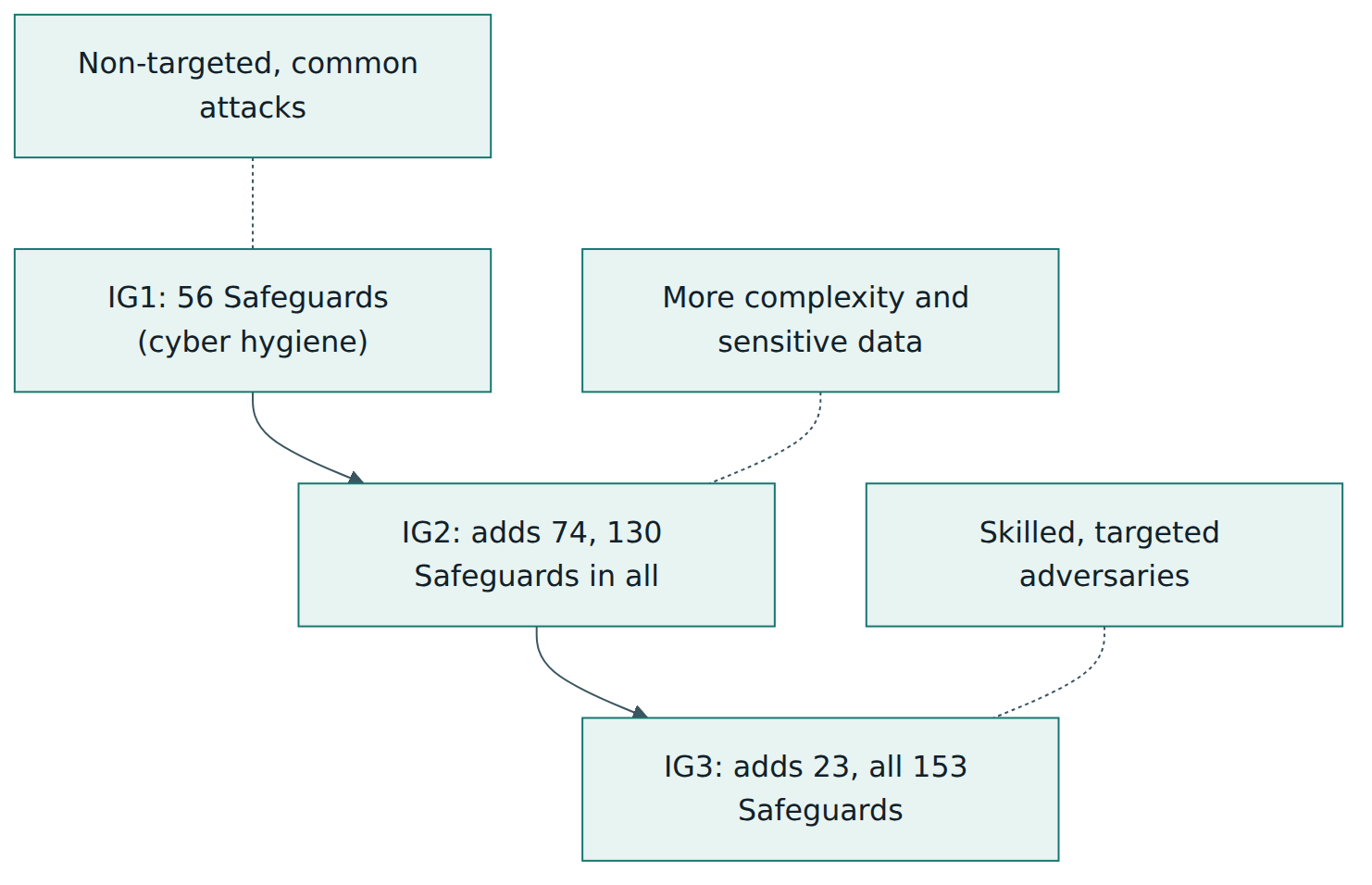
Choosing an IG is a self-assessment; no one assigns it to you. The choice should reflect the sensitivity of the data you hold, the harm a breach would cause, regulatory obligations and the people and budget available. Most organisations should first complete IG1 regardless of where they eventually aim, because IG1 is the base on which the other groups are built.
Asset classes and security functions
Each Safeguard carries two tags. The asset-class tag says what the Safeguard acts on (one of Devices, Software, Data, Users, Network or Documentation). The security-function tag says which NIST CSF 2.0 function it supports. In v8.1, the Govern tag goes mainly to the "establish and maintain a process" Safeguards that open many Controls, such as a documented data management process, a secure configuration process or a vulnerability management process. Protect is by far the largest function, which reflects the Controls' practical, preventive emphasis.
A useful way to read any Control is to notice that it often follows the same internal arc: establish a documented process (Govern), know what you have (Identify), put protections in place (Protect), watch for problems (Detect), and act on what you find (Respond or Recover). Control 7 is a clear example. It starts with a vulnerability management process and a risk-based remediation process, moves on to automated patching of operating systems and applications, then to automated internal and external vulnerability scans, and finally to remediating the vulnerabilities that the scans detect.
How Safeguards are worded
Safeguards are written to be checkable. Many include a minimum frequency, and the phrase "or more frequently" signals that the frequency is a floor, not a target. A few examples, paraphrased from v8.1:
- The enterprise asset inventory should be kept current and reviewed on a fixed schedule (v8.1 says bi-annually, or more often), and unauthorised assets should be dealt with every week.
- Operating systems and applications should be patched through automated patch management at least monthly.
- Dormant accounts should be disabled or deleted after 45 days of inactivity, where the system supports it.
- Automated backups should run at least weekly, more often for sensitive data, with an isolated copy of recovery data.
- IG2 adds quarterly test restores for a sample of in-scope assets and retention of audit logs for at least 90 days.
- Documented processes should be reviewed annually or when significant changes in the enterprise could affect them.
These frequencies give implementers and assessors a shared yardstick. They are minimums for a typical organisation; your own risk assessment may justify doing more.
Lesson 4 – How it works in practice
Roles
The CIS Controls do not mandate an organisation chart, but successful programmes share a recognisable set of roles.
- Executive sponsor. A senior leader who approves the target Implementation Group, funds the work, accepts residual risk and receives progress reports.
- Programme owner. Often a security lead or IT manager who coordinates the implementation, tracks Safeguard status and owns the documentation.
- IT and cloud operations. The people who build inventories, configure devices, run patching, manage accounts and operate backups. Most Safeguards are implemented here.
- Asset and data owners. Business managers who decide who should access their systems and data, and who must approve exceptions.
- Service providers. Managed service providers and cloud vendors frequently operate Safeguards on the organisation's behalf. Accountability stays with the organisation, which is why Control 15 exists.
- Incident handler. IG1 already asks for one named person, with at least one backup, to manage incident handling, even if the technical work is outsourced.
The implementation cycle
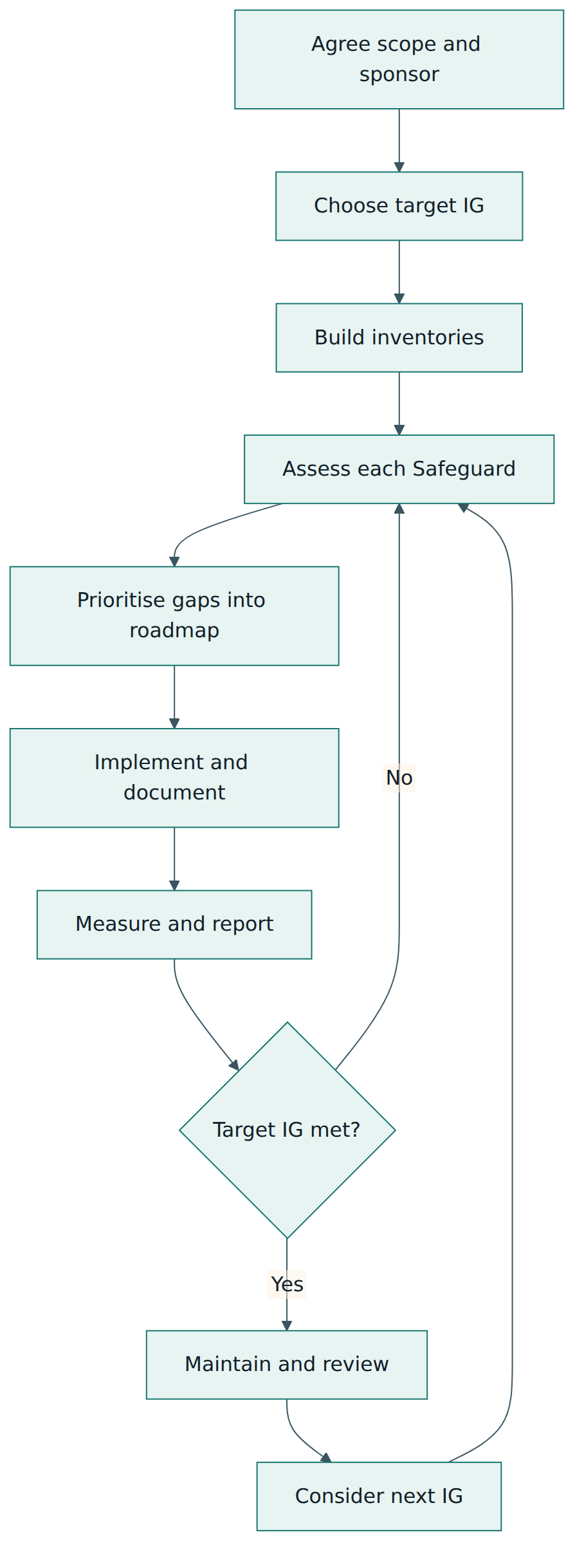
Adopting the CIS Controls is a continuous improvement cycle rather than a one-off project. A typical cycle has seven steps.
- Agree scope and sponsorship. Decide which business units, environments and providers are in scope and who sponsors the programme. Write down the reasons for adopting the Controls (customer demands, insurance, regulation, recent incidents) because they will shape priorities.
- Choose a target Implementation Group. Use the IG descriptions to self-assess. Record the reasoning, for example "we hold health data for 40,000 patients, so IG2 is our target, starting with IG1".
- Build the inventories. Controls 1, 2, 3, 5 and 15 each start with an inventory: devices, software, data, accounts and service providers. Inventories are the foundation for every later Safeguard, so they come first even though they are not glamorous.
- Assess the current state. For each in-scope Safeguard, record whether it is implemented, partly implemented or missing, and how you know. Tools such as the CIS Controls Self Assessment Tool (CSAT) support this, but a well-structured spreadsheet also works.
- Prioritise and plan. Close IG1 gaps before IG2 gaps. Within a group, consider the threats you face, the cost of each fix and dependencies (you cannot automate patching for devices you have not inventoried). Turn gaps into a roadmap with owners and dates.
- Implement and document. Configure technology, write the required policies and processes (the Documentation asset class), and make sure evidence is produced as a by-product of normal work: tickets, configuration exports, reports from management consoles.
- Measure, report and repeat. Re-assess regularly, report coverage to the sponsor, review processes at least annually and after significant changes, and raise the target as the organisation matures.
Artefacts you will produce
Because v8.1 tags governance work explicitly, it is easier to see which documents a programme needs. Typical artefacts include an enterprise asset inventory, a software inventory, a data inventory and data management process, a secure configuration process with configuration standards (often based on CIS Benchmarks), an account inventory, documented access granting and revoking processes, vulnerability management and remediation processes, an audit log management process, a data recovery process, a security awareness programme, a service provider inventory and an incident reporting process. At IG2 and IG3 you add items such as a data classification scheme, data flow documentation, network architecture diagrams, a service provider management policy, a secure application development process, an incident response process and a penetration testing programme.
Keep these documents short and useful. A one-page process that people actually follow is worth more than a forty-page template that nobody reads. The Controls ask you to establish and maintain processes, which implies that someone owns each document and reviews it on a schedule.
Tooling and automation
Many Safeguards become easier and more reliable with automation: device management platforms for inventories and configuration, automated patch management, centrally managed anti-malware, identity providers for MFA and single sign-on, backup services with immutability options, and log collection platforms. The Controls are vendor-neutral, so the right tool depends on your environment. Small organisations often discover that the products they already pay for, such as an office productivity suite, an endpoint management service or a cloud provider's native controls, cover a large share of IG1 once the relevant features are switched on and configured.
Two practical warnings apply. First, a tool is not a Safeguard: deploying an endpoint agent does not satisfy a Safeguard until it covers every in-scope device and someone acts on its output. Second, automation needs an inventory to check against; otherwise you cannot tell which devices the tool is missing.
Lesson 5 – Assessment, certification and compliance
No CIS certificate for organisations
Unlike ISO/IEC 27001, the CIS Controls have no formal certification scheme for organisations. CIS does not accredit auditors to issue "CIS Controls certified" certificates, and there is no official pass or fail. When a company claims to be "CIS compliant", it usually means that it has assessed itself, or had a third party assess it, against a chosen Implementation Group and found most Safeguards implemented. Treat such claims with healthy curiosity: ask which IG, which version, what scope, who assessed and when.
How adoption is assessed
Assessment is about measuring the implementation of each in-scope Safeguard and gathering evidence. Several resources help.
- CIS Controls Self Assessment Tool (CSAT). A web-based tool, offered free for non-commercial use, in which an organisation records the status of each Safeguard, assigns tasks and tracks progress over time. Its capabilities are also part of CIS's paid SecureSuite platform, which adds features such as reporting against the NIST CSF functions.
- CIS Controls Assessment Specification. Guidance that describes, for each Safeguard, what an assessor should look for and how measurement could be done, so that different assessors reach comparable results.
- CIS Risk Assessment Method (CIS RAM). A risk assessment method designed to help an organisation decide which Safeguards are reasonable for it, by weighing the harm a risk could cause against the burden of the Safeguard. It is useful when you need to justify not implementing a Safeguard, or implementing it differently.
- Mappings. CIS publishes mappings from the Controls to other frameworks, such as NIST CSF 2.0, NIST SP 800-53, ISO/IEC 27001 and PCI DSS, so that one assessment can feed several compliance conversations.
A typical assessment scores each Safeguard on more than a yes or no. A useful scale distinguishes whether a policy or process exists, whether the Safeguard is implemented on some or all in-scope assets, whether it is automated, and whether its status is reported. For example, an organisation that has a patching policy and automated patching on 70 % of laptops but none on servers has a partial implementation; reporting it as "done" would hide the gap that an attacker would find.
Evidence
Good evidence is specific, dated and reproducible. For an inventory Safeguard it might be an export from the device management console with a date and record count, plus a reconciliation against DHCP or cloud console data. For MFA, it might be the identity provider's policy settings and a report showing which accounts are enrolled. For backups, it is the backup job history plus a record of a test restore. Evidence should come from systems rather than screenshots taken once before an audit, because systems keep producing it.
Compliance and legal context
Because the CIS Controls are prescriptive and widely recognised, they are often used to demonstrate that security is "reasonable". Some United States state laws and guidance refer to them; for example, Ohio's 2018 Data Protection Act lists them among the frameworks that can support a safe-harbour defence after a breach, provided the organisation reasonably conforms. Cyber insurers, customers and regulators frequently ask questions that correspond to IG1 Safeguards, such as MFA on remote access and isolated backups. None of this makes the Controls a legal requirement in general; it makes them a common, defensible way to show due care.
When the CIS Controls are used inside a certified ISO/IEC 27001 management system, the certification audit is against ISO/IEC 27001, not against the Controls. The Controls then serve as the organisation's chosen control set or as a detailed implementation guide, and the Statement of Applicability records how they map to ISO/IEC 27001 Annex A.
Lesson 6 – Worked example
The organisation
Harbourline Logistics is a fictional freight-forwarding company with 140 staff across a head office and two warehouses. It uses a cloud office suite for email and documents, a software-as-a-service transport management system, a small on-premises file server, and about 160 laptops and phones. Two IT staff and an external managed service provider (MSP) run everything. The company holds customer shipping records, some personal data of drivers and staff, and payment details handled by its payment provider. A large customer has asked Harbourline to describe its security baseline, and the company's cyber-insurance renewal asks about MFA, backups and patching.
Step 1 – Scope, sponsor and target
The finance director agrees to sponsor the work. The scope is everything Harbourline owns or uses: devices, cloud services, the file server, the network at all three sites and the MSP's remote access. Using the IG descriptions, the team concludes that Harbourline today fits IG1 (small IT team, mainly commodity attacks), but that its customer data and its customers' expectations point to IG2 as the eventual target. The sponsor approves "complete IG1 within nine months, then begin IG2".
Step 2 – Inventories first
The IT lead starts with Control 1. The device management console lists 131 laptops, but the DHCP logs and the wireless controller reveal 18 more devices, including two old laptops used in a warehouse, a label printer and a personal tablet connected to the staff network. The team creates a single asset register with owner, department, location, network address and approval status, and agrees a weekly routine to deal with unknown devices: approve, move to the guest network or block. For Control 2, the endpoint tool's software report reveals an unsupported version of a PDF reader and a remote-access utility that nobody can explain; both are removed. For Control 15, the team lists 23 service providers and names an internal contact for each.
Step 3 – Baseline assessment
The team uses CSAT to record the status of the 56 IG1 Safeguards. The baseline shows 21 fully implemented, 19 partly implemented and 16 missing. The biggest gaps are clear: MFA is enforced for email but not for the MSP's remote access or for administrator accounts; the file server backup writes to a share that every domain user can reach; there is no written incident reporting process; and staff have never had structured phishing training.
Step 4 – Prioritise
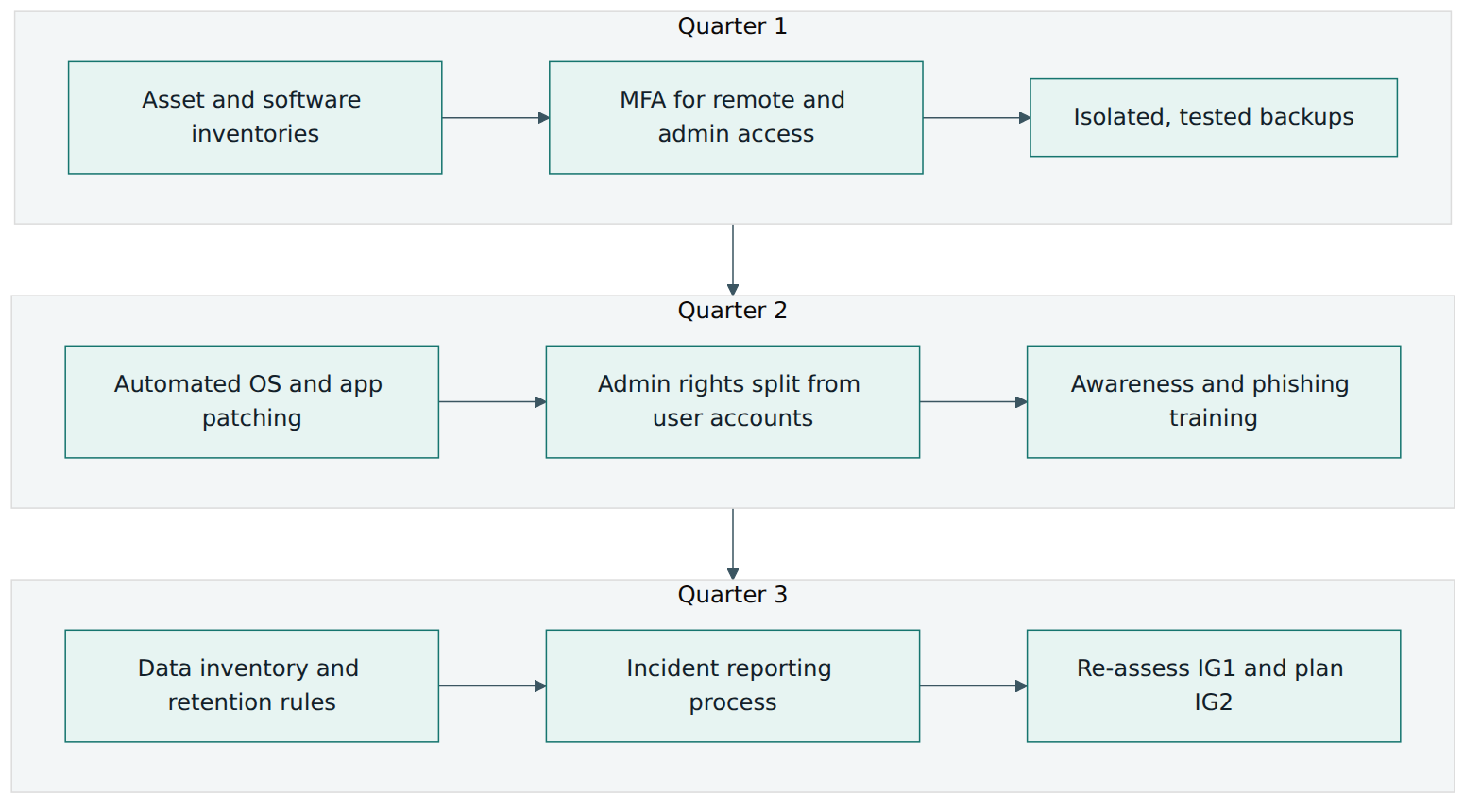
The team ranks gaps by attack relevance and effort. Ransomware is the threat that worries the business most, so isolated backups (Control 11), MFA for remote and administrative access (Control 6), removing local administrator rights from everyday accounts (Control 5) and automated patching (Control 7) go first. Data management, data retention and secure disposal (Control 3) follow, because they require business owners' decisions and take longer. The roadmap below shows the result.
Step 5 – Implement and document
In the first quarter the MSP enables MFA on its remote-access gateway and on every administrator account, and Harbourline turns on the cloud suite's conditional-access rules. The backup design changes: the file server and cloud data are backed up nightly to a service with immutable retention, using separate credentials that are not part of the everyday domain. The IT lead writes a one-page data recovery process stating what is backed up, how often, who checks the jobs and how restores are requested. Although test restores are formally an IG2 Safeguard, the team decides to restore a sample folder each month anyway, because untested backups were the main ransomware worry.
In the second quarter, automated patching is configured for operating systems and the most common applications, with a monthly report of devices that failed to update. Each IT staff member receives a separate administrator account protected by MFA, and everyday accounts lose administrator rights. A short awareness programme starts at onboarding and repeats yearly, covering phishing, password and MFA habits, how to handle customer data and how to report something suspicious.
In the third quarter, the operations and finance managers agree a data inventory: which systems hold shipping records, staff data and contracts, how long each type is kept and how it is disposed of. The team writes an incident reporting process with a named incident manager, a deputy and contact details for the MSP, the insurer and the relevant authorities. All documents are given owners and annual review dates.
Step 6 – Measure and report
At the end of nine months the CSAT re-assessment shows 50 IG1 Safeguards fully implemented and 6 partly implemented, each with a documented plan. The sponsor's report shows coverage by Control and by NIST CSF function, the remaining gaps with dates, and the evidence location for each Safeguard. Harbourline can now answer the customer's questionnaire with specific, honest statements, for example "MFA is enforced for all remote, administrative and externally exposed access; backups are immutable, isolated and restored monthly as a test".
Step 7 – Moving towards IG2
The next cycle starts with the IG2 Safeguards that build directly on IG1 work: active asset discovery, a data classification scheme, centralised audit log collection with 90-day retention, network-based URL filtering, a service provider management policy with security clauses in contracts, and a documented incident response process with regular exercises. Because the inventories and governance documents already exist, IG2 is an extension rather than a restart.
The example shows the core habits of a good CIS Controls programme: inventories before tools, IG1 before IG2, priorities driven by real threats, honest partial scores and evidence produced by everyday systems.
Lesson 7 – Relationship to other standards and frameworks
The CIS Controls rarely stand alone. Most organisations use them together with at least one other framework, and CIS deliberately keeps them aligned with the major ones. Understanding the differences helps you use each for what it does best.
| Framework | Owner | What it is | Relationship to the CIS Controls |
|---|---|---|---|
| NIST Cybersecurity Framework (CSF) 2.0 | NIST (US) | A high-level, outcome-based framework organised by six functions: Govern, Identify, Protect, Detect, Respond, Recover. | CSF says which outcomes to achieve; the CIS Controls give specific, prioritised actions to achieve many of them. v8.1 tags every Safeguard with a CSF 2.0 function. |
| ISO/IEC 27001 and ISO/IEC 27002 | ISO and IEC | A certifiable management system standard with a reference set of 93 controls (Annex A), plus guidance on those controls. | ISO/IEC 27001 provides the risk-based management system and certification; the CIS Controls can serve as a prescriptive implementation set mapped to Annex A. |
| NIST SP 800-53 | NIST (US) | A very large catalogue of security and privacy controls used mainly by US federal systems and their suppliers. | Far broader and more detailed; the CIS Controls act as a prioritised subset and an entry point, with published mappings between them. |
| CIS Benchmarks | CIS | Product-specific secure configuration guides for operating systems, cloud platforms, databases and more. | Control 4 requires secure configurations; Benchmarks supply the concrete settings. They are complementary, not alternatives. |
| MITRE ATT&CK | MITRE | A knowledge base of adversary tactics and techniques observed in real attacks. | CIS uses ATT&CK in its Community Defense Model to show which Safeguards defend against which attack techniques. |
| PCI DSS | PCI Security Standards Council | A mandatory standard for organisations that store, process or transmit payment card data. | Overlaps strongly in technical areas (inventories, patching, logging, MFA), but PCI DSS is contractually enforced and assessed, with its own scope rules. |
Choosing and combining
A common and effective pattern is to use NIST CSF 2.0 or ISO/IEC 27001 as the governance "frame" and the CIS Controls as the operational "engine". Leaders discuss risk and outcomes using the CSF functions or the ISO management system; engineers work from the Safeguards; and the published mappings connect the two. Because v8.1 tags each Safeguard with a CSF function, progress on the Controls can be reported directly in CSF terms.
The CIS Controls also connect naturally to the rest of CIS's ecosystem. The CIS Benchmarks give configuration detail for Control 4; hardened images based on the Benchmarks make secure configuration repeatable in the cloud; and the Community Defense Model provides the evidence base for prioritisation. Outside CIS, many sector-specific schemes, such as US defence-supplier requirements derived from NIST SP 800-171, overlap heavily with IG1 and IG2, so work done under the CIS Controls usually reduces the effort needed for those schemes, although each has its own assessment rules.
Two cautions apply when combining frameworks. First, mappings are approximate: a Safeguard and a mapped control may differ in scope or strictness, so check the details before claiming coverage. Second, avoid running separate programmes for each framework. Maintain one set of implemented controls and evidence, and map it to each framework as needed.
Common pitfalls and best practices
Common pitfalls
- Buying tools before building inventories. Without an accurate list of devices, software, accounts and providers, you cannot tell whether a tool covers everything, and gaps stay hidden.
- Aiming too high too soon. Jumping to IG3 Safeguards such as intrusion prevention or code-level security checks while IG1 gaps remain open spends effort on rare attacks and leaves common ones unaddressed.
- Treating Implementation Groups as maturity levels. An IG defines which Safeguards are in scope, not how well they are done; confusing the two leads to misleading reports.
- Reporting partial Safeguards as complete. "Patching is automated" when it covers laptops but not servers gives management false confidence.
- Ignoring the Documentation asset class. Technical settings without documented processes, owners and review dates decay quickly and are hard to evidence.
- Forgetting service providers. MSPs and SaaS providers often hold privileged access and sensitive data; leaving them out of scope leaves a major attack path uncontrolled.
- Backups that share credentials with production. If ransomware can reach the backup store with the same accounts, the backups are not isolated recovery data.
Best practices
- Complete IG1 first, whatever your final target. It protects against the most common attacks and builds the foundation the other groups depend on.
- Let threats guide the order within an IG. Use your own incidents, insurer requirements and the Community Defense Model to decide which gaps to close first.
- Score Safeguards honestly and in detail. Record policy, coverage, automation and reporting separately, so that partial progress is visible and credible.
- Make evidence a by-product of operations. Prefer reports from management consoles, tickets and logs over one-off screenshots.
- Use CIS Benchmarks for configuration detail. They turn the general requirement for secure configuration into concrete settings you can scan for.
- Give every process an owner and a review date. Review at least annually and after significant changes such as a cloud migration or an acquisition.
- Map once, report many times. Keep one control set and use CIS mappings to answer NIST CSF, ISO/IEC 27001 and customer questions.
Summary and key takeaways
- The CIS Critical Security Controls v8.1 are a free, prioritised set of 18 Controls and 153 Safeguards, maintained by the Center for Internet Security and published in June 2024 as an update to Version 8.
- Safeguards are concrete, checkable actions, many with minimum frequencies, tagged with an asset class and a NIST CSF 2.0 security function.
- Version 8.1 added the Govern function to the mappings, introduced the Documentation asset class, refined definitions and clarified Safeguards without changing Implementation Groups.
- Implementation Groups are cumulative: IG1 (56 Safeguards, essential cyber hygiene), IG2 (130) and IG3 (all 153), chosen by self-assessment of risk and resources.
- Implementation is a cycle: scope, choose an IG, build inventories, assess, prioritise, implement with documentation, measure and repeat.
- There is no CIS certification for organisations; adoption is self-assessed or third-party assessed using tools such as CSAT, the Assessment Specification and CIS RAM.
- The Controls complement rather than replace NIST CSF 2.0, ISO/IEC 27001 and CIS Benchmarks, and published mappings let one programme serve many frameworks.
Reflection questions
- Using the descriptions of IG1, IG2 and IG3, which group fits your organisation (or one you know well) today, and which should it target in two years? What evidence supports your choice?
- Pick one inventory-based Control (devices, software, accounts or service providers). Where would you get the data in your environment, how would you reconcile different sources, and who would own the result?
- Your organisation reports "MFA is enabled". What questions would you ask to find out whether the relevant IG1 Safeguards are really fully implemented?
- Choose one "establish and maintain a process" Safeguard. Draft in a few bullet points what a short, useful version of that process would contain and how you would know people follow it.
- If your organisation already works towards ISO/IEC 27001 or NIST CSF 2.0, how would you use the CIS Controls without creating a second, parallel compliance programme?
Further reading and official sources
- CIS Critical Security Controls Version 8.1 – Center for Internet Security
- CIS Controls Implementation Groups – Center for Internet Security
- The Ongoing Evolution of the CIS Critical Security Controls – Center for Internet Security
- CIS Controls Self Assessment Tool (CSAT) – Center for Internet Security
- CIS RAM (Risk Assessment Method) – Center for Internet Security
- CIS Benchmarks – Center for Internet Security
- NIST Cybersecurity Framework – National Institute of Standards and Technology
Original tutorial by xOps School (DevOpsSchool Private Limited), written from public sources about CIS Critical Security Controls v8.1. Not affiliated with or endorsed by the standard's owner; standard names are trademarks of their owners. Buy the official standard from its publisher for the authoritative text.