
CIS Benchmarks – Tutorial (about 60 minutes)
- View
The CIS Benchmarks are free, community-built guides that tell you how to configure a specific technology securely: an operating system, a cloud account, a database, a browser, a network device or a container platform. They are published by the Center for Internet Security (CIS), a US non-profit organisation, and are used by system administrators, cloud and platform engineers, security teams and auditors all over the world as a reference for "hardened" settings. After this tutorial you will be able to read a benchmark, choose the right profile for a system, plan and run a hardening project, measure conformance, handle exceptions properly and explain how the benchmarks relate to other security standards.
Course overview
Edition and status: The CIS Benchmarks are not one document with a single edition. They are a living catalogue of more than 100 separate configuration guides covering over 25 vendor product families, each with its own version number and change history (for example, the CIS listing shows Ubuntu Linux 26.04 LTS at v1.0.0, Microsoft Windows Server 2025 at v2.1.0 and Kubernetes at v2.1.0). New and updated benchmarks are announced every month; the October 2026 update, for example, revised the VMware ESXi 7.0 and 8 benchmarks, MongoDB, Apache HTTP Server 2.4 and others. The owner body is the Center for Internet Security, and the guides are developed through a volunteer consensus process on the CIS WorkBench platform. PDF versions are free for non-commercial use under a Creative Commons licence. Because versions change often, always download the current version of the benchmark for your exact product release before you start. Verified 2026-10-29.
Who this is for: system and cloud engineers, DevOps and platform teams, security analysts, IT auditors and compliance staff who have been asked to "apply CIS" or "show CIS conformance" and want to understand what that really involves. It is also useful for managers who need to plan the work and judge the results.
Prerequisites: none. Basic familiarity with at least one operating system (Windows or Linux) or one cloud platform helps you picture the examples, but every term is explained when it first appears.
By the end of this tutorial:
- You will be able to explain what the CIS Benchmarks are, who produces them and why secure configuration matters.
- You will be able to describe how a benchmark document is organised and read every part of a single recommendation.
- You will be able to choose between Level 1, Level 2 and STIG profiles for a given system role, and justify the choice.
- You will be able to plan a hardening programme: inventory, selection, tailoring, testing, deployment, assessment and drift monitoring.
- You will be able to explain how conformance is assessed, what a score does and does not prove, and why there is no organisational "CIS certificate".
- You will be able to manage deviations through a documented exception process with compensating controls.
- You will be able to relate the benchmarks to the CIS Controls, DISA STIGs, NIST guidance, ISO/IEC 27001 and PCI DSS.
Lesson 1 – Origins, purpose and scope
The problem: insecure defaults
Most software is shipped to be easy to install and easy to use. Vendors want their product to work on the first try in as many environments as possible, so the default configuration often leaves services running that you do not need, allows older and weaker protocols, logs too little, and grants broad permissions. That is a reasonable commercial choice for the vendor, but it is a poor starting point for security. Attackers know the defaults too. Many real intrusions do not need a clever exploit at all: they use a remote service that should have been switched off, a guest account that was never disabled, a storage bucket that was left public, or an administrator interface reachable from the internet.
The fix for this class of problem is called hardening: changing a system's settings so that it exposes as little as possible and records what happens on it, while still doing its job. Hardening sounds simple, but a modern operating system has thousands of settings, and nobody wants every organisation to work out on its own which of them matter. That is the gap the CIS Benchmarks fill. Each benchmark is a shared answer to the question "how should this product be configured to be reasonably secure?", written once by experts and reused by everyone.
Who publishes them
The Center for Internet Security is a non-profit organisation based in the United States, founded in 2000. Besides the benchmarks, it publishes the CIS Critical Security Controls (a prioritised set of security safeguards for whole organisations) and runs information-sharing centres for public-sector bodies. CIS employs a benchmark development team, but most of the knowledge in each guide comes from volunteers: subject matter experts from companies, governments and universities, product vendors, technical writers and members of the CIS SecureSuite membership programme. The benchmarks are therefore not a law, a regulation or a vendor manual. They are an independent, consensus-based body of good practice.
How a benchmark is created
CIS describes the development process as community consensus, and it runs on CIS WorkBench, a web platform where each technology has its own community. First the scope is agreed: which product and which versions the benchmark will cover. Subject matter experts then write and test a working draft. When the draft is ready, CIS announces it and invites volunteers to join the community, review the draft, test the settings on real systems and comment through tickets and discussion threads. Feedback goes back to the experts and the CIS lead for that benchmark, and the draft is revised, sometimes over several rounds, until the comments are resolved. Once the feedback has been addressed, CIS makes a final call for participation, a review period that lasts about two weeks on average, and any last comments are resolved before the benchmark is published. After publication, new tickets keep arriving (a setting breaks something, a new product release changes a default) and they feed the next version. Major contributors are named in the published document.
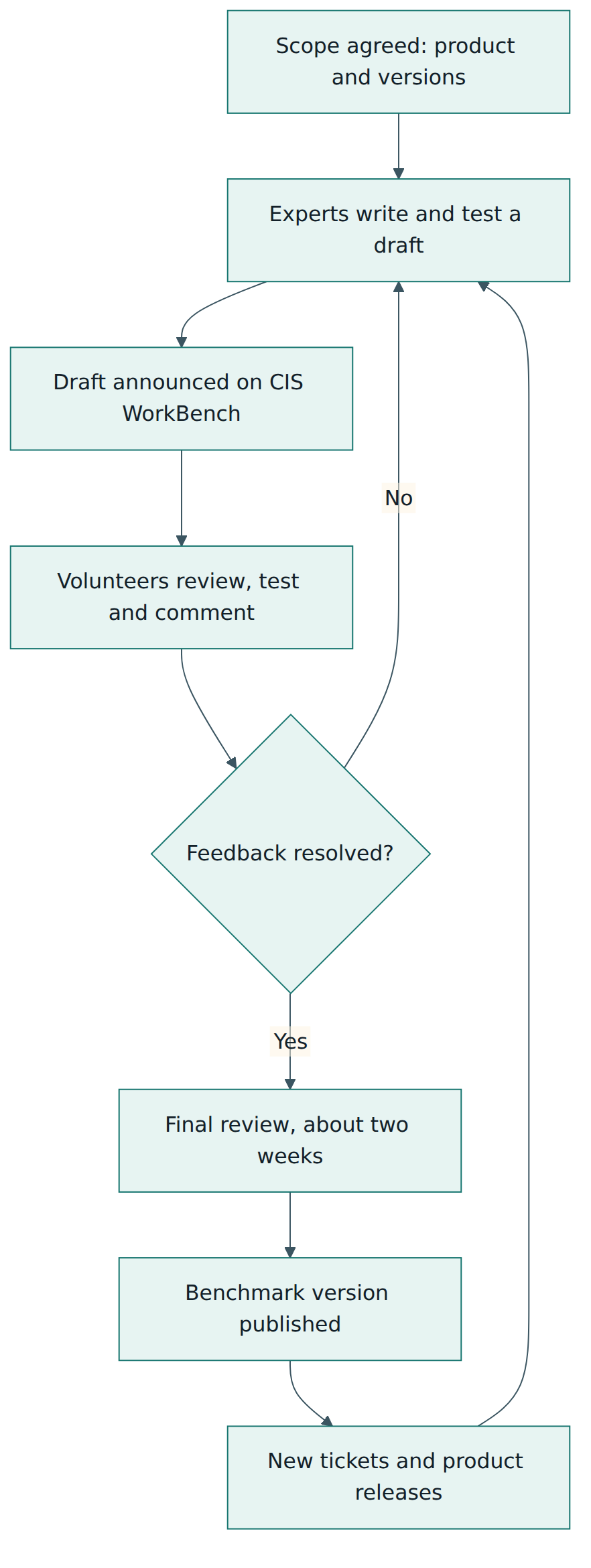
This cycle explains two practical facts you will meet later. First, the benchmarks change: a version you downloaded last year may already have been replaced, and the change history tells you what moved. Second, because the guides are tested by many people on real systems, they tend to be realistic about operational impact; each recommendation says what may break if you apply it.
Scope: what is covered
The catalogue spans operating systems (Windows client and server, many Linux distributions, macOS, Unix), cloud provider platforms (the "Foundations" benchmarks for major public clouds and for productivity suites), managed cloud services, containers and orchestration (Docker, Kubernetes and managed Kubernetes services), databases, web and application servers, desktop software such as browsers and office suites, mobile devices, network devices and storage devices. Benchmarks are always tied to a product and usually to a product version, because settings differ from release to release. For Windows, CIS says it aims to cover the newest build within about 90 days of its release.
What the benchmarks do not cover is equally important. They do not tell you how to run a security programme, assess risk, train staff, patch software or respond to incidents. They are configuration guidance only. A perfectly configured server that is three years behind on patches is still an easy target. That is why the benchmarks are usually used inside a wider framework such as the CIS Controls or an ISO/IEC 27001 management system, which we will look at in Lesson 7.
Lesson 2 – Key concepts and vocabulary
You will meet the following terms in every benchmark, every scanning report and most audit conversations about CIS. Learn them once and the rest of the material becomes much easier to read.
- Benchmark – a CIS document that gives secure configuration recommendations for one technology and version range, such as a particular Linux distribution release or a cloud platform.
- Recommendation – a single numbered item in a benchmark: one setting or practice, with an explanation of why it matters, how to check it and how to set it. CIS deliberately calls these recommendations rather than requirements.
- Hardening – reducing the attack surface of a system by disabling what is not needed, tightening permissions and protocols, and turning on logging and protective features.
- Attack surface – the total set of ways an attacker could interact with a system: open ports, running services, accounts, interfaces and installed software.
- Profile – a named subset of a benchmark's recommendations intended for a particular level of protection or system role. Every recommendation belongs to at least one profile.
- Level 1 – the base profile: settings that can be applied fairly quickly, with little effect on performance or usability, to remove the most obvious weaknesses.
- Level 2 – the "defence in depth" profile for environments where security is paramount. It includes everything in Level 1 and adds stricter settings that may reduce functionality and need careful testing.
- STIG profile – a profile, available in some benchmarks, that collects the recommendations needed to align with the US Defense Information Systems Agency's Security Technical Implementation Guides. It replaced the older "Level 3".
- Assessment status – a label on each recommendation: Automated means a tool can check the setting reliably, Manual means a person must investigate. These labels replaced the older "Scored" and "Not Scored".
- Audit procedure – the steps (commands, console paths or queries) that show the current value of a setting so you can compare it with the recommendation.
- Remediation procedure – the steps to change the setting to the recommended value.
- Configuration baseline – the approved set of settings for a type of system in your organisation. A tailored CIS profile is often the starting point for a baseline.
- Tailoring – adapting a benchmark to your environment by deciding which recommendations apply, which values you will use, and which items are formally excepted.
- Exception (or deviation) – a documented, approved decision not to apply a recommendation, with a reason, an owner, any compensating control and a review date.
- Compensating control – a different safeguard that reduces the same risk when the recommended setting cannot be used.
- Configuration drift – the gradual move away from the approved baseline as people make changes, software updates reset values or new systems are built by hand.
- CIS-CAT – the CIS Configuration Assessment Tool. CIS-CAT Lite is free and covers selected benchmarks; CIS-CAT Pro is part of the paid membership and covers many more.
- CIS WorkBench – the CIS platform where benchmark communities discuss drafts and where members download benchmarks in additional formats and build tailored versions.
- Build Kit – a CIS member resource that automates applying benchmark settings, for example as Windows Group Policy objects or scripts for Linux.
- CIS Hardened Image – a virtual machine image, offered on major cloud marketplaces, that has been preconfigured to a CIS Benchmark.
- CIS SecureSuite – the paid CIS membership that gives organisations access to CIS-CAT Pro, Build Kits, tailoring tools and benchmark files beyond the free PDFs.
Two of these words are easy to confuse. A benchmark is CIS's document; a baseline is your organisation's decision. You adopt a benchmark profile, tailor it, approve it, and the result is your baseline. Auditors will usually ask to see the baseline and the evidence that systems meet it, not just the benchmark PDF.
Lesson 3 – Structure of a benchmark
Naming and versions
Every benchmark carries the product name and a version number in the form major.minor.patch, for example "CIS Ubuntu Linux 26.04 LTS Benchmark v1.0.0". The product name tells you which release of the product the guide was written and tested for; the benchmark version tells you which revision of the guidance you are reading. These are two different things. A product release can have several benchmark versions over its life as the community improves the guidance, and the benchmark for an older product release may stop being updated when the vendor stops supporting that release. When you write your baseline, record both: the product release and the exact benchmark version.
Anatomy of the document
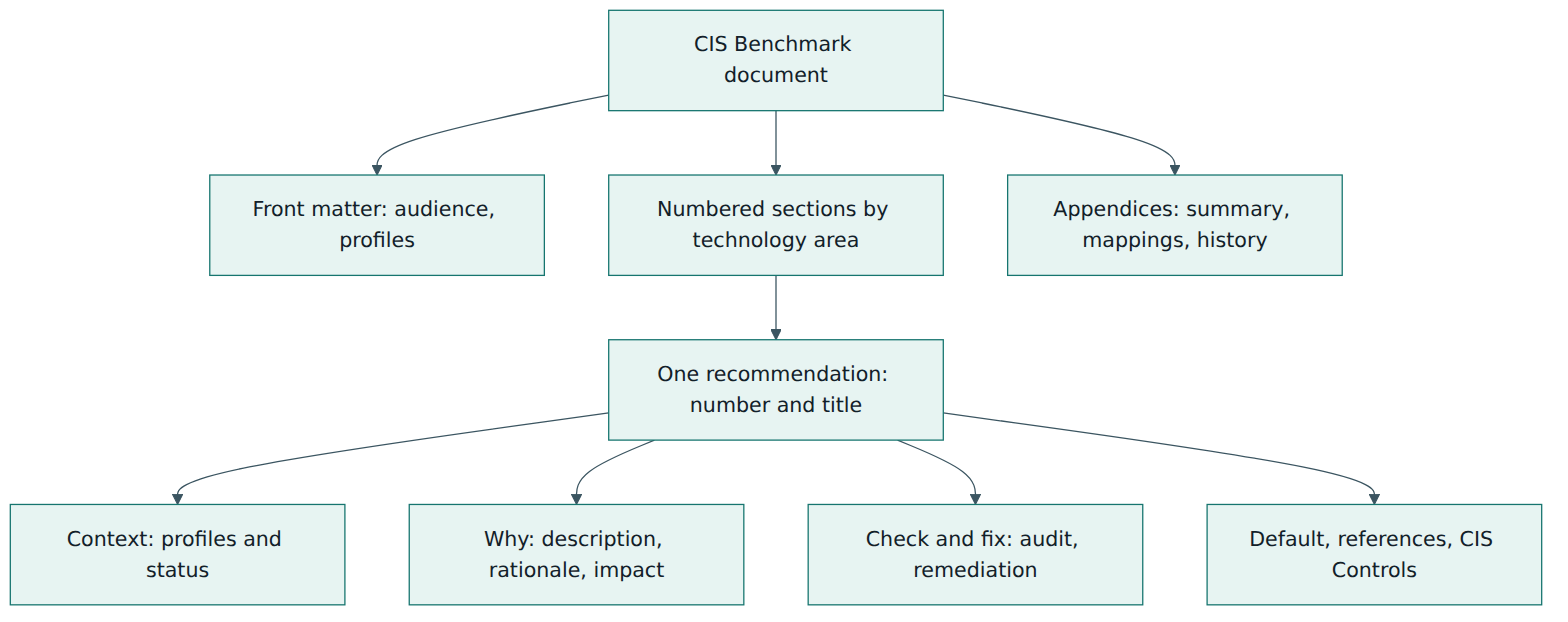
Benchmark documents follow a consistent layout, which makes them easier to navigate once you have read one. The front part explains the intended audience, the consensus process, the typographic conventions, the definitions of the assessment statuses and the profiles used in that benchmark, and thanks the contributors. Then come the recommendations, grouped into numbered sections that follow the natural areas of the technology. A Linux benchmark, for instance, has sections for initial setup (filesystems, software updates, boot settings), services, networking, host firewall, access and authentication, logging and auditing, and system maintenance (file permissions, users and groups). A cloud Foundations benchmark is organised by service areas such as identity and access, storage, logging, monitoring and networking.
At the end you find appendices. The most useful are a summary table that lists every recommendation with its number, title and a checkbox column you can use as a working checklist, tables that map recommendations to the CIS Controls safeguards and their Implementation Groups, and a change history that lists what was added, changed or removed in each version.
Inside one recommendation
Each recommendation is presented in the same set of fields. Understanding them is the single most useful skill this course can give you, because every decision you make later depends on reading these fields properly.
- Number and title. The number places the item in its section (for example 5.2.4 in a Linux benchmark sits in an access-control section). The title states the intended state in plain words, such as "ensure the SSH root login is disabled". Numbers can change between benchmark versions, so do not use them as permanent identifiers in your own records without the version.
- Profile applicability. Which profiles include the item, for example "Level 1 – Server" and "Level 1 – Workstation". Many benchmarks split levels by system role, such as server versus workstation or domain controller versus member server.
- Assessment status. Automated or Manual, as defined in Lesson 2.
- Description. What the setting is and what the recommended state is.
- Rationale. Why the setting matters: which attack or failure it prevents or detects.
- Impact. What may break, change or become harder for users and administrators when you apply it. Read this before every change.
- Audit. How to check the current state, usually with commands or console steps and the expected output.
- Remediation. How to set the recommended value.
- Default value. What the product does out of the box, which tells you whether you need to act at all.
- References and CIS Controls. Links to vendor documentation and the CIS Controls safeguards the setting supports, with the Implementation Groups those safeguards belong to.
Profiles in more detail
Profiles are how a single benchmark serves very different environments. Level 1 aims at broad applicability: most organisations can apply it to most systems after normal testing, and it removes the weaknesses that attackers exploit most often. Level 2 is cumulative: it takes everything in Level 1 and adds settings that give more protection but have a real cost, such as disabling features some users rely on, restricting removable media, or more detailed auditing that produces more logs. CIS warns that Level 2 items can harm the business if they are applied without care, so they need more testing and a clear reason. The STIG profile, where it exists, contains the items needed to align with the corresponding DISA STIG, including any overlapping Level 1 and Level 2 items; it is mainly relevant to US defence and government work or to organisations that have chosen to follow STIG-aligned settings.
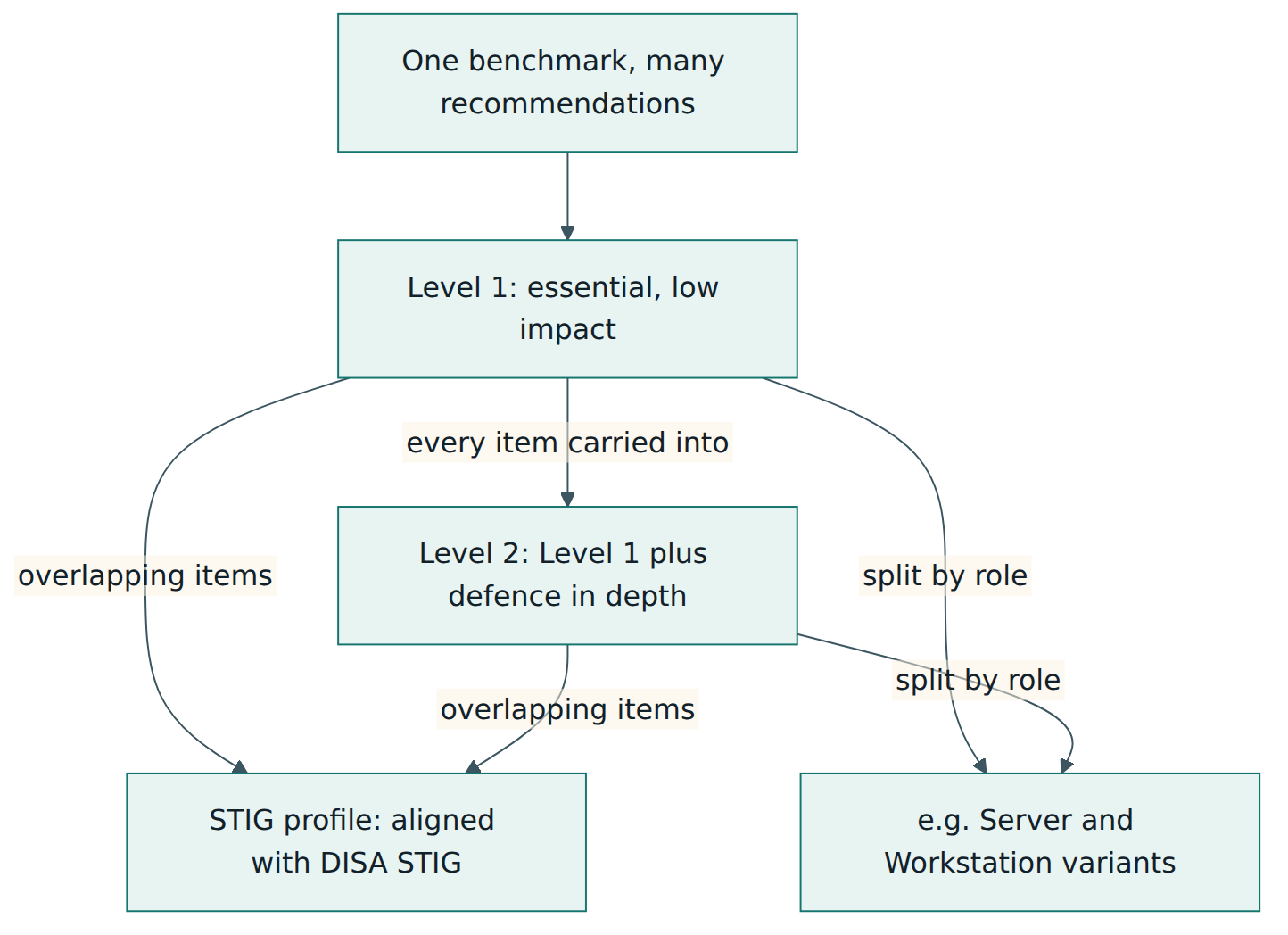
A common misunderstanding is that Level 2 is "the real standard" and Level 1 is a shortcut. That is not how CIS frames it. Level 1 is the recommended base for most systems; Level 2 is for systems whose risk justifies the extra cost. A sensible organisation might run Level 1 on all laptops and general servers, and Level 2 on systems that hold highly sensitive data or face hostile networks.
Formats
Anyone can download the PDF of a benchmark free of charge from the CIS website. SecureSuite members can also download the content in other formats through CIS WorkBench, including spreadsheet, word-processing and machine-readable XML versions, and can create tailored copies of a benchmark that tools such as CIS-CAT Pro can then use for assessment. Many commercial and open-source scanners also ship checks that follow CIS recommendations; how closely they match the official guidance varies, which is something we return to in Lesson 5.
Lesson 4 – How it works in practice
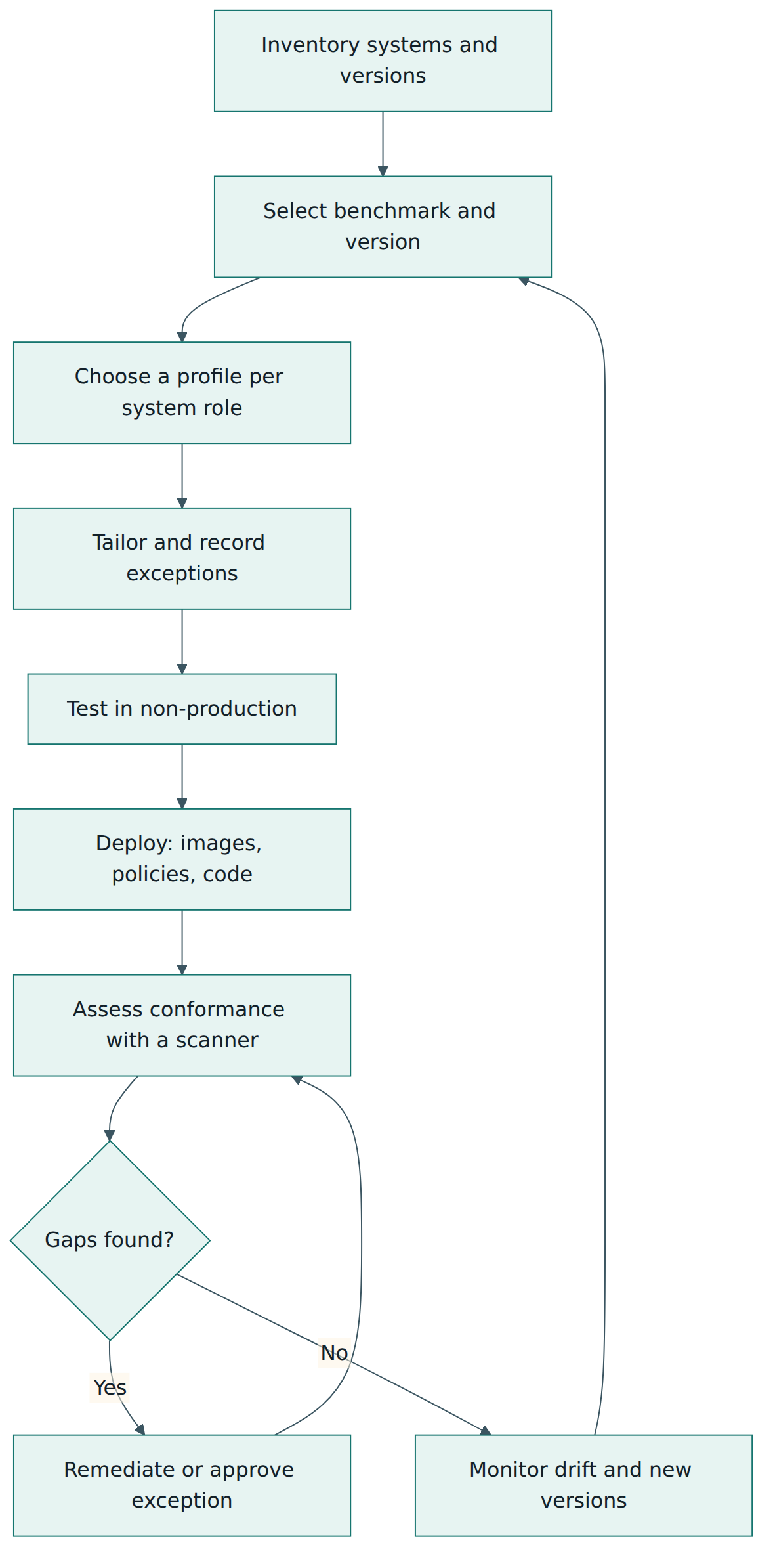
Downloading a benchmark is easy. Turning it into a reliable, maintained set of hardened systems is a project, and like most projects it succeeds or fails on planning, ownership and testing rather than on the technical steps. This lesson walks through a lifecycle that works for organisations of any size.
Step 1 – Inventory
You cannot harden what you do not know about. Start with a list of system types and their exact product releases: operating systems, cloud accounts and subscriptions, Kubernetes clusters, databases, web servers, network devices and end-user devices. The benchmark you choose depends on the precise release, so "Linux" is not enough; you need the distribution and version. The inventory also tells you who owns each system, because owners must be involved in testing and in approving exceptions.
Step 2 – Select the benchmark and version
For each system type, find the matching benchmark in the CIS catalogue and download its current version. If there is no benchmark for an exact release, use the closest one only after checking the change history and vendor documentation for differences, and record that decision. For cloud platforms you typically combine a Foundations benchmark for the account or tenant with service-specific benchmarks, for example one for the managed Kubernetes service.
Step 3 – Choose a profile for each role
Decide which profile each system role will follow. A practical approach is to classify systems by the sensitivity of the data they handle and their exposure (internet-facing, internal, isolated) and map those classes to Level 1 or Level 2. Be explicit about role variants: a domain controller is not a member server, and a developer workstation is not a kiosk.
Step 4 – Tailor and record exceptions
Read every recommendation in the chosen profile and decide, together with the system owner, whether you will apply it as written, apply it with a different but still secure value, or not apply it. Some recommendations are deliberately written to be adjusted, for example items that ask you to "configure" a log retention period or a password policy to meet your own policy. Others will conflict with a business need: an application might genuinely require a service the benchmark says to disable. For every item you do not apply as written, record an exception: the recommendation number and benchmark version, the reason, the risk it leaves, any compensating control, the person who accepted the risk and a date to review it. This record is what separates a professional, defensible baseline from a pile of skipped settings.
Step 5 – Test in a non-production environment
CIS itself advises testing recommendations outside production first. Use the Impact field to predict what may break, then build test systems with the tailored baseline and run the real applications on them: logins, backups, monitoring agents, deployment pipelines, remote administration and anything else people rely on. Level 2 items deserve extra attention. Problems found here become either value changes or exceptions in Step 4.
Step 6 – Deploy the baseline
Apply the settings in a way that is repeatable and does not depend on someone following a long document by hand. Common approaches are:
- Golden images. Build hardened machine images once and create every new system from them. CIS Hardened Images are a ready-made option on major cloud marketplaces; many teams build their own with image pipelines.
- Central policy. On Windows estates, Group Policy or device management policies push the settings to every machine and re-apply them regularly. CIS Build Kits provide policy objects for this.
- Configuration as code. Tools such as Ansible, Puppet, Chef or cloud infrastructure-as-code templates set and keep the values, with changes reviewed like any other code.
- Cloud guardrails. Policy services in the cloud platform prevent or flag resources that break the baseline, such as a storage bucket made public.
Roll out in waves (a pilot group first, then the rest), keep a rollback plan, and tell the help desk what changed so that they can recognise related calls.
Step 7 – Assess conformance
Run an assessment tool against the deployed systems and compare the results with your tailored baseline. Automated items are checked by the tool; Manual items need a person to follow the audit procedure and record the outcome. Treat excepted items as expected results, not failures, provided the exception is current. Store the reports as evidence.
Step 8 – Remediate, monitor drift and keep up with new versions
Fix the gaps the assessment finds or route them into the exception process. Then keep assessing on a schedule, or continuously, because configuration drift is guaranteed: administrators troubleshoot by loosening a setting and forget to restore it, software updates reset values, and new systems appear outside the standard build. Finally, watch the CIS monthly update announcements. When a new benchmark version arrives, read its change history, decide which changes you adopt, update the baseline and the deployment code, and record the new version. When you upgrade the product itself, move to the benchmark for the new release.
Roles and artefacts
A small set of roles keeps this lifecycle working. The baseline owner (often in the security or platform team) maintains the tailored baselines and the exception register. System owners decide on exceptions for their systems and accept the remaining risk. Engineers implement the settings in images, policies and code. Assurance staff (internal audit or a compliance function) check that evidence is complete. The main artefacts are the tailored baseline per system role, the exception register, the deployment code or policy objects, and the dated assessment reports.
Lesson 5 – Assessment, certification and compliance
Measuring conformance
Conformance means "how closely does this system match the recommendations of a chosen benchmark profile?". It is measured by checking each recommendation and counting passes and failures. CIS-CAT, the CIS assessment tool, does exactly that. CIS-CAT Lite is free and gives a conformance score for a limited set of technologies and benchmarks. CIS-CAT Pro Assessor, available to SecureSuite members, covers far more benchmarks, can assess against tailored benchmarks built in CIS WorkBench, and produces reports that link results to the CIS Controls and their Implementation Groups so that you can prioritise. Many vulnerability and compliance scanners, cloud security posture tools and open-source projects also run CIS-style checks.
A conformance score is useful, but it is easy to misread. Keep these points in mind:
- A score is only meaningful together with the benchmark name, version and profile it was measured against. "92 % CIS" with no further detail tells an auditor nothing.
- Manual items are not checked automatically. A tool can report a high score while important manual items remain unexamined.
- Approved exceptions will show as failures in an untailored scan. Either assess against a tailored benchmark or document how exceptions were treated in the report.
- Third-party tools interpret recommendations in their own way, and they may lag behind new benchmark versions. Two tools can give different scores for the same machine.
- A score measures configuration at one moment. It says nothing about patching, vulnerabilities in installed software or how well the system is monitored.
Is there a CIS certification?
This is one of the most frequent questions, and the answer needs care. There is no certification of an organisation, a system or a person against the CIS Benchmarks. No accredited certification body audits you and issues a "CIS Benchmark certificate" in the way that ISO/IEC 27001 certification works. When someone says their systems are "CIS compliant", they mean they have applied, and ideally measured, a benchmark profile; it is a claim you should ask them to support with the benchmark version, profile, scope, exception list and assessment reports.
CIS does run certification programmes for vendors' products. Security tool vendors who are product-vendor members can have their tools certified for specific benchmark versions and profiles, in three types: assessment (the tool checks the settings correctly), remediation (it fixes them correctly) and configuration (it applies them correctly). The CIS members list marks such vendors as "CIS Benchmarks Certified". These are statements about products, not about your organisation's security.
How auditors and regulators use the benchmarks
Although there is no CIS certificate for organisations, the benchmarks play a big role in audits. Many security standards and regulations require secure configuration standards without saying which settings to use. PCI DSS, for example, expects configuration standards for system components that are consistent with industry-accepted hardening standards or vendor recommendations, and CIS Benchmarks are a widely accepted way to meet that expectation. ISO/IEC 27001 Annex A includes a control on configuration management, and NIST SP 800-53 has configuration management controls that call for documented baseline configurations. The US National Checklist Program, run by NIST, lists many CIS Benchmarks among its security configuration checklists. In all these cases the auditor wants to see your tailored baseline, how you deploy it, how you measure it, how you handle exceptions, and evidence that it is maintained over time.
Licensing and use
The free PDF versions are released under the Creative Commons Attribution-NonCommercial-ShareAlike 4.0 licence for non-members. In practice this means you can use them inside your organisation and share them for non-commercial purposes with attribution, while commercial use (for example building them into a product you sell) requires permission or a membership. The licence notice in the benchmark documents adds that if you adapt the content, you may only distribute the modified version under the same licence terms, and it is then no longer a CIS Benchmark. That matters if you share your tailored baseline: call it your own baseline "based on" the CIS Benchmark and version, not the benchmark itself. The separate terms of use for non-member products also restrict posting the files on public websites, so link to the CIS download page rather than re-hosting the PDFs. Check the current terms on the CIS website before redistributing anything.
Lesson 6 – Worked example
The following example is fictional, but the steps and decisions are typical. Lakeside Analytics is a 400-person software company that hosts a data analytics service for hospitals. It runs about 150 Linux virtual machines and a managed Kubernetes cluster in a public cloud, and its staff use Windows laptops. A large hospital customer has asked, in a security questionnaire, whether Lakeside's systems are "hardened to an industry standard such as the CIS Benchmarks" and wants evidence. Lakeside also wants to reduce real risk, not just answer the questionnaire.
Step 1 – Inventory and scope
Priya, the platform security lead, gathers the inventory. She finds three server distributions in use, although the standard build is supposed to be one release of Ubuntu. She also finds the cloud account itself, the managed Kubernetes service and about 380 Windows 11 laptops. The team agrees on scope for the first phase: the cloud account configuration, the production Linux servers, the Kubernetes cluster and the laptops. Network devices are excluded because the cloud provider manages them; this exclusion is written down with the reason.
Step 2 – Benchmark selection
Priya downloads the current versions of the cloud provider's Foundations benchmark, the benchmark for the Ubuntu release used in production, the benchmark for the provider's managed Kubernetes service, and the Windows 11 Enterprise benchmark. The two non-standard Linux distributions are a surprise; rather than writing baselines for them, the team decides to migrate those few machines to the standard build within the quarter and records a time-limited exception.
Step 3 – Profile choice
The team classifies systems. The database servers that hold hospital data and the bastion hosts used for administrator access are rated high risk; they will follow Level 2 – Server. Other production servers follow Level 1 – Server. Laptops follow Level 1 for the corporate workstation role, with a few Level 2 items that the security team specifically wants, such as stricter control of removable storage. The cloud account follows the Foundations benchmark in full, because those recommendations (strong authentication for administrators, logging enabled in every region, no public storage by default) are central to their risk.
Step 4 – Tailoring
Over two weeks, Priya's team and the system owners go through each recommendation. Most are accepted unchanged. Some examples of the decisions they make:
- The Linux benchmark recommends separate partitions with restrictive mount options for temporary directories. The current images do not have them, so the team adds them to the new image build instead of trying to change running servers.
- A Level 2 auditing recommendation produces a large volume of logs on the database servers. The team keeps it but increases log storage and forwards events to the central logging platform, after checking cost.
- One analytics tool needs a network service that the benchmark suggests disabling. The owner cannot remove it this year, so an exception is approved: the service is limited by host firewall rules to two internal addresses (the compensating control), the head of engineering accepts the remaining risk, and a review date is set for six months later.
- Several Manual items about account reviews are assigned to the operations team as quarterly tasks with a ticket template, so that evidence is produced as part of routine work.
The result is a tailored baseline document per system role, plus an exception register listing each deviation with the benchmark version and recommendation number.
Step 5 – Testing
Engineers build test machines from an image with the tailored settings and run the full application test suite, the monitoring agents and the backup jobs. Two problems appear: a monitoring agent fails because of a stricter file permission, and remote administration breaks because an SSH setting conflicts with an old automation account. The first is fixed by adjusting the agent's installation; the second leads to the old automation account being replaced with a properly managed one, which removes a risk the team had not noticed before. Neither becomes an exception.
Step 6 – Deployment
Linux settings are written as configuration code and built into a new hardened image by the image pipeline; all new servers start from it and existing ones are replaced over six weeks during normal maintenance windows. The Kubernetes settings are applied through the cluster configuration templates. Laptop settings are delivered by device management policy to a pilot group of 30 users from different departments for two weeks before the full rollout. Cloud account items are fixed directly and then protected with policy rules that block public storage and require logging.
Step 7 – Assessment
The team runs a CIS-CAT assessment on sample systems and uses the cloud platform's built-in checks for the account. Before hardening, a sample of production servers scored around 60 % against Level 1; after the new image, servers score above 95 % against the tailored baseline, with the remaining failures all matching approved exceptions. For Manual items, the team records the audit steps and results in the ticket system. The reports, the baselines and the exception register go into an evidence folder.
Step 8 – Answering the customer and staying current
Lakeside's answer to the hospital is precise: which benchmarks and versions were used, which profile each system class follows, how many exceptions exist and how they are controlled, how often conformance is measured, and the date of the latest results. It does not claim to be "CIS certified". Scans now run weekly and drift findings create tickets automatically. When CIS publishes a new version of the Ubuntu benchmark three months later, Priya reads the change history, adopts two new recommendations, updates the image code and records the new benchmark version in the baseline.
Notice what made this work: a clear scope, decisions taken with system owners, testing before rollout, deployment through code and policy rather than by hand, honest documentation of exceptions, and a cycle that continues after the first project ends.
Lesson 7 – Relationship to other standards and frameworks
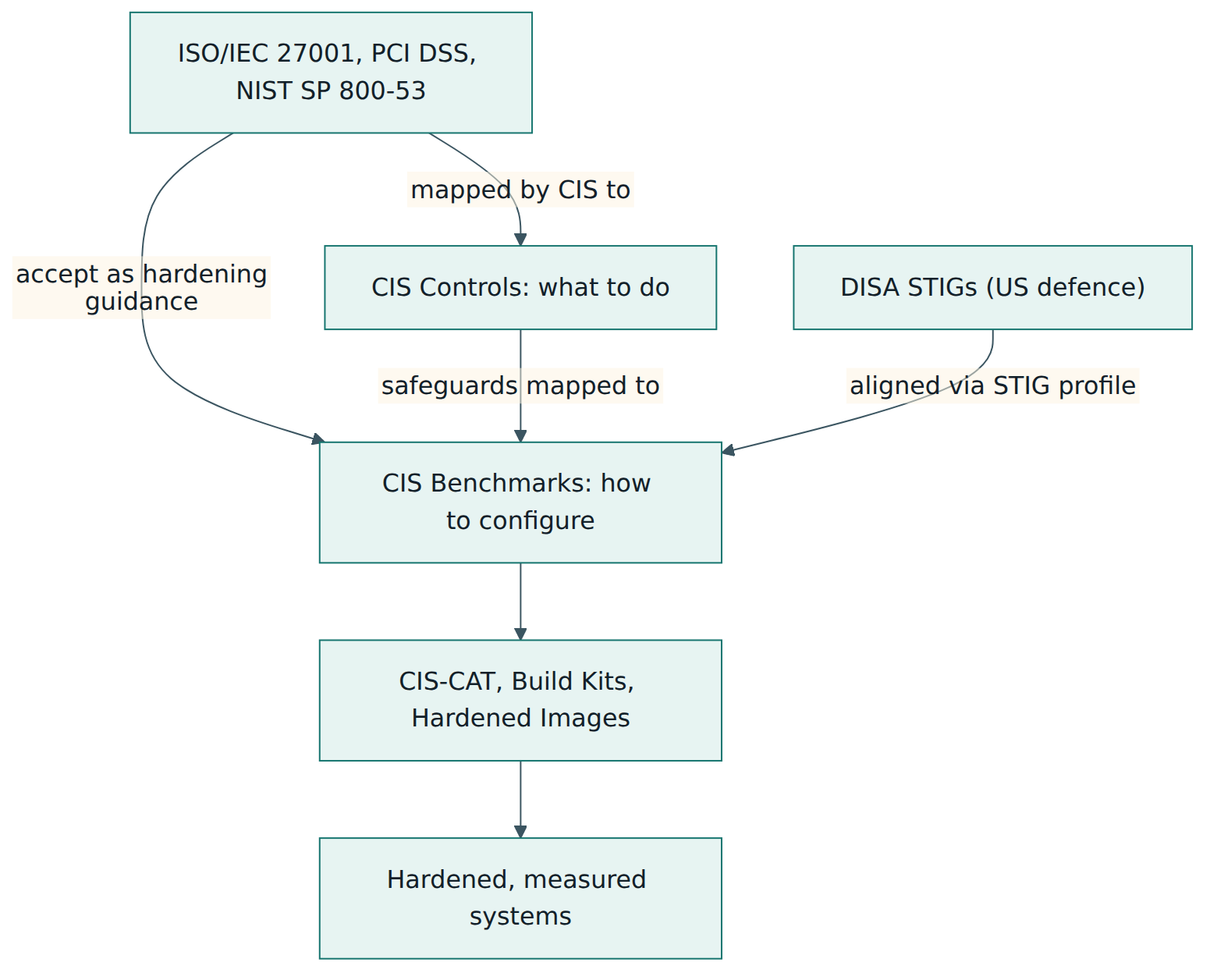
The CIS Benchmarks are most valuable when you see where they sit among other security frameworks. The key idea is the difference between what to do and how to do it on a specific product. Management-system standards and control frameworks say that you must manage secure configuration; the benchmarks say which settings to use on a given technology.
The CIS Controls
The CIS Critical Security Controls (version 8.1 at the time of writing) are a prioritised list of 18 controls with specific safeguards for an entire organisation, grouped into three Implementation Groups (IG1 is essential cyber hygiene for every organisation; IG2 and IG3 add safeguards for organisations with more complex needs and resources). One control is about secure configuration of enterprise assets and software, and the benchmarks are the natural way to put that control into practice. Each benchmark recommendation is mapped to the CIS Controls safeguards it supports, which lets you show how configuration work contributes to the wider programme.
Other related standards
| Standard or framework | Owner | What it is | Relationship to the CIS Benchmarks |
|---|---|---|---|
| CIS Critical Security Controls | CIS | Prioritised organisation-wide safeguards with Implementation Groups | Defines the need for secure configuration; benchmark items are mapped to its safeguards |
| DISA STIGs | US Defense Information Systems Agency | Mandatory configuration guides for US Department of Defense systems, with findings ranked by severity category | Similar purpose and depth; some benchmarks offer a STIG profile that aligns with them |
| NIST SP 800-53 and SP 800-70 | US National Institute of Standards and Technology | A catalogue of security and privacy controls, and guidance on the National Checklist Program | 800-53 requires baseline configurations; the checklist program lists many CIS Benchmarks |
| ISO/IEC 27001 and 27002 | ISO and IEC | Requirements for an information security management system, and guidance on its controls | Includes a configuration management control; benchmarks can provide the technical settings and evidence |
| PCI DSS | PCI Security Standards Council | Security requirements for environments that store, process or transmit payment card data | Expects configuration standards in line with accepted hardening guidance; CIS is a common choice |
| Vendor security baselines | Product vendors, e.g. Microsoft | The vendor's own recommended secure settings for its products | Often overlap with CIS; useful to compare, especially for new product releases |
Choosing between overlapping guides
Organisations often ask whether to follow CIS, a STIG or a vendor baseline. If a contract or regulation names one (for example, US defence work and STIGs), that decides it. Otherwise, the CIS Benchmarks are a strong default because they are vendor-neutral, cover a very wide range of products in a consistent format, explain rationale and impact, and are widely recognised by auditors. Vendor baselines can be faster to appear for brand-new releases and are a good cross-check. Whatever you choose, use one primary source per technology so that your baseline, your tooling and your evidence all speak the same language, and record the choice.
Common pitfalls and best practices
Common pitfalls:
- Applying Level 2 everywhere without testing. Stricter settings break applications, remote access or monitoring, and the resulting outage makes the business distrust the whole hardening effort.
- Chasing a 100 % score. Treating every failure as unacceptable leads either to unsafe hacks to make the scanner happy or to quiet removal of checks. Approved, documented exceptions are normal.
- Undocumented deviations. Skipping items without recording a reason, owner and review date leaves you unable to explain your choices to an auditor or to a future colleague.
- Forgetting Manual items. Relying only on automated scans leaves the recommendations that need human judgement unexamined.
- Hardening once and walking away. Without regular assessment, drift slowly erases the work, and baselines fall behind new benchmark versions and product releases.
- Using the wrong benchmark. Applying a guide written for a different product release, or an outdated version, can miss new settings or apply ones that no longer exist.
- Claiming certification. Telling customers you are "CIS certified" is inaccurate and damages trust when a knowledgeable reviewer asks for the certificate.
Best practices:
- Start from Level 1 for most systems and use Level 2 where the risk of the system justifies the extra cost and testing.
- Tailor with system owners and keep a single exception register with reasons, compensating controls, risk acceptance and review dates.
- Read the Impact field before every change and test the tailored baseline in a non-production environment with real workloads.
- Deploy through images, policies and code so that every new system starts compliant and changes are reviewed.
- Measure continuously against the tailored baseline, keep dated reports as evidence, and turn drift into tickets automatically.
- Record the benchmark version in baselines, reports and exceptions, and review each new version's change history before adopting it.
- Combine configuration with the rest of security: patching, vulnerability management, logging and access control, ideally organised by the CIS Controls or a management system.
Summary and key takeaways
- The CIS Benchmarks are free, consensus-based secure configuration guides from the Center for Internet Security, covering more than 100 technologies, each separately versioned.
- Every recommendation explains what to set, why, what it may affect, how to audit it and how to remediate it, and is mapped to the CIS Controls.
- Level 1 is the low-impact base profile, Level 2 adds defence-in-depth settings on top of Level 1, and some benchmarks offer a STIG-aligned profile.
- Successful adoption follows a lifecycle: inventory, select, choose profiles, tailor, test, deploy through code and policy, assess, remediate and monitor drift.
- Deviations are expected; they must be documented as exceptions with reasons, compensating controls, an accountable owner and a review date.
- Conformance scores need the benchmark version and profile to mean anything, and Manual items need human checks.
- There is no organisational CIS certification; product certification exists for vendors' tools, and auditors accept the benchmarks as evidence of secure configuration.
- The benchmarks give the product-level "how" for the configuration requirements in the CIS Controls, ISO/IEC 27001, PCI DSS and NIST guidance.
Reflection questions
- Pick one system type in your organisation. Which CIS Benchmark and version would apply, and which profile would you choose for it? Explain your reasoning in terms of data sensitivity and exposure.
- Think of a recommendation that would probably conflict with a business need in your environment. How would you document the exception, and what compensating control could reduce the remaining risk?
- Your organisation reports "94 % CIS conformance" to its board. What questions would you ask before you trusted that number?
- How does your organisation currently build new servers or laptops? What would need to change so that every new system starts from a hardened baseline?
- A new version of a benchmark you use has just been published. Describe the steps you would take to decide what to adopt and how you would update your evidence.
Further reading and official sources
- CIS Benchmarks catalogue and downloads – Center for Internet Security
- CIS Benchmarks FAQ – Center for Internet Security
- The CIS Benchmarks Community Consensus Process – Center for Internet Security
- Changes to CIS Benchmark Assessment/Recommendation Scoring – Center for Internet Security
- CIS-CAT Pro – Center for Internet Security
- Terms of Use for Non-Member CIS Products – Center for Internet Security
- CIS Critical Security Controls – Center for Internet Security
- National Checklist Program Repository – NIST
Original tutorial by xOps School (DevOpsSchool Private Limited), written from public sources about CIS Benchmarks. Not affiliated with or endorsed by the standard's owner; standard names are trademarks of their owners. Buy the official standard from its publisher for the authoritative text.