
IEC 62366-1 – Tutorial (about 60 minutes)
- View
IEC 62366-1 is the international standard that tells medical device manufacturers how to run a usability engineering process, so that the way people actually interact with a device does not put patients, users or bystanders at risk. Designers, human factors specialists, risk managers, quality and regulatory teams use it from the first concept sketch to the final validation study. After this tutorial you will be able to explain what the standard requires, walk through its nine process steps, plan formative and summative evaluations, and recognise what an auditor or regulator expects to find in a usability engineering file.
Course overview
Edition and status: the edition in force is IEC 62366-1:2015+AMD1:2020, Medical devices – Part 1: Application of usability engineering to medical devices, consolidated edition 1.1, published by the International Electrotechnical Commission (IEC) on 17 June 2020. It merges the 2015 first edition of Part 1, its 2016 corrigendum and Amendment 1 of 2020. It was prepared by a joint working group of IEC subcommittee SC 62A and ISO technical committee TC 210 and is published as a double-logo IEC/ISO standard, which is why it also appears in the ISO catalogue. The IEC webstore shows a stability date of 2028, meaning the committee does not plan to change the text before then; no second edition of Part 1 has been published. The companion guidance, IEC TR 62366-2:2016, is a Technical Report and contains no requirements. In the European Union, check the current list of standards harmonised under the Medical Device Regulation (Implementing Decision (EU) 2021/1182 and its amendments) before claiming a presumption of conformity; listed or not, notified bodies treat IEC 62366-1 as the state of the art. In the United States, the FDA revised its human factors guidance on 3 August 2026 (first issued in February 2016); the revision cites IEC 62366-1:2015+AMD1:2020. Verified 2026-10-29 against the IEC webstore entry for IEC 62366-1:2015+AMD1:2020 and the FDA guidance document.
Who it is for: product designers, user experience and human factors specialists, systems and software engineers, risk managers, quality and regulatory affairs staff, clinical specialists and project managers who are new to medical device usability work. It also helps suppliers whose components (apps, displays, controls, labels) become part of a device's user interface.
Prerequisites: none. A general idea of how products are designed and tested is helpful. Familiarity with risk management for medical devices (ISO 14971) helps too, and the essentials you need are explained in Lesson 4 and Lesson 7.
Learning objectives. After the seven lessons you will be able to:
- Explain why use-related risk matters, what IEC 62366-1 covers and what it deliberately leaves out.
- Use the core vocabulary correctly: use specification, user interface, use error, abnormal use, hazard-related use scenario, formative and summative evaluation, UOUP and the usability engineering file.
- Describe the general principles in clause 4 and the nine steps of the usability engineering process in clause 5.
- Plan formative and summative evaluations that produce credible evidence and feed results back into risk management.
- Explain how conformity is shown to regulators and test laboratories, and why there is no certificate "to IEC 62366-1".
- Apply the process to a realistic home-use device and judge whether the evidence is sufficient.
- Relate IEC 62366-1 to ISO 14971, IEC 60601-1-6, IEC 62304, IEC TR 62366-2 and the FDA human factors guidance.
Lesson 1 – Origins, purpose and scope
Why usability became a safety topic
For a long time, when something went wrong with a medical device, investigators tended to stop at the phrase "user error". A nurse programmed a pump with ten times the intended rate; a patient injected insulin from the wrong pen; a technician connected a tube to the wrong port. The report blamed the person and recommended retraining. Over the years, human factors research showed that many of these events were predictable. They happened again and again, with different people, because the device invited the mistake: two buttons looked alike, a display showed a decimal point that was hard to see, a connector fitted where it should not, or the instructions assumed knowledge that real users did not have.
Once you accept that some errors are designed in, they can also be designed out. That is the core idea of usability engineering for medical devices: treat the user interface as a source of risk, analyse how people will really use the device in the real environment, and test the design with representative users before it reaches the market. Regulators adopted the same view. The EU Medical Device Regulation (MDR) asks manufacturers to reduce, as far as possible, the risks related to use error, taking into account the users' knowledge, experience, training and use environment. The United States Food and Drug Administration (FDA) publishes guidance that expects human factors data in many premarket submissions.
From IEC 62366 to IEC 62366-1
The first international standard on the topic, IEC 62366, was published in 2007. In 2015 it was restructured. Part 1, IEC 62366-1, keeps only the normative process: what a manufacturer must do to identify and control use-related risk. Part 2, the Technical Report IEC TR 62366-2 published in 2016, collects tutorial guidance and methods and also discusses usability goals that are not about safety, such as efficiency and user satisfaction. In 2020, Amendment 1 clarified several requirements and aligned the references with the 2019 edition of ISO 14971, the risk management standard. The consolidated text of 2020 is what you work with today.
What the standard covers
IEC 62366-1 specifies a process for a manufacturer to analyse, specify, develop and evaluate the usability of a medical device as it relates to safety. Three points about this scope are important.
- It is a process standard. It does not tell you how big a button must be or which colour an alarm should have. It tells you which activities to perform, what to decide and what to record. Design detail comes from your own analysis and from other standards and references.
- It is about safety. The process focuses on use-related risk: hazards that arise from the way people interact with the device, both in correct use and through use errors. A device can be pleasant or tiresome to use; IEC 62366-1 cares about that only where it affects safety. Broader usability goals are discussed in IEC TR 62366-2.
- It does not cover abnormal use. Deliberate acts that violate normal use and are beyond any reasonable design control, such as sabotage or reckless disregard of clear safety information, are outside the process. You still need to recognise such behaviour and justify why it is abnormal, but you are not expected to design it away.
The scope also states that if the process has been followed, the usability of the device as it relates to safety is presumed acceptable unless there is objective evidence to the contrary, for example from post-production surveillance. Keep one more boundary in mind: the clinical decision about whether to use a device for a given patient is not a usability engineering question. A physician choosing the wrong therapy is a clinical problem; a physician unable to set the chosen therapy correctly is a usability problem.
Who uses it
Every class of medical device has a user interface, from a tongue depressor to a radiotherapy system, so the standard applies very widely. It is especially important for devices used at home by lay people, devices used under stress (emergency care, intensive care), devices with software screens and many settings, and combination products such as auto-injectors and inhalers. For medical electrical equipment, the collateral standard IEC 60601-1-6 makes the IEC 62366-1 process mandatory when claiming conformity with the IEC 60601-1 family. Software as a medical device, such as an app that calculates a dose, is covered too, because its screens and messages are a user interface.
Lesson 2 – Key concepts and vocabulary
Usability engineering has its own precise vocabulary. The terms below are explained in our own words; when you work on a real project, read the definitions in clause 3 of the standard itself, because auditors check that teams use them consistently.
- Usability – the quality of a user interface that makes it easy to use and therefore supports effectiveness, efficiency and user satisfaction in the intended use environment. In IEC 62366-1 the interest is in the safety side of usability.
- Usability engineering (also called human factors engineering) – applying knowledge about human behaviour, abilities and limitations to the design of devices, systems and tasks so that they can be used safely and effectively.
- User interface – everything through which the user and the device interact: controls, displays, alarms, labels, packaging, connectors, software screens, the instructions for use and any training the manufacturer provides. Documentation and training are part of the interface, not an afterthought.
- Use specification – a summary of the context of use: the intended medical indication, the intended patient population, the part of the body or tissue involved, the intended users, the use environment and the operating principle. It replaced the older term "application specification".
- User profile and user group – a user profile summarises the mental, physical and demographic traits of the intended users, such as age, education, experience, language and physical limitations. A user group is a subset of users whose differences are likely to influence how they interact with the device, for example patients versus nurses.
- Use environment – the actual conditions and setting of use: lighting, noise, temperature, movement, interruptions, protective gloves, a crowded ward or a moving ambulance.
- Normal use – operation, including routine inspection, adjustment and standby, according to the instructions for use or generally accepted practice.
- Correct use – normal use without any use error.
- Use error – a user action, or a failure to act, that leads to a result different from what the manufacturer intended or the user expected. It includes slips, lapses and mistakes, and the inability to complete a task. A use error says nothing about blame; it describes an outcome.
- Abnormal use – a conscious, intentional act or omission that runs counter to normal use and is beyond reasonable risk control through the user interface. Recognising something as abnormal use requires justification; you cannot simply relabel inconvenient use errors.
- Task – one or more user interactions with the device to achieve a desired result, such as "attach the needle" or "silence the alarm".
- Use scenario – a specific sequence of tasks performed by a specific user in a specific use environment, with the resulting response of the device.
- Hazard-related use scenario – a use scenario that could lead to a hazardous situation or harm. These scenarios are the backbone of the whole process.
- User interface specification – a collection of specifications that describe the user interface completely and in advance, including the requirements derived from risk control.
- User interface evaluation – any process in which the manufacturer explores or assesses the interface, for example by usability tests, expert reviews or cognitive walkthroughs.
- Formative evaluation – evaluation done during design to explore strengths, weaknesses and unexpected use errors, so that the design can be improved.
- Summative evaluation – evaluation done at the end of user interface development to obtain objective evidence that the interface can be used safely.
- User interface of unknown provenance (UOUP) – a user interface, or part of one, that was developed earlier without adequate records of a usability engineering process, such as a legacy device on the market before the standard existed.
- Usability engineering file – the set of records and other documents produced by the process. It may be a folder of its own or references into other files, such as the risk management file.
Types of use: one decision tree
The most important distinction in the vocabulary is the one between correct use, use error and abnormal use. Every user action falls into one of these categories, and the category decides how you handle it. Figure 1 shows the decision logic.
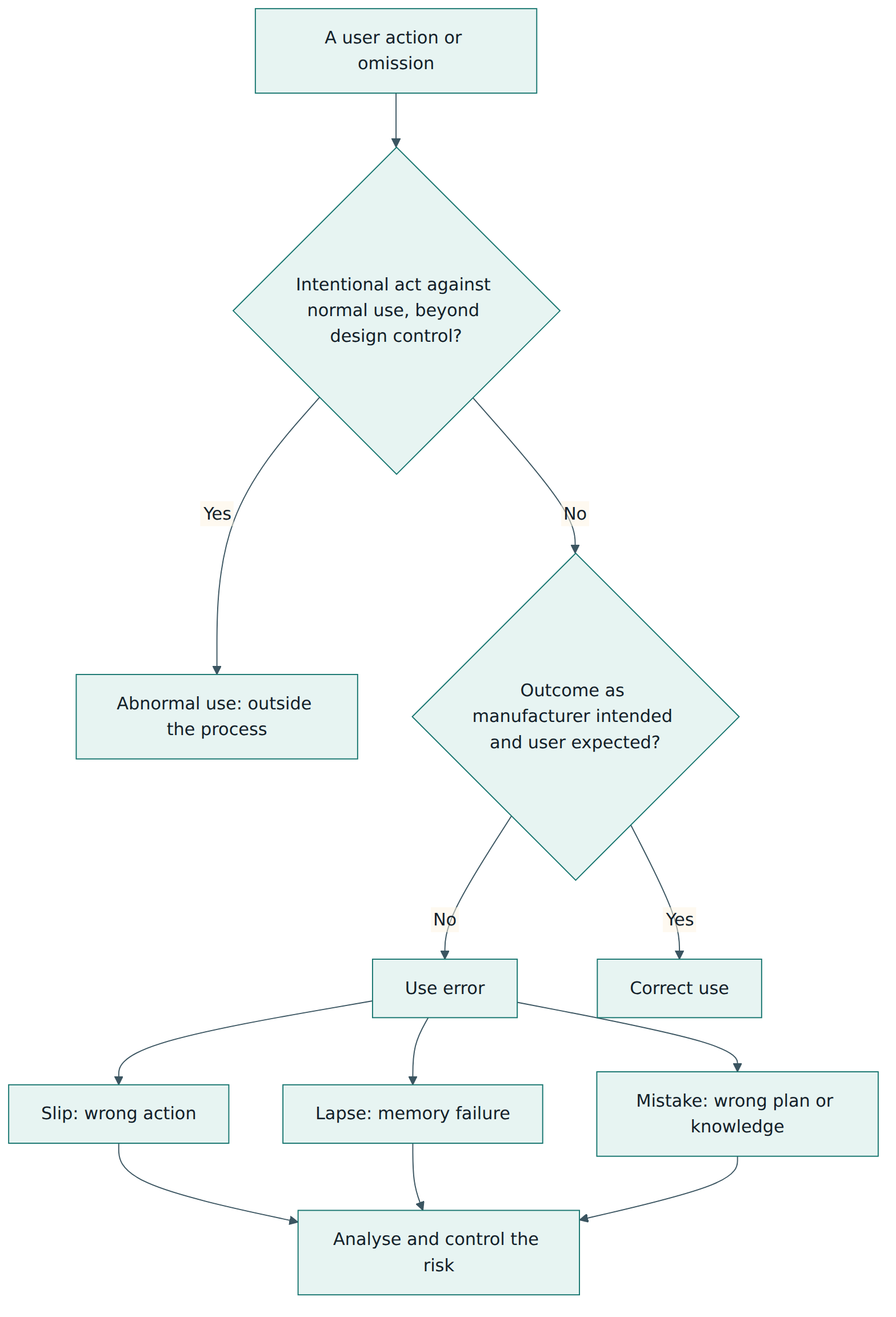
The subtypes of use error come from human error research. A slip is an action that goes wrong in execution, such as pressing the button next to the intended one. A lapse is a memory failure, such as forgetting to unclamp a line. A mistake is a correct execution of a wrong plan, such as setting a rate in millilitres per hour when the order was in milligrams per hour. Each subtype calls for a different kind of design response: physical separation and confirmation for slips, reminders and forcing functions for lapses, clearer information and better mental models for mistakes.
A deliberate shortcut is not automatically abnormal use. If a busy nurse routinely bypasses a confirmation screen because it appears too often, that behaviour is foreseeable and usually a sign of a poor interface. The manufacturer is expected to treat it as a use-related risk rather than call it abnormal.
Lesson 3 – Structure of the standard
IEC 62366-1 is short in its normative part and long in its annexes. Understanding the layout helps you find what you need and explain your process to an auditor.
Clauses 1 to 3
Clause 1 sets the scope described in Lesson 1. Clause 2 lists the normative reference, ISO 14971, which means the usability engineering process assumes a working risk management process. Clause 3 defines the terms you met in Lesson 2.
Clause 4 – Principles
Clause 4 contains general requirements that frame the process:
- Establish a usability engineering process and apply it, with the results recorded. The process may be integrated into the manufacturer's design and development process; it does not have to be a separate procedure.
- Risk control as it relates to user interface design. When reducing use-related risk, the manufacturer follows the priority order of ISO 14971: first make the design inherently safe, then add protective measures, and only then rely on information for safety.
- Information for safety as it relates to usability. When a warning, a label or training is used as a risk control, it must itself be evaluated for usability. A warning that users do not notice or understand does not control anything.
- Usability engineering file. The results of the process are kept in a file that can be referenced from, or combined with, other records.
- Tailoring of the usability engineering effort (clause 4.3). The form and depth of the work may vary with the nature of the device, its intended users and its intended use. In practice teams scale the effort with the complexity of the user interface and the severity of the harm that use errors could cause: a simple, familiar interface with low potential harm needs less evaluation than a complex infusion pump.
Clause 5 – The usability engineering process
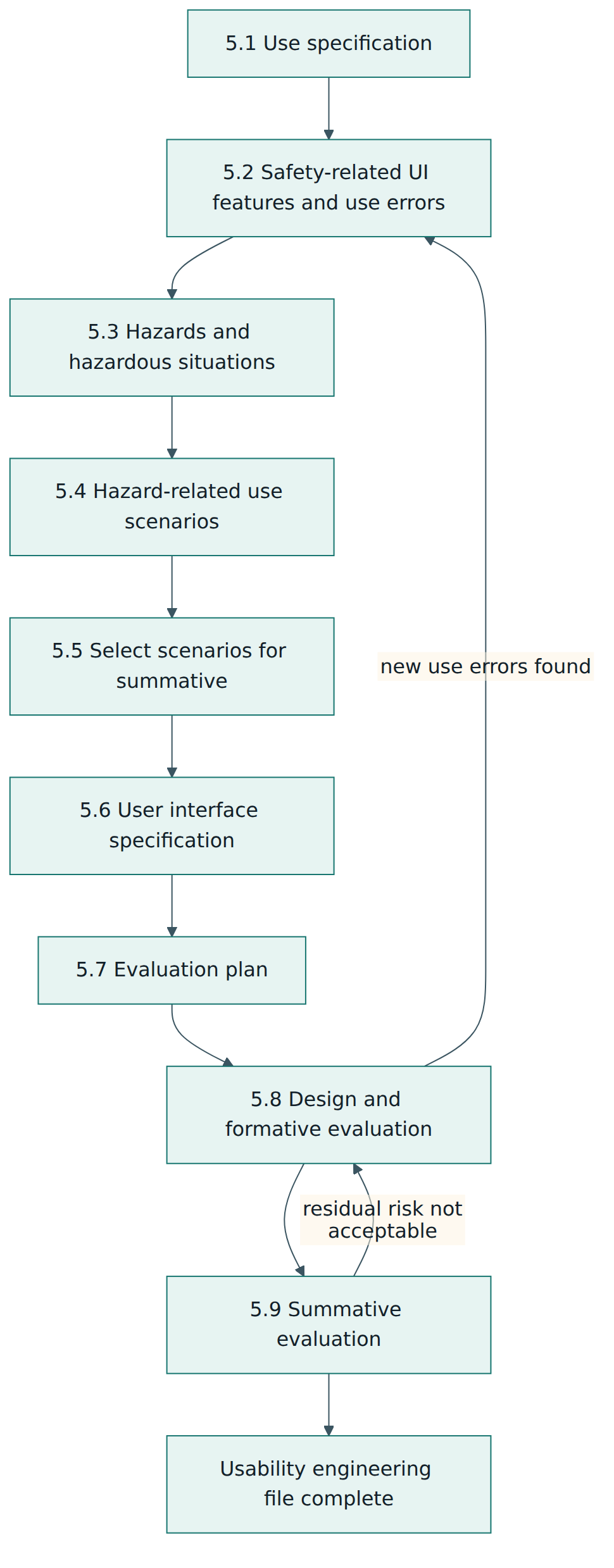
Clause 5 is the heart of the standard. Its first nine subclauses are the process steps, listed here with paraphrased titles; a tenth subclause, 5.10, points to Annex C for user interfaces of unknown provenance.
- 5.1 Prepare the use specification – describe who uses the device, for what, on whom, where and how it works.
- 5.2 Identify user interface characteristics related to safety and potential use errors – from the use specification and task analysis, find the features of the interface that could matter for safety and the use errors that could occur.
- 5.3 Identify known or foreseeable hazards and hazardous situations – including those learned from similar devices, complaints, incident reports and the literature.
- 5.4 Identify and describe hazard-related use scenarios – write the sequences of tasks that could lead to a hazardous situation, with the severity of the possible harm.
- 5.5 Select the hazard-related use scenarios for summative evaluation – all of them, or a justified subset based mainly on the severity of potential harm.
- 5.6 Establish the user interface specification – write the requirements for the interface, including those that implement risk controls and the requirements for accompanying documentation and training.
- 5.7 Establish the user interface evaluation plan – define the purpose, methods and acceptance criteria of formative and summative evaluations.
- 5.8 Perform user interface design, implementation and formative evaluation – design iteratively and evaluate as you go.
- 5.9 Perform summative evaluation of the usability of the user interface – demonstrate with objective evidence that the final interface can be used safely, analyse every use error and close the loop with risk management.
Figure 2 shows the flow. Note the feedback arrows: the process is iterative, and what you learn in later steps sends you back to earlier ones.
The annexes
Annexes A, B, D and E are informative; Annex C is normative, because it contains requirements for anyone who uses its route. Practitioners rely on all of them heavily:
- Annex A gives general guidance and the rationale behind the requirements, clause by clause. When a requirement seems abstract, Annex A usually explains the intent.
- Annex B gives examples of hazardous situations that can be related to usability.
- Annex C (normative) describes a simplified route for evaluating a user interface of unknown provenance, explained in Lesson 4.
- Annex D illustrates the types of medical device use with examples, the logic shown in Figure 1.
- Annex E relates the standard to the essential principles of safety and performance for medical devices, which helps when mapping to regulations.
Regional adoptions can add their own annexes. European editions published as EN 62366-1 may carry informative "Z" annexes that relate clauses to EU legislation; check which legislation the annexes in your copy refer to, because the earlier directives have been replaced by the MDR and the IVDR.
Lesson 4 – How it works in practice
Reading the nine steps is easy; doing them well takes judgement. This lesson goes through the practical work behind each group of steps and shows how usability engineering exchanges information with risk management.
Understanding users, tasks and environments (5.1 and 5.2)
The use specification is short, often a page or two, but it shapes everything else. Write it early and keep it under change control. Typical inputs are the intended purpose from the regulatory strategy, market research, interviews with clinicians and patients, and observation in real settings. Contextual inquiry, where the team watches people work in the actual ward, clinic or home, often reveals conditions that nobody mentioned in meetings: dim night lighting, a device placed on the floor, a caregiver who reads the instructions to the patient, gloves that make touchscreens unreliable.
From there, the team performs a task analysis. It breaks each use of the device into steps and, for each step, asks what the user must perceive, what they must know or decide, and what physical action they must perform. This perception–cognition–action model makes potential use errors visible. If a user must read a small number on a reflective screen, perception can fail; if they must remember a sequence learned months ago, cognition can fail; if they must press firmly with arthritic fingers, action can fail. Those weak points are the user interface characteristics related to safety that step 5.2 asks for.
Linking to hazards (5.3 and 5.4)
Step 5.3 looks outward: what hazards are already known? Teams search complaint and incident data for their own and comparable devices, published recall notices, adverse event databases and literature. A well-known pattern, such as connectors that allow a feeding line to be attached to an intravenous line, should never be rediscovered by a new team the hard way.
Step 5.4 combines the internal and external views into hazard-related use scenarios. A good scenario names the user, the environment, the sequence of tasks, the use error or circumstance, the resulting hazardous situation and the possible harm with its severity. For example: "A patient with reduced dexterity at home removes the auto-injector from the skin before the dose is complete, receiving a partial dose; therapy is less effective; severity moderate." Writing scenarios this concretely makes it possible to design specific controls and to test them later.
Choosing what must be proven (5.5)
Not every scenario needs to be part of the final validation study. The standard lets the manufacturer select all hazard-related use scenarios for summative evaluation or a subset, with the selection based mainly on severity of potential harm. Scenarios whose harm could be serious are almost always included. The rationale for leaving any scenario out must be documented. Regulators may expect more: the FDA, for instance, asks manufacturers to identify "critical tasks", meaning tasks whose incorrect performance could cause serious harm, and to validate all of them.
Specifying the interface (5.6)
The user interface specification turns analysis into testable requirements. It covers the physical and software interface, alarms, labels, the instructions for use and any training. Requirements that come from risk control are flagged, so that they can be traced to the hazard-related use scenarios they address. Good specifications are concrete: "the dose window shows a full-colour indicator visible from 50 cm in normal room lighting" can be tested; "the device shall be intuitive" cannot.
Planning and running evaluations (5.7 to 5.9)
The evaluation plan describes, for formative work, what questions each round will explore and which methods it will use; for the summative evaluation, it describes the scenarios to be tested, the participants, the test environment, the data to be collected, how use errors will be analysed and what result counts as acceptable. Participants must represent the intended user groups, and the test environment must reproduce the relevant conditions of the real use environment.
Formative evaluation uses whatever method fits the maturity of the design: expert heuristic reviews, cognitive walkthroughs, early usability tests with paper prototypes or foam models, simulated-use tests with working prototypes. It is exploratory. Its purpose is to find problems while they are cheap to fix. Several rounds are normal.
Summative evaluation is a confirmation, not an exploration. It uses the production-equivalent device, the final labelling and instructions, and the training that real users will receive. Participants perform the selected hazard-related use scenarios, usually without coaching, while observers record use errors, close calls and difficulties. Afterwards, interviews explore each problem to find its root cause from the user's perspective. Data are mostly qualitative: the goal is not a statistical success rate but an understanding of why each error happened and whether the residual risk is acceptable.
If the summative evaluation reveals use errors with unacceptable residual risk, the team goes back to design (step 5.8), changes the interface, and then evaluates again. A changed design generally needs fresh summative evidence for the affected scenarios.
The link with risk management
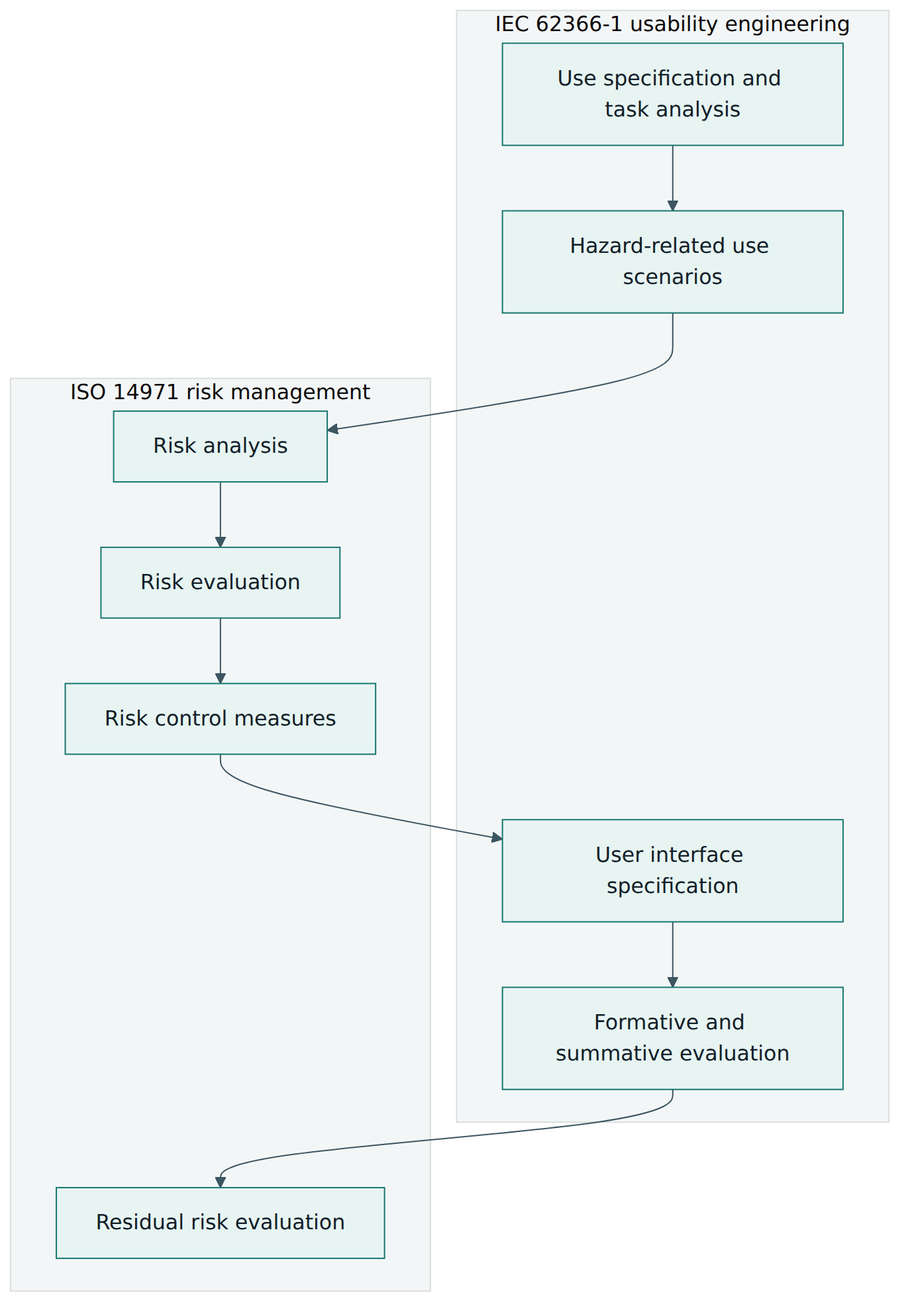
IEC 62366-1 does not replace ISO 14971; it plugs into it. Figure 3 shows the main exchanges. Hazard-related use scenarios become inputs to the risk analysis. Risk evaluation decides which scenarios need control. Risk controls become user interface requirements. Summative results provide evidence that the controls work and feed the evaluation of residual risk. Information for safety, such as a warning, is a risk control like any other and needs its own usability evidence.
User interface of unknown provenance
Many manufacturers have devices that were designed before IEC 62366-1 existed, or bought from another company without adequate usability records. Subclause 5.10 and Annex C offer a route for such a UOUP. In outline, the manufacturer prepares the use specification, reviews post-production information such as complaints and incident reports, identifies hazards and hazardous situations related to usability, applies risk control where needed, evaluates the residual risk, and documents the outcome. Two limits matter. First, the route applies only to the parts of the interface that are unchanged; anything modified must go through the full process of clause 5. Second, the route depends on real post-market data, so it is not available for a brand-new design that merely reuses an old look.
Roles and records
Usability engineering is a team activity. A typical team includes a human factors lead who owns the process, interaction and industrial designers, engineers who implement the interface, a risk manager, clinical experts who know the real use, a regulatory specialist who knows what each market expects and a technical writer for labelling and instructions. Many companies use external human factors laboratories for summative studies, because these require experienced moderators, recruited participants and simulated environments.
The usability engineering file usually contains the use specification, user profiles and environment descriptions, task analyses, the list of user interface characteristics related to safety, known hazards from similar devices, hazard-related use scenarios with their selection rationale, the user interface specification, evaluation plans and reports for every formative and the summative evaluation, and a trace showing how each scenario was controlled and verified. It must be kept current: post-market changes, new user groups and new markets can all reopen the analysis.
Lesson 5 – Assessment, certification and compliance
There is no certificate "to IEC 62366-1"
IEC 62366-1 is not a management system standard like ISO 13485, so there is no accredited certification of an organisation against it, and no certificate a manufacturer can hang on the wall. Conformity is a property of a specific device's development: the manufacturer shows, in the technical documentation, that the process was applied and that the evidence supports the safety of the user interface. Training providers offer courses and personal certificates in usability engineering, but these are commercial offerings, not a scheme run by the IEC.
Who checks conformity
- EU notified bodies review the usability engineering file as part of the technical documentation for most device classes under the MDR or the In Vitro Diagnostic Regulation. They check that the general safety and performance requirement on use error is met, and use IEC 62366-1 as the reference for what "state of the art" looks like. Because the harmonisation status can change, manufacturers should check the latest list of harmonised standards published in the Official Journal of the EU before claiming a presumption of conformity.
- The FDA recognises IEC 62366-1 as a consensus standard. A manufacturer may declare conformity in a premarket submission, but FDA reviewers still expect human factors information that matches FDA's own guidance, including a description of critical tasks and the results of human factors validation testing when the device's risk profile calls for it.
- Test laboratories that assess medical electrical equipment against the IEC 60601-1 family check conformity with IEC 60601-1-6, which requires the IEC 62366-1 process. In practice they review the usability engineering file for completeness and consistency.
- Internal audits and design reviews under the quality management system check that the process defined in the procedures was followed. ISO 13485 requires design and development inputs to include usability requirements, which is often where an auditor starts the trail.
What reviewers look for
Reviewers rarely fail a file because a single document is missing. They fail it because the chain of reasoning is broken. Typical questions are: Does the use specification match the intended purpose in the labelling? Are all user groups represented in the summative evaluation, including lay users and people with relevant impairments? Were known problems from similar devices considered? Is every serious hazard-related use scenario either evaluated or justified as excluded? When use errors occurred in the summative evaluation, did the team analyse the root cause and decide on residual risk, or simply record a pass rate? Were warnings and training validated rather than assumed to work? Was the summative test performed on a production-equivalent design?
How much evidence is enough?
IEC 62366-1 does not prescribe a number of participants. It asks for representative users and objective evidence. FDA guidance has since 2016 recommended, and its August 2026 revision still recommends, at least 15 participants per distinct user group for human factors validation testing, and many manufacturers use that figure worldwide as a practical baseline. The real test, however, is whether the data allow you to understand the use errors that can occur and to judge residual risk. A study with many participants who all received unrealistic coaching proves less than a smaller study under realistic conditions.
After the market launch
Conformity is not a one-time event. Complaints, incident reports and field observations are a rich source of new use errors. The usability engineering file should be updated when post-market data reveal unexpected use, when the device or its labelling changes, when it is sold to a new user group or in a new environment, and when the use specification changes. Changes to software screens are a common trigger, because they are easy to make and easy to underestimate.
Lesson 6 – Worked example: a home-use auto-injector
To tie the concepts together, follow a fictional mid-sized manufacturer, Lumen Medical, as it develops a single-use auto-injector for a biologic medicine that patients with an autoimmune condition inject under the skin every two weeks at home. Lumen plans to sell in the European Union and the United States.
Step 1 – Use specification
The team writes a two-page use specification. The intended users are adult patients, some of whom have reduced hand strength and dexterity because of their condition, together with lay caregivers such as partners or adult children. A third group, healthcare professionals, trains patients at the first visit. The use environment is the home: variable lighting, kitchen tables, possible distractions from children or pets, and storage in a domestic refrigerator. The operating principle is a spring-driven injection triggered by pressing the device against the skin, with a visual and audible end-of-dose signal.
Step 2 – Task analysis and safety-related characteristics
The task analysis lists the steps: take the device out of the refrigerator and let it reach room temperature, check the expiry date and the medicine through the window, choose and clean the injection site, remove the cap, press the device against the skin to start, hold until the end-of-dose signal, remove and check that the window has changed colour, and dispose of the device. For each step the team notes perception, cognition and action demands. The analysis highlights several characteristics related to safety: the force needed to remove the cap, the visibility of the inspection window, the length and clarity of the hold time, the end-of-dose signal and the instructions.
Step 3 – Known hazards
The team searches adverse event databases and the literature for similar auto-injectors. It finds recurring reports of partial doses when users lift the device too early, injections into the thumb when users hold the device upside down, cap removal difficulties for people with arthritis, and injections of cold medicine causing pain and leading some patients to skip doses.
Step 4 – Hazard-related use scenarios
The team writes 14 hazard-related use scenarios. Among them:
- A patient lifts the device after the first click, believing the injection is complete; partial dose; moderate harm through reduced therapy.
- A caregiver holds the device upside down and triggers it into a finger; needle injury and loss of the dose; moderate harm.
- A patient cannot remove the cap and uses a kitchen tool, bending the needle shield; the device fails to deliver; loss of therapy.
- A patient injects a device whose medicine is cloudy because it was frozen; possible reduced effect or adverse reaction; serious harm.
Step 5 – Selecting scenarios for summative evaluation
All scenarios with serious or moderate potential harm are selected, which is 11 of the 14. The three remaining scenarios concern minor discomfort, and the team documents why they are covered by other evidence, such as analysis of user feedback from an earlier, similar product.
Step 6 – User interface specification
The specification includes requirements derived from the scenarios: a cap removal force within the capability of users with reduced grip strength; an asymmetric shape and a coloured needle end so that orientation is obvious by look and feel; a large window that turns fully yellow only when the full dose is delivered; a second, distinct click at the end of the dose; quick-reference instructions printed inside the box lid with numbered pictograms; and a statement on the carton and in the instructions to check that the medicine is clear before use. Each requirement carries the identifier of the scenario it controls.
Steps 7 and 8 – Plan and formative rounds
The evaluation plan defines three formative rounds and one summative study. Figure 4 shows the timeline.
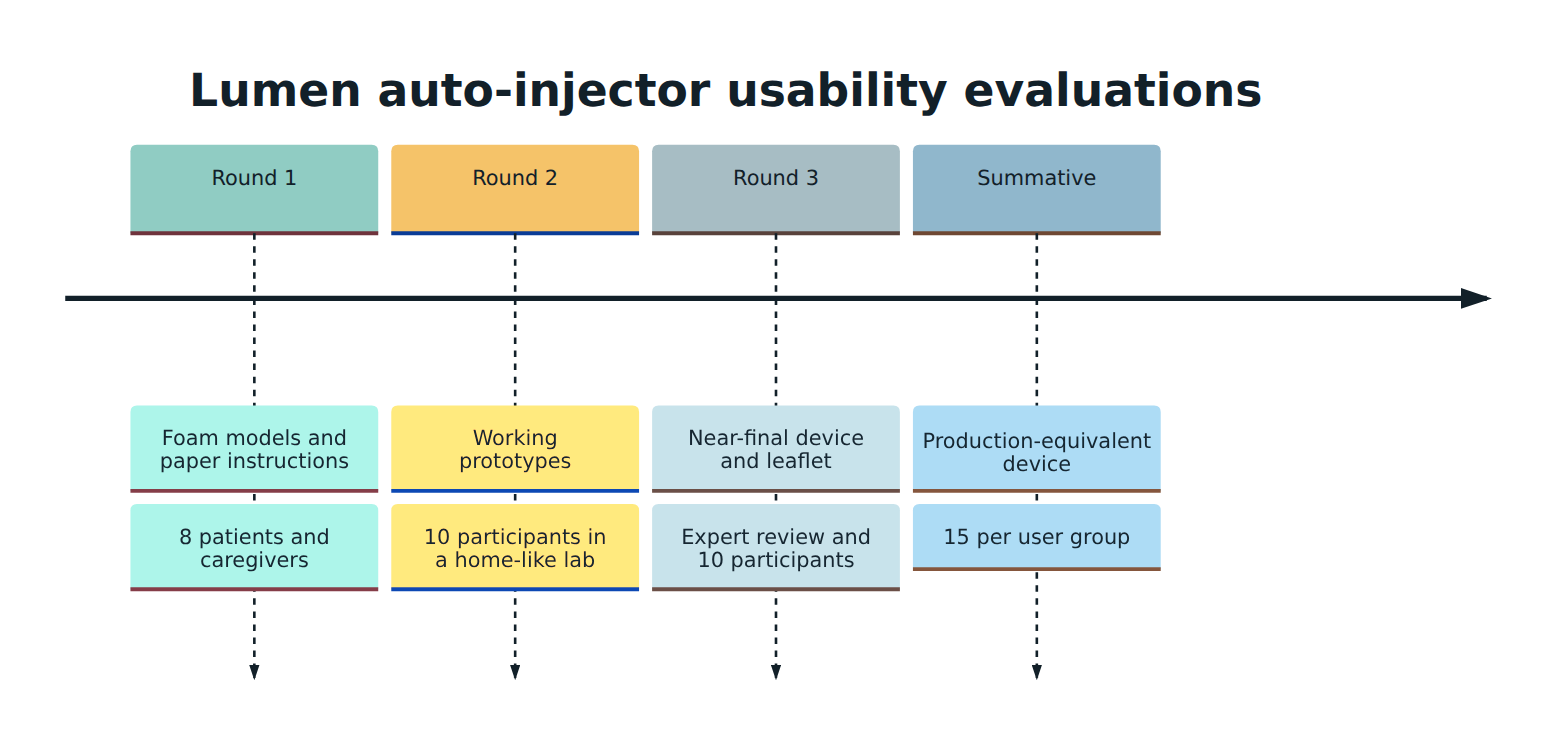
Round 1 shows that several participants hold the foam model upside down; the asymmetric shape helps but not enough, so the team adds a ribbed grip. Round 2 confirms the partial-dose problem: four of ten participants lift the device after the first click. The designers make the end-of-dose click louder and different in pitch, enlarge the window, and change the instructions to say "hold until the window is fully yellow" rather than giving a number of seconds. Round 3, with an expert review and ten participants, finds that the quick-reference instructions are often skipped because they are inside the lid where users do not look; the team moves the first pictograms onto the tray that holds the device.
Step 9 – Summative evaluation
The summative study recruits 15 patients with reduced dexterity, 15 caregivers and 15 healthcare professionals, as the FDA guidance suggests at least 15 per distinct user group. It is run in a simulated home with realistic lighting and distractions. Patients and caregivers receive the same training they would receive in reality, followed by a delay of several days to reflect memory decay before the test session. Participants perform all 11 selected scenarios without help.
Results: no participant injects into a finger; one patient lifts the device early but immediately notices the window is not fully yellow, and the root cause interview shows he was distracted by a phone call. The team judges the residual risk acceptable because the window made the error detectable and the instructions explain what to do. Two caregivers do not check the medicine for cloudiness. Because this scenario could cause serious harm and the only control is information for safety, the team considers the residual risk not acceptable. It goes back to design, adds a temperature indicator to the packaging that changes permanently if the product has been frozen, and repeats the summative evaluation for the affected scenarios with new participants.
Closing the file
The usability engineering file now contains the use specification, task analysis, known-hazard review, 14 scenarios with selection rationale, the user interface specification with trace links, three formative reports, two summative reports and the residual risk conclusions, which are referenced from the risk management file. After launch, Lumen's complaint handling team tags every complaint that mentions difficulty of use, so that new use errors flow back into the analysis.
Lesson 7 – Relationship to other standards and frameworks
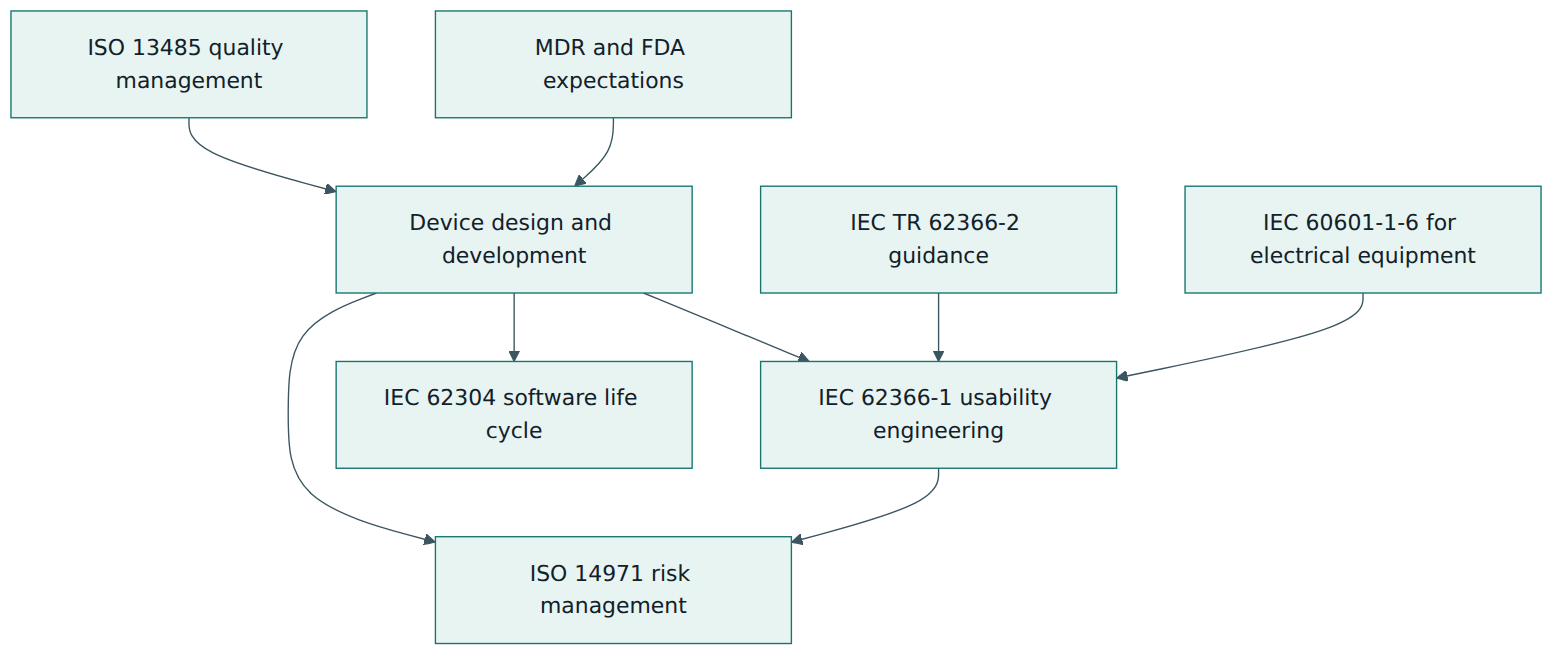
IEC 62366-1 never works alone. It sits within a group of standards and regulatory documents that together define how a medical device is developed and shown to be safe. Knowing how they divide the work prevents duplication and gaps.
| Document | What it covers | How it relates to IEC 62366-1 |
|---|---|---|
| ISO 14971 (risk management for medical devices) | The complete risk management process: analysis, evaluation, control, residual risk and post-production information. | The only normative reference of IEC 62366-1. Usability engineering supplies the use-related part of the risk analysis and the evidence that interface-based risk controls work. |
| IEC TR 62366-2 (guidance on usability engineering) | Tutorial guidance, methods and examples, including usability goals beyond safety. | The companion document. It explains how to carry out the activities that Part 1 requires, but contains no requirements of its own. |
| IEC 60601-1-6 (usability collateral standard) | Usability of medical electrical equipment within the IEC 60601-1 safety family. | Requires applying IEC 62366-1 for medical electrical equipment and adds a few points specific to that equipment. |
| IEC 62304 (medical device software life cycle) | Processes for developing and maintaining device software. | Covers how software is built; IEC 62366-1 covers whether its screens and workflows can be used safely. Usability requirements become software requirements. |
| ISO 13485 (quality management systems) | The quality management system of the manufacturer, including design controls. | Provides the framework of design inputs, reviews, verification and validation into which the usability process is integrated. |
| FDA human factors guidance | US expectations for applying human factors to devices and presenting the data in submissions. | Broadly consistent, with its own vocabulary such as "critical tasks" and specific recommendations for validation testing. |
Similar ideas, different words
Teams that sell in several markets often need to translate between vocabularies. IEC 62366-1 speaks of hazard-related use scenarios selected for summative evaluation; the FDA speaks of critical tasks validated in human factors validation testing. The ideas overlap heavily but are not identical, so many teams maintain one set of analyses and map the terms. Similarly, ISO 14971 uses "reasonably foreseeable misuse", which covers some behaviour that IEC 62366-1 would classify as use error and some it would classify as abnormal use; the classification in Figure 1 helps to keep the two consistent.
Where general usability standards fit
Outside the medical sector, the ISO 9241 series defines usability and human-centred design for interactive systems in general. Its ideas, such as designing around users' tasks and evaluating with real users, underpin IEC 62366-1, but ISO 9241 has no direct regulatory role for medical devices. Design references such as the AAMI human factors design guidance provide detailed recommendations on displays, controls, alarms and labelling that help teams meet the requirements they write in the user interface specification.
Common pitfalls and best practices
Pitfalls
- Starting usability work late. A team designs the device, then commissions a summative study shortly before submission. The study reveals serious use errors when the design is frozen and tooling is paid for, so the team argues the risk away instead of fixing it.
- Treating the summative study as a pass-fail percentage. Reporting "93 % task success" without analysing each failure misses the point. Every use error and close call needs a root cause and a residual risk decision.
- Relying on the instructions for use as the main control. Warnings and training are the weakest risk controls in the ISO 14971 hierarchy and must be validated. Many users never read the leaflet.
- Calling foreseeable behaviour "abnormal use". Shortcuts, workarounds and forgetting steps are predictable; labelling them abnormal to exclude them from the process will not survive a review.
- Unrepresentative participants or environments. Testing with engineers, healthy young volunteers or in a quiet office does not represent elderly patients in a dim kitchen.
- Coaching during the test. Moderators who hint or help destroy the value of a summative evaluation.
- Letting the file go stale. Software updates, new markets and complaint trends change the use-related risk, but the file is never revisited.
Best practices
- Observe real use early. Visit the wards, clinics and homes where the device will be used before writing requirements.
- Integrate with risk management from day one. Keep one set of hazard-related use scenarios shared by the human factors and risk teams, with trace links to requirements and evidence.
- Prefer design changes over warnings. Use shape, forcing functions, defaults and feedback to make the right action easy and the wrong action hard.
- Run several small formative rounds. Cheap, frequent evaluations with a handful of users find most problems early.
- Write the summative protocol carefully and early. Define scenarios, participants, training, delays and acceptance logic before building the test, and review it with regulators where that service is available.
- Scale the effort honestly. Use the scaling principle to spend effort where harm is serious, and document why simpler parts need less.
- Feed post-market data back. Tag complaints that mention difficulty of use and review them regularly as inputs to the analysis.
Summary and key takeaways
- IEC 62366-1:2015+AMD1:2020 defines a usability engineering process that manufacturers use to identify and control use-related risks of medical devices.
- It is a process standard focused on safety; detailed design rules and broader usability goals live in other documents such as IEC TR 62366-2.
- The user interface includes controls, displays, labelling, instructions and training, and all of them can create or reduce risk.
- Every user action is correct use, use error or abnormal use; only abnormal use is outside the process, and it must be justified.
- The nine steps of clause 5 run from the use specification through hazard-related use scenarios and the user interface specification to formative and summative evaluation, with feedback loops.
- Formative evaluations explore and improve the design; the summative evaluation provides objective evidence that the final interface is safe to use.
- Usability engineering is tightly coupled with ISO 14971 risk management, and conformity is shown in the technical documentation rather than through a certificate.
- The usability engineering file must be kept current after launch, using complaints and field data as inputs.
Reflection questions
- Pick a medical device you know. Who are its distinct user groups, and which characteristics of each group would you put in the use specification?
- Think of a "user error" you have seen reported. How would you reclassify it using the categories of use error and abnormal use, and what design change might have prevented it?
- For a device with a touchscreen, which hazard-related use scenarios would you select for summative evaluation, and how would you justify leaving any out?
- Your only control for a serious scenario is a warning in the instructions. What evidence would you need to show it works, and what design alternatives would you explore first?
- A software update changes the order of two screens in a ward device. What parts of the usability engineering file would you review, and would you repeat any evaluation?
Further reading and official sources
- IEC 62366-1:2015+AMD1:2020 CSV – Application of usability engineering to medical devices – International Electrotechnical Commission
- IEC 62366-1:2015/AMD1:2020 – Amendment 1 – International Electrotechnical Commission
- ISO 14971:2019 – Application of risk management to medical devices – International Organization for Standardization
- Docket FDA-2011-D-0469: Applying Human Factors and Usability Engineering to Medical Devices – U.S. Food and Drug Administration (via Regulations.gov)
- FDA Recognized Consensus Standards database (search for IEC 62366-1) – U.S. Food and Drug Administration
- Regulation (EU) 2017/745 on medical devices (MDR) – Publications Office of the European Union
- IEC 62366 explained: usability engineering – Greenlight Guru
Original tutorial by xOps School (DevOpsSchool Private Limited), written from public sources about IEC 62366-1. Not affiliated with or endorsed by the standard's owner; standard names are trademarks of their owners. Buy the official standard from its publisher for the authoritative text.