
ArchiMate – Tutorial (about 60 minutes)
- View
ArchiMate is an open modelling language, owned by The Open Group, for describing enterprise architecture: how strategy, business operations, applications, data and technology fit together and how they change over time. Enterprise architects, solution architects, business analysts and IT planners use it to draw consistent, connected diagrams that different stakeholders can read. After this tutorial you will be able to read and sketch basic ArchiMate models, choose the right elements and relationships, build views for specific audiences and explain how ArchiMate works alongside TOGAF, BPMN and UML.
Course overview
Edition and status: the current edition is the ArchiMate 4 Specification (The Open Group document C260), published on 27 April 2026 with status "Adopted"; it supersedes the ArchiMate 3.2 Specification (C226, October 2022). The Open Group presents version 4 as an evolution of the language with strong user-level compatibility, and its published change list amounts to a clean-up: several elements were removed (the interaction elements, constraint, contract, gap and representation), the layer-specific behaviour elements were merged into one generic set, and the word "layer" was replaced by "domain". At the time of verification, The Open Group's individual certification programme was still the ArchiMate 3 programme, based on version 3.2, and most books, courses and tools still use 3.2 names. This tutorial therefore teaches the concepts shared by both versions, uses version 4 terminology first and points out the 3.2 name wherever learners will meet it. Verified 2026-10-29 against The Open Group publications catalogue and certification pages.
Who it is for: engineers, analysts, project and programme staff, security and compliance people, and new architects who are handed ArchiMate diagrams or asked to produce them. It also suits anyone preparing to study for an ArchiMate certification, although it is an introduction and not an exam syllabus.
Prerequisites: none. A general picture of how an organisation runs (customers, processes, IT systems, servers and projects) helps. You do not need to know TOGAF or UML first.
Learning objectives. After this tutorial you will be able to:
- Explain what problem ArchiMate solves and why a shared, formal notation matters for enterprise architecture.
- Describe the ArchiMate framework of domains and aspects and place any element in it.
- Define the core element types (active structure, behaviour, passive structure, motivation and strategy elements) and give an example of each.
- Choose the correct relationship among the structural, dependency, dynamic and other relationship families.
- Build views with viewpoints that answer one stakeholder's concerns, and keep the underlying model consistent.
- Describe how individuals, tools and training courses are certified, and what is not certifiable.
- Position ArchiMate next to TOGAF, BPMN, UML, the C4 model and ISO/IEC/IEEE 42010.
Lesson 1 – Origins, purpose and scope
The problem ArchiMate solves
Every large organisation has hundreds of business processes, applications, databases, servers, cloud services, suppliers and change projects. Different groups describe these things in different ways: process owners draw swim-lane charts, developers draw component diagrams, infrastructure teams draw network maps and strategists write slide decks about capabilities. Each picture may be correct, but the pictures do not connect. Nobody can answer simple cross-cutting questions such as "Which customer-facing services stop if this database server fails?" or "Which applications support the capability we plan to outsource?"
Enterprise architecture is the discipline that tries to answer such questions by describing the organisation as one connected system. To do that well, architects need a language with a defined vocabulary (so that "service" or "process" means the same thing in every diagram), defined relationships (so that a line between two boxes has a precise meaning) and a way to show different slices of the same model to different people. ArchiMate is that language. It is deliberately not a method: it tells you how to express an architecture, not which steps to follow to design one.
A short history
ArchiMate began as a Dutch research and development project run from 2002 to 2004 by the Telematica Instituut with government, industry and university partners. The aim was a language that could link the business and IT views of an enterprise, tested on real organisations such as a bank and a tax authority. In 2008 the language was handed to The Open Group, the vendor-neutral consortium that also owns the TOGAF Standard. Since then it has been maintained by The Open Group's ArchiMate Forum, a working group of practitioners, tool vendors and academics.
Version 1.0 was published by The Open Group in 2009. Version 2.0 (2012) added the motivation elements and the implementation and migration elements. Version 3.0 (2016) added strategy elements such as capability, physical elements for equipment and facilities, and a generic metamodel that made the language more uniform. Versions 3.1 (2019) and 3.2 (2022) refined it, and version 4 (2026) simplified it.
Purpose and scope
The specification describes ArchiMate as an open and independent modelling language for enterprise architecture, supported by many tool vendors and consulting firms. Its purpose can be summed up in four words: describe, analyse, visualise and communicate.
- Describe – capture the elements of an enterprise (actors, processes, applications, data, technology, goals, projects) and how they relate.
- Analyse – follow relationships to find dependencies, impacts, gaps and redundancies, for example "what depends on this server?".
- Visualise – draw views that show only what one audience needs, with a consistent notation.
- Communicate – give business and IT people a common vocabulary so they can discuss change.
ArchiMate works at the level of the enterprise or a large part of it. It deliberately stays coarser than detailed design languages. It can show that a "Handle Claim" process uses a "Claims Administration" application, but it does not try to model every decision point of the process (that is a job for BPMN) or every class in the application (a job for UML). This "middle altitude" is ArchiMate's main strength: it connects the detailed models of different specialists without replacing them.
Who uses it
Typical users are enterprise architects who keep the architecture repository, solution architects who show how a project fits the landscape, business architects who model capabilities and value streams, portfolio managers who track application lifecycles, security architects who trace which data flows through which systems, and governments or regulators that publish reference architectures. Because the notation is standard, models can be exchanged between tools and understood across organisations.
Lesson 2 – Key concepts and vocabulary
Before looking at the full framework, learn the vocabulary. ArchiMate words have precise meanings, and many beginner mistakes come from using them loosely.
- Model – the complete, connected set of elements and relationships that describes an architecture. A model normally lives in a repository inside a modelling tool.
- View – a diagram (or table, or other presentation) showing a selected part of the model for a particular purpose. One model can have hundreds of views; deleting a box from a view does not remove the element from the model.
- Viewpoint – a specification of which elements and relationships a kind of view may contain and which stakeholder concerns it addresses. A viewpoint is the template; the view is the instance.
- Stakeholder and concern – a stakeholder is a person or group with an interest in the architecture; a concern is a topic that matters to them, such as cost, availability, compliance or time to market.
- Element – a basic building block of the language, such as an application component or a business process. Elements are drawn as boxes with a type icon or a characteristic shape.
- Relationship – a typed connection between two elements, such as serving, realization or composition. Each relationship type has its own line style.
- Domain – a part of the enterprise described by its own group of elements, such as strategy, business, application, technology or implementation and migration, plus a common domain of generic elements that every domain can use. ArchiMate 4 uses "domain" where 3.2 said "layer".
- Aspect – a way of classifying elements across domains: active structure (who or what performs), behaviour (what is performed) and passive structure (what is acted on). Motivation is sometimes shown as a further aspect.
- Active structure element – an entity capable of performing behaviour, such as a business actor, an application component or a device.
- Behaviour element – a unit of activity performed by active structure elements: process, function, service or event.
- Passive structure element – an object on which behaviour is performed, such as a business object, a data object or an artifact.
- Internal and external – internal elements describe how something works inside (a process, a component); external elements describe what is offered to the outside (a service, an interface). This separation lets you change the inside without changing what users depend on.
- Service – explicitly defined behaviour that an element exposes to its environment, described by the value it delivers rather than how it is produced.
- Interface – the point of access where a service is made available, such as a web portal, an API or a call centre.
- Capability – what an organisation is able to do, independent of how or by whom it is done, used in the strategy domain.
- Plateau – a stable architectural situation that holds for some time, for example today's baseline or a planned target.
- Derivation – a rule that lets a tool or modeller infer an indirect relationship from a chain of direct ones, so that summary views stay consistent with detailed ones.
Model versus view
The most important idea in the list is the difference between the model and its views. Beginners often treat ArchiMate as a drawing notation and create each diagram from scratch, which produces three different boxes all named "CRM" in three different diagrams. In a proper repository there is one "CRM" application component, and every view that shows it refers to the same element. Change its name or its lifecycle status once and every view reflects it. Analysis such as impact assessment works only because the elements are shared.
The three aspects
ArchiMate's grammar resembles a simple sentence. An active structure element is the subject (the one who acts), a behaviour element is the verb (the action) and a passive structure element is the object (what the action is about). "The claims handler (subject) assesses (verb) the claim (object)." This mirrors natural language and makes models easier to read. Figure 1 shows how the three aspects connect, together with the internal and external split.
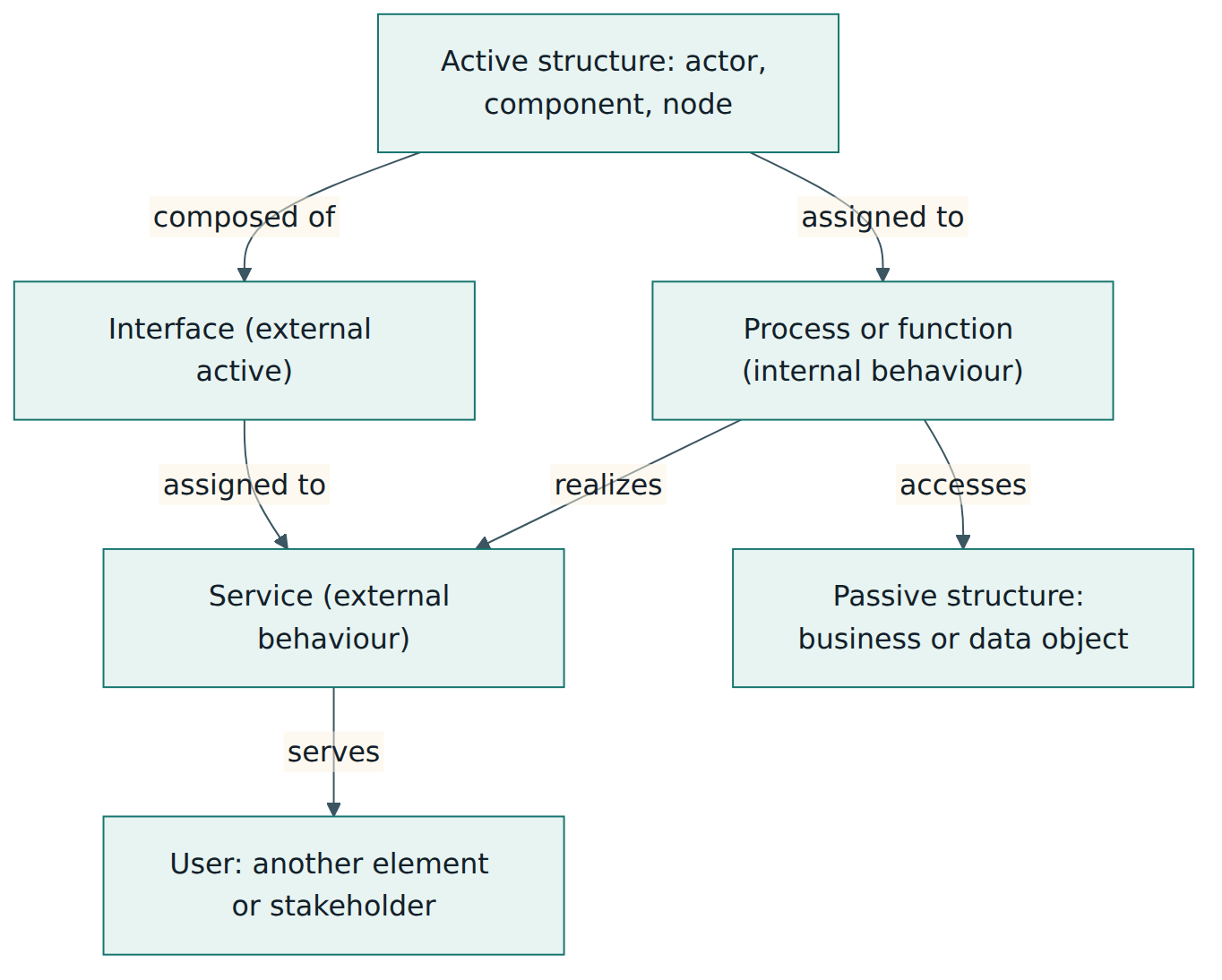
Read Figure 1 from the middle. An active structure element (a team, an application, a server) is assigned to internal behaviour (a process or function). That behaviour realizes a service, which is the externally visible part. The service is offered through an interface that belongs to the active structure element, and it serves some user. While doing its work, the behaviour reads or writes passive objects. This one pattern repeats in the business, application and technology domains, which is why learning it once pays off everywhere.
Lesson 3 – Structure of the language: domains, elements and relationships
The framework of domains
ArchiMate 3.2 drew its framework as a matrix: layers (business, application, technology) as rows and aspects (active structure, behaviour, passive structure) as columns, with strategy above, physical below and motivation and implementation and migration at the sides. ArchiMate 4 redraws this as a set of concentric hexagons and renames layers as domains, but the ideas carry over. Figure 2 shows the domains and their main purpose.
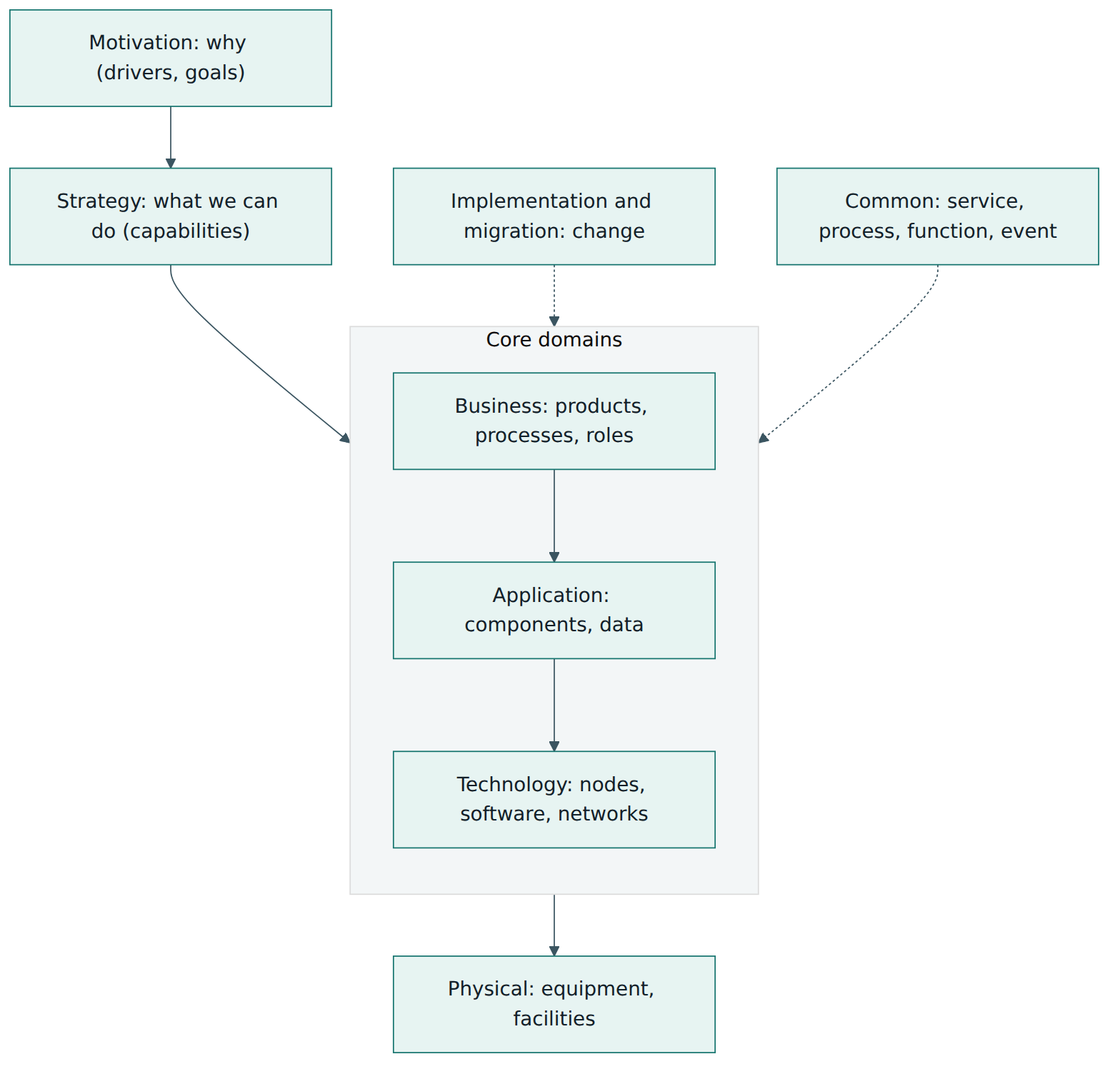
The arrows in Figure 2 are not ArchiMate relationships; they only show the usual reading order. In practice, lower domains serve higher ones (technology serves applications, applications serve the business) and higher ones are realized by lower ones (a capability is realized by business processes and applications).
Common domain
In ArchiMate 4 the common domain holds generic elements that can appear in any domain. The four behaviour elements – service, process, function and event – are now a single generic set. In 3.2 each layer had its own copies (business process, application process, technology process and so on). Version 4 also has a single generic role (replacing the business role) and a single collaboration (replacing the business, application and technology collaborations), and it moves path (a link through which elements exchange things) into the common domain. Grouping (to put elements together for any reason) and location (a place where something is), already generic in 3.2, can likewise be used anywhere. In practice, what an element is assigned to and the view it appears in tell the reader which domain the behaviour belongs to: a process assigned to a business role is business behaviour; one assigned to an application component is application behaviour.
The difference between process and function is worth learning early. A process is a sequence of behaviour with a defined result, such as "Handle insurance claim" from notification to payment. A function groups behaviour by required skills, resources or knowledge, without implying a sequence, such as "Claims assessment" or "Customer accounting". An event is something that happens and can trigger or interrupt behaviour, such as "Claim received". A service, as already defined, is the outward face of behaviour.
Strategy domain
Strategy elements describe what the enterprise intends and is able to do, at a level above processes and systems. A capability is an ability, such as "Claims management". A value stream is a sequence of stages that create value for a stakeholder, such as "Settle claim". A resource is an asset owned or controlled by the enterprise, such as skilled staff or brand reputation. A course of action is an approach or plan for configuring capabilities and resources to reach a goal. Capability maps built from these elements are among the most popular ArchiMate views with executives.
Business domain
Business elements describe the operational organisation. Active structure: a business actor (a person, department or organisation) and the business interface through which it offers services, for example a branch office or mobile app channel. Actors are assigned to generic roles such as "Claims handler". Passive structure: the business object, an information concept such as "Claim" or "Policy". Behaviour uses the common process, function, service and event elements. The business domain also has composite elements: a product bundles services and passive elements offered to customers, and was accompanied in 3.2 by a separate contract element and a representation element, both of which version 4 removed.
Application domain
Application elements describe software. The application component is an encapsulated piece of software, such as a claims administration system or a microservice. It exposes an application interface, such as a REST API or a user screen. The data object is data structured for automated processing, such as a "Claim record" table or document. Application behaviour again uses the common elements: an application service such as "Register claim" or an application function such as "Fraud scoring".
Technology and physical domains
Technology elements describe the platforms that run applications. A node is a computational or physical resource that hosts or runs things; it can be refined into a device (hardware), system software (an operating system, database engine or container runtime), a technology interface and a communication network. The artifact is the passive element of this domain: a file, deployment package, script or database schema that realizes application components or data objects. Physical elements – equipment, facility, distribution network and material – let you model factories, hospitals, warehouses or logistics, which matters for organisations whose operations are not purely digital.
Motivation domain
Motivation elements explain why the architecture looks the way it does. A stakeholder has interests; a driver is an internal or external condition that motivates change, such as a new regulation or rising costs; an assessment is the result of analysing a driver, for example "claims take on average three weeks to settle"; a goal is a high-level intended state; an outcome is a measurable end result; a principle is a general rule guiding design; a requirement is a specific need the architecture must meet. Meaning and value describe the interpretation and the worth of elements. Version 3.2 also had a constraint element, which version 4 removed; model such limits as requirements or principles instead.
Implementation and migration domain
These elements connect architecture to change. A work package is a series of actions with a defined goal, such as a project or a sprint backlog item. A deliverable is a precisely defined result of a work package, such as a migrated database or a signed contract. A plateau is a stable architecture state, such as "Baseline 2026" or "Target 2028". Version 3.2 included a gap element to record differences between plateaus and an implementation event; version 4 removed the gap element and replaced the implementation event with the generic event. Gaps are therefore shown by comparing plateaus and their contents directly.
Relationships
Elements are connected by a small set of relationship types, grouped into four families. Each has a distinct line style, so a trained reader can see at a glance whether two boxes are connected structurally or only by dependency. Figure 3 groups them.
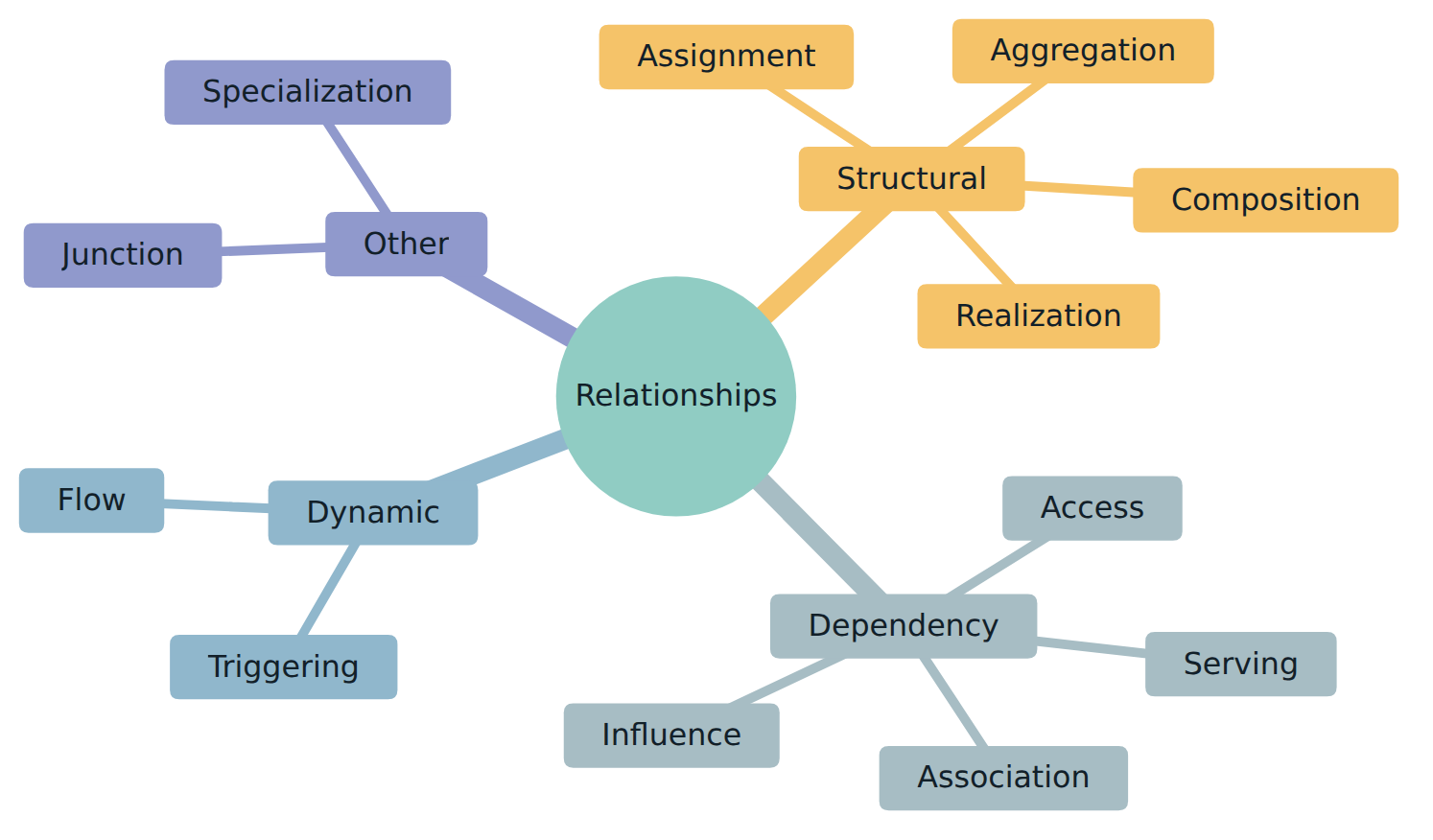
- Composition – a whole consists of parts that cannot exist without it. Example: an application component composed of modules. Drawn with a filled diamond at the whole.
- Aggregation – a whole groups parts that can also exist on their own or belong to several wholes. Example: a product aggregating services. Drawn with a hollow diamond.
- Assignment – allocation of responsibility, performance or execution. Example: a role assigned to a process; a node assigned to (running) system software. Drawn with a dot at the source and an arrowhead at the target.
- Realization – something more concrete creates, achieves or implements something more abstract. Example: an application component realizing an application service; an artifact realizing a component; a process realizing a capability. Drawn with a dashed line and a hollow triangle.
- Serving – an element provides its functionality to another. Example: an application service serving a business process. Called "used by" before version 3. Drawn with a solid line and an open arrowhead.
- Access – behaviour or an active element reads, writes or otherwise uses a passive object. Example: "Assess claim" reads the claim record. Drawn as a dotted line; the arrow can show the direction of data.
- Influence – a motivation element affects another positively or negatively, optionally with a strength such as "+" or "−". Example: a principle influencing a requirement.
- Association – an unspecified relationship, used when no other type fits. It can be undirected or directed. Over-use of association is a sign that the modeller has not thought hard enough.
- Triggering – a temporal or causal order between behaviour: one step starts the next.
- Flow – something (information, goods, money) passes from one behaviour or active element to another, without implying that the first starts the second.
- Specialization – one element is a particular kind of another of the same type, such as "Motor claim process" being a kind of "Claim process".
- Junction – a connector to merge or split relationships of the same type, with "and" or "or" semantics.
The version 4 change list does not mention changes to these families; it names two relationship changes: an active structure element now realizes a path (instead of a path aggregating technology elements), and relationships may carry multiplicity, so you can state, for example, that each claims team is assigned to exactly one regional office.
Validity and derivation
The specification contains a table of which relationships are allowed between which element types. You cannot, for example, draw an assignment from a data object to a process, because passive objects do not perform behaviour. Modelling tools enforce this table and stop invalid lines. Derivation rules then allow summary views: if a node is assigned to system software that serves an application component which realizes an application service, a tool can infer that the node indirectly supports that service. Since version 3.1 the specification distinguishes derivations that are always valid from "potential" derivations that a modeller must confirm. Use derivation to produce management overviews, but keep the detailed chain in the model so that the summary can be explained.
Viewpoints and customisation
The specification defines a viewpoint mechanism and provides example viewpoints. In version 3.2 the examples were grouped into basic viewpoints (for composition, support, cooperation and realization), motivation viewpoints (such as goal realization and requirements realization), strategy viewpoints (such as capability map and value stream) and implementation and migration viewpoints (such as project and migration). The 3.2 text also classified views by purpose – designing, deciding or informing – and by content – details, coherence or overview. Organisations are encouraged to define their own viewpoints for their own stakeholders. The language can also be customised: you can add attributes (profiles) such as "owner" or "lifecycle status" to elements, and define specialisations such as "Microservice" as a kind of application component, provided the specialisation behaves like its parent.
Lesson 4 – How ArchiMate works in practice
Start from questions, not from boxes
A good ArchiMate model exists to answer questions for someone. Before opening a tool, write down who needs the model and what they need to decide. A CIO deciding which applications to retire needs an application portfolio view with lifecycle and cost; a security officer needs to know where personal data is stored and processed; a project sponsor needs to see how a project moves the organisation from today's state to the target. Each question suggests a viewpoint, and each viewpoint suggests which domains and how much detail to model.
A typical modelling lifecycle
Most teams follow a cycle similar to Figure 4, repeated for each initiative and kept alive between initiatives.
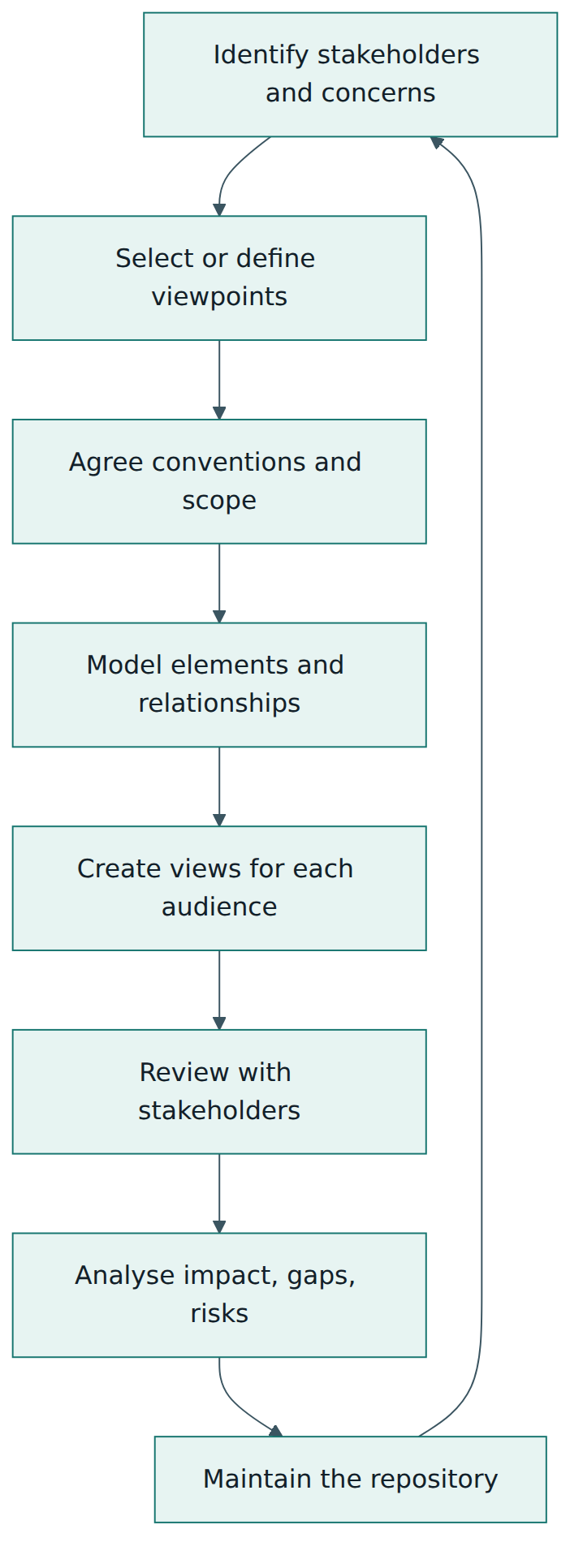
- Identify stakeholders and concerns. List the audience and their questions. Record them as motivation elements if they shape design decisions.
- Select or define viewpoints. Start with the examples in the specification and adapt them; a small, stable set of standard viewpoints is easier to maintain than a new one for every request.
- Agree conventions and scope. Decide naming rules (for example, processes as verb plus noun, services as noun phrases or "-ing" forms), which attributes are mandatory, which domains are in scope and how deep to go. Write these down in a short modelling guide.
- Model. Create elements once in the repository and connect them with the most specific valid relationship. Import data where possible, for example the application list from a configuration management database.
- Create views. Draw diagrams that show only what the audience needs. Use layout conventions (business at the top, technology at the bottom) to make views familiar.
- Review. Walk the views through with stakeholders. Their corrections improve the model, not only the picture.
- Analyse. Use the connected model for impact analysis, dependency tracing, gap comparison between plateaus and portfolio rationalisation.
- Maintain. Assign owners to parts of the model and tie updates to change processes so the model does not decay.
Roles around an ArchiMate repository
Successful teams make responsibilities explicit. A repository owner (often the lead enterprise architect) maintains conventions, viewpoints and quality checks. Domain modellers (business, application, infrastructure, security architects) maintain their parts. Contributors such as project architects add project-level detail and update the model when changes go live. Consumers – managers, auditors, engineers – read views, often through a web portal published from the tool. Many organisations also link elements to other sources, such as service catalogues or cost data, so that the model stays factual.
Tools and the exchange format
ArchiMate is supported by commercial modelling suites and by free tools; the open-source tool Archi is widely used for learning and for smaller teams. The Open Group runs a tool certification programme for vendors. Because organisations change tools, The Open Group also publishes a separate standard for an XML-based model exchange file format, which lets tools import and export elements, relationships, properties and views. Treat it as an interchange format rather than as your primary storage, and test round trips before relying on them.
Choosing the right level of detail
ArchiMate allows very fine detail, but enterprise models become unmaintainable when they try to copy every process step or every server. A useful rule of thumb is to model each domain one level deeper than the decisions you need to support, and to link to specialist models (BPMN process diagrams, UML designs, network diagrams, cloud resource inventories) for the rest. For example, model the ten most important business processes and the applications that serve them; let the process team keep the step-by-step BPMN diagrams.
Layering a view
The most common view in practice is a layered view: business elements at the top, application elements in the middle, technology at the bottom, with serving relationships pointing upwards and realization relationships tying behaviour to services. Readers learn to scan such a view from top to bottom ("what does the customer get?") and from bottom to top ("what breaks if this fails?"). Lesson 6 builds one.
Lesson 5 – Assessment, certification and compliance
There is no organisational certification
ArchiMate is a language, not a management system. Unlike ISO/IEC 27001 or ISO 9001, there is no audit through which an organisation becomes "ArchiMate certified". An organisation may require ArchiMate in its architecture policy, in procurement or in contracts with consultants, but proof of use is internal: reviews of models and views against the specification and the organisation's own modelling guide.
Certification of people
The Open Group certifies individuals. At the time of verification its programme was ArchiMate 3, aligned with the 3.2 specification, with two levels:
- ArchiMate 3 Foundation – tests knowledge of the terminology, structure and basic concepts of the language.
- ArchiMate 3 Practitioner – tests the ability to apply the language to modelling problems and scenarios, building on Foundation knowledge.
Exams are delivered by The Open Group's exam partner at test centres or online with remote proctoring, and successful candidates can appear in a public certification register. The Open Group also offers an ArchiMate Essentials credential for 3.2, aimed mainly at accredited trainers. The syllabus is defined in the ArchiMate 3 conformance requirements published with the programme. Because version 4 was published in April 2026, expect the certification programme to be updated; always check the official certification page for the current exam versions, formats and prices rather than relying on course marketing.
Certification of tools and courses
The Open Group runs ArchiMate tool certification, which confirms that a modelling tool implements the language as specified (for example the elements, relationships and notation). It also accredits training courses, so that learners can find courses whose content follows the official syllabus. Both registers are public. When choosing a tool, check which specification version its certification covers: a tool certified for 3.x may not yet support version 4 elements and rules.
Assessing model quality inside your organisation
Even without external audits, models need assessment. Useful checks include:
- Syntactic validity – every relationship is allowed by the specification (most tools check this automatically).
- Completeness for purpose – each view answers the concern it was built for; for example, every critical business service is traced to the applications and nodes that realize and serve it.
- Consistency – no duplicate elements with different names; naming conventions followed; mandatory attributes filled.
- Currency – elements are reviewed after changes go live; stale elements are retired.
- Understandability – a stakeholder outside the architecture team can read the view and explain it back.
Some organisations score these checks in an architecture review board before a project passes a gate. This is a governance practice of the organisation, not something the ArchiMate specification mandates.
Lesson 6 – Worked example: modelling a claims transformation
Northbridge Mutual is a fictional mid-sized insurer with 2,000 employees. Customers complain that motor claims take weeks to settle, and the regulator has asked insurers to improve the handling of complaints and claims. The board approves a programme to replace an ageing on-premises claims system with a cloud-based claims platform within two years. The enterprise architecture team uses ArchiMate to support the programme. Follow their steps.
Step 1 – Stakeholders, concerns and viewpoints
The team lists its audience: the board (Is the programme worth it? What changes for customers?), the claims director (What happens to my processes and staff?), the IT operations manager (What do we run, decommission and migrate?) and the data protection officer (Where is personal claim data stored and who can access it?). For each audience they choose a viewpoint: a motivation view for the board, a layered view for the claims director, a technology and migration view for IT operations and an information view for the data protection officer.
Step 2 – Motivation
They model the board and the regulator as stakeholders. Two drivers appear: "Customer satisfaction" and "Regulatory expectations". The assessment "Average motor claim takes 21 days to settle" is linked to the first driver. A goal "Faster, fairer claims" is influenced positively by the programme; the outcome "80 % of simple motor claims settled within 5 days" makes the goal measurable. A principle "Cloud first for customer-facing systems" and a requirement "Claim data stored only in approved regions" complete the motivation view. The requirement will later be realized by technology elements, which gives the data protection officer a traceable answer.
Step 3 – Strategy
The business architect adds the capability "Claims management", decomposed into "Claim intake", "Claim assessment", "Fraud detection" and "Claim settlement". A heat map view colours each capability by current performance; "Claim assessment" and "Fraud detection" show red. A value stream "Settle claim" with stages "Notify", "Assess", "Decide" and "Pay" shows the customer's perspective. A course of action "Digitise claim handling" realizes the goal and is linked to the weak capabilities, telling the board exactly which abilities the money will improve.
Step 4 – Business
The business actor "Customer" uses the business service "Claim settlement" through two interfaces: "Mobile app" and "Call centre". Inside Northbridge, the actor "Claims department" is assigned to the role "Claims handler", which is assigned to the process "Handle motor claim". This process is composed of sub-processes "Register claim", "Assess damage", "Decide" and "Pay out", connected by triggering relationships, and it realizes the claim settlement service. The process accesses the business object "Claim". The event "Claim notified" triggers the process. In ArchiMate 3.2 notation these would be a business service, business role, business process and business event; in version 4 they are the common elements placed in the business context.
Step 5 – Application and technology, baseline and target
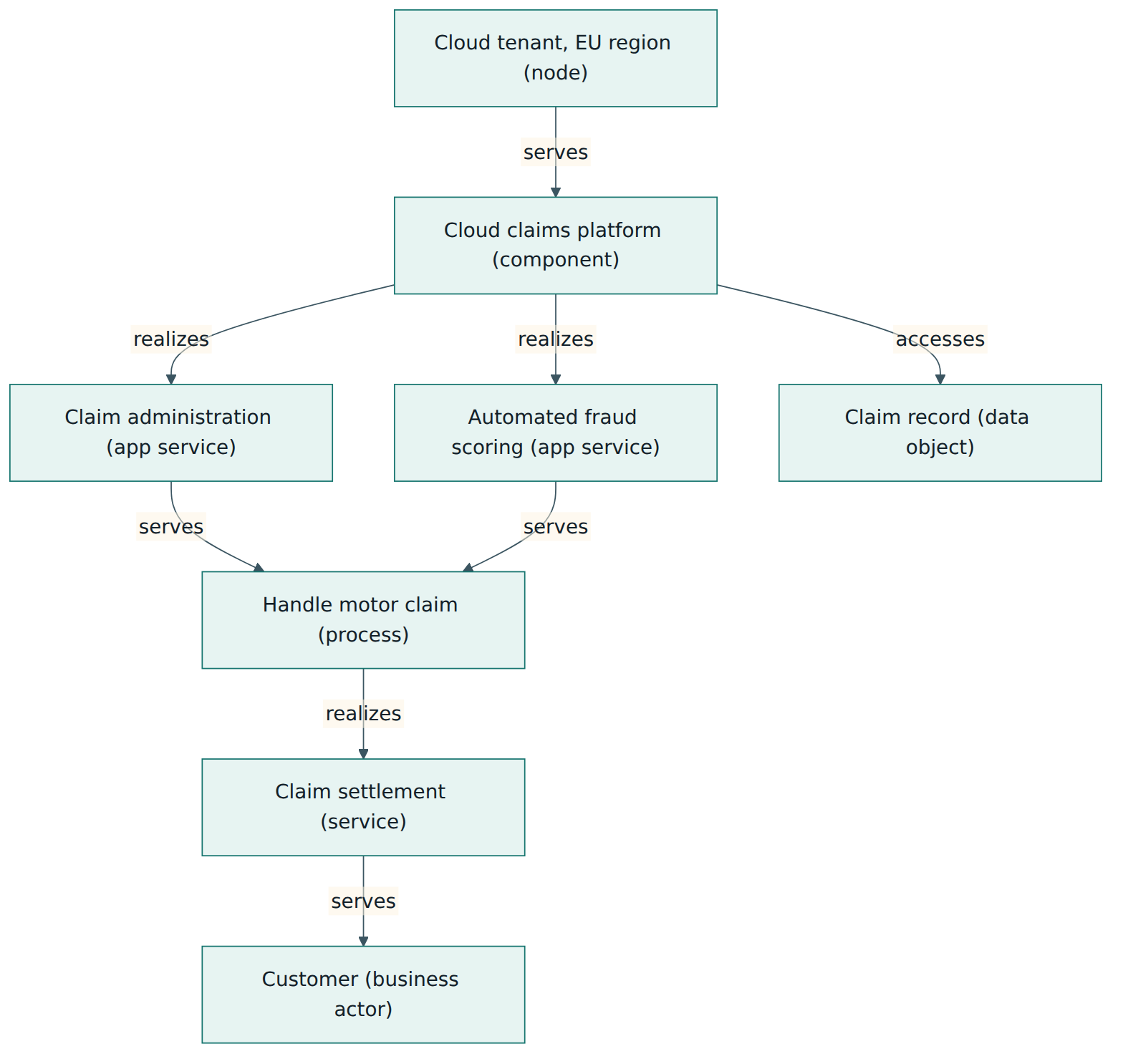
Today, the application component "Legacy claims system" realizes the application service "Claim administration", which serves the registration and assessment steps. It accesses the data object "Claim record", which realizes the business object "Claim". The legacy system runs on system software (a database engine and an application server) installed on on-premises devices in the company data centre (a facility). In the target, a new component "Cloud claims platform" realizes the same application service plus a new service "Automated fraud scoring", and the node "Cloud tenant, EU region" hosts it. Because the application service is unchanged in name and purpose, the business view barely changes – a direct benefit of separating services from their implementation. Figure 5 shows the target layered view.
Step 6 – Implementation and migration
The team defines three plateaus: "Baseline 2026", "Transition 2027" (both systems run in parallel, new claims go to the cloud platform) and "Target 2028" (the legacy system is decommissioned). Each plateau aggregates the elements that exist in that state. Work packages "Platform implementation", "Data migration" and "Legacy decommissioning" realize deliverables such as "Migrated claim history" and "Decommissioned data centre servers", and the deliverables realize the target elements. Since version 4 no longer has a gap element, the team compares plateaus in the tool to list what is added, changed and removed between them, and attaches that list to the programme plan.
Step 7 – Analysis and use
With the model in place, the team answers questions directly. Impact: if the "Cloud tenant, EU region" node becomes unavailable, the derivation chain shows which business services fail, so the team defines a recovery requirement and models a second region. Compliance: the requirement on data location is realized by the EU node, and the data object "Claim record" is accessed only by approved components, which the data protection officer can review in an information view. Portfolio: the application view shows two other small tools that also access claim records; they are added to the decommissioning work package. Communication: the board receives a one-page motivation and strategy view; engineers receive the technology view – all from one model.
Lessons from the example
- The model began with concerns and viewpoints, not with drawing.
- Motivation and strategy elements tied the investment to measurable outcomes and specific capabilities.
- Separating services from components made the change visible where it mattered and invisible where it did not.
- Plateaus and work packages turned the architecture into a roadmap.
- The connected model supported impact, compliance and portfolio questions that separate drawings could not answer.
Lesson 7 – Relationship to other standards and frameworks
ArchiMate rarely stands alone. It is a notation that sits between methods that tell you what to do and detailed languages that describe particular areas in depth. Knowing its neighbours helps you decide when to use which.
| Standard or framework | What it is | How it relates to ArchiMate |
|---|---|---|
| TOGAF Standard (The Open Group) | An enterprise architecture framework and method, including the Architecture Development Method (ADM), content guidance and governance. | Complementary: TOGAF says how to develop and govern architecture; ArchiMate says how to express it. The business, application and technology domains map to the TOGAF architecture domains, and implementation and migration elements support TOGAF migration planning. The Open Group keeps the two aligned. |
| BPMN (OMG) | Business Process Model and Notation, a detailed and partly executable process notation with gateways, events and message flows. | Different altitude: ArchiMate shows which processes exist and what supports them; BPMN details the steps inside one process. A common practice is to link an ArchiMate process to its BPMN diagram. |
| UML (OMG) | Unified Modeling Language for software design: classes, components, sequences, deployments. | Different altitude: ArchiMate application and technology elements summarise what UML describes in detail. Use UML for software design inside a component. |
| C4 model | An informal, widely used approach for software architecture diagrams at context, container, component and code levels. | Overlaps at the application level for a single system; ArchiMate covers the whole enterprise including business, strategy and motivation, and has a formal metamodel. |
| ISO/IEC/IEEE 42010 | The international standard for architecture description: stakeholders, concerns, viewpoints, views and model kinds. | Conceptual foundation: ArchiMate's view and viewpoint mechanism follows the same ideas; ArchiMate can serve as the modelling language within a 42010-style architecture description. |
| IT4IT Reference Architecture (The Open Group) | A reference architecture for managing the business of IT through value streams. | IT4IT material is itself expressed largely in ArchiMate, which shows how a reference architecture can be published in the language. |
ArchiMate and TOGAF in more detail
Because both standards belong to The Open Group, people often confuse them or think one requires the other. Neither does. Many organisations use ArchiMate with their own in-house method, with agile architecture practices or with other frameworks. Likewise, many TOGAF users draw diagrams in other notations. When used together, ArchiMate supplies the notation for the architecture artefacts that TOGAF phases produce: capability maps and value streams in the early phases, business, data, application and technology views in the domain phases, and plateaus and work packages in migration planning.
ArchiMate and process or software notations
A frequent question is whether ArchiMate replaces BPMN or UML. It does not, and trying to make it do so leads to overloaded models. The healthy pattern is a federation: the enterprise model in ArchiMate holds the main elements and their relationships; process models in BPMN and software designs in UML or C4 hold the details; and links (often by shared names or identifiers) connect them. Impact analysis starts in ArchiMate and drills into the specialist models when needed.
ArchiMate in regulated environments
ArchiMate itself has no compliance requirements, but its models are useful evidence for other standards. An information security team implementing ISO/IEC 27001 can use application and technology views to support its asset inventory and risk assessment. A resilience team can use the service-to-technology dependency chains for business impact analysis. A privacy team can trace personal data through data objects and the components that access them. In each case the other standard defines the requirements, and ArchiMate provides a clear picture of the landscape to which they apply.
Common pitfalls and best practices
Pitfalls
- Drawing instead of modelling. Creating every diagram from scratch produces duplicates and inconsistent names; the views look fine but the model cannot be analysed.
- One diagram for everyone. A single giant view with all domains and hundreds of boxes informs nobody. Build several focused views for different concerns.
- Association everywhere. Using the generic association when a serving, realization or access relationship applies throws away meaning and blocks derivation.
- Confusing process, function and service. Naming a service after an internal activity ("Run claims batch") instead of the value it provides ("Claim status information") hides what users depend on.
- Modelling too deep. Copying every BPMN step or every virtual machine into the enterprise model makes it impossible to maintain; the repository decays within months.
- Ignoring version differences. Mixing 3.2 elements (such as gap or contract) with version 4 rules in one repository, or assuming a tool supports version 4, causes validation surprises.
Best practices
- Start from stakeholder concerns and define a small set of standard viewpoints before modelling.
- Write a short modelling guide with naming rules, mandatory attributes, allowed specialisations and the specification version in use.
- Model each element once in a shared repository and reuse it in every view.
- Use the most specific valid relationship, and let the tool's validation and derivation help you.
- Separate services from their implementation so that change in components does not ripple into business views.
- Link to specialist models (BPMN, UML, CMDB) instead of duplicating their detail.
- Give parts of the model owners and tie updates to change and release processes so that the model stays current.
Summary and key takeaways
- ArchiMate is The Open Group's open modelling language for enterprise architecture; the current edition is ArchiMate 4 (2026), which simplifies 3.2 while staying compatible for users.
- It is a notation, not a method: it expresses architecture and works with methods such as the TOGAF ADM.
- The language is organised into domains – motivation, strategy, business, application, technology, physical, implementation and migration, plus common elements – and aspects of active structure, behaviour and passive structure.
- Services and interfaces form the external face of an element; processes, functions and components form its internal workings.
- A small set of relationship types in four families (structural, dependency, dynamic, other) gives every line a precise meaning, and derivation rules support summary views.
- One model, many views: viewpoints tailor views to stakeholder concerns, while the shared repository keeps them consistent.
- People, tools and training courses can be certified by The Open Group; organisations cannot be, and model quality is assessed internally.
- ArchiMate sits at a middle altitude and links to BPMN, UML or C4 for detail and to ISO/IEC/IEEE 42010 for architecture description concepts.
Reflection questions
- Think of a recent change in your organisation, such as a system replacement. Which stakeholders were involved, what were their concerns and which ArchiMate viewpoints would have helped each of them?
- Pick one business service your team provides. Which processes realize it, which application services serve those processes and which technology nodes serve the applications? Where would the chain break today?
- Your repository currently contains elements such as gap and contract from version 3.2. How would you plan a migration of the model and the modelling guide to version 4?
- Where would you draw the line between your ArchiMate enterprise model and detailed BPMN or UML models, and how would you keep them linked?
- If you had to convince a sceptical manager that a maintained ArchiMate repository is worth the effort, which analysis from the worked example would you demonstrate first, and why?
Further reading and official sources
- ArchiMate 4 Specification (C260) – The Open Group
- The Open Group Announces ArchiMate 4 Specification – The Open Group
- About the ArchiMate Modeling Language – The Open Group ArchiMate Forum
- ArchiMate Certification – The Open Group
- The TOGAF Standard – The Open Group
- ISO/IEC/IEEE 42010:2022 Architecture description – ISO
- Archi – open-source ArchiMate modelling tool – Archi project
Original tutorial by xOps School (DevOpsSchool Private Limited), written from public sources about ArchiMate. Not affiliated with or endorsed by the standard's owner; standard names are trademarks of their owners. Buy the official standard from its publisher for the authoritative text.